

編輯:關於 Android 程式設計
Android 系統內建了 SQLite 資料庫,並提供完整的 API 供開發者進行增刪改查。無論是使用原生 SQL 語句,還是 Android API 提供的 CRUD 方法,SQLite 都是我們常用的資料儲存方式。
然而,使用 SQLite 儲存資料存在一個問題:由於大多數 Android 手機都已 Root,Root 過的手機可以進入 /data/data/<package_name>/databases 目錄,直接查看資料庫中儲存的所有資料。若是一般的資料還好,但一旦涉及帳號密碼或聊天內容,就會面臨嚴重的安全漏洞隱患。
SQLCipher 是一個在 SQLite 基礎上擴展的開源資料庫,主要為 SQLite 增加了資料加密功能。使用它來儲存資料,可以大幅提高程式的安全性。SQLCipher 支援多種平台,以下介紹它在 Android 中的用法。
首先下載 SQLCipher 工具包(例如 SQLCipher for Android v2.2.2),解壓後會看到 assets 與 libs 兩個目錄。新建一個 Android 專案(如 SQLCipherTest),將這兩個目錄中必要的檔案複製到專案的對應目錄中即可。
建立一個繼承自 SQLiteOpenHelper 的類別,注意這裡使用的是 net.sqlcipher.database 套件下的版本,而非 Android API 原生的類別:
import android.content.Context;
import net.sqlcipher.database.SQLiteDatabase;
import net.sqlcipher.database.SQLiteDatabase.CursorFactory;
import net.sqlcipher.database.SQLiteOpenHelper;

public class MyDatabaseHelper extends SQLiteOpenHelper {

    public static final String CREATE_TABLE = "create table Book(name text, pages integer)";

    public MyDatabaseHelper(Context context, String name, CursorFactory factory, int version) {
        super(context, name, factory, version);
    }

    @Override
    public void onCreate(SQLiteDatabase db) {
        db.execSQL(CREATE_TABLE);
    }

    @Override
    public void onUpgrade(SQLiteDatabase db, int arg1, int arg2) {
    }
}
除了引入的套件不同,其他用法與傳統的 SQLiteOpenHelper 完全相同。這裡建立了一張 Book 表,包含 name 與 pages 兩個欄位。
<LinearLayout xmlns:android="https://schemas.android.com/apk/res/android"
    android:layout_width="match_parent"
    android:layout_height="match_parent"
    android:orientation="vertical">

    <Button
        android:id="@+id/add_data"
        android:layout_width="match_parent"
        android:layout_height="wrap_content"
        android:text="添加數據" />

    <Button
        android:id="@+id/query_data"
        android:layout_width="match_parent"
        android:layout_height="wrap_content"
        android:text="查詢數據" />
</LinearLayout>
public class MainActivity extends Activity {

    private SQLiteDatabase db;

    @Override
    protected void onCreate(Bundle savedInstanceState) {
        super.onCreate(savedInstanceState);
        setContentView(R.layout.activity_main);

        SQLiteDatabase.loadLibs(this);
        MyDatabaseHelper dbHelper = new MyDatabaseHelper(this, "demo.db", null, 1);
        db = dbHelper.getWritableDatabase("secret_key");

        Button addData = (Button) findViewById(R.id.add_data);
        Button queryData = (Button) findViewById(R.id.query_data);

        addData.setOnClickListener(new OnClickListener() {
            @Override
            public void onClick(View v) {
                ContentValues values = new ContentValues();
                values.put("name", "達芬奇密碼");
                values.put("pages", 566);
                db.insert("Book", null, values);
            }
        });

        queryData.setOnClickListener(new OnClickListener() {
            @Override
            public void onClick(View v) {
                Cursor cursor = db.query("Book", null, null, null, null, null, null);
                if (cursor != null) {
                    while (cursor.moveToNext()) {
                        String name = cursor.getString(cursor.getColumnIndex("name"));
                        int pages = cursor.getInt(cursor.getColumnIndex("pages"));
                        Log.d("TAG", "book name is " + name);
                        Log.d("TAG", "book pages is " + pages);
                    }
                    cursor.close();
                }
            }
        });
    }
}
onCreate() 中,先呼叫 SQLiteDatabase.loadLibs() 靜態方法,將 SQLCipher 依賴的 so 庫載入進來。SQLiteDatabase 時,getWritableDatabase("secret_key") 傳入的參數就是加密所用的 key,SQLCipher 在加解密時都會使用它。ContentValues 組裝並呼叫 insert();查詢時呼叫 query(),結果存放於 Cursor 中(此處使用 net.sqlcipher 套件下的 Cursor)。可以發現,SQLCipher 幾乎對 Android SDK 中所有資料庫相關 API 都製作了一份鏡像,讓開發者能像操作普通資料庫一樣操作 SQLCipher,而所有的加解密工作,SQLCipher 都在背後默默替我們完成了。
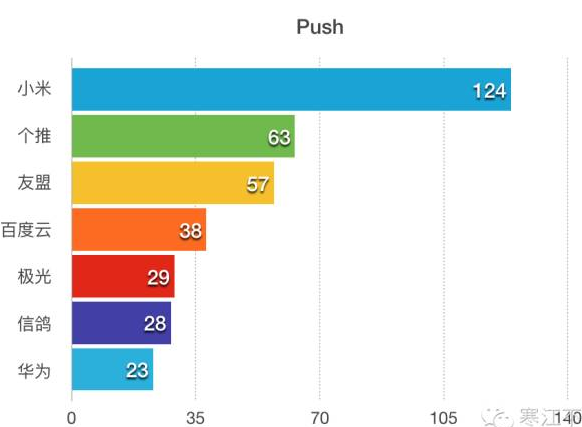 Android 幾種消息推送方案總結與優缺點對比
先看一張圖,統計國內 Top 500 Android 應用各自採用的第三方推送及佔比: 下面總結一下 Android 平台下幾種常見推送方案的基本情況與優缺點: 一、使
 百思不得姐實作筆記:圖片的展示、縮放、保存與依網路狀態載入
一、本篇要完成的功能二、思路清單回顧上一篇的 cell 拆分方式 → 建立圖片專用的 view 類與 xib → 點擊圖片看大圖 → 長圖的捲動瀏覽 → 把顯示圖片的控制
 用 RenderScript 的 ScriptIntrinsicBlur 實作高斯模糊
翻 RenderScript 官方文件的時候,發現這套 API 相當強悍。其中 ScriptIntrinsic 這個抽象類別底下藏了幾個很實用的子類別,而 ScriptI
 Android 代碼混淆原理與設定方式
什麼是代碼混淆 Java 編譯後的位元碼仍保留許多名稱資訊,容易被反編譯。混淆會重新組織程式碼,將變數、方法與類別名稱改成短碼,讓反編譯後的內容更難理解。 混淆的作用