

編輯:關於 Android 程式設計
做 IM 一定會遇到連線被切斷的問題——網路切換、伺服器重啟、帳號在他處登入等等。這篇示範如何監聽連線狀態並設計一套自動重連機制。
Smack 提供了 ConnectionListener 介面,實作它就能掌握連線的各種變化。其中最重要的兩個回呼是:
無論哪一種,都應該觸發重連。這裡用 Timer 做兩秒後的重連排程。
public class TaxiConnectionListener implements ConnectionListener {

    private Timer tExit;
    private String username;
    private String password;
    private int logintime = 2000;   // 重連延遲 2 秒

    @Override
    public void connectionClosed() {
        Log.i("TaxiConnectionListener", "連接關閉");
        XmppConnection.getInstance().closeConnection();

        tExit = new Timer();
        tExit.schedule(new timetask(), logintime);
    }

    @Override
    public void connectionClosedOnError(Exception e) {
        Log.i("TaxiConnectionListener", "連接關閉異常");

        // 判斷是否為「帳號已在別處登入」
        boolean error = e.getMessage().equals("stream:error (conflict)");
        if (!error) {
            XmppConnection.getInstance().closeConnection();
            tExit = new Timer();
            tExit.schedule(new timetask(), logintime);
        }
    }

    class timetask extends TimerTask {
        @Override
        public void run() {
            // 帳密存在 SharedPreferences 中
            username = Utils.getInstance().getSharedPreferences(
                    "taxicall", "account", MainActivity.context);
            password = Utils.getInstance().getSharedPreferences(
                    "taxicall", "password", MainActivity.context);

            if (username != null && password != null) {
                Log.i("TaxiConnectionListener", "嘗試登錄");
                if (XmppConnection.getInstance().login(username, password)) {
                    Log.i("TaxiConnectionListener", "登錄成功");
                } else {
                    Log.i("TaxiConnectionListener", "重新登錄");
                    tExit.schedule(new timetask(), logintime);
                }
            }
        }
    }

    @Override public void reconnectingIn(int arg0) {}
    @Override public void reconnectionFailed(Exception arg0) {}
    @Override public void reconnectionSuccessful() {}
}
建議註冊放在登入方法中,移除放在關閉連線方法中:
// 註冊
TaxiConnectionListener connectionListener = new TaxiConnectionListener();
getConnection().addConnectionListener(connectionListener);

// 移除
connection.removeConnectionListener(connectionListener);
上面的程式碼能跑,但直接搬到正式環境會遇到幾個問題,值得逐一改善:
兩秒一次、永不放棄的策略在伺服器掛掉時會造成大量無效請求,也可能讓裝置耗電與發燙。建議改成指數退避(exponential backoff):1s、2s、4s、8s…並設定上限與最大重試次數,超過後改為提示使用者手動重試。
程式碼中 tExit.schedule() 在重試失敗的分支又建立新的排程,但 tExit 已指向新的 Timer 物件,舊的排程其實無法被取消,容易堆疊出多條重連鏈。建議改用單一 ScheduledExecutorService,或在排程前先 cancel() 舊的。
e.getMessage().equals("stream:error (conflict)") 依賴 Smack 的錯誤字串格式,版本一升就可能失效,而且 getMessage() 可能為 null 導致 NPE。建議改用 Smack 提供的 XMPPException 條件分支(如 StanzaError.Condition.conflict)來判斷。
IM 帳密屬於敏感資訊,明文存放於 SharedPreferences 並不安全(尤其在已 root 或可備份的裝置上)。實務上應改用 Token 認證,或至少搭配 EncryptedSharedPreferences。
重連成功只是第一步。連線中斷期間漏掉的離線訊息、會議室成員變動、需要重新加入的 MultiUserChat、需要重新註冊的各類監聽器,都要在 reconnectionSuccessful() 或登入成功後處理。這一塊往往才是「重連看起來成功但功能壞掉」的真正原因。
Activity 銷毀或登出時,除了 removeConnectionListener(),也要 cancel 掉尚未執行的重連排程,否則 App 已登出卻仍在背景反覆嘗試連線。
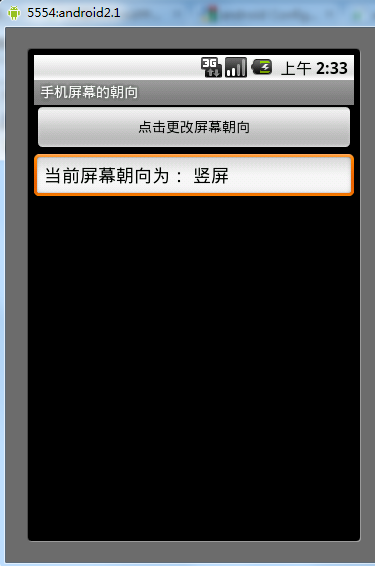 Android 切換螢幕方向:setRequestedOrientation 用法解析
行動裝置的螢幕方向切換看似簡單,實際上涉及 Activity 的設定、系統方向感測器,以及 Configuration 變動時的生命週期處理。本文示範以程式碼主動切換橫向
 Android 網路圖片與網頁原始碼查看器實作
本文示範兩個實用的小工具:網路圖片查看器與網頁原始碼查看器。網路圖片查看器首先需在 AndroidManifest.xml 加入 INTERNET 權限。程式以 Http
 Android Intent 元件呼叫指南:顯式與隱式 Intent 的差異
Intent 的作用 Intent 是 Android 元件之間溝通的核心,可用來啟動 Activity、Service,或傳送 Broadcast。它既能明確指定目標元
 Android 用 ListView 實現多選批量刪除 item
本文示範如何透過 CheckBox 選中一或多個 item,進而一次批量刪除它們,並附上解決滾動時顯示錯亂的完整程式碼。程式運行效果如下:核心思路是:用一個布林清單 bo