

編輯:關於 Android 程式設計
在實際開發中,我們偶爾會有「監聽 App 本身是否被解除安裝」這類需求。網路上翻找了很久,卻很少看到真正可行的做法,大多只給出一個思路:透過捕捉系統日誌來偵測應用是否被移除,進而觸發後續操作。
首先要提醒一個常見誤區:監聽 Intent.ACTION_PACKAGE_REMOVED 意圖,只能接收到「其他」應用被解除安裝的通知,是無法監聽到自身被移除的。本文的範例正是繞過這個限制,改以攔截系統日誌的方式來達成目的。
public interface LogcatObserver {
    public void handleLog(String info);
}
這個 Service 會啟動一條背景執行緒,不斷讀取 logcat 的輸出,並在偵測到包含自身套件名稱的 DELETE 意圖時觸發處理:
import java.io.DataInputStream;
import java.io.IOException;
import java.io.InputStream;
import android.app.Service;
import android.content.Intent;
import android.os.IBinder;

public class LogcatScannerService extends Service implements LogcatObserver {
    @Override
    public void onStart(Intent intent, int startId) {
        super.onStart(intent, startId);
        new AndroidLogcatScannerThread(this).start();
    }

    @Override
    public void handleLog(String info) {
        if (info.contains("android.intent.action.DELETE") && info.contains(getPackageName())) {
            // 在這裡寫下你要執行的邏輯
        }
    }

    private class AndroidLogcatScannerThread extends Thread {
        private LogcatObserver mObserver;
        public AndroidLogcatScannerThread(LogcatObserver observer) {
            mObserver = observer;
        }
        @Override
        public void run() {
            String[] cmds = { "logcat", "-c" };
            String shellCmd = "logcat";
            Process process = null;
            InputStream is = null;
            DataInputStream dis = null;
            String line = "";
            Runtime runtime = Runtime.getRuntime();
            try {
                mObserver.handleLog(line);
                int waitValue = runtime.exec(cmds).waitFor();
                mObserver.handleLog("waitValue=" + waitValue + "\n Has do Clear logcat cache.");
                process = runtime.exec(shellCmd);
                is = process.getInputStream();
                dis = new DataInputStream(is);
                while ((line = dis.readLine()) != null) {
                    if (mObserver != null) mObserver.handleLog(line);
                }
            } catch (InterruptedException e) {
                e.printStackTrace();
            } catch (IOException ie) {
            } finally {
                try {
                    if (dis != null) dis.close();
                    if (is != null) is.close();
                    if (process != null) process.destroy();
                } catch (Exception e) { }
            }
        }
    }

    @Override
    public IBinder onBind(Intent intent) {
        return null;
    }
}
使用時,只要在需要的地方呼叫 startService 並傳入這個 Service 即可啟動監聽。
要特別注意的是,這個範例透過不斷讀取日誌來判斷自身是否被解除安裝,因此會持續消耗電力與效能,並非理想的長時間運行方案。此外,實測顯示在 handleLog() 裡只能執行一些輕量操作——例如發送簡訊可行,但發送 HTTP 請求往往無法如願。若你有更省電、更優雅的作法,非常歡迎一起交流討論。
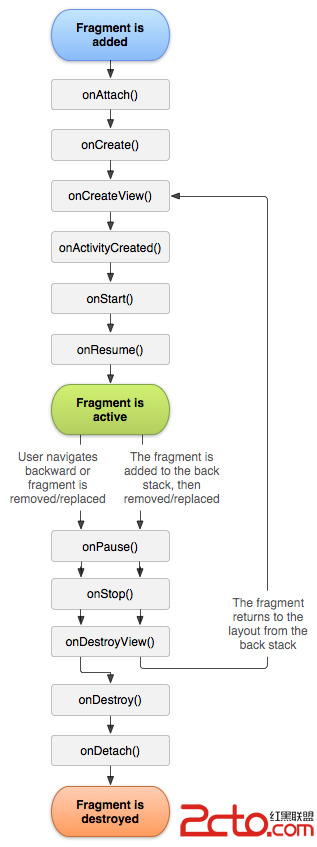 Android Fragment 生命周期詳解:與 Activity 的對應關係
上一篇談了 Fragment 的基礎用法,這次把焦點放在它的生命周期。Fragment 的行為看似複雜,其實只要抓住一條主線就不難理解:Fragment 的命運完全依附於
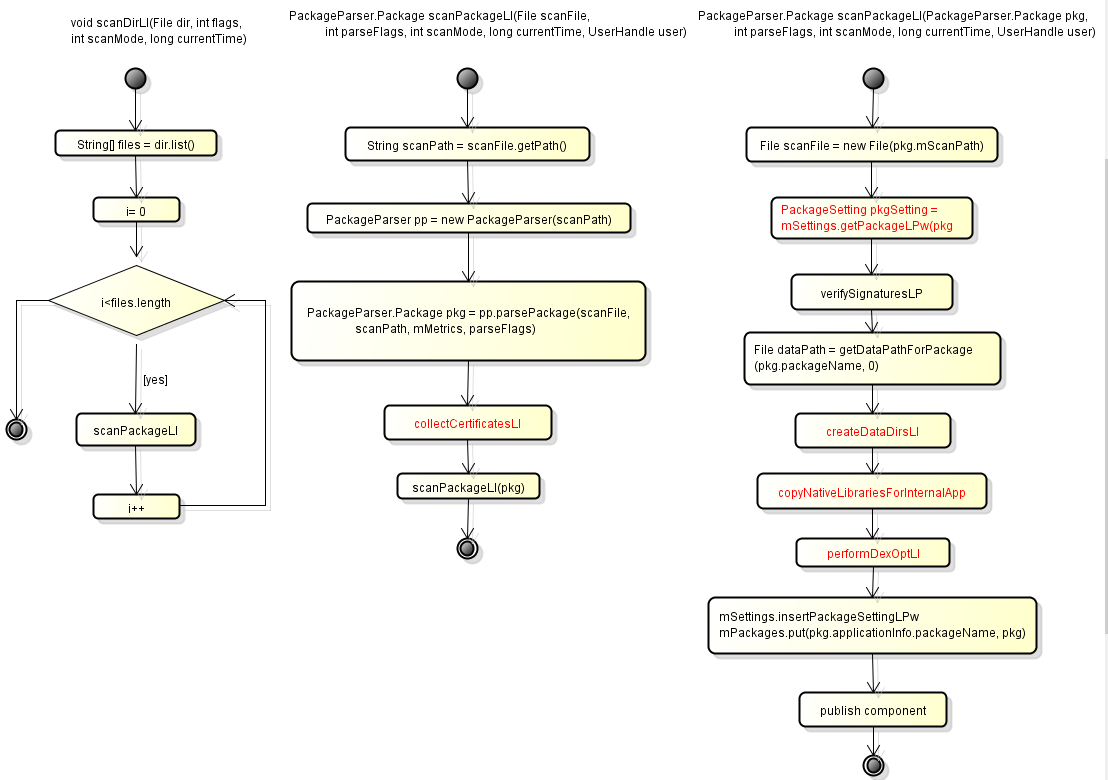 Android 框架分析系列:PackageManager 與 APK 安裝機制透視
本文緊扣 Android 的套件管理機制,重點剖析 APK 的檔案格式(含簽名機制),以及應用程式的安裝、升級與卸載過程。 1. Android APK 檔案 Andro
 Android 圖像繪製(四)自定義一個 SurfaceView 控件
SurfaceView 適合用在需要頻繁重繪的場景,例如某塊動態圖,或類似 UC 瀏覽器下方的工具欄。本文示範如何自定義一個 SurfaceView 控件。 如下圖示例
 用 Cordova 命令列快速建立並運行 Android 專案
用命令列建立專案 Cordova 建立專案的核心指令是 cordova create,它需要搭配三個參數使用: 第一個參數 <dir>:專案要存放的資料夾名