

編輯:關於 Android 程式設計
剛開始接觸 Android 版面配置時,最常遇到的就是「怎麼把按鈕放到我想要的位置」。本文整理兩個實用的小技巧,幫助你靈活擺放圖片按鈕與一般按鈕。
使用 ImageButton 時,透過 android:layout_marginLeft 與 android:layout_marginTop 就能精準控制它在你指定範圍內的位置:
<ImageButton
android:id="@+id/set"
android:layout_width="190dp"
android:layout_height="67dp"
android:layout_marginLeft="45dip"
android:layout_marginTop="195dip"
android:scaleType="fitXY"
android:src="@drawable/ing" />
一般 Button 的寫法類似,也能用邊距屬性定位:
<Button
android:id="@+id/start"
android:layout_width="190dip"
android:layout_height="45dip"
android:layout_marginLeft="50dip"
android:layout_marginTop="125dip"
android:background="#00000000" />
上面兩個按鈕都放在 <RelativeLayout> 裡,如此一來就能透過邊距把它們擺到你要的位置。而若你希望按鈕完全透明、只看得到圖片內容,只要加上這一句即可:
android:background="@null"
這兩個小設定看似簡單,卻是打造自訂 UI 時經常派上用場的基礎功。
 Android 自訂 View 實作四碼驗證碼
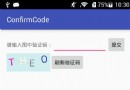
登入、註冊頁面幾乎都會放一個驗證碼。自己動手做一個其實不難,拆成「產生隨機字元」與「自繪 Drawable」兩塊即可。 效果如下: 一、隨機產生四個字母 把 2
 Android ListView 元件解析:結構、XML 屬性與核心方法
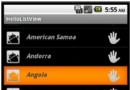
本文整理 Android 中 ListView 的關鍵 API,適合在查閱官方文件時快速定位重點。一、類別結構ListView 是 Android 中常見的列表容器,其繼
 小米手環如何接入微信?訊息通知設定教學
小米手環可接入微信,方便查看訊息通知與相關資訊。1. 開啟小米手環 App,點擊右上角「更多」。2. 選擇「服務」。3. 點擊「微信接入」。4. 跟隨指示關注小米手環微信
 Android 實戰(二十六):網絡圖片查看器的本地緩存
上一篇已經能把網絡上的圖片獲取下來了。生活中有這麼些場景:微信聯網打開別人的照片後,即使手機斷網,再去點擊那張圖片仍能完整看到。這並不是重新去網絡獲取,而是微信在首次加載