

編輯:關於 Android 程式設計
在 Eclipse 或 MyEclipse 中,執行 Run on Server 或檢視專案檔案時,可能會遇到類似以下的錯誤:
Resource is out of sync with the file system:
'/Test_1_Struts_Spring_Hibernate/WebContent/WEB-INF/.struts-config.xml.strutside'.
這是典型的檔案系統不同步問題,通常是由於在 Eclipse 或 MyEclipse 之外修改了專案中的資源所引起(例如用其他工具、或在不同系統之間編輯檔案)。不過有時即使沒有在 IDE 外部動過檔案,也可能出現類似錯誤。
核心做法是手動重新整理資源管理器:
完成上述設定後,IDE 便會在偵測到外部檔案變更時自動同步,能有效避免這類不同步錯誤再次發生。
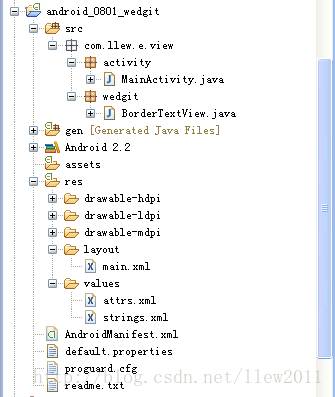 自定義屬性實作帶邊框線的 TextView 控制項
當系統自帶屬性無法滿足需求時,就得替控制項加上自定義屬性。這裡示範一個很典型的例子:讓文字方塊能單獨顯示左、上、右、下任一邊的邊框線。不用自定義屬性當然也做得到,但把「要
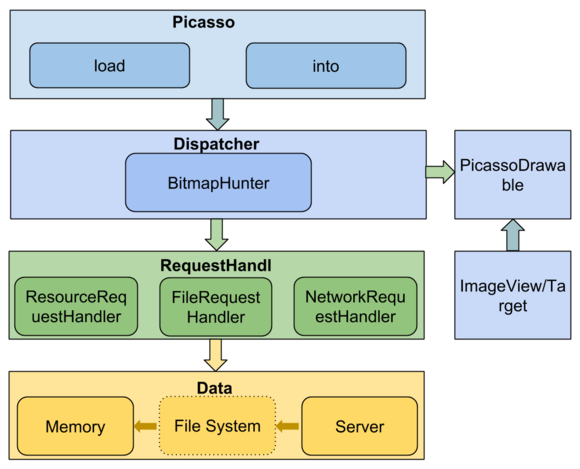 Picasso 源碼深度解析:從入隊到顯示的完整鏈路
Android 的圖片加載庫我用過不少:UIL、Volley、Picasso、Glide、Fresco,都是不錯的選擇。其中 Picasso 研究得稍多一些。網上關於它的
 Android Studio 使用心得(一):簡介與環境配置
關於 Android Studio Android Studio 在 2013 年 Google I/O 大會上首次亮相,是 Google 官方推出的全新 IDE。截至
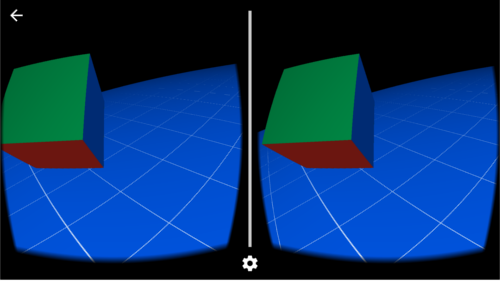 VR 入門:用 Cardboard SDK for Android 打造你的第一個虛擬實境應用
本文是一份入門指南,示範如何使用 Cardboard SDK for Android 動手做一個虛擬實境(VR)體驗,並以官方 Android 範例應用「Treasure