

編輯:關於 Android 程式設計
在 Android 上打造即時通訊(IM)時,Smack 搭配 Openfire 是很常見的組合。其中「好友名冊(Roster)」是整個通訊錄的核心,分組、好友、頭像等操作大多繞著它打轉。以下整理幾個常用的操作範例。
透過 Roster(可由 connection.getRoster() 取得)就能拿到所有分組:
public static List<RosterGroup> getGroups(Roster roster) {
    List<RosterGroup> grouplist = new ArrayList<RosterGroup>();
    Collection<RosterGroup> rosterGroup = roster.getGroups();
    Iterator<RosterGroup> i = rosterGroup.iterator();
    while (i.hasNext()) {
        grouplist.add(i.next());
    }
    return grouplist;
}
public static boolean addGroup(Roster roster, String groupName) {
    try {
        roster.createGroup(groupName);
        return true;
    } catch (Exception e) {
        e.printStackTrace();
        return false;
    }
}
public static List<RosterEntry> getEntriesByGroup(Roster roster, String groupName) {
    List<RosterEntry> Entrieslist = new ArrayList<RosterEntry>();
    RosterGroup rosterGroup = roster.getGroup(groupName);
    Collection<RosterEntry> rosterEntry = rosterGroup.getEntries();
    Iterator<RosterEntry> i = rosterEntry.iterator();
    while (i.hasNext()) {
        Entrieslist.add(i.next());
    }
    return Entrieslist;
}
public static List<RosterEntry> getAllEntries(Roster roster) {
    List<RosterEntry> Entrieslist = new ArrayList<RosterEntry>();
    Collection<RosterEntry> rosterEntry = roster.getEntries();
    Iterator<RosterEntry> i = rosterEntry.iterator();
    while (i.hasNext()) {
        Entrieslist.add(i.next());
    }
    return Entrieslist;
}
public static VCard getUserVCard(XMPPConnection connection, String user)
        throws XMPPException {
    VCard vcard = new VCard();
    vcard.load(connection, user);
    return vcard;
}
頭像同樣存在 VCard 中,取出後可把 InputStream 轉成 Drawable:
public static Drawable getUserImage(XMPPConnection connection, String user) {
    ByteArrayInputStream bais = null;
    try {
        VCard vcard = new VCard();
        // 這行程式碼用來解決 "No VCard for" 的問題
        ProviderManager.getInstance().addIQProvider("vCard", "vcard-temp",
                new org.jivesoftware.smackx.provider.VCardProvider());

        vcard.load(connection, user + "@" + connection.getServiceName());

        if (vcard == null || vcard.getAvatar() == null)
            return null;
        bais = new ByteArrayInputStream(vcard.getAvatar());
    } catch (Exception e) {
        e.printStackTrace();
    }
    if (bais == null)
        return null;
    return FormatTools.getInstance().InputStream2Drawable(bais);
}
// 無分組
public static boolean addUser(Roster roster, String userName, String name) {
    try {
        roster.createEntry(userName, name, null);
        return true;
    } catch (Exception e) {
        e.printStackTrace();
        return false;
    }
}

// 有分組
public static boolean addUser(Roster roster, String userName, String name,
        String groupName) {
    try {
        roster.createEntry(userName, name, new String[] { groupName });
        return true;
    } catch (Exception e) {
        e.printStackTrace();
        return false;
    }
}
public static boolean removeUser(Roster roster, String userName) {
    try {
        if (userName.contains("@")) {
            userName = userName.split("@")[0];
        }
        RosterEntry entry = roster.getEntry(userName);
        roster.removeEntry(entry);
        return true;
    } catch (Exception e) {
        e.printStackTrace();
        return false;
    }
}
serverDomain 為伺服器名稱,透過 UserSearchManager 送出搜尋表單並解析結果:
public static List<User> searchUsers(XMPPConnection connection,
        String serverDomain, String userName) throws XMPPException {
    List<User> results = new ArrayList<User>();

    UserSearchManager usm = new UserSearchManager(connection);

    Form searchForm = usm.getSearchForm(serverDomain);
    Form answerForm = searchForm.createAnswerForm();
    answerForm.setAnswer("userAccount", true);
    answerForm.setAnswer("userPhote", userName);
    ReportedData data = usm.getSearchResults(answerForm, serverDomain);

    Iterator<Row> it = data.getRows();
    Row row = null;
    User user = null;
    while (it.hasNext()) {
        user = new User();
        row = it.next();
        user.setUserAccount(row.getValues("userAccount").next().toString());
        user.setUserPhote(row.getValues("userPhote").next().toString());
        results.add(user);
    }
    return results;
}
把圖片讀成位元組、編碼為 Base64 後寫入 VCard,再儲存回伺服器:
public static void changeImage(XMPPConnection connection, File f)
        throws XMPPException, IOException {

    VCard vcard = new VCard();
    vcard.load(connection);

    byte[] bytes = getFileBytes(f);
    String encodedImage = StringUtils.encodeBase64(bytes);
    vcard.setAvatar(bytes, encodedImage);
    vcard.setEncodedImage(encodedImage);
    vcard.setField("PHOTO", "<TYPE>image/jpg</TYPE><BINVAL>" + encodedImage
            + "</BINVAL>", true);

    ByteArrayInputStream bais = new ByteArrayInputStream(vcard.getAvatar());
    FormatTools.getInstance().InputStream2Bitmap(bais);

    vcard.save(connection);
}
掌握以上這些以 Roster 與 VCard 為核心的操作,就能應付大部分 IM 通訊錄的開發需求。
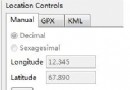 Android GPS 定位資料取得:LocationManager 與位置監聽
LocationManager 是定位核心Android 的定位服務主要由 LocationManager 管理。應用可透過 getSystemService 取得它,再
 動手實作 Android 硬體抽象層(HAL)程式碼
前面已經寫過了 Java 層的應用與系統服務,這一步要往下走進 native 層,實作一個對應自訂硬體的 HAL 模組。HAL 的本質是一套「有強制規範的動態連結庫」,
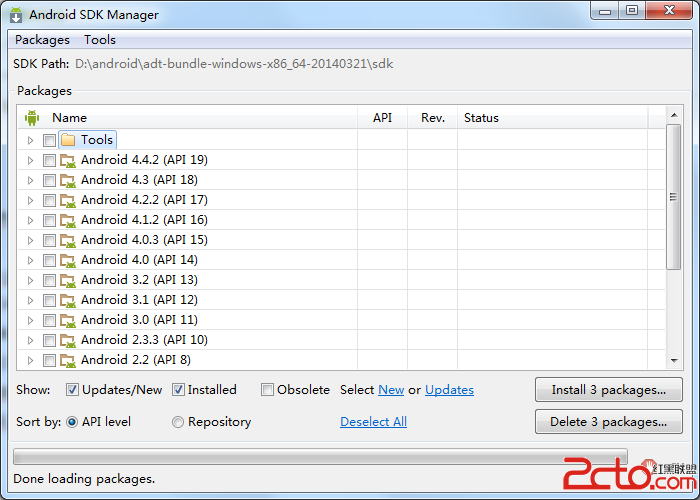 Android 開發效率補給:SDK 更新、Eclipse 掛載源碼與離線文件
自從 Google 被牆之後,Android 開發者有段時間過得挺辛苦:官網打不開、SDK 更新不了、源碼抓不下來。身為一個有追求的開發者,滿足於只會用 SDK 顯然不夠
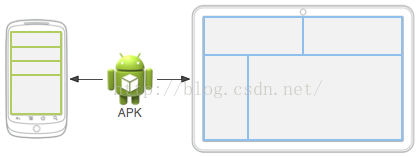 為 Android 應用提供資源的完整指南
你應該始終把應用資源(如圖片、字串)外部化,這樣便於單獨維護。此外,還應為特定裝置配置提供備用資源,方法是將它們分組到專門命名的資源目錄中。執行時,Android 會依當