

編輯:關於 Android 程式設計
在 Android 介面開發中,若想讓文字旁搭配小圖示,很多人直覺會想到用 RelativeLayout 去拼接 ImageView 與 TextView。但其實 TextView 本身就提供了更方便的屬性,可以直接在文字的四個方位放置圖元,省去額外佈局的麻煩。
以下是一個簡單的範例:
<?xml version="1.0" encoding="utf-8"?>
<LinearLayout xmlns:android="https://schemas.android.com/apk/res/android"
    android:layout_width="match_parent"
    android:layout_height="match_parent"
    android:orientation="vertical" >

    <TextView
        android:layout_height="wrap_content"
        android:layout_width="wrap_content"
        android:drawableLeft="@drawable/icon"
        android:text="@string/app_name"
        />

</LinearLayout>
看到 android:drawableLeft 這個屬性,相信大家都明白了!TextView 提供了四個方位的圖元屬性:
android:drawableLeft=""      // 文字左側
android:drawableRight=""     // 文字右側
android:drawableTop=""       // 文字上方
android:drawableBottom=""    // 文字下方
此外,還有 android:drawablePadding 可以用來設定圖元與文字之間的間距,非常實用。以往需要靠 RelativeLayout 層層堆疊才能達到的效果,如今一個屬性就能搞定,既簡潔又直觀。
 Android 簡單實現彈出菜單(PopupMenu)效果
本文為大家分享 Android 彈出菜單效果的具體程式碼,供大家參考。 功能描述:用戶點擊按鈕彈出菜單。當用戶選擇某個菜單項時,會觸發 MenuItemClick 事件並
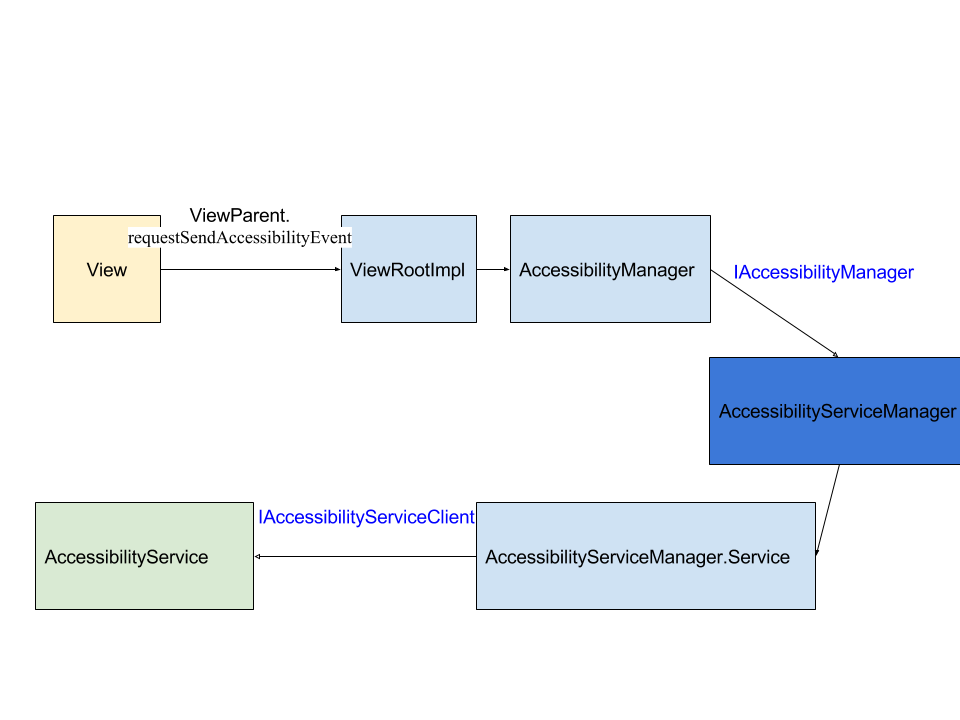 Android Accessibility 使用方式與底層原理入門
Accessibility 是 Android 從 API 4 就開始提供的功能,最初的用意是協助那些因為視覺、聽覺或身體障礙,而無法完整使用觸控螢幕、鈴聲等一般操作的族
 Android 接入極光推送完整配置實錄:從後台建應用到代碼落地
由於業務需要,客戶端要加推送功能。最早用的是百度推送,但小米手機上偶爾收不到;後來換成極光推送,各品牌設備基本都能收到,缺點是高峰期可能會有延遲。這裡用的是免費版,收費版
 Android 漫游記(6):App 啟動之旅(上)
Android 建立在 Linux 2.6+ 核心之上。在看懂 App 是怎麼被拉起來之前,先對整體架構有個感性的認識會輕鬆很多。 一、分層架構速覽 1. Kernel