

編輯:關於 Android 程式設計
這是一個把「抓網頁 → 解析圖片連結 → 下載存檔 → 記錄檔名序號」串起來的小框架,用純 Java SE 完成,沒有引入任何第三方 HTTP 或 HTML 解析套件。適合理解底層流程,實務上若頁面複雜,建議改用 jsoup 這類專門的解析器。
package cn.mypic;

import java.io.BufferedInputStream;
import java.io.BufferedReader;
import java.io.File;
import java.io.FileOutputStream;
import java.io.IOException;
import java.io.InputStreamReader;
import java.net.URL;
import java.util.regex.Matcher;
import java.util.regex.Pattern;

public class GetContentPicture {

    /** 解析網頁,找出圖片網址並下載 */
    public void get(String url) throws IOException {
        // 相對路徑的圖片連結
        String searchImgReg =
            "(?x)(src|SRC|background|BACKGROUND)=('|\")/?(([\\w-]+/)*([\\w-]+\\.(jpg|JPG|png|PNG|gif|GIF)))('|\")";
        // 完整 http 路徑的圖片連結
        String searchImgReg2 =
            "(?x)(src|SRC|background|BACKGROUND)=('|\")(https://([\\w-]+\\.)+[\\w-]+(:[0-9]+)*(/[\\w-]+)*(/[\\w-]+\\.(jpg|JPG|png|PNG|gif|GIF)))('|\")";

        String content = this.getHtmlCode(url);

        Pattern pattern = Pattern.compile(searchImgReg);
        Matcher matcher = pattern.matcher(content);
        while (matcher.find()) {
            System.out.println(matcher.group(3));
            this.getHtmlPicture(matcher.group(3));
        }

        pattern = Pattern.compile(searchImgReg2);
        matcher = pattern.matcher(content);
        while (matcher.find()) {
            System.out.println(matcher.group(3));
            this.getHtmlPicture(matcher.group(3));
        }
    }

    /** 把整頁 HTML 讀成一個字串 */
    public String getHtmlCode(String httpUrl) throws IOException {
        StringBuilder content = new StringBuilder();
        URL uu = new URL(httpUrl);
        BufferedReader ii = new BufferedReader(
                new InputStreamReader(uu.openStream()));
        String input;
        while ((input = ii.readLine()) != null) {
            content.append(input);
        }
        ii.close();
        return content.toString();
    }

    /** 下載單張圖片到指定目錄,檔名用序號命名 */
    public void getHtmlPicture(String httpUrl) {
        // 檔名序號由 FileNumber 負責讀寫
        FileNumber num = new FileNumber();
        int count = num.NumberReadFromFile();

        String filePath = "d:/image/";
        String fileName = String.valueOf(count)
                + httpUrl.substring(httpUrl.lastIndexOf("."));

        try (BufferedInputStream in =
                     new BufferedInputStream(new URL(httpUrl).openStream());
             FileOutputStream file =
                     new FileOutputStream(new File(filePath + fileName))) {
            int t;
            while ((t = in.read()) != -1) {
                file.write(t);
            }
            System.out.println("圖片下載成功:" + fileName);
            num.NumberWriteToFile(count + 1);   // 序號 +1 並存檔
        } catch (IOException e) {
            e.printStackTrace();
        }
    }

    public static void main(String[] args) throws IOException {
        GetContentPicture gcp = new GetContentPicture();
        gcp.get("https://www.baidu.com");
    }
}
把目前抓到第幾張記在 d:/image/number.txt,下次執行時接續編號,避免覆蓋舊檔。
package cn.mypic;

import java.io.DataInputStream;
import java.io.DataOutputStream;
import java.io.File;
import java.io.FileInputStream;
import java.io.FileNotFoundException;
import java.io.FileOutputStream;
import java.io.IOException;

public class FileNumber {

    /** 寫入序號 */
    public void NumberWriteToFile(int x) {
        File filePath = new File("d:/image");
        File f1 = new File(filePath, "number.txt");
        try (FileOutputStream fout = new FileOutputStream(f1);
             DataOutputStream out = new DataOutputStream(fout)) {
            out.writeInt(x);
        } catch (IOException e) {
            System.err.println(e);
        }
    }

    /** 讀取序號 */
    public int NumberReadFromFile() {
        int c1 = 0;
        File filePath = new File("d:/image");
        File f1 = new File(filePath, "number.txt");
        try (FileInputStream fin = new FileInputStream(f1);
             DataInputStream in = new DataInputStream(fin)) {
            c1 = in.readInt();
            System.out.println("目前序號:" + c1);
        } catch (IOException e) {
            System.err.println(e);
        }
        return c1;
    }
}
以相對路徑那條為例,(?x) 是 extended 模式,讓正則可以寫成多行並加註解。整體結構是:
(src|SRC|background|BACKGROUND):屬性名稱,group 1。('|\"):引號,group 2。(...):真正的路徑,group 3,這就是我們要的值。([\w-]+/)*:任意層數的目錄。([\w-]+\.(jpg|JPG|png|PNG|gif|GIF)):檔名與副檔名。兩條正則的分工:第一條抓相對路徑,第二條抓完整 https:// 開頭的絕對路徑。兩者都只支援少數幾種副檔名,實務上可以再擴充。
InputStreamReader 沒指定編碼會使用平台預設,中文頁面容易亂碼。建議明確帶入 "UTF-8",或從 HTTP 回應標頭的 Content-Type 讀取 charset。content += input 在迴圈中會產生大量暫存物件,改用 StringBuilder 較好(上面已修正)。BufferedOutputStream 或用 byte[] 緩衝區批次寫入,速度差很多。 Android 客戶端註冊與登入實作詳解(上)
開發 Android App 幾乎一定會跟伺服器打交道,其中帳號的註冊與登入更是必備技能。本文聚焦「客戶端如何向伺服器發起註冊請求」,伺服器端收到請求後的處理不在討論範圍
 Android 自定義底部導航控件:從需求分析到源碼實現
一、先看效果 圖一是最簡單的用法;圖二、圖三配合 ViewPager 使用,並能隨 ViewPager 滑動做漸變過渡。兩者的差別在於:圖二用選中/未選中兩張圖片切
 Android Studio 打包全攻略:從手動簽名到多渠道秒級出包
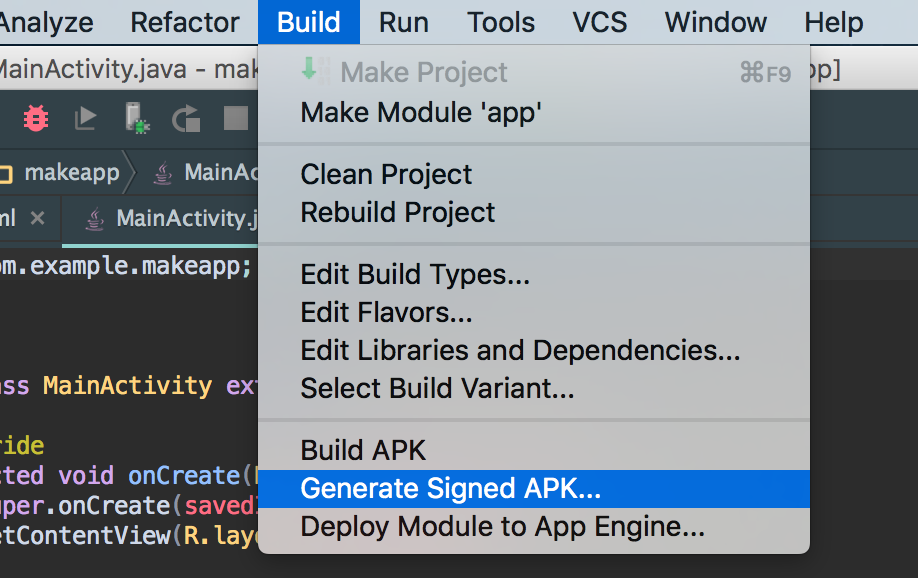
第一階段:初出茅廬——手動打包 怎麼手動打包 項目寫完準備上傳市場,第一個問題就是:怎麼把代碼變成 .apk? 1. 創建簽名文件 2. 填寫簽名參數 3. 生成 A
 Android Activity(活動)全面詳解
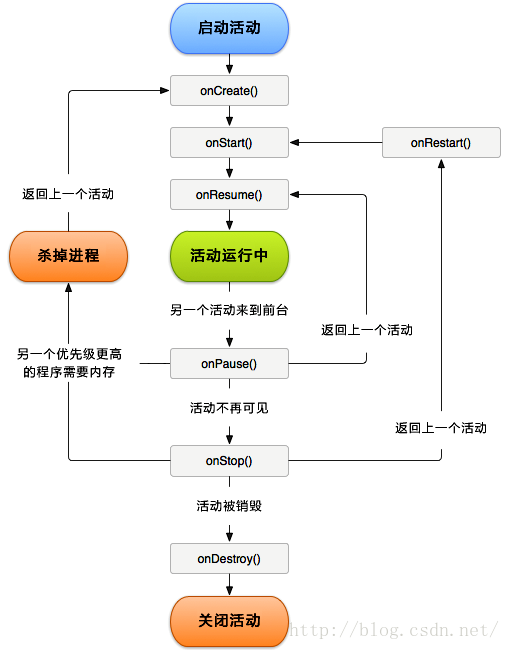
Activity 是 Android 四大元件之一,幾乎每一個可見的應用介面背後都有一個 Activity 在支撐。本文將從專案結構、日誌工具一路談到 Activity