

編輯:關於 Android 程式設計
在 ListView 的項目(item)裡嵌套 Button 時,常會遇到一個惱人的狀況:Button 把整行的點擊事件「吃掉了」,導致 item 本身的點擊監聽無法觸發。這是因為 Button 預設是可取得焦點(focusable)的,會攔截觸摸事件。
解決方式其實只需兩個屬性:
1. 在 item 佈局的根佈局上加上:android:descendantFocusability="blocksDescendants"
這會阻擋子控制項取得焦點。
2. 在Button 上加上:android:focusable="false"
讓按鈕不再搶走焦點。
兩處設定搭配使用後,item 與 Button 就都能各自正常點擊了。
<?xml version="1.0" encoding="utf-8"?>
<LinearLayout xmlns:android="https://schemas.android.com/apk/res/android"
    android:layout_width="match_parent"
    android:layout_height="match_parent"
    android:orientation="vertical"
    android:descendantFocusability="blocksDescendants">

    <Button
        android:id="@+id/worklog_update"
        android:layout_width="wrap_content"
        android:layout_height="wrap_content"
        android:text="修改"
        android:focusable="false" />

    <Button
        android:id="@+id/worklog_del"
        android:layout_width="wrap_content"
        android:layout_height="wrap_content"
        android:text="刪除"
        android:focusable="false" />

</LinearLayout>
透過這兩個屬性的組合,就能兼顧「整行可點擊」與「行內按鈕可獨立點擊」這兩個需求。若使用 RecyclerView,思路類似,也可以在 item 根佈局套用 descendantFocusability,或於 Adapter 中妥善處理事件分發。
 Android 打包成 jar 給第三方使用時,資源該怎麼辦
有個很常見的需求:把自家工程封裝成 jar 交給客戶使用,藉此隱藏實作細節。問題是——程式碼打包了,版面、圖片這些資源檔要怎麼一起給對方? 網路上流傳的做法不少,有用
 寫一個 Cocos2d-x 的 Android.mk 自動維護工具
用 Cocos2d-x 開發時,通常先在電腦上完成邏輯,再移植到手機平台。打包成 apk 的过程中,最惱人的往往不是程式碼,而是維護 Android.mk。 問題在於:
 Android 打造 miniTwitter 登入介面:漸層背景、圓角卡片與版面配置全解析
一個好看的登入頁,能大幅提升使用者對 App 的第一印象。本文以 miniTwitter 為例,一步步拆解這個登入介面的實作方式,讓你也能做出精緻的登入畫面。 先看成品:
 Android 登入客戶端實戰:驗證碼抓取、網頁資料解析與 HttpWatch 抓包
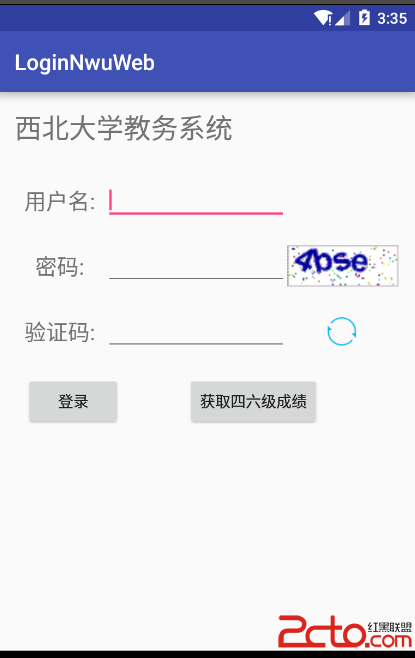
大家好,我是 M1ko。在這個處處都要連網的時代,一個完全沒有網路能力的 App 很難有長但它的生命週期,所以 Android 網路程式設計是每個開發者的必修課。我本身是