

編輯:關於 Android 程式設計
網路請求幾乎是每個 App 的必備功能。以下分享一個把 GET、POST、位元組上傳、Cookie 維護與網路檢查都封裝好的 HttpUtil 工具類,方便專案直接複用。
package com.example.mynetutil;

import java.io.DataOutputStream;
import java.io.IOException;
import java.io.InputStream;
import java.net.HttpURLConnection;
import java.net.SocketTimeoutException;
import java.net.URL;
import java.util.ArrayList;
import java.util.HashMap;
import java.util.Map;

import org.apache.http.*;
import org.apache.http.client.entity.UrlEncodedFormEntity;
import org.apache.http.client.methods.HttpPost;
import org.apache.http.impl.client.DefaultHttpClient;
import org.apache.http.message.BasicHeader;
import org.apache.http.message.BasicNameValuePair;
import org.apache.http.params.CoreConnectionPNames;
import org.apache.http.util.EntityUtils;

import android.content.Context;
import android.net.ConnectivityManager;
import android.net.NetworkInfo;
import android.util.Log;
import android.widget.Toast;

public class HttpUtil {

    private static Header[] headers = new BasicHeader[11];
    private static String TAG = "HTTPUTIL";
    private static int TIMEOUT = 10 * 1000;

    // 靜態區塊初始化各項自訂 header
    static {
        headers[0]  = new BasicHeader("Appkey", "");
        headers[1]  = new BasicHeader("Udid", "");
        headers[2]  = new BasicHeader("Os", "");
        headers[3]  = new BasicHeader("Osversion", "");
        headers[4]  = new BasicHeader("Appversion", "");
        headers[5]  = new BasicHeader("Sourceid", "");
        headers[6]  = new BasicHeader("Ver", "");
        headers[7]  = new BasicHeader("Userid", "");
        headers[8]  = new BasicHeader("Usersession", "");
        headers[9]  = new BasicHeader("Unique", "");
        headers[10] = new BasicHeader("Cookie", "");
    }

    // 把 map 拼接到網址後,實際仍走 post 送出
    static public String get(String url, HashMap<String, String> map) {
        int i = 0;
        for (Map.Entry<String, String> entry : map.entrySet()) {
            url = url + (i == 0 ? "?" : "&")
                    + entry.getKey() + "=" + entry.getValue();
            i++;
        }
        return post(url, null);
    }

    static public String post(String url, HashMap<String, String> map) {
        DefaultHttpClient client = new DefaultHttpClient();
        client.getParams().setParameter(CoreConnectionPNames.CONNECTION_TIMEOUT, TIMEOUT);
        client.getParams().setParameter(CoreConnectionPNames.SO_TIMEOUT, TIMEOUT);
        HttpPost post = new HttpPost(url);
        post.setHeaders(headers);
        String result = "404error";
        ArrayList<BasicNameValuePair> pairList = new ArrayList<BasicNameValuePair>();

        if (map != null) {
            for (Map.Entry<String, String> entry : map.entrySet()) {
                pairList.add(new BasicNameValuePair(entry.getKey(), entry.getValue()));
            }
        }
        try {
            HttpEntity entity = new UrlEncodedFormEntity(pairList, "UTF-8");
            post.setEntity(entity);
            HttpResponse response = client.execute(post);
            if (response.getStatusLine().getStatusCode() == HttpStatus.SC_OK) {
                setCookie(response);
                result = EntityUtils.toString(response.getEntity(), "UTF-8");
                return result;
            }
        } catch (Exception e) {
            // 忽略
        }
        Log.e(TAG, result);
        return result;
    }

    // 以 HttpURLConnection 上傳位元組資料
    public static String PostBytes(String url, byte[] bytes) {
        try {
            URL murl = new URL(url);
            HttpURLConnection con = (HttpURLConnection) murl.openConnection();
            con.setDoInput(true);
            con.setDoOutput(true);
            con.setUseCaches(false);
            con.setRequestMethod("POST");
            con.setRequestProperty("Connection", "Keep-Alive");
            con.setRequestProperty("Charset", "UTF-8");
            con.setRequestProperty("Content-Type", "text/html");
            String cookie = headers[10].getValue();
            if (!isNull(cookie)) {
                con.setRequestProperty("cookie", cookie);
            }
            con.setReadTimeout(TIMEOUT);
            con.setConnectTimeout(TIMEOUT);

            DataOutputStream ds = new DataOutputStream(con.getOutputStream());
            ds.write(bytes, 0, bytes.length);
            ds.close();

            if (con.getResponseCode() == HttpStatus.SC_OK) {
                InputStream is = con.getInputStream();
                int ch;
                StringBuffer buffer = new StringBuffer();
                while ((ch = is.read()) != -1) {
                    buffer.append((char) ch);
                }
                return buffer.toString();
            } else {
                return "404error";
            }
        } catch (SocketTimeoutException e) {
            return "timeouterror";
        } catch (IOException e) {
            return "404error";
        }
    }

    // 從回應中擷取 Set-Cookie 並更新 header
    private static void setCookie(HttpResponse response) {
        if (response.getHeaders("Set-Cookie").length > 0) {
            headers[10] = new BasicHeader("Cookie",
                response.getHeaders("Set-Cookie")[0].getValue());
        }
    }

    // 檢查網路是否可用
    public static boolean hasNetwork(Context context) {
        ConnectivityManager con = (ConnectivityManager)
            context.getSystemService(Context.CONNECTIVITY_SERVICE);
        NetworkInfo workinfo = con.getActiveNetworkInfo();
        if (workinfo == null || !workinfo.isAvailable()) {
            Toast.makeText(context, "當前無網絡連接,請稍後重試", Toast.LENGTH_SHORT).show();
            return false;
        }
        return true;
    }

    public static boolean isNull(String string) {
        boolean t1 = "".equals(string);
        boolean t2 = string == null;
        boolean t3 = string.equals("null");
        return t1 || t2 || t3;
    }
}
public class MainActivity extends Activity {

    @Override
    public void onCreate(Bundle savedInstanceState) {
        super.onCreate(savedInstanceState);
        setContentView(R.layout.activity_main);
        String url = "https://192.168.1.77/zwork/test.php";
        HashMap<String, String> map = new HashMap<String, String>();
        map.put("goods_id", "100078");
        map.put("cat_id", "100088");
        HttpUtil.get(url, map);
    }
}
這個封裝把 timeout、自訂 header、Cookie 維護、位元組上傳與網路檢查都集中管理,在實際專案中只要替換 header 內容與網址即可快速上手。提醒一下,Apache HttpClient 在較新的 Android 版本已逐步被官方標記為 deprecated,新專案建議改用 HttpURLConnection 或 OkHttp 等方案。
 Android ListView 字母排序:實現字母擠壓、右側快速定位與關鍵字搜索
本文將講解如何自定義 EditText 實現搜索框的自定義樣式,以及字母擠壓效果的實現思路,並最終完成一個具備字母排序、右側快速選取與關鍵字搜索功能的通訊錄列表。 自定義
 自定義 View 實作:手機淘寶風格物流進度橫向版
本文以「手機淘寶」風格的物流進程為靈感,示範如何以自定義 View 實作橫向步驟指示器。設計概念參考 https://dribbble.com/LeslyPyram。
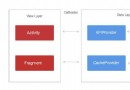 實作 Android 的 MVP 架構(搭配 RxJava)
內容大綱: Android 開發架構的選擇、如何一步步搭建分層架構、使用 RxJava 解決主線程發出網路請求的問題,以及結語。 一、Android 開發架構的選擇 原生
 在 Android Studio 中正確設定 NDK 與 JNI 開發環境
Ps:最近比較閒,就多寫幾篇當作整理。順便說一句,實在不太欣賞那種直接搬網路文章上來、自己完全沒跑過一遍的寫法——結果就是網路上的教學千篇一律,最初那個人踩過的坑,後面每