

編輯:關於 Android 程式設計
在 ListView 或 GridView 裡異步加載網絡圖片,看似只是「開個線程下載、下完塞給 ImageView」這麼簡單,實則不然。用戶手指一劃,列表快速滾動,同一個 item 會被反覆複用,很容易出現三類問題:同一張圖被下載十幾次、圖片錯位貼到別的 item 上、以及大量線程把內存和網絡打滿。
本文把這件事拆成三個遞進的問題來解決(ListView、GridView、ViewPager 同理,可舉一反三):
static Bitmap downloadBitmap(String url) {
    final AndroidHttpClient client = AndroidHttpClient.newInstance("Android");
    final HttpGet getRequest = new HttpGet(url);
    try {
        HttpResponse response = client.execute(getRequest);
        final int statusCode = response.getStatusLine().getStatusCode();
        if (statusCode != HttpStatus.SC_OK) {
            Log.w("ImageDownloader", "Error " + statusCode
                    + " while retrieving bitmap from " + url);
            return null;
        }
        final HttpEntity entity = response.getEntity();
        if (entity != null) {
            InputStream inputStream = null;
            try {
                inputStream = entity.getContent();
                return BitmapFactory.decodeStream(inputStream);
            } finally {
                if (inputStream != null) {
                    inputStream.close();
                }
                entity.consumeContent();
            }
        }
    } catch (Exception e) {
        getRequest.abort();
        Log.w("ImageDownloader", "Error while retrieving bitmap from " + url, e);
    } finally {
        if (client != null) {
            client.close();
        }
    }
    return null;
}
注意 finally 塊裡的收尾工作:關閉輸入流、消費實體內容、關閉客戶端。網絡請求最容易出的問題不是下載失敗,而是連接洩漏。
Android 提供了 AsyncTask,它用一對方法把子線程和主線程接起來:doInBackground 在子線程執行,onPostExecute 在主線程執行,前者返回值作為後者入參。
public class ImageLoader {

    public void loadImage(String url, ImageView imageView) {
        BitmapDownloaderTask task = new BitmapDownloaderTask(imageView);
        task.execute(url);
    }
}

class BitmapDownloaderTask extends AsyncTask<String, Void, Bitmap> {

    private String url;
    private final WeakReference<ImageView> imageViewReference;

    public BitmapDownloaderTask(ImageView imageView) {
        imageViewReference = new WeakReference<ImageView>(imageView);
    }

    @Override
    protected Bitmap doInBackground(String... params) {
        url = params[0];
        return downloadBitmap(url);
    }

    @Override
    protected void onPostExecute(Bitmap bitmap) {
        if (isCancelled()) {
            bitmap = null;
        }
        if (imageViewReference != null) {
            ImageView imageView = imageViewReference.get();
            if (imageView != null) {
                imageView.setImageBitmap(bitmap);
            }
        }
    }
}
這裡有兩個關鍵設計。其一,用 WeakReference 持有 ImageView。列表滾動時 View 會被回收,強引用會讓下載任務拖住一整批已銷毀的 View,直接導致內存洩漏。其二,把 url 記在任務對象上,為下一步的去重做準備。
核心思路只有一句話:讓每個 ImageView 記住自己當前綁定的下載任務。如果它已經有任務在跑,就不再新建;如果新請求的 url 與正在下載的不同,說明這個 View 被複用給了新 item,那就把舊任務取消。
為了「記住」,我們自定義一個 Drawable,把任務引用掛在 View 上:
static class DownloadedDrawable extends ColorDrawable {
    private final WeakReference<BitmapDownloaderTask> taskReference;

    public DownloadedDrawable(BitmapDownloaderTask task) {
        super(Color.BLACK);
        taskReference = new WeakReference<BitmapDownloaderTask>(task);
    }

    public BitmapDownloaderTask getBitmapDownloaderTask() {
        return taskReference.get();
    }
}
改造後的 ImageLoader:
public class ImageLoader {

    public void loadImage(String url, ImageView imageView) {
        if (cancelPotentialDownload(url, imageView)) {
            BitmapDownloaderTask task = new BitmapDownloaderTask(imageView);
            DownloadedDrawable d = new DownloadedDrawable(task);
            imageView.setImageDrawable(d);
            task.execute(url);
        }
    }

    private static boolean cancelPotentialDownload(String url, ImageView imageView) {
        BitmapDownloaderTask task = getBitmapDownloaderTask(imageView);
        if (task != null) {
            String bitmapUrl = task.url;
            if ((bitmapUrl == null) || (!bitmapUrl.equals(url))) {
                task.cancel(true);
            } else {
                /* 相同 url 正在下載中,直接複用 */
                return false;
            }
        }
        return true;
    }

    private static BitmapDownloaderTask getBitmapDownloaderTask(ImageView imageView) {
        if (imageView != null) {
            Drawable drawable = imageView.getDrawable();
            if (drawable instanceof DownloadedDrawable) {
                return ((DownloadedDrawable) drawable).getBitmapDownloaderTask();
            }
        }
        return null;
    }
}
最後在 onPostExecute 裡加一道校驗,這是杜絕圖片錯位的最後防線:
if (imageViewReference != null) {
    ImageView imageView = imageViewReference.get();
    BitmapDownloaderTask task = getBitmapDownloaderTask(imageView);
    /* 只有任務仍然與該 ImageView 綁定時,才設置圖片 */
    if (this == task) {
        imageView.setImageBitmap(bitmap);
    }
}
這一行判斷解決的正是經典的「圖片串行」問題:item A 被回收複用為 item B 之後,A 的下載結果如果晚一步到達,沒有這道校驗就會被貼到 B 上,用戶看到的就是列表裡圖文對不上。
上述方案讓流程正確了,但要上生產還建議補齊幾塊:
不過理解上面這套「DownloadedDrawable + cancelPotentialDownload」的機制仍然很有價值——所有圖片加載庫的核心,歸根到底都在解決同一個問題:如何讓異步結果找到正確的落點。
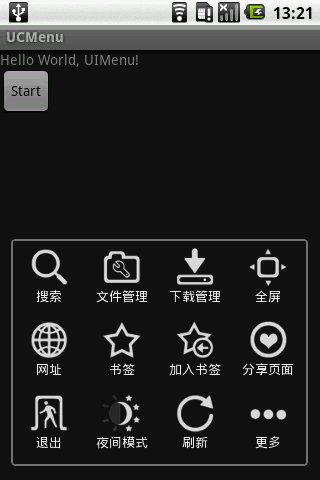 用 PopupWindow 加 GridView 打造 UCWeb 風格的功能菜單
UCWeb 的底部彈出菜單相當有辨識度:半透明遮罩蓋住整個畫面,功能圖示以四欄網格排列,點選後菜單收起。這個效果不需要任何特殊元件,用 PopupWindow 裝一個 G
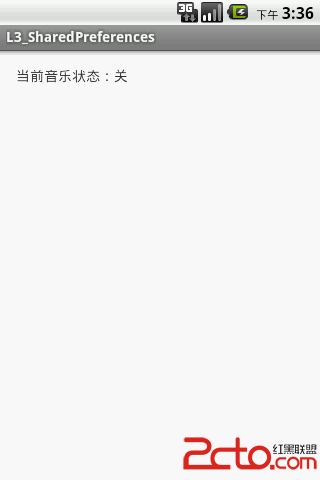 Android 學習:SharedPreferences 輕量資料持久化實作
SharedPreferences 是 Android 提供的輕量級資料儲存機制,適合保存設定、狀態等鍵值對資料。本例以一個音樂開關狀態的保存與還原為例,示範其用法。 執
 Android 事件分發機制完全總結:從源碼看 View 與 ViewGroup
事件分發是 Android 面試的高頻考點,也是自定義控件繞不開的一課。網上的圖表和口訣很多,但如果沒讀過源碼,遇到「明明重寫了 onTouchEvent 卻不執行」這類
 Android 性能分析工具 TraceView 使用與指標解析
TraceView 是 Android 平台上常見的方法級效能分析工具,它能以圖形方式呈現應用程式在一段時間內的方法呼叫與執行時間,協助開發者快速找出卡頓原因。