

編輯:關於 Android 程式設計
在移植或調試藍牙協議棧時,往往需要打開 BlueZ 的調試日志。下面提供兩種做法,都在 external/bluetooth/bluez/src/log.h 中修改。
把 DBG 重新定義為通過 Android 的日志系統輸出,並引入 android/log.h:
#include <android/log.h>

#define DBG(fmt, arg...) \
    __android_log_print(ANDROID_LOG_DEBUG, "BlueZ", fmt, ## arg)
同時在日誌初始化相關的函數(如 __btd_log_init、__btd_toggle_debug)中,把原本基於 __start___debug / __stop___debug 段的遍歷邏輯註釋掉即可。
第一步,引入日誌頭文件:
#include <cutils/logd.h>
第二步,把調試標志的默認值改為開啟:
#define BTD_DEBUG_FLAG_DEFAULT 1
#define BTD_DEBUG_FLAG_PRINT   1
第三步,把 DBG 宏的最終輸出改成 Android 日志:
#define DBG(fmt, arg...) do { \
    static struct btd_debug_desc __btd_debug_desc \
    __attribute__((used, section("__debug"), aligned(8))) = { \
        .file = __FILE__, .flags = BTD_DEBUG_FLAG_DEFAULT, \
    }; \
    if (__btd_debug_desc.flags & BTD_DEBUG_FLAG_PRINT) \
        __android_log_print(ANDROID_LOG_DEBUG, "BlueZ", fmt, ## arg); \
} while (0)
改完重新編譯,BlueZ 的調試信息就會通過 logcat 打印出來。
 Android Intent 元件呼叫指南:顯式與隱式 Intent 的差異
Intent 的作用 Intent 是 Android 元件之間溝通的核心,可用來啟動 Activity、Service,或傳送 Broadcast。它既能明確指定目標元
 Android 多媒體:MediaPlayer 生命週期解析
Android MediaPlayer 的生命週期 MediaPlayer 的狀態轉換圖也象徵著它的生命週期。搞清楚這張圖,能幫助我們在使用 MediaPlayer 時考
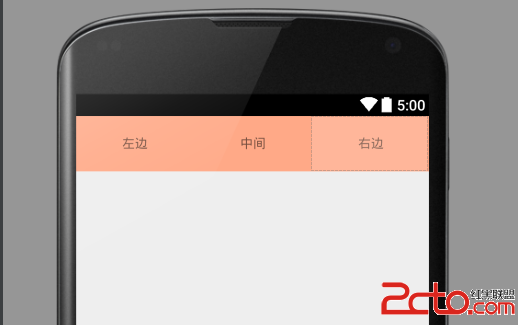 Android UI 優化(二):用 include 標簽復用布局
問題:重復的布局怎麼辦 假設下面這塊布局在很多界面都用到了,我該怎麼辦?每個頁面都寫一遍的話,代碼太冗余,並且後續維護難度成倍增加——改一處就得記着同步改十幾處,漏一處就
 Android SDK 下載提速到 8-10M/S:鏡像源配置圖文教程
官方源下載 SDK 龜速是每個 Android 新手的痛。透過切換到國內鏡像並做幾處小改動,速度可以拉到 8-10MB/s。 1. 強制把 https 鏈接換成 http