

編輯:關於 Android 程式設計
假設下面這塊布局在很多界面都用到了,我該怎麼辦?每個頁面都寫一遍的話,代碼太冗余,並且後續維護難度成倍增加——改一處就得記着同步改十幾處,漏一處就是 bug。
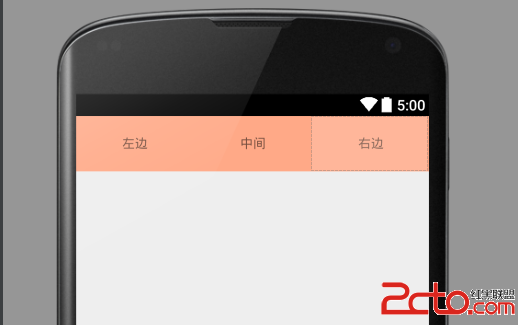
傳統做法有兩種:一是複製粘貼,二是寫個方法在代碼裡動態生成。前者難維護,後者讓視圖邏輯散落在 Java 代碼裡,設計稿一改就得動代碼。更好的答案是 <include> 標簽。
把公共部分抽成獨立布局文件,然後在需要的地方 include 進來:
<LinearLayout xmlns:android="https://schemas.android.com/apk/res/android"
    xmlns:tools="https://schemas.android.com/tools"
    android:layout_width="match_parent"
    android:layout_height="match_parent"
    android:orientation="vertical"
    tools:context=".MainActivity">

    <include layout="@layout/activity_clude_item" />

    <TextView
        android:layout_width="match_parent"
        android:layout_height="match_parent"
        android:gravity="center"
        android:text="這是中間的東西" />
</LinearLayout>
效果如下:
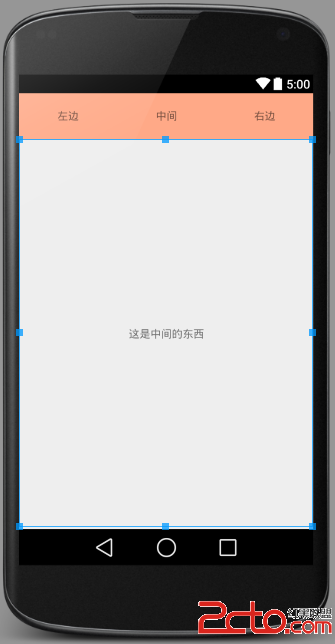
上邊這個布局用的就是 include 標簽。代碼顯然更加整潔,並且增加了布局的復用性,同時因為去掉重復的 XML 解析,也降低了 app 的內存佔用與啟動耗時。
最基本的寫法只有一個屬性:
<include layout="@layout/activity_clude_item" />
其中我們使用 layout="@layout/activity_clude_item" 指定要復用的布局文件。
除此之外還有幾個屬性可以覆寫被引入布局根節點的屬性:
<include
    android:id="@+id/header"
    layout="@layout/header_layout"
    android:layout_width="match_parent"
    android:layout_height="wrap_content"
    android:visibility="visible" />
IllegalArgumentException,提示你必須同時指定 both width and height。android:id 以及 android:layout_* 這組參數。想改被引入布局根節點的 background、padding 是不行的,此時應該在被引入的布局文件內部修改,或者用 <merge> 搭配代碼操作。<include> 引入的是一個完整的布局,會多一層根節點;<merge> 則是把子元素直接合併到父容器中,不產生額外層級。如果你在意層級深度,可以考慮在被引入的布局裡用 <merge> 作為根節點,但要注意 merge 不能獨立使用,必須配合 include 或 ViewStub.inflate()。配合 <style> 抽取屬性、<color> 與 <dimen> 資源抽取具體數值,整個布局體系的復用性會有質的提升——這三者搭配使用,才是 Android 布局層的完整優化方案。
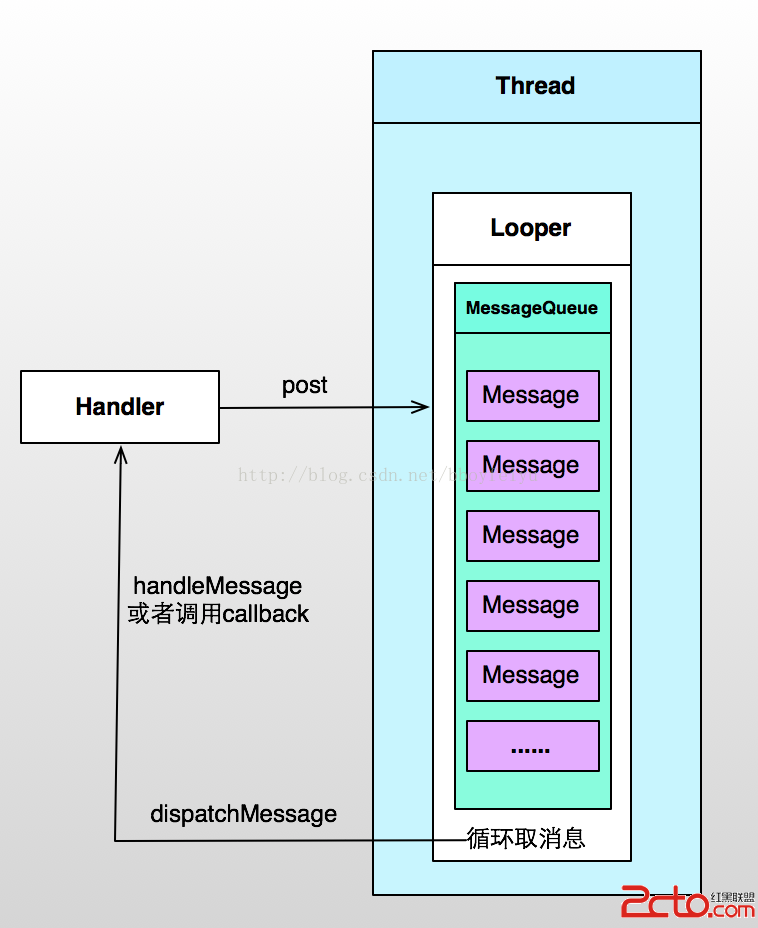 Android 中 Thread、Handler、Looper 與 MessageQueue 原理剖析
Thread、Handler、Looper 這三個類別在 Android 開發中幾乎無所不在,但剛入門時往往只會用、知其然而不知其所以然。這篇就從源碼角度把這套機制拆開來
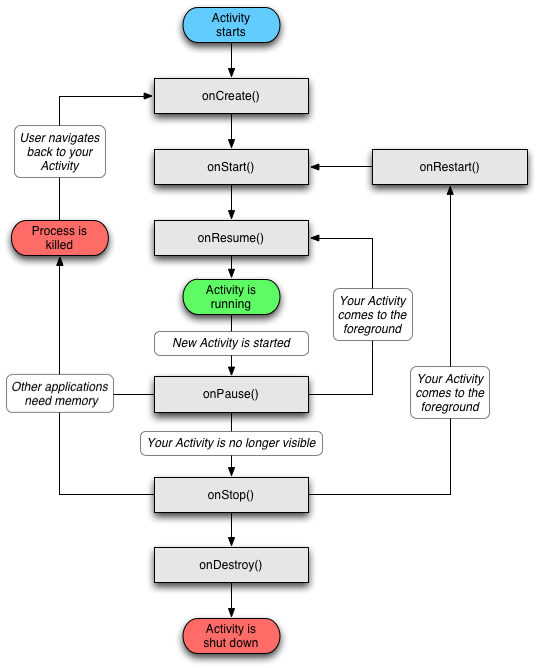 深入解析 Android Activity 元件的核心概念與生命週期
Activity 是 Android 應用開發中最基礎的組成單元,中文習慣稱之為「活動」。從使用者角度來看,一個 Activity 往往就對應著應用程式中的一個獨立畫面。
 Android 實現透明狀態欄的詳解教程
現在越來越多 App 採用了透明狀態欄,效果確實很出彩。本文記錄一下實現過程,方便以後使用。先來看看要達到的效果: 其實原理很簡單:把 StatusBar 背景變成透
 SD 卡壞了怎麼辦?先別急著格式化,資料還有救
學習、工作、拍照,SD 卡幾乎無所不在。它容量可觀,卻 also 相當脆弱——一旦罷工,往往欲哭無淚。 面對讀不到的 SD 卡,第一反應通常是格式化,但這恰恰是資料徹底消