

編輯:關於 Android 程式設計
介紹:
Retrofit 是 Square 公司開發的一款 Android 網路請求框架,Retrofit2 底層基於 OkHttp 實現,而 OkHttp 目前已獲得 Google 官方認可,被大量 App 採用。本文使用 Retrofit 2.0.0 版本進行演示。
Retrofit 支持 GET、POST、PUT、DELETE 等請求方式。
同步請求:需在子線程中完成,會阻塞主線程。
Response response = call.execute().body();
異步請求:結果在主線程回調,可在 onResponse() 中更新 UI。
call.enqueue(Callback callback);
使用步驟:
(1) 創建工程,添加依賴:
compile 'com.squareup.retrofit2:retrofit:2.0.0'
compile 'com.squareup.retrofit2:converter-gson:2.0.0' // 兩個版本要一致,否則會衝突
(2) 創建業務請求接口:
/** 創建業務請求接口 */
public interface IUserService {
    /** GET 請求 */
    @GET("Servlet/UserServlet")
    Call<User> getUser(@Query("email") String email);

    /** POST 請求 */
    @FormUrlEncoded
    @POST("UserServlet")
    Call<User> postUser(@Field("name") String name, @Field("email") String email);
}
說明:
@GET 表示 GET 請求,@Query 表示請求參數,會以 key=value 的方式拼接在 url 後面。
@POST 表示 POST 請求,@FormUrlEncoded 會自動把請求參數類型設為 application/x-www-form-urlencoded(不能用於 GET)。@Field 把每個參數放進請求體,還可加 encoded 參數(boolean),為 true 時 key-value 會被編碼,適合中文與特殊字元。
(3) 創建 Retrofit 物件:
Retrofit retrofit = new Retrofit.Builder()
        .baseUrl(Constant.BASE_URL)
        .addConverterFactory(GsonConverterFactory.create())
        .build();
IUserService iUserService = retrofit.create(IUserService.class);
說明:
baseUrl() 指定網路請求的固定絕對地址(協議 + 域名/IP + 端口)。若不配置 addConverterFactory,會回調 JSON 字串;配置後則回調實體物件。支持的解析庫有:
Gson:    compile 'com.squareup.retrofit2:converter-gson:2.0.1'
Jackson: compile 'com.squareup.retrofit2:converter-jackson:2.0.1'
Moshi:   compile 'com.squareup.retrofit2:converter-moshi:2.0.1'
Protobuf:compile 'com.squareup.retrofit2:converter-protobuf:2.0.1'
Wire:    compile 'com.squareup.retrofit2:converter-wire:2.0.1'
Simple XML: compile 'com.squareup.retrofit2:converter-simplexml:2.0.1'
Scalars: compile 'com.squareup.retrofit2:converter-scalars:2.0.1'
(4) 呼叫請求方法取得 Call 例項:
Call<ResponseBody> call = iUserService.getUser("xing-java@foxmail.com");
(5) 使用 Call 完成同步或異步請求:
/** 發送 GET 請求 */
private void getRequest() {
    Retrofit retrofit = new Retrofit.Builder()
            .baseUrl(Constant.BASE_URL)
            .addConverterFactory(GsonConverterFactory.create())
            .build();
    IUserService iUserService = retrofit.create(IUserService.class);
    Call<User> call = iUserService.getUser("xing-java@foxmail.com");
    call.enqueue(new Callback<User>() {
        @Override
        public void onResponse(Call<User> call, Response<User> response) {
            User user = response.body();
            resTxtView.setText(user.toString());
        }

        @Override
        public void onFailure(Call<User> call, Throwable t) {
        }
    });
}
常見請求方式:
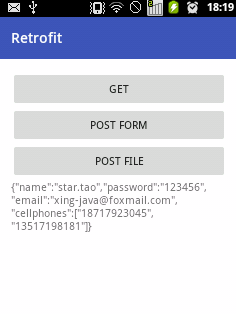
GET 請求返回 JSON 字串:
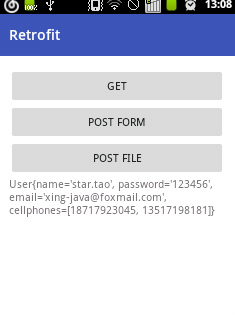
GET 請求返回實體物件:
POST 發送表單:
/** 發送 POST 請求 */
private void postRequest() {
    Retrofit retrofit = new Retrofit.Builder()
            .baseUrl(Constant.BASE_URL)
            .addConverterFactory(GsonConverterFactory.create())
            .build();
    IUserService iUserService = retrofit.create(IUserService.class);
    Call<User> call = iUserService.postUser("star.tao", "xing-java@foxmail.com");
    call.enqueue(new Callback<User>() {
        @Override
        public void onResponse(Call<User> call, Response<User> response) {
        }

        @Override
        public void onFailure(Call<User> call, Throwable throwable) {
        }
    });
}
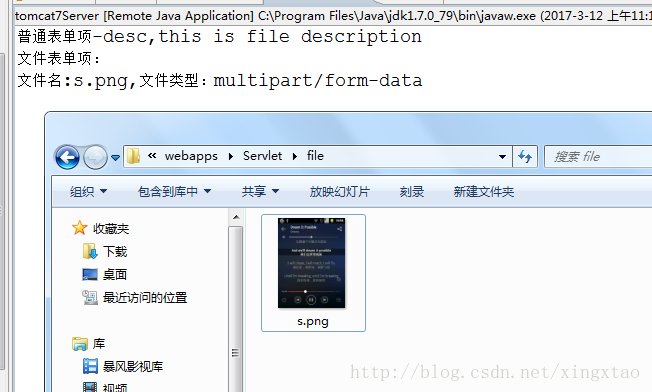
服務端接收到的結果:

文件上傳:
private void uploadFile() {
    Retrofit retrofit = new Retrofit.Builder()
            .addConverterFactory(GsonConverterFactory.create())
            .baseUrl(Constant.BASE_URL)
            .build();
    IUserService iUserService = retrofit.create(IUserService.class);
    File file = new File("/sdcard/s.png");
    RequestBody fileRequestBody = RequestBody.create(MediaType.parse("multipart/form-data"), file);
    MultipartBody.Part multipartBody = MultipartBody.Part.createFormData("upload_file", file.getName(), fileRequestBody);
    String desc = "this is file description";
    RequestBody descRequestBody = RequestBody.create(MediaType.parse("multipart/form-data"), desc);
    Call<ResponseBody> call = iUserService.uploadFile(descRequestBody, multipartBody);
    call.enqueue(new Callback<ResponseBody>() {
        @Override
        public void onResponse(Call<ResponseBody> call, Response<ResponseBody> response) {
            Log.i("debug", "upload success");
        }

        @Override
        public void onFailure(Call<ResponseBody> call, Throwable t) {
        }
    });
}
透過 Retrofit,網路請求被抽象成「接口 + 註解」的形式,配合 enqueue 的異步回調,能讓代碼既清晰又易維護,是目前 Android 網路層的主流選擇之一。
 用 SurfaceView 與属性動畫打造彈跳小球載入動畫
先看效果 這個動畫看起來簡單,真要做得自然卻需要幾個知識點配合: 1. 属性動畫(ValueAnimator / AnimatorSet) 2. Path 與 Canv
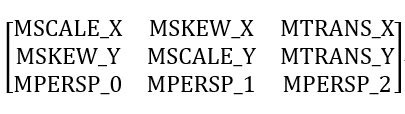 Android Matrix 用法總結:平移、旋轉、縮放與錯切
Matrix 是 Android 圖像處理中常見的 3x3 矩陣。它主要用於平面上的平移、旋轉、縮放與錯切等變換。本文從概念出發,整理 Matrix 的常見用法與背後的座
 Android 動畫基礎:Drawable Animation 與 View Animation 全示例
Android 的動畫體系主要分為三大類: Drawable Animation(逐幀動畫) View Animation(補間動畫) Property Animati
 Android 自定義控件實戰(四):手把手做一個圓環進度條
先看效果 模擬器上會有輕微鋸齒,真機顯示與預期一致。 效果拆解 看到這個效果,第一反應應該是:原生控件裡沒有現成東西能做到,那就自己畫。仔細拆一下,這個圓環進度條其實由