

編輯:關於 Android 開發
Toast 的預設位置在螢幕靠近底部處,但這個位置並非總是合適。當頁面內容較少、使用者注意力集中在上半部時,底部的 Toast 可能被忽略;又或者會被使用者的手擋住。實務上,把 Toast 顯示在螢幕中央或中上部往往更理想。以下透過範例示範如何調整。
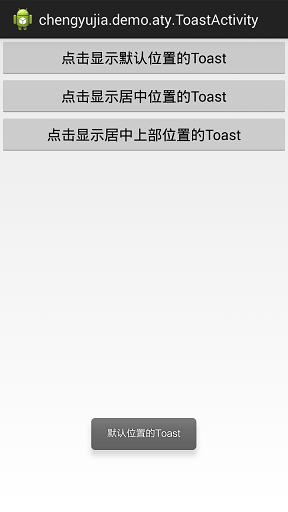
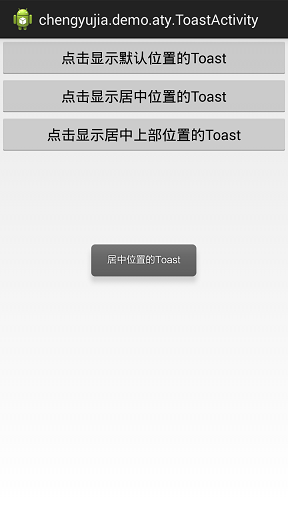
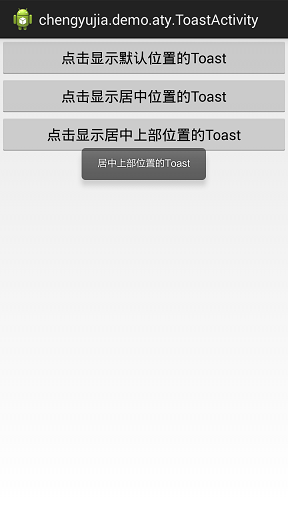
放置三個按鈕,分別對應預設位置、置中、以及置中上部的 Toast。
<?xml version="1.0" encoding="utf-8"?> <LinearLayout xmlns:android="https://schemas.android.com/apk/res/android" android:layout_width="match_parent" android:layout_height="match_parent" android:orientation="vertical" > <Button android:layout_width="fill_parent" android:layout_height="wrap_content" android:onClick="onClickDefaultToast" android:text="點擊顯示默認位置的Toast" /> <Button android:layout_width="fill_parent" android:layout_height="wrap_content" android:onClick="onClickCenterToast" android:text="點擊顯示居中位置的Toast" /> <Button android:layout_width="fill_parent" android:layout_height="wrap_content" android:onClick="onClickTopToast" android:text="點擊顯示居中上部位置的Toast" /> </LinearLayout>
透過 Toast 的 setGravity() 方法即可調整位置。置中可傳入 Gravity.CENTER;若要顯示在置中偏上,可取得螢幕高度後給予 y 軸偏移量。
package chengyujia.demo.aty; import android.os.Bundle; import android.view.Display; import android.view.Gravity; import android.view.View; import android.widget.Toast; import chengyujia.demo.R; public class ToastActivity extends BaseActivity { @Override protected void onCreate(Bundle savedInstanceState) { super.onCreate(savedInstanceState); setContentView(R.layout.activity_toast); } public void onClickDefaultToast(View v) { Toast.makeText(this, "默認位置的Toast", Toast.LENGTH_LONG).show(); } public void onClickCenterToast(View v) { Toast toast = Toast.makeText(this, "居中位置的Toast", Toast.LENGTH_LONG); toast.setGravity(Gravity.CENTER, 0, 0); toast.show(); } public void onClickTopToast(View v) { Display display = getWindowManager().getDefaultDisplay(); // 獲取屏幕高度 int height = display.getHeight(); Toast toast = Toast.makeText(this, "居中上部位置的Toast", Toast.LENGTH_LONG); // 這裡給了一個1/4屏幕高度的y軸偏移量 toast.setGravity(Gravity.TOP, 0, height / 4); toast.show(); } }
 ListView 自適應表格實作:讓每個單元格都能自訂尺寸
用 ListView 拼出一張會自適應的表格,是不少 Android 新手會卡住的地方。老實說,如果只講「自適應表格」,GridView 其實更好寫;但 GridView
 安卓界面編程入門(三):TextView 及其子類詳解
 本篇進入第二組 UI 組件的學習——TextView 及其子類。TextView 是 Android 中最基礎的文
 Android SQLite 入門:編寫 SQL 語句操作資料庫(慕課筆記)
 本文記錄了 Android 常用資料儲存方式之一 SQLite 的學習與操作重點。 0. 視
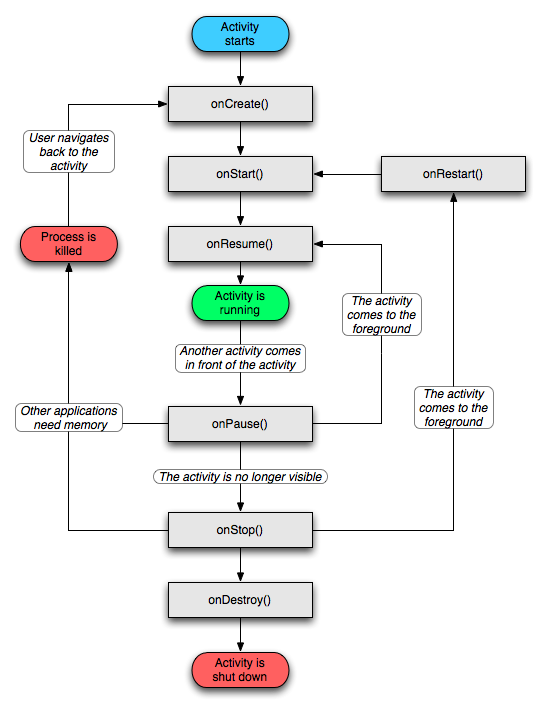 Android Activity 的生命週期詳解
 Activity 類別中定義了七個回呼方法,涵蓋了活動生命週期的每一個環節,以下逐一介紹這七個方法。 七個核心回呼方法