

編輯:關於 Android 開發
集合、迭代、陣列、序列——這些型別都共用一套好用的函式:map、filter、forEach、first……能大幅簡化資料處理。但 Android SDK 的設計讓這套工具用不上:ViewGroup 內部並未提供子視圖的清單,你只能用 getChildCount() 搭配 getChildAt(i) 寫迴圈。
好消息是 Kotlin 有辦法把任何資料「包裝」成可函數操作的樣子。訣竅是建立一個 Sequence,而 Sequence 只需要你提供一個 Iterator。

fun ViewGroup.asSequence(): Sequence<View> = object : Sequence<View> {

    override fun iterator(): Iterator<View> = object : Iterator<View> {
        private var nextValue: View? = null
        private var done = false
        private var position: Int = 0

        override fun hasNext(): Boolean {
            if (nextValue == null && !done) {
                nextValue = getChildAt(position)
                position++
                if (nextValue == null) done = true
            }
            return nextValue != null
        }

        override fun next(): View {
            if (!hasNext()) throw NoSuchElementException()
            val answer = nextValue
            nextValue = null
            return answer!!
        }
    }
}迭代器只需實作兩件事:hasNext() 判斷有沒有下一個,next() 取出並前移。這裡用 nextValue 快取值,是因為 getChildAt() 在索引越界時回傳 null,正好可以當作結尾標記。
接著用擴充屬性包一層:
public val ViewGroup.views: List<View>
    get() = asSequence().toList()
再往遞歸版本推進——不只列出直接子節點,而是把整棵視圖樹都攤平:
public val ViewGroup.viewsRecursive: List<View>
    get() = views flatMap {
        when (it) {
            is ViewGroup -> it.viewsRecursive   // 是容器就繼續往下
            else         -> listOf(it)          // 是葉節點就回傳自己
        }
    }
flatMap 在這裡的價值是把「多個清單」攤平成「一個清單」:遍歷每個子視圖,遇到 ViewGroup 就遞迴展開,否則包成單元素清單。
準備這樣一份布局:
<RelativeLayout xmlns:android="https://schemas.android.com/apk/res/android"
    xmlns:tools="https://schemas.android.com/tools"
    android:id="@+id/container"
    android:layout_width="match_parent"
    android:layout_height="match_parent"
    android:paddingBottom="@dimen/activity_vertical_margin"
    android:paddingLeft="@dimen/activity_horizontal_margin"
    android:paddingRight="@dimen/activity_horizontal_margin"
    android:paddingTop="@dimen/activity_vertical_margin"
    tools:context=".MainActivity">

    <TextView
        android:layout_width="wrap_content"
        android:layout_height="wrap_content"
        android:text="@string/hello_world" />

    <FrameLayout
        android:layout_width="match_parent"
        android:layout_height="wrap_content"
        android:layout_centerInParent="true">

        <TextView
            android:layout_width="wrap_content"
            android:layout_height="wrap_content"
            android:text="Hello Java" />

        <TextView
            android:layout_width="wrap_content"
            android:layout_height="wrap_content"
            android:layout_gravity="center_horizontal"
            android:text="Hello Kotlin" />

        <TextView
            android:layout_width="wrap_content"
            android:layout_height="wrap_content"
            android:layout_gravity="end"
            android:text="Hello Scala" />

    </FrameLayout>

    <LinearLayout
        android:layout_width="match_parent"
        android:layout_height="wrap_content"
        android:layout_alignParentBottom="true"
        android:orientation="horizontal">

        <CheckBox android:layout_width="wrap_content" android:layout_height="wrap_content" android:text="Check 1" />
        <CheckBox android:layout_width="wrap_content" android:layout_height="wrap_content" android:text="Check 2" />
        <CheckBox android:layout_width="wrap_content" android:layout_height="wrap_content" android:text="Check 3" />
        <CheckBox android:layout_width="wrap_content" android:layout_height="wrap_content" android:text="Check 4" />

    </LinearLayout>

</RelativeLayout>
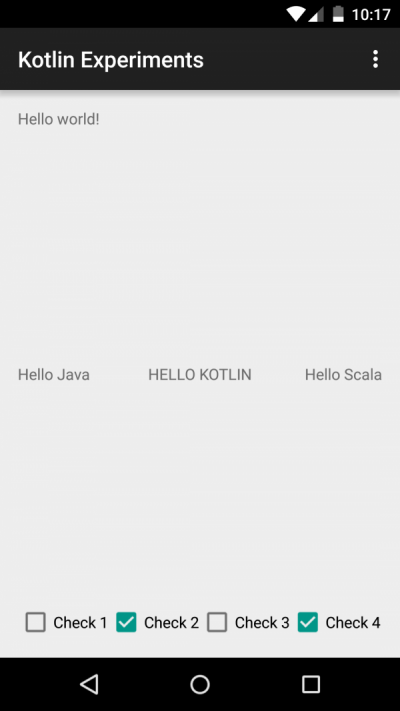
接著在 onCreate() 中做兩件事:把含「Kotlin」字樣的文字轉成大寫,並把偶數編號的 CheckBox 勾選起來。
val container: ViewGroup = find(R.id.container)
val views = container.viewsRecursive

// 1. 找到 Kotlin 那段文字並轉大寫
val kotlinText = views.first {
    it is TextView && it.text.toString().contains("Kotlin")
} as TextView
kotlinText.text = kotlinText.text.toString().toUpperCase()

// 2. 偶數勾選、奇數不勾選
views filter {
    it is CheckBox
} forEach {
    with(it as CheckBox) {
        val number = text.toString().removePrefix("Check ").toInt()
        setChecked(number % 2 == 0)
    }
}
對照 traditional 的寫法,這裡完全沒有 for 迴圈、沒有索引變數、沒有 if 判斷型別的巢狀結構,意圖直接寫在程式碼上。
有讀者(lakedaemon666)指出一個更好的做法。Sequence 的設計目的是惰性求值——像逐行讀大檔那樣,只取需要的元素、不必一次算完。但我們這裡最終一定會遍歷全部子視圖,惰性帶不來好處,反而多了一層間接。
更何況要產生視圖清單本來就有一行寫法:用 Kotlin 的「值域」表達索引範圍,再 map 成視圖:
public val ViewGroup.views: List<View>
    get() = (0 until childCount) map { getChildAt(it) }
(0 until childCount) 產生 IntRange,map 把每個索引轉成對應的 View。簡潔、直觀、沒有額外的匿名類。
這個例子本身不複雜,但它示範了一件重要的事:透過擴充函式與擴充屬性,你可以把 Android SDK 中「不那麼好操作」的 API 包裝成符合函數式風格的介面,然後让整个程式碼基調從命令式迴圈轉向宣告式表達。這種轉變一旦開始,通常就回不去了。
想更系統地學習 Kotlin,可以參考 Antonio Leiva 的《Kotlin for Android Developers》,書中從零開始打造一個完整的 Android App。
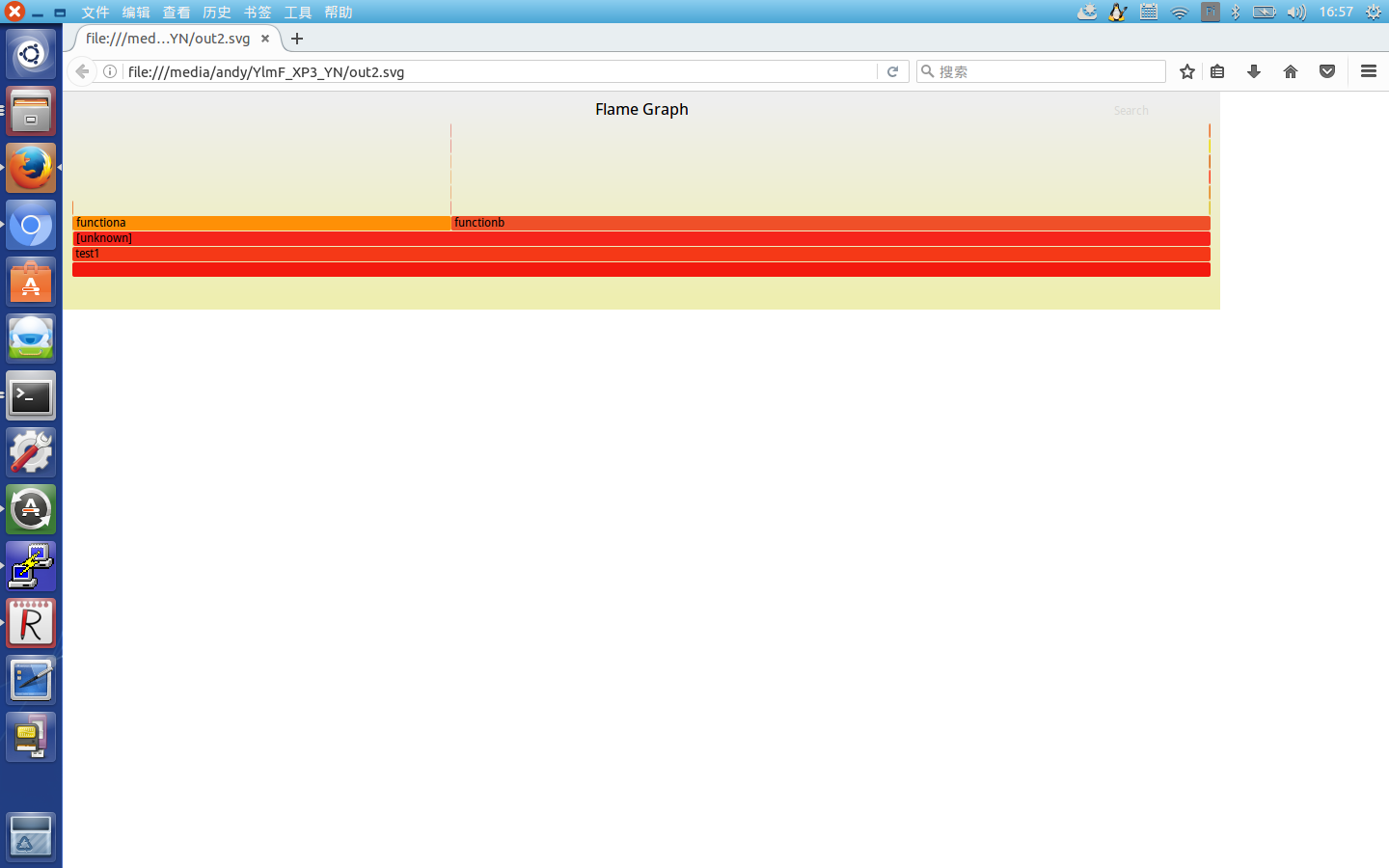 用 perf 做效能剖析:以火焰圖找出程式最耗時的呼叫路徑
perf 在做什麼 perf 有個很實用的能力:以固定頻率對某個程式抽取呼叫堆疊(call stack),再對這些樣本做統計分析。原理很直觀——某段程式碼路徑在樣本中出現
 Cordova 系列教學 02:Eclipse 開發環境建置與專案執行
Cordova 開發環境準備 本文以 Eclipse 為基礎,說明如何建立 Cordova 的 Android 開發環境,並完成專案導入、編譯與執行。雖然現在 Andro
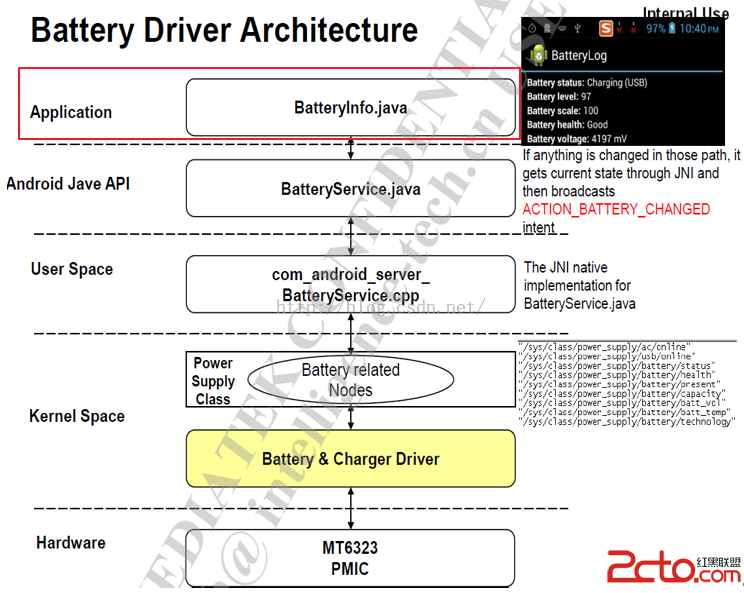 MSM8909+Android5.1.1 BSP開發:電池管理之BatteryInfo.java源碼剖析
 先借用MTK的電池管理框架圖作為引子: 圖1 透過電話測試指令
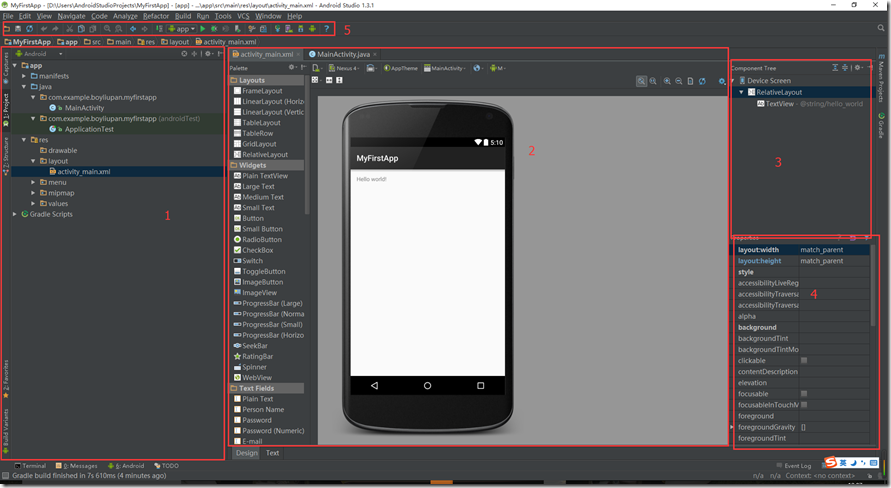 Android Studio 常用功能全解析(自學筆記番外篇)
 剛從 Eclipse 轉戰 Android Studio 的朋友,往往會被全新的介面搞得有點找不著方向。本