

編輯:關於 Android 開發
先借用MTK的電池管理框架圖作為引子:
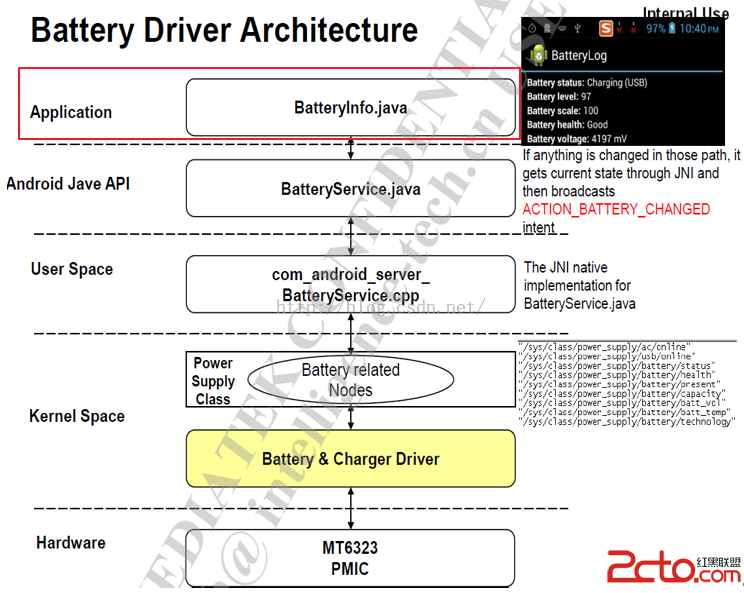
圖1
透過電話測試指令:*#*#4636#*#*可以彈出Testing介面:
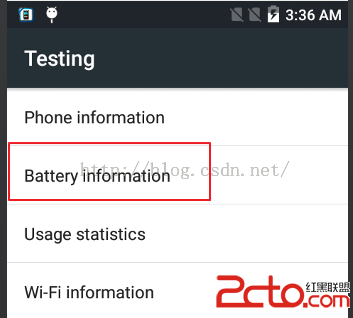
圖2
選擇Battery information進入:
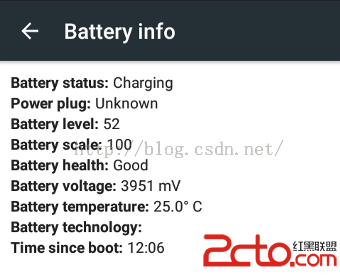
圖3
我們接入USB或DC充電時,Power plug都顯示為Unknown,說明底層就判斷為Unknown類型,這個問題需要查清楚。
BatteryInfo對應的程式碼為packages\apps\Settings\src\com\android\settings\BatteryInfo.java。
1. \packages\apps\Settings\AndroidManifest.xml
(1) android:label
android:label="@string/battery_info_label",label表示標籤,@表示引用,表示從strings.xml中引用battery_info_label這個鍵值的值。其在\packages\apps\Settings\res\values\strings.xml中對應的值為Battery info。
(2) android:taskAffinity
android:taskAffinity="com.android.settings"表示BatteryInfo Activity希望進入com.android.settings這個task。
Activity的歸屬(也就是它應該在哪個Task中)與Activity和Task的吸附關係值得說明。一般情況下,同一個應用中啟動的Activity都在同一個Task中度過生命週期。那麼為什麼我們創建的Activity會進入某個Task?關鍵就在於每個Activity的taskAffinity屬性。
每個Activity都有taskAffinity屬性,指出它希望進入的Task。如果一個Activity沒有顯式指明taskAffinity,那麼它的值就等於Application指明的taskAffinity;如果Application也沒指明,則等於包名。而Task也有自己的affinity屬性,其值等於它根Activity的taskAffinity。
2. BatteryInfo.java程式碼分析
2.1 onCreate()
@Override public void onCreate(Bundle icicle) { super.onCreate(icicle); setContentView(R.layout.battery_info); // create the IntentFilter that will be used to listen // to battery status broadcasts mIntentFilter = new IntentFilter(); mIntentFilter.addAction(Intent.ACTION_BATTERY_CHANGED); }
(1) R.layout.battery_info 其值在packages\apps\Settings\res\layout\battery_info.xml定義。
(2) 創建一個IntentFilter物件mIntentFilter,用於監聽電池狀態廣播。
(3) mIntentFilter.addAction(Intent.ACTION_BATTERY_CHANGED); 為此IntentFilter增加一個ACTION_BATTERY_CHANGED的action,也就是說當其他Activity或Service等發送包含ACTION_BATTERY_CHANGED的intent時,BatteryInfo就執行更新電池狀態的動作。
2.2 onResume()
public void onResume() { super.onResume(); mStatus = (TextView)findViewById(R.id.status); mPower = (TextView)findViewById(R.id.power); mLevel = (TextView)findViewById(R.id.level); mScale = (TextView)findViewById(R.id.scale); mHealth = (TextView)findViewById(R.id.health); mTechnology = (TextView)findViewById(R.id.technology); mVoltage = (TextView)findViewById(R.id.voltage); mTemperature = (TextView)findViewById(R.id.temperature); mUptime = (TextView) findViewById(R.id.uptime); // Get awake time plugged in and on battery mBatteryStats =IBatteryStats.Stub.asInterface(ServiceManager.getService( BatteryStats.SERVICE_NAME)); mScreenStats = IPowerManager.Stub.asInterface(ServiceManager.getService(POWER_SERVICE)); mHandler.sendEmptyMessageDelayed(EVENT_TICK, 3000); registerReceiver(mIntentReceiver, mIntentFilter); }
在onResume()中透過registerReceiver(mIntentReceiver,mIntentFilter)註冊一個Receiver,最終在onReceive()中收到值為ACTION_BATTERY_CHANGED的action時,BatteryInfo這個Activity要更新電池狀態資訊。
(1) 創建一個Handler:
private Handler mHandler = new Handler() { @Override public void handleMessage(Message msg) { switch (msg.what) { case EVENT_TICK: updateBatteryStats(); sendEmptyMessageDelayed(EVENT_TICK, 1000); break; } } };
重寫handleMessage()用於處理消息EVENT_TICK,收到此消息後呼叫updateBatteryStats()更新電池狀態,並在1000ms後再次發送EVENT_TICK消息。
(2) 註冊一個監聽器:
/** *Listens for intent broadcasts */ private IntentFilter mIntentFilter; private BroadcastReceiver mIntentReceiver = new BroadcastReceiver() { @Override public void onReceive(Context context, Intent intent) { String action = intent.getAction(); if (action.equals(Intent.ACTION_BATTERY_CHANGED)) { int plugType =intent.getIntExtra("plugged", 0); mLevel.setText("" +intent.getIntExtra("level", 0)); mScale.setText("" +intent.getIntExtra("scale", 0)); mVoltage.setText("" +intent.getIntExtra("voltage", 0) + " " +getString(R.string.battery_info_voltage_units)); mTemperature.setText("" +tenthsToFixedString(intent.getIntExtra("temperature", 0)) +getString(R.string.battery_info_temperature_units)); mTechnology.setText("" +intent.getStringExtra("technology")); mStatus.setText(Utils.getBatteryStatus(getResources(), intent)); switch (plugType) { case 0: mPower.setText(getString(R.string.battery_info_power_unplugged)); break; case BatteryManager.BATTERY_PLUGGED_AC: mPower.setText(getString(R.string.battery_info_power_ac)); break; case BatteryManager.BATTERY_PLUGGED_USB: mPower.setText(getString(R.string.battery_info_power_usb)); break; caseBatteryManager.BATTERY_PLUGGED_WIRELESS: mPower.setText(getString(R.string.battery_info_power_wireless)); break; case(BatteryManager.BATTERY_PLUGGED_AC|BatteryManager.BATTERY_PLUGGED_USB): mPower.setText(getString(R.string.battery_info_power_ac_usb)); break; default: mPower.setText(getString(R.string.battery_info_power_unknown)); break; } int health =intent.getIntExtra("health", BatteryManager.BATTERY_HEALTH_UNKNOWN); String healthString; if (health ==BatteryManager.BATTERY_HEALTH_GOOD) { healthString =getString(R.string.battery_info_health_good); } else if (health ==BatteryManager.BATTERY_HEALTH_OVERHEAT) { healthString =getString(R.string.battery_info_health_overheat); } else if (health ==BatteryManager.BATTERY_HEALTH_DEAD) { healthString =getString(R.string.battery_info_health_dead); } else if (health ==BatteryManager.BATTERY_HEALTH_OVER_VOLTAGE) { healthString =getString(R.string.battery_info_health_over_voltage); } else if (health ==BatteryManager.BATTERY_HEALTH_UNSPECIFIED_FAILURE) { healthString =getString(R.string.battery_info_health_unspecified_failure); } else if (health ==BatteryManager.BATTERY_HEALTH_COLD) { healthString =getString(R.string.battery_info_health_cold); } else { healthString =getString(R.string.battery_info_health_unknown); } mHealth.setText(healthString); } } };
1) Battery status資訊的更新
其中Battery status有些特別:mStatus.setText(Utils.getBatteryStatus(getResources(),intent)); 來看packages\apps\Settings\src\com\android\settings\Utils.java的getBatteryStatus()實現:
public static StringgetBatteryStatus(Resources res, Intent batteryChangedIntent) { final Intent intent = batteryChangedIntent; int plugType = intent.getIntExtra(BatteryManager.EXTRA_PLUGGED, 0); int status = intent.getIntExtra(BatteryManager.EXTRA_STATUS, BatteryManager.BATTERY_STATUS_UNKNOWN); String statusString; if (status == BatteryManager.BATTERY_STATUS_CHARGING) { int resId; if (plugType == BatteryManager.BATTERY_PLUGGED_AC) { resId =R.string.battery_info_status_charging_ac; } else if (plugType == BatteryManager.BATTERY_PLUGGED_USB) { resId =R.string.battery_info_status_charging_usb; } else if (plugType == BatteryManager.BATTERY_PLUGGED_WIRELESS) { resId =R.string.battery_info_status_charging_wireless; } else { resId =R.string.battery_info_status_charging; } statusString = res.getString(resId); } else if (status ==BatteryManager.BATTERY_STATUS_DISCHARGING) { statusString = res.getString(R.string.battery_info_status_discharging); } else if (status == BatteryManager.BATTERY_STATUS_NOT_CHARGING) { statusString = res.getString(R.string.battery_info_status_not_charging); } else if (status == BatteryManager.BATTERY_STATUS_FULL) { statusString = res.getString(R.string.battery_info_status_full); } else { statusString = res.getString(R.string.battery_info_status_unknown); } return statusString; }
從上面可知,plugType是unknown,所以從strings.xml的battery_info_status_charging獲取到充電狀態是Charging。
2) 如何獲取電池的資訊
public void onReceive(Context context,Intent intent) { String action = intent.getAction(); if (action.equals(Intent.ACTION_BATTERY_CHANGED)) { int plugType =intent.getIntExtra("plugged", 0);
這是上面其中一段程式碼,收到廣播且intent的action值為ACTION_BATTERY_CHANGED時,就從intent中讀取plugged的值,這個intent是由BatteryService廣播出來的。
2.3 onPause()
@Override public void onPause() { super.onPause(); mHandler.removeMessages(EVENT_TICK); Slog.e(TAG, "BatteryInfo--->onPause()"); // we are no longer on the screen stop the observers unregisterReceiver(mIntentReceiver); }
比較簡單,就是刪除EVENT_TICK消息和註銷監聽器mIntentReceiver。
 Android 動態資源載入原理與換膚實踐
 一、Resources 是怎麼被造出來的 我們平常取得資源的起點是 getResources(): public Resou
 Android 框架設計模式(五):Singleton Method 單例模式
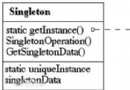
 一、單例模式介紹 什麼是單例模式 單例模式指的是:在整個全域範圍中(無論單執行緒還是
 Android UIAutomator 自動化測試入門
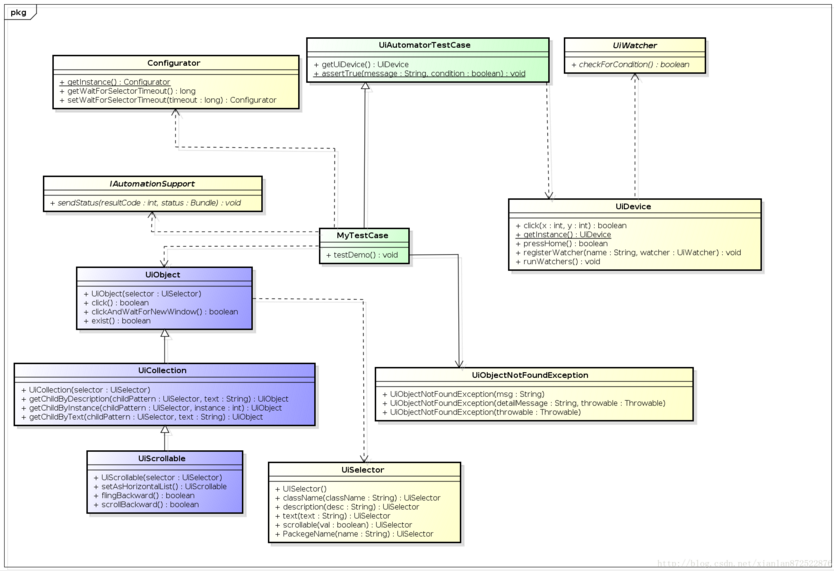
 UIAutomator 是 Android 提供的 UI 自動化測試工具,可模擬點擊、滑動、輸入文字等操作。對於測
 在 Android App 中嵌入 YouTube 影片:API 串接完整教學
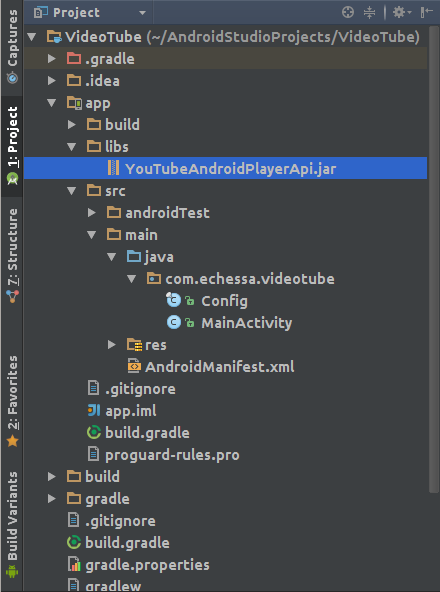
這個 API 能做什麼 Android 版 YouTube Player API 讓你能把影片播放功能直接放進自己的應用裡。它可以載入並播放 YouTube 影片與播放清