

編輯:關於 Android 開發
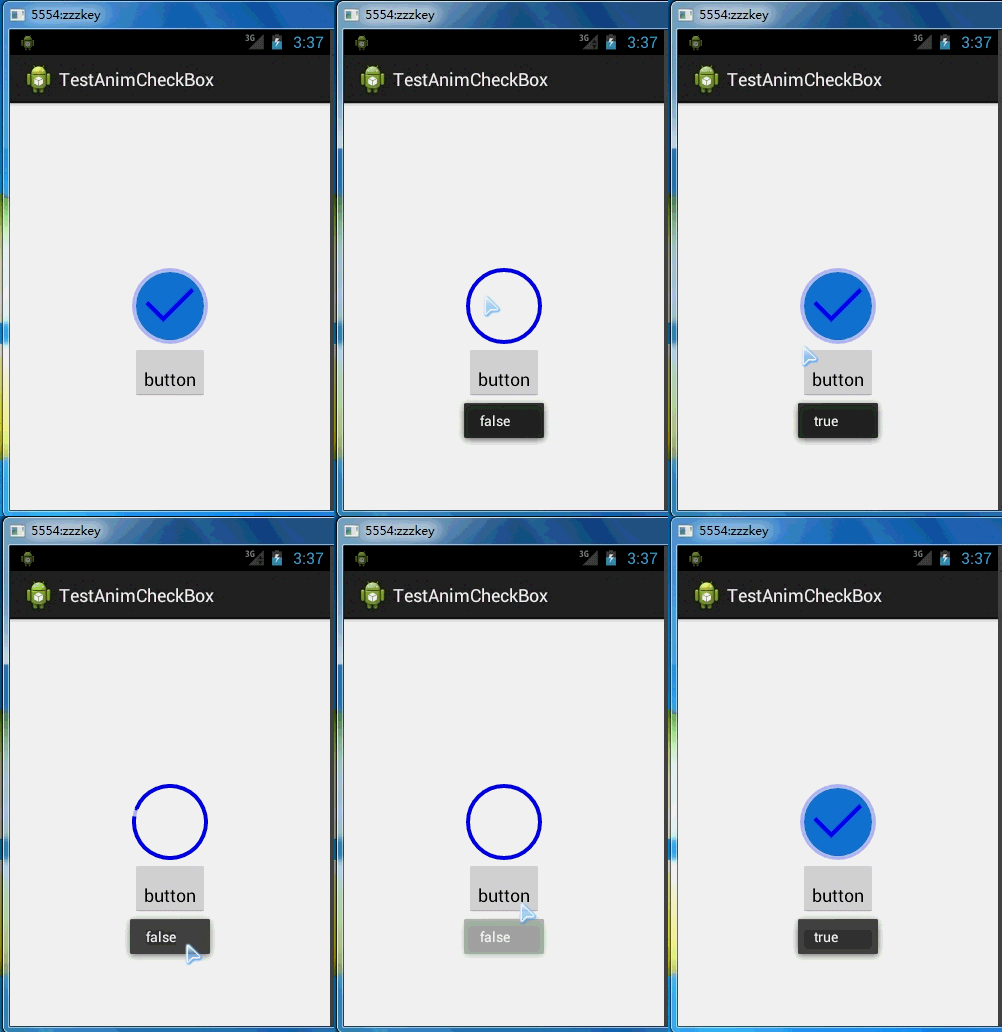
這個有趣的勾選動畫由開源庫 AnimCheckBox 實現,專案地址:https://github.com/lguipeng/AnimCheckBox。點擊時圓圈填色、勾號描繪的過渡相當細緻,很適合用在「操作成功」這類狀態回饋上。
<RelativeLayout xmlns:android="https://schemas.android.com/apk/res/android"
    xmlns:tools="https://schemas.android.com/tools"
    xmlns:app="https://schemas.android.com/apk/res-auto"
    android:layout_width="match_parent"
    android:layout_height="match_parent" >

    <!-- app:circle_color:點擊後的填色 -->
    <!-- app:stroke_color:線條與勾號顏色 -->
    <!-- app:stroke_width:線條寬度 -->

    <com.github.lguipeng.library.animcheckbox.AnimCheckBox
        android:id="@+id/checkBox"
        android:layout_width="80dp"
        android:layout_height="80dp"
        android:layout_centerInParent="true"
        app:circle_color="#1976D2"
        app:stroke_width="4dp" />

    <Button
        android:id="@+id/button"
        android:layout_width="wrap_content"
        android:layout_height="wrap_content"
        android:layout_below="@id/checkBox"
        android:layout_centerHorizontal="true"
        android:paddingTop="20dp"
        android:text="button" />

</RelativeLayout>
package com.zzw.testanimcheckbox;

import com.github.lguipeng.library.animcheckbox.AnimCheckBox;
import com.github.lguipeng.library.animcheckbox.AnimCheckBox.OnCheckedChangeListener;

import android.app.Activity;
import android.os.Bundle;
import android.view.View;
import android.view.View.OnClickListener;
import android.widget.Toast;

public class MainActivity extends Activity {

    private boolean temp = true;
    private AnimCheckBox checkBox;

    @Override
    protected void onCreate(Bundle savedInstanceState) {
        super.onCreate(savedInstanceState);
        setContentView(R.layout.activity_main);

        checkBox = (AnimCheckBox) findViewById(R.id.checkBox);

        // 設定初始狀態:勾選或空圈
        checkBox.setChecked(temp);

        checkBox.setOnCheckedChangeListener(new OnCheckedChangeListener() {
            @Override
            public void onChange(boolean checked) {
                if (checked) {
                    Toast.makeText(getApplicationContext(), "true", 0).show();
                } else {
                    Toast.makeText(getApplicationContext(), "false", 0).show();
                }
            }
        });

        findViewById(R.id.button).setOnClickListener(new OnClickListener() {
            @Override
            public void onClick(View v) {
                temp = !temp;
                // 第二個參數 true 代表播放動畫;
                // 若傳入 false,狀態會改變但不顯示動畫效果
                checkBox.setChecked(temp, true);
            }
        });
    }
}
setChecked(boolean, boolean animate) 的第二個參數是關鍵:設為 true 才會播放描繪動畫,設為 false 則直接跳轉狀態。實務上很適合替換「轉賬成功」「任務完成」這類需要正向回饋的場景,比單純彈 Toast 更有記憶點。
 你的 App 是怎麼被掉包的?App 劫持病毒剖析
一、什麼是 App 劫持 App 劫持指的是程式的執行流程被惡意重定向,依手法可細分為 Activity 劫持、安裝劫持、流量劫持、函式執行劫持等類型。本文以 Activ
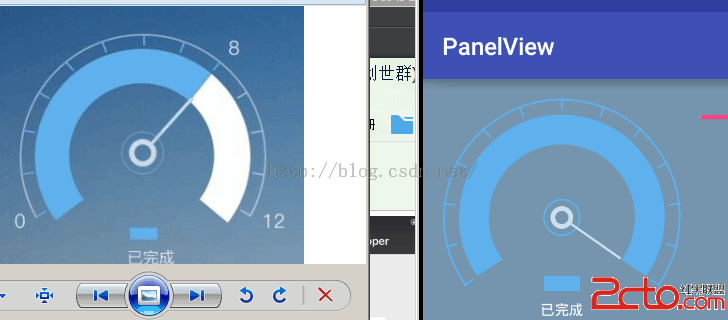 Android 自定義 View 實作時尚儀表盤
 拿到美工效果圖後,工程師需要把設計稿轉成可運行的 View。儀表盤看似複雜,但可以拆解成外弧、粗弧、小圓、刻度、指針、矩
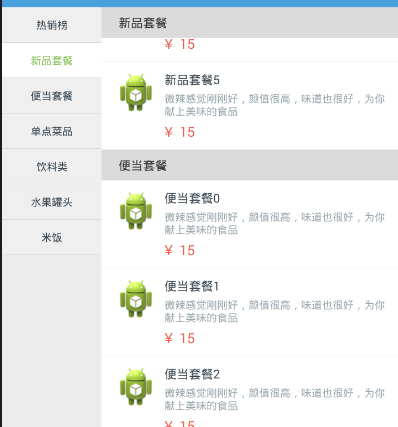 仿餓了么點餐界面:兩個 ListView 聯動實現
點餐類應用的經典交互是左右聯動:左側是分類菜單,右側是菜品列表,點左側切換右側內容,滑右側則左側高亮跟隨。本文記錄一個實現思路,同時也留下了一個尚未解決的問題,歡迎一起探
 Android 反射機制實現與原理:從 Java 反射到實際應用
反射的基本概念 反射是指程序在運行時能夠檢查、訪問和修改自身結構與行為的能力。在 Java 中,反射機制允許程序動態獲取類的信息,例如構造方法、成員方法、字段、父類、接口