

編輯:關於 Android 開發
SystemServer 是 Android 系統中一個極為關鍵的核心進程,它由 zygote 進程所建立,因此在整個開機流程中僅次於 zygote。可以說,Android 絕大多數的系統服務循環都架構在 SystemServer 之上。在這個進程中,會看到系統建立了大部分服務,並透過 ServerManager 的 add_service 方法把它們加入到 ServiceManager 的 svclist 裡,藉此完成 ServiceManager 對服務的管理。
native public static void init1(String[] args);
public static void main(String[] args) {
if (SamplingProfilerIntegration.isEnabled()) {
SamplingProfilerIntegration.start();
timer = new Timer();
timer.schedule(new TimerTask() {
@Override
public void run() {
SamplingProfilerIntegration.writeSnapshot("system_server");
}
}, SNAPSHOT_INTERVAL, SNAPSHOT_INTERVAL);
}
// The system server has to run all of the time, so it needs to be
// as efficient as possible with its memory usage.
VMRuntime.getRuntime().setTargetHeapUtilization(0.8f);
System.loadLibrary("android_servers"); // 載入本地函式庫 android_servers
init1(args);
}
main 函式主要呼叫了本地方法 init1(args),其實作位於 base/services/jni/com_android_server_SystemService.cpp 中:
static void android_server_SystemServer_init1(JNIEnv* env, jobject clazz) {
system_init();
}
進一步觀察 system_init,可看到它啟動了閉合循環管理框架:
runtime->callStatic("com/android/server/SystemServer", "init2"); // 回調 SystemServer.java 的 init2 方法
if (proc->supportsProcesses()) {
LOGI("System server: entering thread pool.\n");
ProcessState::self()->startThreadPool();
IPCThreadState::self()->joinThreadPool();
LOGI("System server: exiting thread pool.\n");
}
透過呼叫 SystemServer.java 中的 init2 方法來完成服務的註冊。init2 主要是建立了一個 ServerThread 執行緒,並啟動它以完成服務註冊:
public static final void init2() {
Slog.i(TAG, "Entered the Android system server!");
Thread thr = new ServerThread();
thr.setName("android.server.ServerThread");
thr.start();
}
真正負責註冊服務的邏輯則在 ServerThread 的 run 方法中:
try {
Slog.i(TAG, "Entropy Service");
ServiceManager.addService("entropy", new EntropyService());
Slog.i(TAG, "Power Manager");
power = new PowerManagerService();
ServiceManager.addService(Context.POWER_SERVICE, power);
Slog.i(TAG, "Activity Manager");
context = ActivityManagerService.main(factoryTest);
Slog.i(TAG, "Telephony Registry");
ServiceManager.addService("telephony.registry", new TelephonyRegistry(context));
}
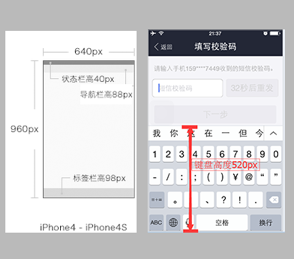 App 單頁最佳輸入框數量:鍵盤遮擋與表單體驗的設計判斷
App 單頁最佳輸入框數量 表單設計不能只看視覺,還要考慮鍵盤彈起後是否遮擋輸入框。原文以不同 iPhone 解析度估算單頁可容納的輸入框數量,並延伸到手機 App 的通
 AlertDialog 對話框的基本建立方式
 AlertDialog 是 Android 中最常用的對話框元件,可用來顯示標題、訊息、圖示,並搭配多個按鈕或選項清單。以下
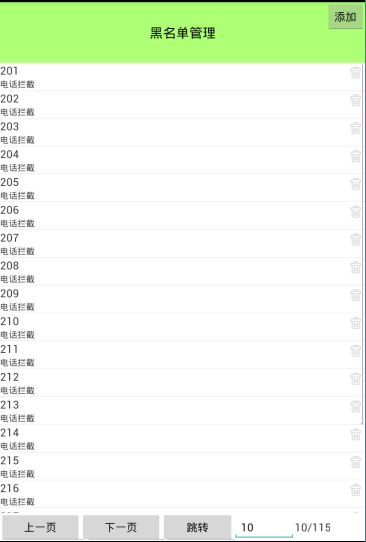 手機安全衛士實作:通訊衛士黑名單管理與攔截模式
通訊衛士是手機安全衛士中很實用的功能,主要用來管理黑名單號碼,決定要攔截來電、短信,或兩者同時攔截。本文整理 CallSafeActivity 的畫面、資料流與資料庫操作
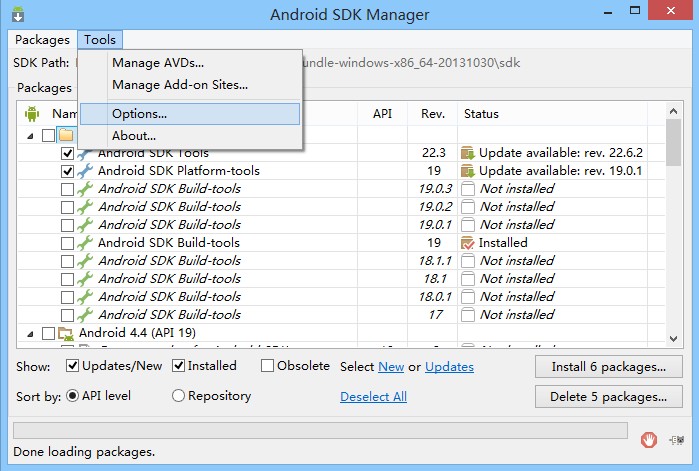 如何解決 Android SDK Manager 下載速度太慢的問題
這個方法是在極客頭條上看到的,覺得相當實用,特別記錄下來以備日後不時之需。 當 Android SDK Manager 更新元件龜速爬行時,可以透過設定境內鏡像伺服器來大