

編輯:關於 Android 開發
Toast 是 Android 中常見的輕量提示元件。除了系統預設樣式,我們還能透過自訂版面與位置,做出更豐富多樣的提示效果。以下示範五種常見用法。
package com.wjq.toast;
import android.app.Activity;
import android.os.Bundle;
import android.os.Handler;
import android.view.Gravity;
import android.view.LayoutInflater;
import android.view.View;
import android.view.ViewGroup;
import android.view.View.OnClickListener;
import android.widget.ImageView;
import android.widget.LinearLayout;
import android.widget.TextView;
import android.widget.Toast;
public class Main extends Activity implements OnClickListener {
Handler handler = new Handler();
@Override
public void onCreate(Bundle savedInstanceState) {
super.onCreate(savedInstanceState);
setContentView(R.layout.main);
findViewById(R.id.btnSimpleToast).setOnClickListener(this);
findViewById(R.id.btnSimpleToastWithCustomPosition).setOnClickListener(this);
findViewById(R.id.btnSimpleToastWithImage).setOnClickListener(this);
findViewById(R.id.btnCustomToast).setOnClickListener(this);
findViewById(R.id.btnRunToastFromOtherThread).setOnClickListener(this);
}
public void showToast() {
handler.post(new Runnable() {
@Override
public void run() {
Toast.makeText(getApplicationContext(), "我來自其他執行緒!", Toast.LENGTH_SHORT).show();
}
});
}
@Override
public void onClick(View v) {
Toast toast = null;
switch (v.getId()) {
case R.id.btnSimpleToast:
// 預設樣式
Toast.makeText(getApplicationContext(), "預設 Toast 樣式", Toast.LENGTH_SHORT).show();
break;
case R.id.btnSimpleToastWithCustomPosition:
// 自訂位置
toast = Toast.makeText(getApplicationContext(), "自訂位置 Toast", Toast.LENGTH_LONG);
toast.setGravity(Gravity.CENTER, 0, 0);
toast.show();
break;
case R.id.btnSimpleToastWithImage:
// 帶圖片
toast = Toast.makeText(getApplicationContext(), "帶圖片的 Toast", Toast.LENGTH_LONG);
toast.setGravity(Gravity.CENTER, 0, 0);
LinearLayout toastView = (LinearLayout) toast.getView();
ImageView imageCodeProject = new ImageView(getApplicationContext());
imageCodeProject.setImageResource(R.drawable.icon);
toastView.addView(imageCodeProject, 0);
toast.show();
break;
case R.id.btnCustomToast:
// 完全自訂
LayoutInflater inflater = getLayoutInflater();
View layout = inflater.inflate(R.layout.custom, (ViewGroup) findViewById(R.id.llToast));
ImageView image = (ImageView) layout.findViewById(R.id.tvImageToast);
image.setImageResource(R.drawable.icon);
TextView title = (TextView) layout.findViewById(R.id.tvTitleToast);
title.setText("Attention");
TextView text = (TextView) layout.findViewById(R.id.tvTextToast);
text.setText("完全自定義 Toast");
toast = new Toast(getApplicationContext());
toast.setGravity(Gravity.RIGHT | Gravity.TOP, 12, 40);
toast.setDuration(Toast.LENGTH_LONG);
toast.setView(layout);
toast.show();
break;
case R.id.btnRunToastFromOtherThread:
// 從其他執行緒彈出 Toast
new Thread(new Runnable() {
public void run() { showToast(); }
}).start();
break;
}
}
}
<?xml version="1.0" encoding="utf-8"?>
<LinearLayout xmlns:android="https://schemas.android.com/apk/res/android"
android:orientation="vertical" android:layout_width="fill_parent"
android:layout_height="fill_parent" android:padding="5dip" android:gravity="center">
<Button android:layout_height="wrap_content"
android:layout_width="fill_parent" android:id="@+id/btnSimpleToast"
android:text="預設"></Button>
<Button android:layout_height="wrap_content"
android:layout_width="fill_parent" android:text="自訂顯示位置"
android:id="@+id/btnSimpleToastWithCustomPosition"></Button>
<Button android:layout_height="wrap_content"
android:layout_width="fill_parent" android:id="@+id/btnSimpleToastWithImage"
android:text="帶圖片"></Button>
<Button android:layout_height="wrap_content"
android:layout_width="fill_parent" android:text="完全自定義"
android:id="@+id/btnCustomToast"></Button>
<Button android:layout_height="wrap_content"
android:layout_width="fill_parent" android:text="其他執行緒"
android:id="@+id/btnRunToastFromOtherThread"></Button>
</LinearLayout>
<?xml version="1.0" encoding="utf-8"?>
<LinearLayout
xmlns:android="https://schemas.android.com/apk/res/android"
android:layout_height="wrap_content" android:layout_width="wrap_content"
android:background="#ffffffff" android:orientation="vertical"
android:id="@+id/llToast">
<TextView
android:layout_height="wrap_content"
android:layout_margin="1dip"
android:textColor="#ffffffff"
android:layout_width="fill_parent"
android:gravity="center"
android:background="#bb000000"
android:id="@+id/tvTitleToast" />
<LinearLayout
android:layout_height="wrap_content"
android:orientation="vertical"
android:id="@+id/llToastContent"
android:layout_marginLeft="1dip"
android:layout_marginRight="1dip"
android:layout_marginBottom="1dip"
android:layout_width="wrap_content"
android:padding="15dip"
android:background="#44000000">
<ImageView
android:layout_height="wrap_content"
android:layout_gravity="center"
android:layout_width="wrap_content"
android:id="@+id/tvImageToast" />
<TextView
android:layout_height="wrap_content"
android:paddingRight="10dip"
android:paddingLeft="10dip"
android:layout_width="wrap_content"
android:gravity="center"
android:textColor="#ff000000"
android:id="@+id/tvTextToast" />
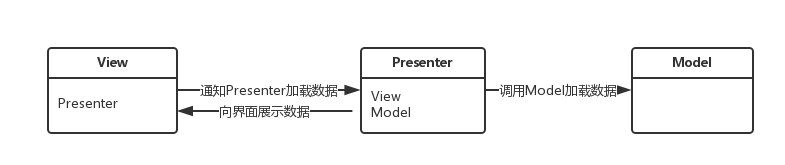 MVP 架構在 Android 項目中的落地實踐
早些年寫項目的時候,我並沒有太在意架構模式。因為長期做 J2EE 開發,習慣了 MVC,所以搭公司項目時也沿用類似 MVC 的思路——嚴格說,那時的項目還算不上真正的 M
 Android Selector 選擇器詳解:按鈕狀態切換與圖片替換
 Selector,也就是「選擇器」,在 App 開發中可說是隨處可見。最典型的例子就是按鈕:平時顯示
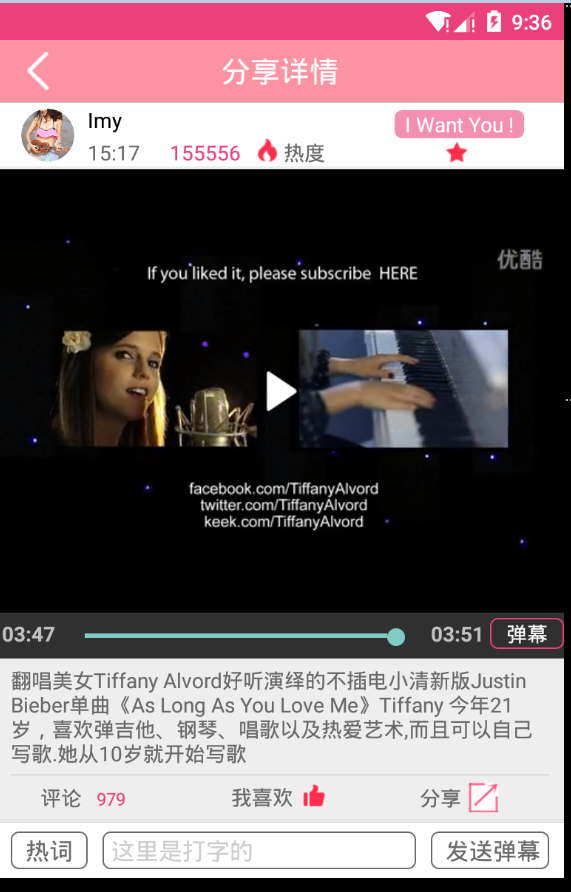 個人 App 開發實錄(一):從靈感到第一版界面的歷程
某天突然靈感來了,想做一個影片分享社群類的 App。既然想到了,就開始動手。 寫這系列文章有兩個目的:一是逼自己把技術磨得更扎實,二是單純自娛自樂。專案架構沿用之前公開過
 Linux 內核調試技術:用 hung task 機制檢測進程 D 狀態死鎖
 Linux 進程有多種狀態,比如 TASK_RUNNING 運行態、EXIT_DEAD 退出