

編輯:關於 Android 開發
Linux 進程有多種狀態,比如 TASK_RUNNING 運行態、EXIT_DEAD 退出態、TASK_INTERRUPTIBLE 可被信號喚醒的等待態等等(可在 include/linux/sched.h 中查閱)。其中有一種等待狀態叫 TASK_UNINTERRUPTIBLE,通稱 D 狀態:處於該狀態的進程不響應信號,只能被 wake_up 喚醒。
進入 D 狀態的場合很多。mutex 鎖在競爭失敗時會把進程置於該狀態;進程等待某種 IO 資源就緒時(wait_event 機制)也是如此。一般情況下停留時間不會太長,但若 IO 設備故障或出現進程死鎖,進程就可能長期卡在 D 狀態再也回不到 TASK_RUNNING。
為此內核提供了 hung task 機制,專門檢測長期停留於 D 狀態的進程並發出告警。本文以 Linux 4.1.15 源碼為例分析其實現,並給出一個可複現的示例。
這套機制在很早的內核版本就已引入,源代碼位於 kernel/hung_task.c,代碼量並不大。
核心思想:創建一個內核監測線程,週期性掃描所有處於 D 狀態的任務,統計它們在兩次檢測之間的調度次數。若某任務在整個檢測週期內一次都沒被調度過,就可判定它一直卡在 D 狀態、極可能已死鎖,於是觸發告警,打印進程基本信息、棧回溯與寄存器現場,供開發者定位。
static int __init hung_task_init(void)
{
    atomic_notifier_chain_register(&panic_notifier_list, &panic_block);
    watchdog_task = kthread_run(watchdog, NULL, "khungtaskd");
    return 0;
}
subsys_initcall(hung_task_init);
若內核配置開啟了該機制,在 subsys 初始化階段就會調用 hung_task_init()。它做兩件事:
一是向內核的 panic_notifier_list 通知鏈注册回調:
static struct notifier_block panic_block = {
    .notifier_call = hung_task_panic,
};
內核觸發 panic 時會調用 hung_task_panic(),其作用稍後可見。
二是通過 kthread_run() 創建一個名為 khungtaskd 的內核線程,入口函數是 watchdog(),創建後立即嘗試調度執行。這就是專職檢測 D 狀態死鎖的後台線程。
/*
 * kthread which checks for tasks stuck in D state
 */
static int watchdog(void *dummy)
{
    set_user_nice(current, 0);

    for (;;) {
        unsigned long timeout = sysctl_hung_task_timeout_secs;

        while (schedule_timeout_interruptible(timeout_jiffies(timeout)))
            timeout = sysctl_hung_task_timeout_secs;

        if (atomic_xchg(&reset_hung_task, 0))
            continue;

        check_hung_uninterruptible_tasks(timeout);
    }

    return 0;
}
線程先把自己的 nice 值設為 0(普通優先級),不干擾其他進程。然後進入主循環:
睡眠時間取自 sysctl_hung_task_timeout_secs,對應內核配置項 CONFIG_DEFAULT_HUNG_TASK_TIMEOUT,默認 120 秒。被喚醒後先檢查原子標識 reset_hung_task,若被置位則跳過本輪檢測,同時由 atomic_xchg 順手清零。該標識由 reset_hung_task_detector() 設置:
void reset_hung_task_detector(void)
{
    atomic_set(&reset_hung_task, 1);
}
EXPORT_SYMBOL_GPL(reset_hung_task_detector);
如果沒有被要求跳過,就調用檢測函數 check_hung_uninterruptible_tasks(),入參是本次的超時閾值。
/*
 * Check whether a TASK_UNINTERRUPTIBLE does not get woken up for
 * a really long time (120 seconds). If that happens, print out
 * a warning.
 */
static void check_hung_uninterruptible_tasks(unsigned long timeout)
{
    int max_count = sysctl_hung_task_check_count;
    int batch_count = HUNG_TASK_BATCHING;
    struct task_struct *g, *t;

    /*
     * If the system crashed already then all bets are off,
     * do not report extra hung tasks:
     */
    if (test_taint(TAINT_DIE) || did_panic)
        return;

    rcu_read_lock();
    for_each_process_thread(g, t) {
        if (!max_count--)
            goto unlock;
        if (!--batch_count) {
            batch_count = HUNG_TASK_BATCHING;
            if (!rcu_lock_break(g, t))
                goto unlock;
        }
        /* use "==" to skip the TASK_KILLABLE tasks waiting on NFS */
        if (t->state == TASK_UNINTERRUPTIBLE)
            check_hung_task(t, timeout);
    }
unlock:
    rcu_read_unlock();
}
開頭先判斷內核是否已經 tainted 為 DIE 或已 panic——若是,說明系統已經崩了,再報多餘的 hung task 沒有意義,直接返回。這裡的 did_panic 正是在前文的 panic 通知鏈回調中置位的:
static int hung_task_panic(struct notifier_block *this, unsigned long event, void *ptr)
{
    did_panic = 1;
    return NOTIFY_DONE;
}
隨後在 RCU 讀鎖保護下遍歷所有進程。因為進程數量可能很多、持鎖時間不能太長,這裡設了兩道閘:batch_count 控制單次最多處理 HUNG_TASK_BATCHING 個進程,到量後調用 rcu_lock_break() 嘗試釋放鎖;max_count 取自 sysctl_hung_task_check_count,默認是最大 PID 數 PID_MAX_LIMIT。
注意狀態判斷用的是 == 而不是位運算,這樣 TASK_KILLABLE 狀態(例如在 NFS 上等 IO 的任務)不會被誤報。
static void check_hung_task(struct task_struct *t, unsigned long timeout)
{
    unsigned long switch_count = t->nvcsw + t->nivcsw;

    /*
     * Ensure the task is not frozen.
     * Also, skip vfork and any other user process that freezer should skip.
     */
    if (unlikely(t->flags & (PF_FROZEN | PF_FREEZER_SKIP)))
        return;

    /*
     * When a freshly created task is scheduled once, changes its state to
     * TASK_UNINTERRUPTIBLE without having ever been switched out once, it
     * musn't be checked.
     */
    if (unlikely(!switch_count))
        return;

    if (switch_count != t->last_switch_count) {
        t->last_switch_count = switch_count;
        return;
    }

    trace_sched_process_hang(t);

    if (!sysctl_hung_task_warnings)
        return;

    if (sysctl_hung_task_warnings > 0)
        sysctl_hung_task_warnings--;
}
判斷依據是 t->nvcsw + t->nivcsw:前者是進程主動讓出 CPU 的次數,後者是被強制搶佔的次數,兩者相加即該任務自創建以來的總調度次數。
接著排除三種情況:進程被凍結(PF_FROZEN 或 PF_FREEZER_SKIP)不查;調度次數為 0 的不查(剛創建就被置為 D 狀態,還沒真正被換出去過);調度次數與上次記錄不同,說明這 120 秒內發生過調度,更新記錄後返回。
如果以上都不成立,就意味着該進程已經整整 120 秒沒被調度過,一直卡在 D 狀態。
sysctl_hung_task_warnings 表示還允許報警的次數,默認 10。也就是說同一個卡死任務默認每 2 分鐘告警一次,共 10 次後不再刷屏。
/*
 * Ok, the task did not get scheduled for more than 2 minutes,
 * complain:
 */
pr_err("INFO: task %s:%d blocked for more than %ld seconds.\n",
       t->comm, t->pid, timeout);
pr_err("%s%s%.*s\n",
       print_tainted(), init_utsname()->release,
       (int)strcspn(init_utsname()->version, ""),
       init_utsname()->version);
pr_err("\"echo 0 > /proc/sys/kernel/hung_task_timeout_secs\" "
       "disables this message.\n");
sched_show_task(t);
debug_show_held_locks(t);

touch_nmi_watchdog();
輸出內容包括:任務名與 PID、閾值秒數、內核 tainted 標志與版本信息、如何關閉該提示、進程狀態摘要,以及調用棧回溯與寄存器現場。若開啟了 lockdep,還會打印持有的鎖。
最後 touch 一下 nmi_watchdog,避免 hung task 的檢測過程本身被 NMI 硬鎖檢測誤判(在 ARM 平台上無需考慮)。
if (sysctl_hung_task_panic) {
    trigger_all_cpu_backtrace();
    panic("hung_task: blocked tasks");
}
若配置了 sysctl_hung_task_panic,則不止告警,而是直接 panic 並打印所有 CPU 的回溯。這個開關既可寫在內核配置文件裡,也能通過 sysctl 動態設置。
演示環境:樹莓派 B(Linux 4.1.15)。
先確認內核已開啟該機制:
Kernel hacking --->
Debug Lockups and Hangs --->
[*] Detect Hung Tasks
(120) Default timeout for hung task detection (in seconds)
然後寫一個最小內核模塊,人為製造 mutex 自死鎖:
#include <linux/module.h>
#include <linux/kernel.h>
#include <linux/init.h>
#include <linux/mutex.h>

DEFINE_MUTEX(dlock);

static int __init dlock_init(void)
{
    mutex_lock(&dlock);
    mutex_lock(&dlock);   /* 同一把鎖加兩次,自己把自己鎖死 */

    return 0;
}

static void __exit dlock_exit(void)
{
    return;
}

module_init(dlock_init);
module_exit(dlock_exit);
MODULE_LICENSE("GPL");
第二次 mutex_lock() 會走入 __mutex_lock_slowpath(),把當前進程置為 TASK_UNINTERRUPTIBLE。由於沒有其他 CPU 能釋放這把鎖,進程再也醒不過來。
加載模塊:
root@apple:~# insmod dlock.ko
用 ps 能看到進程還在:
root@apple:~# busybox ps
PID USER TIME COMMAND
......
521 root 0:00 insmod dlock.ko
......
查看狀態,確認已進入 D:
root@apple:~# cat /proc/521/status
Name: insmod
State: D (disk sleep)
Tgid: 521
Ngid: 0
Pid: 521
等兩分鐘,串口 console 就會開始輸出告警,此後每 120 秒重複一次:
[ 360.625466] INFO: task insmod:521 blocked for more than 120 seconds.
[ 360.631878] Tainted: G O 4.1.15 #5
[ 360.637042] "echo 0 > /proc/sys/kernel/hung_task_timeout_secs" disables this message.
[ 360.644986] [<c05278e8>] (__schedule) from [<c0527d34>] (schedule+0x40/0xa4)
[ 360.652129] [<c0527d34>] (schedule) from [<c0527ec8>] (schedule_preempt_disabled+0x18/0x1c)
[ 360.660570] [<c0527ec8>] (schedule_preempt_disabled) from [<c0529200>] (__mutex_lock_slowpath+0x6c/0xe4)
[ 360.670142] [<c0529200>] (__mutex_lock_slowpath) from [<c05292bc>] (mutex_lock+0x44/0x48)
[ 360.678432] [<c05292bc>] (mutex_lock) from [<bf026020>] (dlock_init+0x20/0x2c [dlock])
[ 360.686480] [<bf026020>] (dlock_init [dlock]) from [<c0009558>] (do_one_initcall+0x90/0x1e8)
[ 360.694976] [<c0009558>] (do_one_initcall) from [<c007ac4c>] (do_init_module+0x6c/0x1c0)
[ 360.703170] [<c007ac4c>] (do_init_module) from [<c007c568>] (load_module+0x1690/0x1d34)
[ 360.711284] [<c007c568>] (load_module) from [<c007cce8>] (SyS_init_module+0xdc/0x130)
[ 360.719239] [<c007cce8>] (SyS_init_module) from [<c000f800>] (ret_fast_syscall+0x0/0x54)
這段回溯把問題講得非常清楚:insmod 進程在 dlock_init 裡第二次調用 mutex_lock,於 __mutex_lock_slowpath 中進入 schedule 後再沒出來。鎖的位置、調用路徑、涉及的模塊,全都在這幾行裡。
D 狀態死鎖在驅動開發中相當常見,而且不太容易定位——進程既不崩潰也不報錯,只是安靜地不動了,用信號還殺不掉。內核的 hung task 機制把這件事變簡單了:開發者只需要把這些告警信息抓取並保留下來,就能快速定位到是哪個進程、卡在哪一行、持有什麼鎖。
實務上有幾個調參要點值得記住:/proc/sys/kernel/hung_task_timeout_secs 控制閾值, IO 較慢的設備可以適當調大以免誤報;hung_task_warnings 控制告警次數,避免日志被刷爆;hung_task_panic 則是把「卡死」升級為「崩潰並留 core」,適合那些必須自動復位、無法人工介入的嵌入式產品。設為 0 可以完全關閉檢測,但線上環境不建議這麼做。
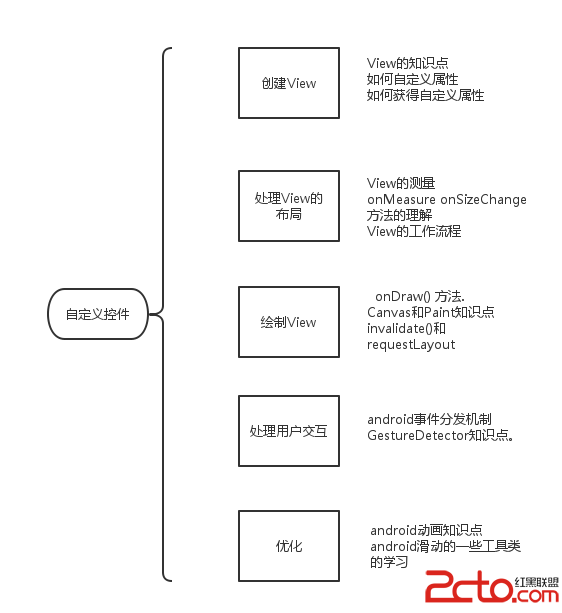 Android 自定義控件入門:五個步驟拆解完整流程
Android 官方已經提供了琳瑯滿目的 View,但真實的產品需求千變萬化,現成元件总有覆蓋不到的時候。這時候就轮到自定義控件登場了。 很多初學者一听到「自定義控件」就
 Android 學習指南之二十七:Handler 是怎麼把耗時任務的結果送回主執行緒的
想像一個情境:使用者按下按鈕,而這個按鈕背後要跑一段頗耗時間的運算。如果你直接在 UI 執行緒上硬做,畫面會整個卡住不動,使用者以為 App 當機了。Android 對這
 在 Android 上使用 qemu-user 執行可執行檔:編譯、部署與 AT_SECURE 錯誤排查
作者:尋禹 @ 阿里聚安全 前言 QEMU 可以解釋執行可執行程式。既然它能解釋執行,那麼它就能知道執行了哪些指令,從而具備了追蹤指令執行的能力。 QEMU 編譯出來的
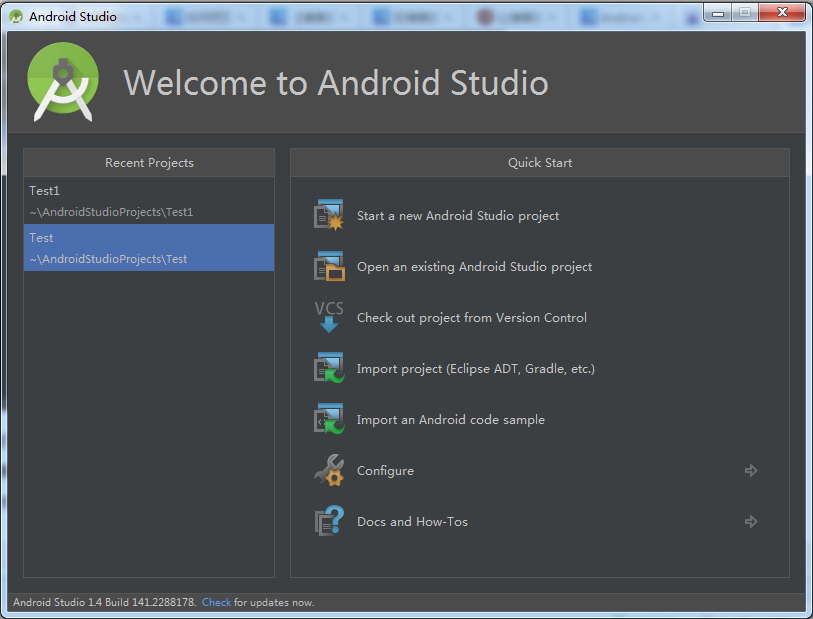 Android Studio 安裝與上手完整指南(環境準備、建立專案、常用設定)
Android Studio 安裝與使用入門 2013 年 Google 推出 Android Studio,正式把 Android 開發從 Eclipse 時代帶向新的
