

編輯:關於 Android 開發
只要有檔案下載,就需要進度回饋。本文以 ProgressBar 為主角,實作一個能即時顯示百分比的下載流程,並把過程中撞到的幾個經典問題逐一記錄。
1. 主執行緒中不能開啟網路連線,但 Toast 這類元件又只能在主執行緒使用。
2. 子執行緒不能修改 UI。
3. 必須在 Manifest 中宣告網路權限。
4. 暫停與續傳的處理。

<RelativeLayout xmlns:android="https://schemas.android.com/apk/res/android"
    xmlns:tools="https://schemas.android.com/tools"
    android:layout_width="match_parent"
    android:layout_height="match_parent"
    tools:context="com.dragon.android.textbar.MainActivity$PlaceholderFragment" >

    <!-- prigressBar 進度條 -->
    <!-- progress 當前進度 -->
    <!-- indeterminate 是否為不確定模式,預設 false -->
    <ProgressBar
        android:id="@+id/progressBar1"
        android:layout_width="match_parent"
        android:layout_height="wrap_content"
        android:layout_centerInParent="true"
        android:max="100"
        android:progress="0"
        android:indeterminate="true"/>

    <Button
        android:id="@+id/button1"
        android:layout_width="wrap_content"
        android:layout_height="wrap_content"
        android:layout_alignParentTop="true"
        android:layout_centerHorizontal="true"
        android:onClick="startLoad"
        android:layout_marginTop="86dp"
        android:background="#009FEE"
        android:text="@string/start"
        android:textColor="#ffffff" />

    <TextView
        android:id="@+id/textView1"
        android:layout_width="wrap_content"
        android:layout_height="wrap_content"
        android:layout_above="@+id/progressBar1"
        android:background="@null"
        android:layout_alignParentLeft="true" />

</RelativeLayout>
這裡有個關鍵細節:indeterminate 預設為 true,也就是轉圈圈的不確定模式。要顯示百分比就必須把它關掉,程式碼中也會再 setIndeterminate(false) 一次保險。
<?xml version="1.0" encoding="utf-8"?>
<resources>
    <string name="app_name">hwdownload</string>
    <string name="hello_world">Hello world!</string>
    <string name="action_settings">Settings</string>
    <string name="start">開始</string>
    <string name="stop">暫停</string>
    <string name="contin">繼續</string>
</resources>
<!-- 請求網路權限 -->
<uses-permission android:name="android.permission.INTERNET"/>
少了這一行,連線會直接抛出 UnknownHostException,而且是那種看起來像網路問題、實際上是權限問題的錯誤,很容易浪費時間排查。
package com.dragon.android.textbar;

import java.io.IOException;
import java.io.InputStream;
import java.net.HttpURLConnection;
import java.net.URL;

import android.app.Activity;
import android.os.Bundle;
import android.view.View;
import android.widget.Button;
import android.widget.ProgressBar;
import android.widget.TextView;
import android.widget.Toast;

/** 只有建立 View 的那個執行緒才能改動它的 UI,主執行緒也叫 UI 執行緒 */
public class MainActivity extends Activity {
    private ProgressBar progressBar1;
    private Button button1;
    private TextView textView1;

    @Override
    protected void onCreate(Bundle savedInstanceState) {
        super.onCreate(savedInstanceState);
        setContentView(R.layout.fragment_main);
        progressBar1 = (ProgressBar) findViewById(R.id.progressBar1);
        button1 = (Button) findViewById(R.id.button1);
        textView1 = (TextView) findViewById(R.id.textView1);
    }

    public void startLoad(View view) {
        String text = (String) button1.getText();
        // 切換按鈕文字
        button1.setText(text.equals(getResources().getString(R.string.start))
                ? R.string.stop
                : (text.equals(getResources().getString(R.string.stop))
                    ? R.string.contin : R.string.stop));
        progressBar1.setIndeterminate(false);

        new Thread(new Runnable() {
            private int percent;

            @Override
            public void run() {
                try {
                    // 開啟 URL 必須在子執行緒
                    URL url = new URL(
                        "https://b.zol-img.com.cn/sjbizhi/images/9/540x960/1472549276394.jpg");
                    HttpURLConnection conn = (HttpURLConnection) url.openConnection();
                    int contentLength = conn.getContentLength();

                    if (conn.getResponseCode() == HttpURLConnection.HTTP_OK) {
                        InputStream is = conn.getInputStream();
                        byte[] buffer = new byte[1024];
                        int len = -1;
                        int sum = 0;
                        while ((len = is.read(buffer)) != -1) {
                            sum += len;
                            // 注意轉型方式,必須先轉 double 再乘,否則整數除法會讓結果一直是 0
                            percent = (int) (100.0 * sum / contentLength);

                            // 回到主執行緒更新 UI
                            runOnUiThread(new Runnable() {
                                @Override
                                public void run() {
                                    progressBar1.setProgress(percent);
                                    textView1.setText(percent + "%");
                                    if (percent == progressBar1.getMax()) {
                                        Toast.makeText(MainActivity.this, "下載完成!",
                                                Toast.LENGTH_SHORT).show();
                                    }
                                }
                            });
                        }
                        is.close();
                        conn.disconnect();
                    }
                } catch (IOException e) {
                    e.printStackTrace();
                }
            }
        }).start();
    }
}
整數除法陷阱。100 * sum / contentLength 若三者都是整數,在 sum 遠小於 contentLength 的階段結果會被無條件捨去成 0,進度條永遠不動。必須寫成 100.0 * sum / contentLength 先轉成浮點運算。
UI 執行緒邊界。Android 規定只有建立 View 的執行緒才能操作它,因此 setProgress()、setText()、Toast 全部得塞進 runOnUiThread()。反過來說,url.openConnection() 這種網路操作絕對不能出現在主執行緒,否則會收到 NetworkOnMainThreadException。
尚未解決的問題 4:暫停與續傳。目前這版按下的「暫停」其實只切換了按鈕文字,下載並未真正中止。要做到真正的斷點續傳,需要搭配 Range 請求標頭把已下載的位元組數告訴伺服器,再把資料落地成實體檔案——而如何在 assets 與外部儲存空間之間正確擺放檔案,是下一步要補的功課。
 Mobizen 免帳號版本使用心得:用電腦遠端控制 Android 裝置
Mobizen 是一款由 RSUPPORT 推出的遠端控制工具,可透過電腦網頁或用戶端,從遠端連線 Android 手機或平板。支援 3G/4G、Wi-Fi 與 USB
 Android 高階面試題整理:效能優化、記憶體與系統架構
這份題庫整理自準備面試過程中累積的問題,涵蓋效能分析、記憶體洩漏與 OOM、ANR、Handler 機制、事件分發等常見考點,並附上簡要答案與實務觀點。 一、效能優化
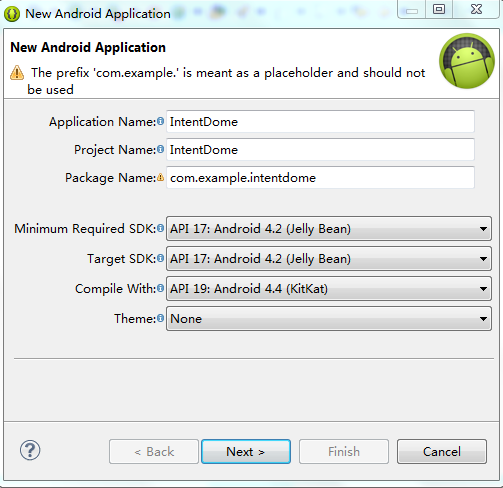 Android 開發實戰:用 Intent 打通 Activity 之間的交互與數據傳遞
Intent:讓 Activity 之間彼此溝通的橋樑 在 Android 的四大組件體系裡,Intent 扮演著「信使」的角色。它既能明確告訴系統「我要啟動哪一個組件」
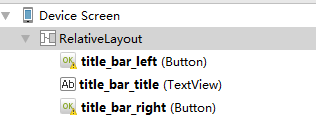 Android 自定義組合控件:打造可重複使用的標題欄
 在 App 開發中,標題欄經常重複出現。若每個頁面都手寫一次,不僅維護困難,風格也容易不一致。自定義組合控件能把標