

編輯:關於 Android 開發
在 Android 與單片機通信過程中,經常需要在字符串、字節數組、十六進制表示以及不同編碼格式之間轉換。例如單片機通常直接處理字節流,而 Android 層更常使用字符串或日誌形式展示數據。
當通信協議使用 GB2312 或 GBK 編碼時,可以將十六進制字符串還原為字節數組,再按照指定編碼解析成字符串。例如兩個十六進制字符可以合成一個字節,多個字節再按 GBK 解析為中文。
public static String stringToGbk(String string) throws Exception {
    byte[] bytes = new byte[string.length() / 2];
    for (int j = 0; j < bytes.length; j++) {
        byte high = Byte.parseByte(string.substring(j * 2, j * 2 + 1), 16);
        byte low = Byte.parseByte(string.substring(j * 2 + 1, j * 2 + 2), 16);
        bytes[j] = (byte) (high << 4 | low);
    }
    return new String(bytes, "GBK");
}在調試通信數據時,將 byte 數組轉成十六進制字符串非常方便查看。這種方式常用於日誌輸出,因為原始字節往往不可直接閱讀。
public static String bytesToHexString(byte[] src) {
    StringBuilder builder = new StringBuilder();
    if (src == null || src.length == 0) {
        return null;
    }
    for (byte value : src) {
        int v = value & 0xFF;
        String hv = Integer.toHexString(v);
        if (hv.length() < 2) {
            builder.append('0');
        }
        builder.append(hv);
    }
    return builder.toString();
}
如果希望每個字節之間用空格分隔,也可以在格式化時加入分隔符,使日誌更易讀。
與上述過程相反,有時需要把字符串形式的十六進制數據還原成 byte 數組,以便發送給單片機或寫入設備。
public static byte[] hexStringToBytes(String src) {
    byte[] ret = new byte[src.length() / 2];
    for (int i = 0; i < ret.length; i++) {
        ret[i] = (byte) Integer.parseInt(src.substring(i * 2, i * 2 + 2), 16);
    }
    return ret;
}有時需要將 byte 數組整體解釋為一個大整數,再輸出為十進制、十六進制或其他進制。這類場景可以借助 BigInteger 完成。
public static String bytesToAllHex(byte[] bytes, int radix) {
    return new BigInteger(1, bytes).toString(radix);
}
其中參數 1 表示將數據作為正數處理,radix 表示目標進制。
在 Android 與單片機通信中,常見轉換包括 GBK 編碼轉換、十六進制字符串與 byte 數組互轉、字節數據日誌化輸出,以及不同進制之間的數值轉換。掌握這些方法,可以顯著提升通信調試與協議解析效率。
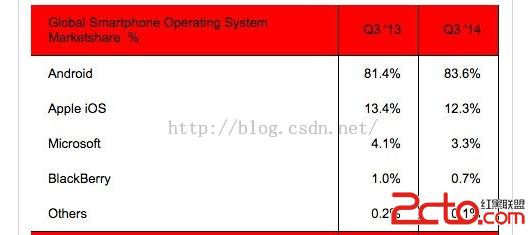 從零開始學 Android(背景篇):Android 系統的來龍去脈與優勢解析
Android 是什麼 Android(安卓)是一套以 Linux 核心為基礎的開源行動作業系統,主要應用於智慧型手機與平板電腦,由 Google 牽頭成立的開放手持設備
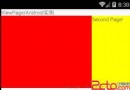 React Native 開發:ViewPagerAndroid 講解與美團首頁頂部分類實例
React Native 控件之 ViewPagerAndroid 講解及美團首頁頂部效果實例 (一) 前言 今天一起來看看 ViewPagerAndroid 組件,並仿
 Android XML 動畫入門:旋轉、縮放、平移三種跳轉效果
上一篇講了怎麼用系統內置動畫做 Activity 跳轉,這一篇往前一步:自己寫 XML 動畫。先有效果,再講屬性,最後是完整代碼。 先認識幾個關鍵屬性 interpol
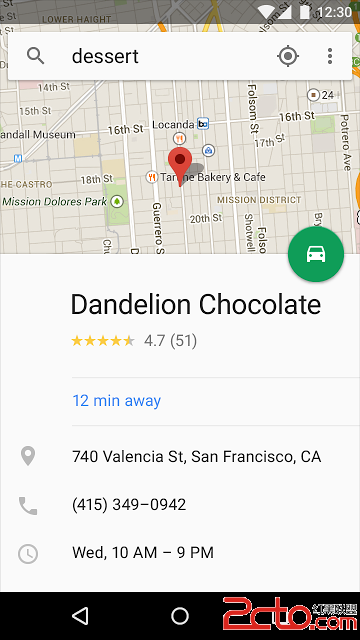 Bottom Sheet 使用詳解:五種狀態、嵌套滑動與 Dialog 封裝
Support Library 23.2 帶來的 Bottom Sheet Android Support Library 更新到 23.2 版時,除了既有的 API 調