

編輯:關於 Android 開發
Android 上的窗口大致可以分成兩類:一類由系統進程管理,即系統窗口,例如狀態欄、導航欄;另一類由應用程序創建,即應用窗口。本文以狀態欄為線索,梳理系統窗口的添加路徑,再對照說明 Activity 窗口的添加過程。
PhoneStatusBar.java 中:
private void addStatusBarWindow() {
    makeStatusBarView();
    mStatusBarWindowManager = new StatusBarWindowManager(mContext);
    mStatusBarWindowManager.add(mStatusBarWindow, getStatusBarHeight());
}
狀態欄高度通過 getStatusBarHeight() 獲得:
public int getStatusBarHeight() {
    if (mNaturalBarHeight < 0) {
        final Resources res = mContext.getResources();
        mNaturalBarHeight = res.getDimensionPixelSize(com.android.internal.R.dimen.status_bar_height);
    }
    return mNaturalBarHeight;
}
可見高度並非運行時計算,而是固定配置在 dimen 資源中,並做了首次加載後的緩存。
再看 add 方法:
public void add(View statusBarView, int barHeight) {
    // 狀態欄窗口現已包含滑動面板與半透明背景,因此整體設置為 TRANSLUCENT 並啟用硬件加速
    mLp = new WindowManager.LayoutParams(
            ViewGroup.LayoutParams.MATCH_PARENT,
            barHeight,
            WindowManager.LayoutParams.TYPE_STATUS_BAR,
            WindowManager.LayoutParams.FLAG_NOT_FOCUSABLE
            | WindowManager.LayoutParams.FLAG_TOUCHABLE_WHEN_WAKING
            | WindowManager.LayoutParams.FLAG_SPLIT_TOUCH
            | WindowManager.LayoutParams.FLAG_WATCH_OUTSIDE_TOUCH
            | WindowManager.LayoutParams.FLAG_DRAWS_SYSTEM_BAR_BACKGROUNDS,
            PixelFormat.TRANSLUCENT);
    mLp.flags |= WindowManager.LayoutParams.FLAG_HARDWARE_ACCELERATED;
    mLp.gravity = Gravity.TOP;
    mLp.softInputMode = WindowManager.LayoutParams.SOFT_INPUT_ADJUST_RESIZE;
    mLp.setTitle("StatusBar");
    mLp.packageName = mContext.getPackageName();
    mStatusBarView = statusBarView;
    mBarHeight = barHeight;
    mWindowManager.addView(mStatusBarView, mLp);
    mLpChanged = new WindowManager.LayoutParams();
    mLpChanged.copyFrom(mLp);
}
這裡主要是 LayoutParams 的屬性設置,並通過 gravity 把窗口固定在屏幕頂部。
mLp.softInputMode = WindowManager.LayoutParams.SOFT_INPUT_ADJUST_RESIZE;
關於軟鍵盤的處理:絕大多數情況下狀態欄的顯示不影響軟鍵盤位置,若出現衝突,策略是軟鍵盤優先調整、狀態欄優先顯示。
最後是把自己加入 WMS:
mWindowManager = (WindowManager) context.getSystemService(Context.WINDOW_SERVICE);
這裡的 mWindowManager 實際上是 WMS 的一個客戶端代理(綁定代理)。
再看 makeStatusBarView:

protected PhoneStatusBarView makeStatusBarView() {
    final Context context = mContext;
    Resources res = context.getResources();
    updateDisplaySize();   // 填充 mDisplayMetrics
    updateResources();
    mStatusBarWindow = (StatusBarWindowView) View.inflate(context, R.layout.super_status_bar, null);
    mStatusBarWindow.setService(this);
    mStatusBarWindow.setOnTouchListener(new View.OnTouchListener() {
        @Override
        public boolean onTouch(View v, MotionEvent event) {
            checkUserAutohide(v, event);
            if (event.getAction() == MotionEvent.ACTION_DOWN) {
                if (mExpandedVisible) {
                    animateCollapsePanels();
                }
            }
            return mStatusBarWindow.onTouchEvent(event);
        }
    });
    mStatusBarView = (PhoneStatusBarView) mStatusBarWindow.findViewById(R.id.status_bar);
    mStatusBarView.setBar(this);
    PanelHolder holder = (PanelHolder) mStatusBarWindow.findViewById(R.id.panel_holder);
    mStatusBarView.setPanelHolder(holder);
    mNotificationPanel = (NotificationPanelView) mStatusBarWindow.findViewById(R.id.notification_panel);
    mNotificationPanel.setStatusBar(this);
    if (!ActivityManager.isHighEndGfx()) {
        mStatusBarWindow.setBackground(null);
        mNotificationPanel.setBackground(new FastColorDrawable(
                context.getColor(R.color.notification_panel_solid_background)));
    }
    mHeadsUpManager = new HeadsUpManager(context, mStatusBarWindow);
    mHeadsUpManager.setBar(this);
    mHeadsUpManager.addListener(this);
    mHeadsUpManager.addListener(mNotificationPanel);
    mNotificationPanel.setHeadsUpManager(mHeadsUpManager);
    mNotificationData.setHeadsUpManager(mHeadsUpManager);
    if (MULTIUSER_DEBUG) {
        mNotificationPanelDebugText = (TextView) mNotificationPanel.findViewById(R.id.header_debug_info);
        mNotificationPanelDebugText.setVisibility(View.VISIBLE);
    }
    try {
        boolean showNav = mWindowManagerService.hasNavigationBar();
        if (DEBUG) Log.v(TAG, "hasNavigationBar=" + showNav);
        if (showNav) {
            mNavigationBarView = (NavigationBarView) View.inflate(context, R.layout.navigation_bar, null);
            mNavigationBarView.setDisabledFlags(mDisabled1);
            mNavigationBarView.setBar(this);
            mNavigationBarView.setOnVerticalChangedListener(new NavigationBarView.OnVerticalChangedListener() {
                @Override
                public void onVerticalChanged(boolean isVertical) {
                    if (mAssistManager != null) {
                        mAssistManager.onConfigurationChanged();
                    }
                    mNotificationPanel.setQsScrimEnabled(!isVertical);
                }
            });
            mNavigationBarView.setOnTouchListener(new View.OnTouchListener() {
                @Override
                public boolean onTouch(View v, MotionEvent event) {
                    checkUserAutohide(v, event);
                    return false;
                }
            });
        }
    } catch (RemoteException ex) {
        // 沒有窗口管理器?那就只能自求多福了
    }
    mAssistManager = new AssistManager(this, context);
    // 決定狀態欄使用的像素格式
    mPixelFormat = PixelFormat.OPAQUE;
    mStackScroller = (NotificationStackScrollLayout) mStatusBarWindow.findViewById(R.id.notification_stack_scroller);
    mStackScroller.setLongPressListener(getNotificationLongClicker());
    mStackScroller.setPhoneStatusBar(this);
    mStackScroller.setGroupManager(mGroupManager);
    mStackScroller.setHeadsUpManager(mHeadsUpManager);
    mGroupManager.setOnGroupChangeListener(mStackScroller);
    mKeyguardIconOverflowContainer = (NotificationOverflowContainer) LayoutInflater.from(mContext)
            .inflate(R.layout.status_bar_notification_keyguard_overflow, mStackScroller, false);
    mKeyguardIconOverflowContainer.setOnActivatedListener(this);
    mKeyguardIconOverflowContainer.setOnClickListener(mOverflowClickListener);
    mStackScroller.setOverflowContainer(mKeyguardIconOverflowContainer);
    SpeedBumpView speedBump = (SpeedBumpView) LayoutInflater.from(mContext)
            .inflate(R.layout.status_bar_notification_speed_bump, mStackScroller, false);
    mStackScroller.setSpeedBumpView(speedBump);
    mEmptyShadeView = (EmptyShadeView) LayoutInflater.from(mContext)
            .inflate(R.layout.status_bar_no_notifications, mStackScroller, false);
    mStackScroller.setEmptyShadeView(mEmptyShadeView);
    mDismissView = (DismissView) LayoutInflater.from(mContext)
            .inflate(R.layout.status_bar_notification_dismiss_all, mStackScroller, false);
    mDismissView.setOnButtonClickListener(new View.OnClickListener() {
        @Override
        public void onClick(View v) {
            MetricsLogger.action(mContext, MetricsLogger.ACTION_DISMISS_ALL_NOTES);
            clearAllNotifications();
        }
    });
    mStackScroller.setDismissView(mDismissView);
    mExpandedContents = mStackScroller;
    mBackdrop = (BackDropView) mStatusBarWindow.findViewById(R.id.backdrop);
    mBackdropFront = (ImageView) mBackdrop.findViewById(R.id.backdrop_front);
    mBackdropBack = (ImageView) mBackdrop.findViewById(R.id.backdrop_back);
    ScrimView scrimBehind = (ScrimView) mStatusBarWindow.findViewById(R.id.scrim_behind);
    ScrimView scrimInFront = (ScrimView) mStatusBarWindow.findViewById(R.id.scrim_in_front);
    View headsUpScrim = mStatusBarWindow.findViewById(R.id.heads_up_scrim);
    mScrimController = new ScrimController(scrimBehind, scrimInFront, headsUpScrim, mScrimSrcModeEnabled);
    mHeadsUpManager.addListener(mScrimController);
    mStackScroller.setScrimController(mScrimController);
    mScrimController.setBackDropView(mBackdrop);
    mStatusBarView.setScrimController(mScrimController);
    mDozeScrimController = new DozeScrimController(mScrimController, context);
    mHeader = (StatusBarHeaderView) mStatusBarWindow.findViewById(R.id.header);
    mHeader.setActivityStarter(this);
    mKeyguardStatusBar = (KeyguardStatusBarView) mStatusBarWindow.findViewById(R.id.keyguard_header);
    mKeyguardStatusView = mStatusBarWindow.findViewById(R.id.keyguard_status_view);
    mKeyguardBottomArea = (KeyguardBottomAreaView) mStatusBarWindow.findViewById(R.id.keyguard_bottom_area);
    mKeyguardBottomArea.setActivityStarter(this);
    mKeyguardBottomArea.setAssistManager(mAssistManager);
    mKeyguardIndicationController = new KeyguardIndicationController(mContext,
            (KeyguardIndicationTextView) mStatusBarWindow.findViewById(R.id.keyguard_indication_text),
            mKeyguardBottomArea.getLockIcon());
    mKeyguardBottomArea.setKeyguardIndicationController(mKeyguardIndicationController);
    // 設置初始的通知可見性
    setAreThereNotifications();
    mIconController = new StatusBarIconController(mContext, mStatusBarView, mKeyguardStatusBar, this);
    // 為需要獨立線程的控制器準備後台線程
    mHandlerThread = new HandlerThread(TAG, Process.THREAD_PRIORITY_BACKGROUND);
    mHandlerThread.start();
    mLocationController = new LocationControllerImpl(mContext, mHandlerThread.getLooper());
    mBatteryController = new BatteryController(mContext);
    mBatteryController.addStateChangedCallback(new BatteryStateChangeCallback() {
        @Override
        public void onPowerSaveChanged() {
            mHandler.post(mCheckBarModes);
            if (mDozeServiceHost != null) {
                mDozeServiceHost.firePowerSaveChanged(mBatteryController.isPowerSave());
            }
        }
        @Override
        public void onBatteryLevelChanged(int level, boolean pluggedIn, boolean charging) {
            // 無需處理
        }
    });
    mNetworkController = new NetworkControllerImpl(mContext, mHandlerThread.getLooper());
    mHotspotController = new HotspotControllerImpl(mContext);
    mBluetoothController = new BluetoothControllerImpl(mContext, mHandlerThread.getLooper());
    mSecurityController = new SecurityControllerImpl(mContext);
    if (mContext.getResources().getBoolean(R.bool.config_showRotationLock)) {
        mRotationLockController = new RotationLockControllerImpl(mContext);
    }
    mUserInfoController = new UserInfoController(mContext);
    mVolumeComponent = getComponent(VolumeComponent.class);
    if (mVolumeComponent != null) {
        mZenModeController = mVolumeComponent.getZenController();
    }
    mCastController = new CastControllerImpl(mContext);
    final SignalClusterView signalCluster = (SignalClusterView) mStatusBarView.findViewById(R.id.signal_cluster);
    final SignalClusterView signalClusterKeyguard =
            (SignalClusterView) mKeyguardStatusBar.findViewById(R.id.signal_cluster);
    final SignalClusterView signalClusterQs = (SignalClusterView) mHeader.findViewById(R.id.signal_cluster);
    mNetworkController.addSignalCallback(signalCluster);
    mNetworkController.addSignalCallback(signalClusterKeyguard);
    mNetworkController.addSignalCallback(signalClusterQs);
    signalCluster.setSecurityController(mSecurityController);
    signalCluster.setNetworkController(mNetworkController);
    signalClusterKeyguard.setSecurityController(mSecurityController);
    signalClusterKeyguard.setNetworkController(mNetworkController);
    signalClusterQs.setSecurityController(mSecurityController);
    signalClusterQs.setNetworkController(mNetworkController);
    final boolean isAPhone = mNetworkController.hasVoiceCallingFeature();
    if (isAPhone) {
        mNetworkController.addEmergencyListener(mHeader);
    }
    mFlashlightController = new FlashlightController(mContext);
    mKeyguardBottomArea.setFlashlightController(mFlashlightController);
    mKeyguardBottomArea.setPhoneStatusBar(this);
    mKeyguardBottomArea.setUserSetupComplete(mUserSetup);
    mAccessibilityController = new AccessibilityController(mContext);
    mKeyguardBottomArea.setAccessibilityController(mAccessibilityController);
    mNextAlarmController = new NextAlarmController(mContext);
    mKeyguardMonitor = new KeyguardMonitor(mContext);
    if (UserSwitcherController.isUserSwitcherAvailable(UserManager.get(mContext))) {
        mUserSwitcherController = new UserSwitcherController(mContext, mKeyguardMonitor, mHandler);
    }
    mKeyguardUserSwitcher = new KeyguardUserSwitcher(mContext,
            (ViewStub) mStatusBarWindow.findViewById(R.id.keyguard_user_switcher),
            mKeyguardStatusBar, mNotificationPanel, mUserSwitcherController);
    // 初始化快捷設置面板
    mQSPanel = (QSPanel) mStatusBarWindow.findViewById(R.id.quick_settings_panel);
    if (mQSPanel != null) {
        final QSTileHost qsh = new QSTileHost(mContext, this, mBluetoothController, mLocationController,
                mRotationLockController, mNetworkController, mZenModeController, mHotspotController,
                mCastController, mFlashlightController, mUserSwitcherController, mKeyguardMonitor,
                mSecurityController);
        mQSPanel.setHost(qsh);
        mQSPanel.setTiles(qsh.getTiles());
        mBrightnessMirrorController = new BrightnessMirrorController(mStatusBarWindow);
        mQSPanel.setBrightnessMirror(mBrightnessMirrorController);
        mHeader.setQSPanel(mQSPanel);
        qsh.setCallback(new QSTileHost.Callback() {
            @Override
            public void onTilesChanged() {
                mQSPanel.setTiles(qsh.getTiles());
            }
        });
    }
    // 用戶信息,觸發首次加載
    mHeader.setUserInfoController(mUserInfoController);
    mKeyguardStatusBar.setUserInfoController(mUserInfoController);
    mKeyguardStatusBar.setUserSwitcherController(mUserSwitcherController);
    mUserInfoController.reloadUserInfo();
    mHeader.setBatteryController(mBatteryController);
    ((BatteryMeterView) mStatusBarView.findViewById(R.id.battery)).setBatteryController(mBatteryController);
    mKeyguardStatusBar.setBatteryController(mBatteryController);
    mHeader.setNextAlarmController(mNextAlarmController);
    PowerManager pm = (PowerManager) mContext.getSystemService(Context.POWER_SERVICE);
    mBroadcastReceiver.onReceive(mContext, new Intent(pm.isScreenOn()
            ? Intent.ACTION_SCREEN_ON : Intent.ACTION_SCREEN_OFF));
    mGestureWakeLock = pm.newWakeLock(PowerManager.SCREEN_BRIGHT_WAKE_LOCK, "GestureWakeLock");
    mVibrator = mContext.getSystemService(Vibrator.class);
    // 註冊廣播
    IntentFilter filter = new IntentFilter();
    filter.addAction(Intent.ACTION_CLOSE_SYSTEM_DIALOGS);
    filter.addAction(Intent.ACTION_SCREEN_OFF);
    filter.addAction(Intent.ACTION_SCREEN_ON);
    context.registerReceiverAsUser(mBroadcastReceiver, UserHandle.ALL, filter, null, null);
    IntentFilter demoFilter = new IntentFilter();
    if (DEBUG_MEDIA_FAKE_ARTWORK) {
        demoFilter.addAction(ACTION_FAKE_ARTWORK);
    }
    demoFilter.addAction(ACTION_DEMO);
    context.registerReceiverAsUser(mDemoReceiver, UserHandle.ALL, demoFilter,
            android.Manifest.permission.DUMP, null);
    // 監聽 USER_SETUP_COMPLETE 設置(按用戶維度)
    resetUserSetupObserver();
    // 關閉 profiling bars,避免它們遮擋並干擾應用窗口的輸出
    ThreadedRenderer.overrideProperty("disableProfileBars", "true");
    // 私有 API 調用,讓 Recents 的陰影觀感更好
    ThreadedRenderer.overrideProperty("ambientRatio", String.valueOf(1.5f));
    return mStatusBarView;
}
這段代碼看上去很長很嚇人,本質卻很樸素:new 出一個 View,然後掛上一堆依賴與監聽。
WMS 並不關心 View Tree 的內部結構,它只需要知道窗口的顯示尺寸與「層級值」,而這些信息都封裝在 WindowManager.LayoutParams 裡。
public int addWindow(Session session, IWindow client, int seq,
        WindowManager.LayoutParams attrs, int viewVisibility, int displayId,
        Rect outContentInsets, Rect outStableInsets, Rect outOutsets, InputChannel outInputChannel) {
    int[] appOp = new int[1];
    int res = mPolicy.checkAddPermission(attrs, appOp);
    if (res != WindowManagerGlobal.ADD_OKAY) {
        return res;
    }
    boolean reportNewConfig = false;
    WindowState attachedWindow = null;
    long origId;
    final int type = attrs.type;
    synchronized (mWindowMap) {
        if (!mDisplayReady) {
            throw new IllegalStateException("Display has not been initialialized");
        }
        final DisplayContent displayContent = getDisplayContentLocked(displayId);
        if (displayContent == null) {
            Slog.w(TAG, "Attempted to add window to a display that does not exist: "
                    + displayId + ". Aborting.");
            return WindowManagerGlobal.ADD_INVALID_DISPLAY;
        }
        if (!displayContent.hasAccess(session.mUid)) {
            Slog.w(TAG, "Attempted to add window to a display for which the application "
                    + "does not have access: " + displayId + ". Aborting.");
            return WindowManagerGlobal.ADD_INVALID_DISPLAY;
        }
        if (mWindowMap.containsKey(client.asBinder())) {
            Slog.w(TAG, "Window " + client + " is already added");
            return WindowManagerGlobal.ADD_DUPLICATE_ADD;
        }
        if (type >= FIRST_SUB_WINDOW && type <= LAST_SUB_WINDOW) {
            attachedWindow = windowForClientLocked(null, attrs.token, false);
            if (attachedWindow == null) {
                Slog.w(TAG, "Attempted to add window with token that is not a window: "
                        + attrs.token + ". Aborting.");
                return WindowManagerGlobal.ADD_BAD_SUBWINDOW_TOKEN;
            }
            if (attachedWindow.mAttrs.type >= FIRST_SUB_WINDOW
                    && attachedWindow.mAttrs.type <= LAST_SUB_WINDOW) {
                Slog.w(TAG, "Attempted to add window with token that is a sub-window: "
                        + attrs.token + ". Aborting.");
                return WindowManagerGlobal.ADD_BAD_SUBWINDOW_TOKEN;
            }
        }
        if (type == TYPE_PRIVATE_PRESENTATION && !displayContent.isPrivate()) {
            Slog.w(TAG, "Attempted to add private presentation window to a non-private display. Aborting.");
            return WindowManagerGlobal.ADD_PERMISSION_DENIED;
        }
        boolean addToken = false;
        WindowToken token = mTokenMap.get(attrs.token);
        if (token == null) {
            if (type >= FIRST_APPLICATION_WINDOW && type <= LAST_APPLICATION_WINDOW) {
                Slog.w(TAG, "Attempted to add application window with unknown token "
                        + attrs.token + ". Aborting.");
                return WindowManagerGlobal.ADD_BAD_APP_TOKEN;
            }
            if (type == TYPE_INPUT_METHOD) {
                Slog.w(TAG, "Attempted to add input method window with unknown token "
                        + attrs.token + ". Aborting.");
                return WindowManagerGlobal.ADD_BAD_APP_TOKEN;
            }
            if (type == TYPE_VOICE_INTERACTION) {
                Slog.w(TAG, "Attempted to add voice interaction window with unknown token "
                        + attrs.token + ". Aborting.");
                return WindowManagerGlobal.ADD_BAD_APP_TOKEN;
            }
            if (type == TYPE_WALLPAPER) {
                Slog.w(TAG, "Attempted to add wallpaper window with unknown token "
                        + attrs.token + ". Aborting.");
                return WindowManagerGlobal.ADD_BAD_APP_TOKEN;
            }
            if (type == TYPE_DREAM) {
                Slog.w(TAG, "Attempted to add Dream window with unknown token "
                        + attrs.token + ". Aborting.");
                return WindowManagerGlobal.ADD_BAD_APP_TOKEN;
            }
            if (type == TYPE_ACCESSIBILITY_OVERLAY) {
                Slog.w(TAG, "Attempted to add Accessibility overlay window with unknown token "
                        + attrs.token + ". Aborting.");
                return WindowManagerGlobal.ADD_BAD_APP_TOKEN;
            }
            token = new WindowToken(this, attrs.token, -1, false);
            addToken = true;
        } else if (type >= FIRST_APPLICATION_WINDOW && type <= LAST_APPLICATION_WINDOW) {
            AppWindowToken atoken = token.appWindowToken;
            if (atoken == null) {
                Slog.w(TAG, "Attempted to add window with non-application token " + token + ". Aborting.");
                return WindowManagerGlobal.ADD_NOT_APP_TOKEN;
            } else if (atoken.removed) {
                Slog.w(TAG, "Attempted to add window with exiting application token " + token + ". Aborting.");
                return WindowManagerGlobal.ADD_APP_EXITING;
            }
            if (type == TYPE_APPLICATION_STARTING && atoken.firstWindowDrawn) {
                // 不需要啟動窗口了
                if (localLOGV) Slog.v(TAG, "**** NO NEED TO START: " + attrs.getTitle());
                return WindowManagerGlobal.ADD_STARTING_NOT_NEEDED;
            }
        } else if (type == TYPE_INPUT_METHOD) {
            if (token.windowType != TYPE_INPUT_METHOD) {
                Slog.w(TAG, "Attempted to add input method window with bad token " + attrs.token + ". Aborting.");
                return WindowManagerGlobal.ADD_BAD_APP_TOKEN;
            }
        } else if (type == TYPE_VOICE_INTERACTION) {
            if (token.windowType != TYPE_VOICE_INTERACTION) {
                Slog.w(TAG, "Attempted to add voice interaction window with bad token " + attrs.token + ". Aborting.");
                return WindowManagerGlobal.ADD_BAD_APP_TOKEN;
            }
        } else if (type == TYPE_WALLPAPER) {
            if (token.windowType != TYPE_WALLPAPER) {
                Slog.w(TAG, "Attempted to add wallpaper window with bad token " + attrs.token + ". Aborting.");
                return WindowManagerGlobal.ADD_BAD_APP_TOKEN;
            }
        } else if (type == TYPE_DREAM) {
            if (token.windowType != TYPE_DREAM) {
                Slog.w(TAG, "Attempted to add Dream window with bad token " + attrs.token + ". Aborting.");
                return WindowManagerGlobal.ADD_BAD_APP_TOKEN;
            }
        } else if (type == TYPE_ACCESSIBILITY_OVERLAY) {
            if (token.windowType != TYPE_ACCESSIBILITY_OVERLAY) {
                Slog.w(TAG, "Attempted to add Accessibility overlay window with bad token "
                        + attrs.token + ". Aborting.");
                return WindowManagerGlobal.ADD_BAD_APP_TOKEN;
            }
        } else if (token.appWindowToken != null) {
            Slog.w(TAG, "Non-null appWindowToken for system window of type=" + type);
            // 系統類型窗口不允許使用 app token,這裡重新為它建立一個 token
            attrs.token = null;
            token = new WindowToken(this, null, -1, false);
            addToken = true;
        }
        WindowState win = new WindowState(this, session, client, token, attachedWindow,
                appOp[0], seq, attrs, viewVisibility, displayContent);
        if (win.mDeathRecipient == null) {
            // 客戶端已經死亡,沒有繼續的必要
            Slog.w(TAG, "Adding window client " + client.asBinder() + " that is dead, aborting.");
            return WindowManagerGlobal.ADD_APP_EXITING;
        }
        if (win.getDisplayContent() == null) {
            Slog.w(TAG, "Adding window to Display that has been removed.");
            return WindowManagerGlobal.ADD_INVALID_DISPLAY;
        }
        mPolicy.adjustWindowParamsLw(win.mAttrs);
        win.setShowToOwnerOnlyLocked(mPolicy.checkShowToOwnerOnly(attrs));
        res = mPolicy.prepareAddWindowLw(win, attrs);
        if (res != WindowManagerGlobal.ADD_OKAY) {
            return res;
        }
        if (outInputChannel != null
                && (attrs.inputFeatures & WindowManager.LayoutParams.INPUT_FEATURE_NO_INPUT_CHANNEL) == 0) {
            String name = win.makeInputChannelName();
            InputChannel[] inputChannels = InputChannel.openInputChannelPair(name);
            win.setInputChannel(inputChannels[0]);
            inputChannels[1].transferTo(outInputChannel);
            mInputManager.registerInputChannel(win.mInputChannel, win.mInputWindowHandle);
        }
        // 從這裡開始,不允許再拋出異常或返回錯誤
        res = WindowManagerGlobal.ADD_OKAY;
        origId = Binder.clearCallingIdentity();
        if (addToken) {
            mTokenMap.put(attrs.token, token);
        }
        win.attach();
        mWindowMap.put(client.asBinder(), win);
        if (win.mAppOp != AppOpsManager.OP_NONE) {
            int startOpResult = mAppOps.startOpNoThrow(win.mAppOp, win.getOwningUid(), win.getOwningPackage());
            if ((startOpResult != AppOpsManager.MODE_ALLOWED)
                    && (startOpResult != AppOpsManager.MODE_DEFAULT)) {
                win.setAppOpVisibilityLw(false);
            }
        }
        if (type == TYPE_APPLICATION_STARTING && token.appWindowToken != null) {
            token.appWindowToken.startingWindow = win;
            if (DEBUG_STARTING_WINDOW) Slog.v(TAG, "addWindow: " + token.appWindowToken
                    + " startingWindow=" + win);
        }
        boolean imMayMove = true;
        if (type == TYPE_INPUT_METHOD) {
            win.mGivenInsetsPending = true;
            mInputMethodWindow = win;
            addInputMethodWindowToListLocked(win);
            imMayMove = false;
        } else if (type == TYPE_INPUT_METHOD_DIALOG) {
            mInputMethodDialogs.add(win);
            addWindowToListInOrderLocked(win, true);
            moveInputMethodDialogsLocked(findDesiredInputMethodWindowIndexLocked(true));
            imMayMove = false;
        } else {
            addWindowToListInOrderLocked(win, true);
            if (type == TYPE_WALLPAPER) {
                mLastWallpaperTimeoutTime = 0;
                displayContent.pendingLayoutChanges |= FINISH_LAYOUT_REDO_WALLPAPER;
            } else if ((attrs.flags & FLAG_SHOW_WALLPAPER) != 0) {
                displayContent.pendingLayoutChanges |= FINISH_LAYOUT_REDO_WALLPAPER;
            } else if (mWallpaperTarget != null
                    && mWallpaperTarget.mLayer >= win.mBaseLayer) {
                // 若新窗口的 base layer 低於當前壁紙目標窗口,需要重新調整壁紙,
                // 避免新窗口被插在壁紙與其目標窗口之間
                displayContent.pendingLayoutChanges |= FINISH_LAYOUT_REDO_WALLPAPER;
            }
        }
        final WindowStateAnimator winAnimator = win.mWinAnimator;
        winAnimator.mEnterAnimationPending = true;
        winAnimator.mEnteringAnimation = true;
        if (displayContent.isDefaultDisplay) {
            mPolicy.getInsetHintLw(win.mAttrs, mRotation, outContentInsets, outStableInsets, outOutsets);
        } else {
            outContentInsets.setEmpty();
            outStableInsets.setEmpty();
        }
        if (mInTouchMode) {
            res |= WindowManagerGlobal.ADD_FLAG_IN_TOUCH_MODE;
        }
        if (win.mAppToken == null || !win.mAppToken.clientHidden) {
            res |= WindowManagerGlobal.ADD_FLAG_APP_VISIBLE;
        }
        mInputMonitor.setUpdateInputWindowsNeededLw();
        boolean focusChanged = false;
        if (win.canReceiveKeys()) {
            focusChanged = updateFocusedWindowLocked(UPDATE_FOCUS_WILL_ASSIGN_LAYERS, false);
            if (focusChanged) {
                imMayMove = false;
            }
        }
        if (imMayMove) {
            moveInputMethodWindowsIfNeededLocked(false);
        }
        assignLayersLocked(displayContent.getWindowList());
        // 這裡不做 layout,窗口必須調用 relayout 才會顯示,layout 留到那時再做
        if (focusChanged) {
            mInputMonitor.setInputFocusLw(mCurrentFocus, false);
        }
        mInputMonitor.updateInputWindowsLw(false);
        if (localLOGV || DEBUG_ADD_REMOVE) Slog.v(TAG, "addWindow: New client "
                + client.asBinder() + ": window=" + win + " Callers=" + Debug.getCallers(5));
        if (win.isVisibleOrAdding() && updateOrientationFromAppTokensLocked(false)) {
            reportNewConfig = true;
        }
    }
    if (reportNewConfig) {
        sendNewConfiguration();
    }
    Binder.restoreCallingIdentity(origId);
    return res;
}
step1. 權限校驗
對於非系統類型的窗口,WMS 直接放行:
if (type < FIRST_SYSTEM_WINDOW || type > LAST_SYSTEM_WINDOW) {
    // Window manager will make sure these are okay.
    return WindowManagerGlobal.ADD_OKAY;
}
step2. 防止重複添加
if (mWindowMap.containsKey(client.asBinder())) {
    Slog.w(TAG, "Window " + client + " is already added");
    return WindowManagerGlobal.ADD_DUPLICATE_ADD;
}
step3. 子窗口處理
子窗口必須依附於一個已存在的父窗口,因此通過 token 調用 windowForClientLocked 查找宿主;同時不允許子窗口再掛子窗口。
if (type >= FIRST_SUB_WINDOW && type <= LAST_SUB_WINDOW) {
    attachedWindow = windowForClientLocked(null, attrs.token, false);
    if (attachedWindow == null) { /* 返回 ADD_BAD_SUBWINDOW_TOKEN */ }
    if (attachedWindow.mAttrs.type >= FIRST_SUB_WINDOW
            && attachedWindow.mAttrs.type <= LAST_SUB_WINDOW) { /* 返回 ADD_BAD_SUBWINDOW_TOKEN */ }
}
step4. token 校驗
依據窗口 type 判斷 token 是否有效。這裡涉及幾個關鍵變量:
WindowToken token = mTokenMap.get(attrs.token);
attrs.token
attrs.token 的類型是 IBinder,代表這個窗口的「主人」。AMS 會為每個 Activity 對象創建一個 ActivityRecord,其本質就是一個 IBinder。
boolean addToken = false;
該標誌用於記錄是否新建了 token。
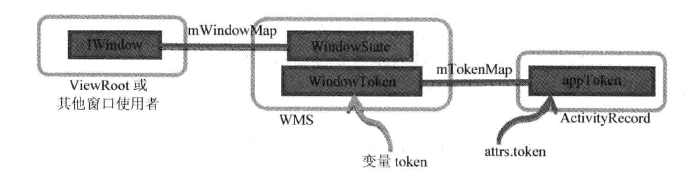
上圖展示了幾個 token 之間的引用關係。
1)若 attrs.token 在 mTokenMap 中查不到,說明 AMS 沒有對應記錄。以下類型本應由 AMS 登記,一旦缺失即視為異常並返回:
if (type >= FIRST_APPLICATION_WINDOW && type <= LAST_APPLICATION_WINDOW)
TYPE_INPUT_METHOD
TYPE_VOICE_INTERACTION
TYPE_WALLPAPER
TYPE_DREAM
TYPE_ACCESSIBILITY_OVERLAY
2)除上面這些類型之外,WMS 允許 AMS 沒有記錄,此時會為窗口新建一個 token。
反之,若 attrs.token 能在 mTokenMap 中找到,也只可能是上述幾種類型,因此仍需進一步做類型比對與一致性檢查。
step5. 構造 WindowState
一切校驗通過後,new 出一個 WindowState:
WindowState win = new WindowState(this, session, client, token, attachedWindow,
        appOp[0], seq, attrs, viewVisibility, displayContent);
其中 this 代表 WMS 自身;session 是 WMS 頒發給窗口使用者的 IWindowSession;client 是 IWindow,即窗口暴露給 WMS 的訪問通道。
step6. 客戶端存活檢查
if (win.mDeathRecipient == null)
若窗口所屬進程已死亡,則直接中止添加流程。
step7. 由 Policy 調整參數
mPolicy.adjustWindowParamsLw(win.mAttrs);
step8. 登記新建的 token
if (addToken) {
    mTokenMap.put(attrs.token, token);
}
step9. 重新分配 layer
新窗口需要插入到既有的窗口序列中,因此要重新排序並賦值層級。
step10. 計算 insets
if (displayContent.isDefaultDisplay) {
    mPolicy.getInsetHintLw(win.mAttrs, mRotation, outContentInsets, outStableInsets, outOutsets);
}
private void addWindowToListInOrderLocked(final WindowState win, boolean addToToken) {
    if (DEBUG_FOCUS_LIGHT) Slog.d(TAG, "addWindowToListInOrderLocked: win=" + win
            + " Callers=" + Debug.getCallers(4));
    if (win.mAttachedWindow == null) {
        final WindowToken token = win.mToken;
        int tokenWindowsPos = 0;
        if (token.appWindowToken != null) {
            tokenWindowsPos = addAppWindowToListLocked(win);
        } else {
            addFreeWindowToListLocked(win);
        }
        if (addToToken) {
            if (DEBUG_ADD_REMOVE) Slog.v(TAG, "Adding " + win + " to " + token);
            token.windows.add(tokenWindowsPos, win);
        }
    } else {
        addAttachedWindowToListLocked(win, addToToken);
    }
    if (win.mAppToken != null && addToToken) {
        win.mAppToken.allAppWindows.add(win);
    }
}
1)最外層判斷 win.mAttachedWindow == null,用於區分子窗口與獨立窗口。本文分析的狀態欄屬於系統窗口,只需考慮為 null 的分支。
2)token.appWindowToken != null 表示該窗口與 Activity 相關,因為 appWindowToken 正是 Activity 的標識。
從 WMS 的角度看,添加窗口並不區分系統窗口與應用窗口,差別只在於權限校驗與層級規則。
AMS 在啟動 Activity 時,會把必要信息傳給 WMS(\\services\\core\\java\\com\\android\\server\\am\\ActivityStack.java):
final void startActivityLocked(ActivityRecord r, boolean newTask, boolean doResume,
        boolean keepCurTransition, Bundle options) {
    mWindowManager.addAppToken(task.mActivities.indexOf(r), r.appToken, r.task.taskId, mStackId,
            r.info.screenOrientation, r.fullscreen,
            (r.info.flags & ActivityInfo.FLAG_SHOW_FOR_ALL_USERS) != 0,
            r.userId, r.info.configChanges, task.voiceSession != null, r.mLaunchTaskBehind);
}
WMS 隨後把這個 token 記錄進前面提到的 mTokenMap。
那麼 Activity 究竟在什麼節點才會走到 addView → WMS.addWindow?答案在 ActivityThread 的 handleResumeActivity:
ActivityClientRecord r = performResumeActivity(token, clearHide);
Resume 的實際流程正是在這裡展開。DecorView 是每個 Activity 最外層的布局容器:
if (r.window == null && !a.mFinished && willBeVisible) {
    r.window = r.activity.getWindow();
    View decor = r.window.getDecorView(); // DecorView
    decor.setVisibility(View.INVISIBLE);
    ViewManager wm = a.getWindowManager(); // WindowManagerImpl
    WindowManager.LayoutParams l = r.window.getAttributes();
    a.mDecor = decor;
    l.type = WindowManager.LayoutParams.TYPE_BASE_APPLICATION; // 窗口類型
l.softInputMode |= forwardBit;
if (a.mVisibleFromClient) {
    a.mWindowAdded = true;
    wm.addView(decor, l);
}
關鍵就是這句 wm.addView(decor, l),其後續流程與前面狀態欄的添加過程基本一致。
在 WMS 側對應的方法為:
private int addAppWindowToListLocked(final WindowState win)
這裡分為兩種情況:
1)該 application 已經有窗口存在時,新窗口直接疊在上面即可(但啟動窗口仍需保持在最上層):
if (!tokenWindowList.isEmpty()) {
    // If this application has existing windows, we simply place the new window
    // on top of them... but keep the starting window on top.
2)若該 application 尚無任何窗口,處理會複雜一些。WMS 把部分 token 信息集中保存在:
AppTokenList tokens = tasks.get(taskNdx).mAppTokens;
然後在所有 app token 中為當前 token 尋找合適的位置:
// We now know the index into the apps. If we found an app window above,
// that gives us the position; else we need to look some more.
if (pos != null) {
找到合適位置後 pos 便會被賦值。先檢查 WindowToken 的位置,若有對應窗口就直接沿用該 pos:
WindowState bottom = tokenWindowList.get(0);
if (bottom.mSubLayer < 0) {
    pos = bottom;
}
若沒有參考窗口,則退而選取最後一個;若 pos 仍為 null,說明沒有找到合適的參考值,此時繼續尋找下一個 token 的對應值;若依然找不到,就只能依據 BaseLayer 數值挑一個合適的位置插入。
參考資料:《深入理解 Android 內核設計思想》 林學森
 自定義 PinnedHeaderListView:實現仿聯繫人分組懸浮列表
 像聯繫人那樣的分組懸浮列表,是很多應用常見的需求。本文透過自定義 PinnedHeaderLi
 Android 手機衛士:Widget 窗口小部件實作
 AppWidget 可讓使用者在桌面查看應用程式資訊。本範例實作一個顯示行程總數與可用記憶體的小部件,並支援定時更
 Android 清單檔 AndroidManifest.xml 的主要結構解析
每個 Android 專案都有一個 AndroidManifest.xml,它是應用與系統溝通的橋樑:元件宣告、權限申請、版本資訊、SDK 相容範圍全都寫在這裡。理解它的
 Linux Samba 伺服器搭建:讓 Windows 與 Ubuntu 共享檔案
 一、什麼是 SambaSamba 實作的是 SMB(Server Message Bl