

編輯:關於 Android 開發
程式碼如下:
<android.support.v7.widget.Toolbar android:id="@+id/toolbar" android:layout_width="match_parent" android:layout_height="wrap_content" android:background="?attr/colorPrimary" android:minHeight="?attr/actionBarSize"/> <android.support.v4.widget.DrawerLayout android:id="@+id/dl_home" android:layout_width="match_parent" android:layout_height="match_parent"> <FrameLayout android:id="@+id/dl_container" android:layout_width="match_parent" android:layout_height="match_parent"/> <LinearLayout android:id="@+id/dl_menu" android:layout_width="match_parent" android:layout_height="match_parent" android:layout_gravity="end" android:background="@color/white" android:orientation="vertical"/> </android.support.v4.widget.DrawerLayout>
mToolbar = (Toolbar) findViewById(R.id.toolbar); dlHome = (DrawerLayout) findViewById(R.id.dl_home); drawerToggle = new ActionBarDrawerToggle(this, dlHome, mToolbar, 0, 0); drawerToggle.syncState();
問題描述:
使用 Toolbar、DrawerLayout 和 ActionBarDrawerToggle 實現側滑菜單效果,按鈕點擊實現左側滑出沒問題,但改成右側滑出
報錯:No drawer view found with gravity LEFT
這個問題的根源在於 ActionBarDrawerToggle 預設處理的是左側(LEFT/START)的抽屜,當我們改用右側滑出時,需要自行處理工具列按鈕的點擊事件。
解決辦法:為 mToolbar 的導航按鈕添加一個點擊監聽,具體實現如下:
mToolbar.setNavigationOnClickListener(new View.OnClickListener() { @Override public void onClick(View v) { if (dlHome.isDrawerOpen(GravityCompat.END)) { dlHome.closeDrawers(); } else { dlHome.openDrawer(Gravity.END); } } }); 透過手動控制抽屜的開關(使用 Gravity.END 代表右側),就能避免 ActionBarDrawerToggle 因找不到左側 drawer view 而報錯,問題便迎刃而解。
 TCPCOPY 1.0安裝與使用:把線上流量實時複製到測試環境
 簡介 TCPCOPY是一個TCP流量的實時複製工具,其1.0版本由網易工程師@tcpcopy開發和維護,一
 Android 學習指南(七):TableLayout 表格版面配置完全解析
TableLayout 的基本觀念 TableLayout 以列與行的方式排列子元件。每一個 TableRow 通常代表一列,而 TableRow 中的元件會依序形成欄位
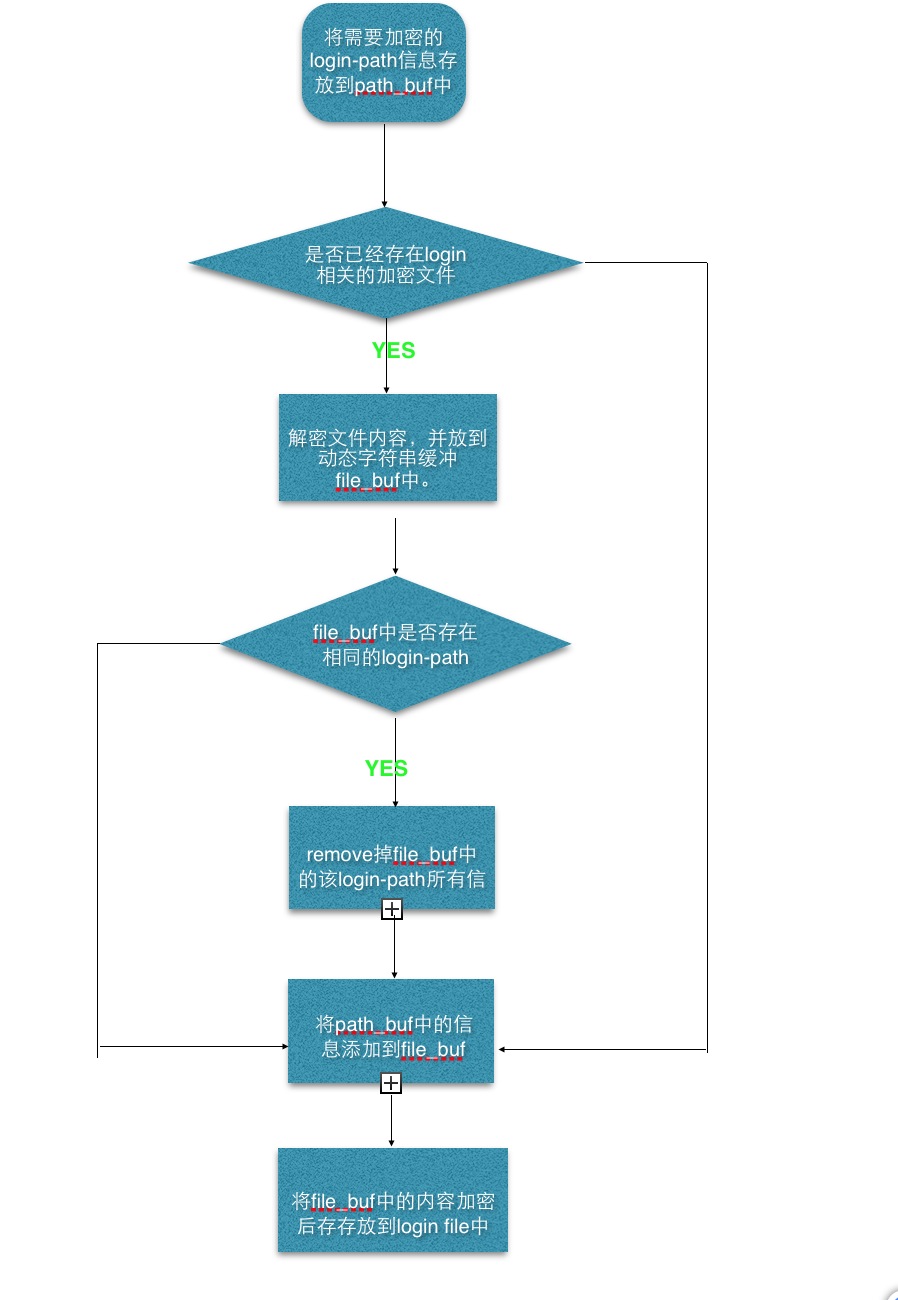 MySQL 新特性解析:mysql_config_editor 加密原理與原始碼
 從 MySQL 5.6 開始,官方推出了加密工具 mysql_config_editor
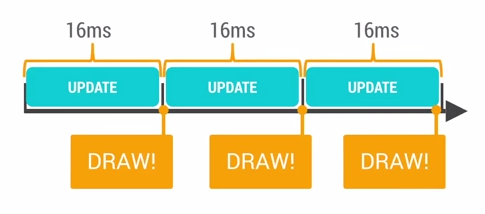 Google 官方 Android 性能優化課程重點整理:渲染、記憶體與電量
2015 年初,Google 推出了一系列關於 Android 效能優化的短片課程,每支約三到五分鐘,協助開發者打造更順暢、更省電的應用。課程不只講解了系統底層的運作原理