

編輯:關於 Android 開發
在前幾篇文章《Android 採用 get 方式提交資料到伺服器》《Android 採用 post 方式提交資料到伺服器》中,介紹了 Android 提交資料到伺服器的兩種方法,本文接著介紹採用 HttpClient 提交資料的方式。
HTTP 協議可能是現在 Internet 上使用得最多、最重要的協議了,越來越多的 Java 應用程式需要直接透過 HTTP 協議來訪問網絡資源。雖然在 JDK 的 java net 套件中已經提供了訪問 HTTP 協議的基本功能,但是對於大部分應用程式來說,JDK 庫本身提供的功能還不夠豐富和靈活。HttpClient 是 Apache Jakarta Common 下的子專案,用來提供高效的、最新的、功能豐富的支援 HTTP 協議的客戶端編程工具包,並且它支援 HTTP 協議最新的版本和建議。HttpClient 已經應用在很多的專案中,比如 Apache Jakarta 上很著名的另外兩個開源專案 Cactus 和 HTMLUnit 都使用了 HttpClient。
修改後的程式碼如下:
public void LoginHttpClientGet(View view) { String name = et_name.getText().toString().trim(); String pwd = et_pwd.getText().toString().trim(); if (TextUtils.isEmpty(name) || TextUtils.isEmpty(pwd)) { Toast.makeText(this, "用戶名密碼不能為空", 0).show(); } else { // 1、打開一個浏覽器 HttpClient client = new DefaultHttpClient(); // 2、輸入地址 String path = "https://169.254.168.71:8080/web/LoginServlet?username=" + name + "&password=" + pwd; try { HttpGet httpGet = new HttpGet(path); // 3、敲回車 HttpResponse response = client.execute(httpGet); int code = response.getStatusLine().getStatusCode(); if (code == 200) { InputStream is = response.getEntity().getContent(); // 把is的內容轉換為字符串 ByteArrayOutputStream bos = new ByteArrayOutputStream(); byte[] buffer = new byte[1024]; int len = -1; while ((len = is.read(buffer)) != -1) { bos.write(buffer, 0, len); } String result = new String(bos.toByteArray()); is.close(); Toast.makeText(this, result, 0).show(); } else { Toast.makeText(this, "請求失敗,失敗原因: " + code, 0).show(); } } catch (Exception e) { e.printStackTrace(); Toast.makeText(this, "請求失敗,請檢查logcat日志控制台", 0).show(); } } } public void LoginHttpClientPost(View view) { String name = et_name.getText().toString().trim(); String pwd = et_pwd.getText().toString().trim(); if (TextUtils.isEmpty(name) || TextUtils.isEmpty(pwd)) { Toast.makeText(this, "用戶名密碼不能為空", 0).show(); } else { // 1、打開一個浏覽器 HttpClient client = new DefaultHttpClient(); // 2、輸入地址 String path = "https://169.254.168.71:8080/web/LoginServlet?username=" + name + "&password=" + pwd; try { HttpPost httpPost = new HttpPost(path); //指定要去提交的數據實體 List<NameValuePair> parameters = new ArrayList<NameValuePair>(); parameters.add(new BasicNameValuePair("username", name)); parameters.add(new BasicNameValuePair("password", pwd)); httpPost.setEntity(new UrlEncodedFormEntity(parameters, "utf-8")); //3、敲回車 HttpResponse response = client.execute(httpPost); int code = response.getStatusLine().getStatusCode(); if (code == 200) { InputStream is = response.getEntity().getContent(); // 把is的內容轉換為字符串 ByteArrayOutputStream bos = new ByteArrayOutputStream(); byte[] buffer = new byte[1024]; int len = -1; while ((len = is.read(buffer)) != -1) { bos.write(buffer, 0, len); } String result = new String(bos.toByteArray()); is.close(); Toast.makeText(this, result, 0).show(); } else { Toast.makeText(this, "請求失敗,失敗原因: " + code, 0).show(); } } catch (Exception e) { e.printStackTrace(); Toast.makeText(this, "請求失敗,請檢查logcat日志控制台", 0).show(); } } }相較於直接使用 HttpURLConnection,HttpClient 提供了更為靈活且功能完整的 API,能更便捷地處理 GET 與 POST 請求,適合用於需要與伺服器交換資料的應用場景。
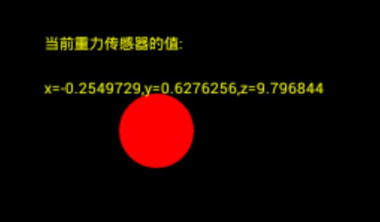 Android 感測器實作:用重力感測器做一顆會滾動的彈球
 一、問題描述 Android 平台上定義了多達 11 種感測器,而各家手機實際支援的類型並不相同: 1、 重力
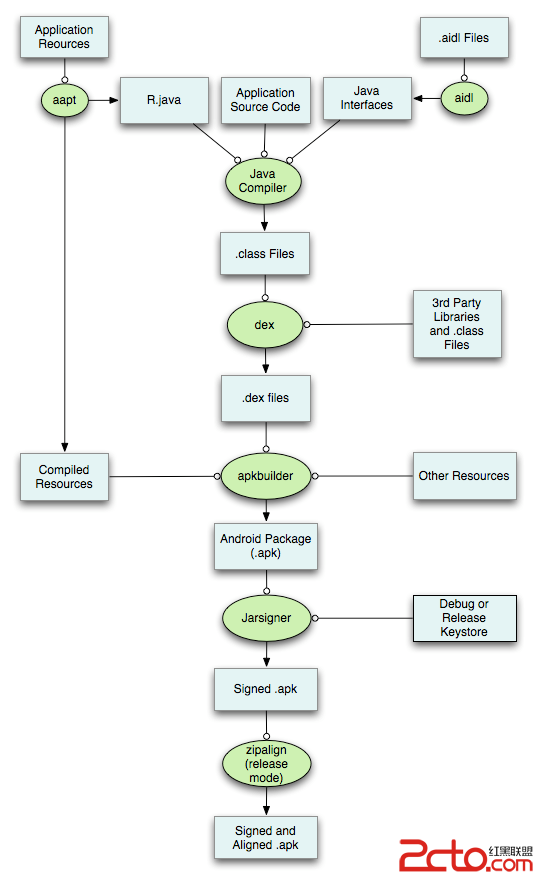 攻破 Android 65536 方法數上限:MultiDex 與 DEX 自動拆包、動態載入實踐
問題是怎麼來的 應用成長到一定規模之後,新功能、新函式庫不斷疊上去,APK 體積一路膨脹,最終幾乎每個團隊都會撞上同一堵牆: 在 Android 2.3 或更早的機型上
 Toast 的三種進階玩法:純文字、單張圖片與圖文混排
別小看 Toast,它不只是用來「吐一行字」 不少初學者對 Toast 的印象停留在「彈出一句提示就消失」,其實這個元件的能力比想像中強得多。除了純文字,我們可以塞進一張
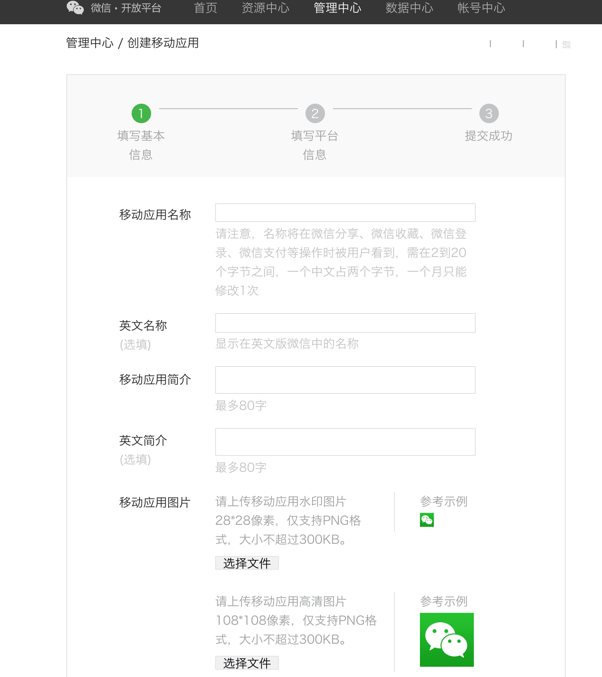 接入微信分享的點點滴滴——踩坑經驗全記錄
 背景故事 4 月份從公司回到學校,開始著手做大學四年級的畢業設計。而畢設的其中一個功能模組便是——心情分享模組:在記錄心情的同時