

編輯:關於 Android 開發
GridView 的樣子好不好看,幾乎全決定在幾個間距與滾動條屬性上。以下是一個較完整的設定範例:
<GridView
    android:id="@+id/movie_list"
    android:layout_width="906dp"
    android:layout_height="654dp"
    android:layout_marginLeft="230dp"
    android:layout_marginTop="110dp"
    android:paddingRight="60dp"
    android:background="@color/transparent"
    android:numColumns="5"
    android:verticalSpacing="80dp"
    android:horizontalSpacing="10dp"
    android:scrollbars="vertical"
    android:fadeScrollbars="false"
    android:listSelector="@drawable/item_selected"
    android:fadingEdge="none"
    android:scrollbarTrackVertical="@drawable/scrollbar_track"
    android:scrollbarThumbVertical="@drawable/scrollbar_thumb"
    android:transcriptMode="disabled" />
auto_fit 讓系統依螢幕寬度自動決定。none、spacingWidth、columnWidth、spacingWidthUniform)。insideOverlay、insideInset、outsideOverlay、outsideInset。true 時,停止滑動後滾動條會自動淡出隱藏。none 表示邊框顏色不變,horizontal 為水平方向變淡,vertical 為垂直方向變淡。disabled、normal、alwaysScroll、transcript 四種;把 ListView/GridView 的資料更新後自動滑到底部,就是靠這個屬性。實務提醒:自訂滾動條的 track 與 thumb 建議使用 nine-patch 圖,否則在 thumb 被拉長時容易出現邊緣變形。
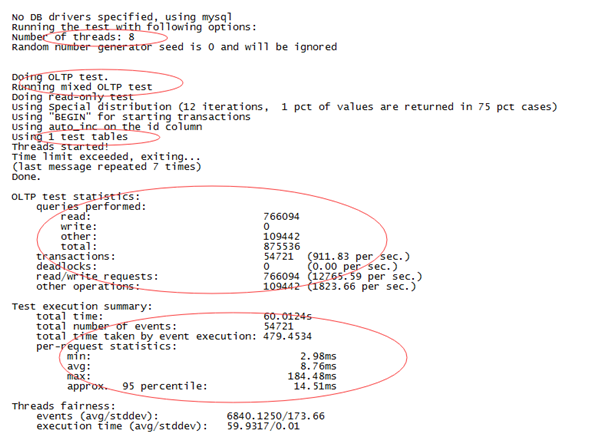 淺析 MySQL 數據庫 OLTP 基準測試
sysbench 是一款非常優秀的基準測試工具,它能精準地模擬 MySQL 儲存引擎 InnoDB 的磁碟 I/O 模式。基於這個特性,本文利用 sysbench 對 M
 深入 TelephonyManager:用反射機制挖掘 Android 的隱藏電話功能
上一篇我們用 Java 反射機制呼叫了藍牙的隱藏 API,這次把同一套手法應用到電話相關的功能上,一探 TelephonyManager 在 Framework 裡存在、
 仿 QQ 好友列表左滑選單:SwipeMenuListView 置頂與刪除實作
帶手勢的列表選單,不用自己刻 先看一下要做的效果——列表項向左滑出「置頂/刪除」按鈕: SwipeMenuListView 是 GitHub 上的第三方開源專案(專案網
 安卓開源項目精選(第三期):23 個值得收藏的組件與工具
本期精選匯總了近期收錄的優質 Android 開源項目,涵蓋圖片壓縮、動效組件、掃碼、彈幕、MVP 框架等方向,方便大家快速找到合適的工具。 圖片與媒體 Advance