

編輯:關於 Android 開發
JSON(JavaScript Object Notation)是當今最普及的輕量級資料交換格式。相較於 XML,它沒有冗長的標籤,體積更小、解析更快、可讀性也更好。由於語法本身源自 JavaScript 的物件字面量,JSON 天然具備語言與平台中立性,因此各家語言社群都為它打造了自己的解析器與綁定框架。
本文以同一組 Java 測試物件為基準,實測七款主流的 Java JSON 類庫,示範如何把 POJO 序列化為 JSON 並寫入檔案,以及如何反向把 JSON 檔案還原成物件,最後再從效能與套件體積兩個維度做比較。
Jackson 的設計目標是「更快、更準確、更輕量,也更貼近開發者的直覺」。它提供三種處理模型:
1)串流式 API(Streaming):以離散事件的方式增量讀寫 JSON。
2)樹模型(Tree Model):在記憶體中以可變樹結構表示整份 JSON 文件。
3)資料綁定(Data Binding):直接完成 JSON 與 POJO 之間的轉換。
我們關注的是第三種。Jackson 的核心由三個套件組成:jackson-core、jackson-databind 與 jackson-annotations,皆可從 Maven 中央倉庫取得。
public class JsonThirdObject {
    private int age = 81;
    private String name = "Michael Caine";
    private List<String> messages;

    public JsonThirdObject() {
        this.messages = new ArrayList<String>() {{
            add("You wouldn't hit a man with no trousers..");
            add("At this point, I'd set you up with a..");
            add("You know, your bobby dangler, giggle stick,..");
        }};
    }
    // Getter and setter
}

public class JsonSecondObject {
    private int age = 83;
    private String name = "Clint Eastwood";
    private JsonThirdObject jsnTO = new JsonThirdObject();
    private List<String> messages;

    public JsonSecondObject() {
        this.messages = new ArrayList<String>() {{
            add("This is the AK-47 assault..");
            add("Are you feeling lucky..");
            add("When a naked man's chasing a..");
        }};
    }
    // Getter and setter
}

public class JsonFirstObject {
    private int age = 76;
    private String name = "Morgan Freeman";
    private JsonSecondObject jsnSO = new JsonSecondObject();
    private List<String> messages;

    public JsonFirstObject() {
        this.messages = new ArrayList<String>() {{
            add("I once heard a wise man say..");
            add("Well, what is it today? More..");
            add("Bruce... I'm God. Circumstances have..");
        }};
    }
    // Getter and setter
}

public class Json {
    private int age = 52;
    private String name = "Jim Carrey";
    private JsonFirstObject jsnFO = new JsonFirstObject();
    private List<String> messages;

    public Json() {
        this.messages = new ArrayList<String>() {{
            add("Hey, maybe I will give you a call..");
            add("Excuse me, I'd like to ask you a few..");
            add("Brain freeze. Alrighty Then I just heard..");
        }};
    }
    // Getter and setter
}
這組物件採四層嵌套結構,每層都帶有基本型別欄位與一個字串清單,序列化後大致如下:
{
    "age": 52,
    "name": "Jim Carrey",
    "jsnFO": {
        "age": 76,
        "name": "Morgan Freeman",
        "jsnSO": {
            "age": 83,
            "name": "Clint Eastwood",
            "jsnTO": {
                "age": 81,
                "name": "Michael Caine",
                "messages": [
                    "You wouldn't hit a man..",
                    "At this point, I'd set you..",
                    "You know, your bobby dangler.."
                ]
            },
            "messages": [
                "This is the AK-47 assault..",
                "Are you feeling lucky..",
                "When a naked man's chasing a.."
            ]
        },
        "messages": [
            "I once heard a wise man..",
            "Well, what is it today? More..",
            "Bruce... I'm God. Circumstances have.."
        ]
    },
    "messages": [
        "Hey, maybe I will give you a call..",
        "Excuse me, I'd like to ask you a few..",
        "Brain freeze. Alrighty Then I just heard.."
    ]
}
Jackson 透過 ObjectMapper 完成綁定,先建立物件與 mapper:
Json jsonObj = new Json();
ObjectMapper mapper = new ObjectMapper();
接著直接把物件寫入檔案:
System.out.println("Convert Java object to JSON format and save to file");
try {
    mapper.writeValue(new File("c:\\jackson.json"), jsonObj);
} catch (JsonGenerationException e) {
} catch (JsonMappingException e) {
} catch (IOException e) {
}
反向還原只需要一行:
System.out.println("Read JSON from file, convert JSON back to object");
try {
    jsonObj = mapper.readValue(new File("c:\\jackson.json"), Json.class);
} catch (JsonGenerationException e) {
} catch (JsonMappingException e) {
} catch (IOException e) {
}
光是從 try-catch 區塊裡的兩行程式碼就能看出,Jackson 的 API 設計相當簡潔。至於速度表現,後面的基準測試會給出答案。
Gson 是 Google 自家方案,最大的賣點是幾乎零設定即可完成雙向轉換。它的特色包括:
1)提供 toJson() 與 fromJson() 一對方法完成序列化與反序列化。
2)能夠還原既有的不可變物件。
3)完整支援 Java 泛型。
4)可處理任意複雜度的物件圖。
Gson 只需要一個 jar 檔(如 gson-2.2.4.jar),無需其他依賴。序列化:
Json jsonObj = new Json();
Gson gson = new Gson();

System.out.println("Convert Java object to JSON format and save to file");
try (FileWriter writer = new FileWriter("c:\\gson.json")) {
    writer.write(gson.toJson(jsonObj));
} catch (IOException e) {
}
反序列化:
System.out.println("Read JSON from file, convert JSON string back to object");
try (BufferedReader reader = new BufferedReader(new FileReader("c:\\gson.json"))) {
    jsonObj = gson.fromJson(reader, Json.class);
} catch (FileNotFoundException e) {
} catch (IOException e) {
}
由於 Gson 的實例本身不保存任何狀態,同一個物件可以放心地重複用於多組序列化與反序列化操作。
JSON-lib 建立在 Douglas Crockford 的工作成果之上,可以在 bean、Map、集合、Java 陣列與 XML 之間與 JSON 雙向轉換,也能還原成 DynaBean。它的代價是依賴較多:
· jakarta commons-lang 2.6
· jakarta commons-beanutils 1.9.1
· jakarta commons-collections 3.2.1
· jakarta commons-logging 1.1.3
· ezmorph 1.0.6
順帶一提,Douglas Crockford 是 Web 開發領域最具影響力的技術權威之一,ECMA JavaScript 2.0 標準化委員會委員,被 Brendan Eich 稱為 JavaScript 的「大宗師」。他創建了 JSON、JSLint、JSMin 與 ADSafe,也是《JavaScript: The Good Parts》的作者。
序列化:
Json jsonObj = new Json();
JSONObject json;
System.out.println("Convert Java object to JSON format and save to file");
try (FileWriter writer = new FileWriter("c:\\json-lib.json")) {
    json = JSONObject.fromObject(jsonObj);
    json.write(writer);
} catch (IOException e) {
}
反序列化:
System.out.println("Read JSON from file, convert JSON string back to object");
try (BufferedReader reader = new BufferedReader(new FileReader("c:\\json-lib.json"))) {
    jsonObj = (Json) JSONObject.toBean(JSONObject.fromObject(reader), Json.class);
} catch (IOException ex) {
}
這麼多層依賴是否會拖累效能?答案同樣留到測試章節。
Flexjson 是一個極輕量的序列化/反序列化庫,支援深拷貝與淺拷貝兩種模式。深度序列化類似於延遲載入的效果——只在真正需要時才展開關聯物件。當你希望把整個物件圖完整落檔時這並不合適,但在只需要局部資料的場景下卻很實用。它無任何第三方依賴。
Json jsonObj = new Json();
JSONSerializer serializer = new JSONSerializer();
System.out.println("Convert Java object to JSON format and save to file");
try (FileWriter writer = new FileWriter("c:\\flexjson.json")) {
    serializer.deepSerialize(jsonObj, writer);
} catch (IOException e) {
}
System.out.println("Read JSON from file, convert JSON string back to object");
try (BufferedReader reader = new BufferedReader(new FileReader("c:\\flexjson.json"))) {
    jsonObj = new JSONDeserializer<Json>().deserialize(reader);
} catch (FileNotFoundException e) {
} catch (IOException e) {
}
json-io 只暴露兩個主要類別,一個負責讀、一個負責寫,讓開發者不必再直接面對 ObjectInputStream 與 ObjectOutputStream。它能序列化任意的 Java 物件圖並轉成 JSON,同時保留完整的圖語意與型別資訊,官方 Maven 座標可直接引用,無額外依賴。
Json jsonObj = new Json();
System.out.println("Convert Java object to JSON format and save to file");
try (JsonWriter writer = new JsonWriter(new FileOutputStream("c:\\json-io.json"))) {
    writer.write(jsonObj);
} catch (IOException e) {
}
System.out.println("Read JSON from file, convert JSON string back to object");
try (JsonReader reader = new JsonReader(new FileInputStream(new File("c:\\json-io.json")))) {
    jsonObj = (Json) reader.readObject();
} catch (FileNotFoundException e) {
} catch (IOException e) {
}
官方文件聲稱它在序列化速度上優於 JDK 原生的 ObjectInputStream/ObjectOutputStream。
Genson 主打可擴展、可伸縮且易用。它完整支援泛型、可用於 JAX-RS 的 JSON provider,相容 JAXB 註解與型別,還能處理鍵名較為特殊的 Map。同樣沒有第三方依賴。
Json jsonObj = new Json();
Genson genson = new Genson();
System.out.println("Convert Java object to JSON format and save to file");
try (FileWriter writer = new FileWriter("c:\\genson.json")) {
    writer.write(genson.serialize(jsonObj));
} catch (IOException | TransformationException e) {
}
System.out.println("Read JSON from file, convert JSON string back to object");
try (BufferedReader reader = new BufferedReader(new FileReader("c:\\genson.json"))) {
    jsonObj = genson.deserialize(reader, Json.class);
} catch (FileNotFoundException e) {
} catch (IOException | TransformationException e) {
}
壓軸的是 JSONiJ,它同時是 JSON 解析器、JPath 實作與 Marshaller,可在 Java 物件與 JSON 之間雙向轉換,無第三方依賴。序列化:
Json jsonObj = new Json();
System.out.println("Convert Java object to JSON format and save to file");
try (FileWriter writer = new FileWriter("c:\\jsonij.json")) {
    writer.write(JSONMarshaler.marshalObject(jsonObj).toJSON());
} catch (IOException | JSONMarshalerException e) {
}
反序列化則需要自行以反射把欄位填回去,程式碼量明顯多於其他幾套:
System.out.println("Read JSON from file, convert JSON string back to object");
try (BufferedReader reader = new BufferedReader(new FileReader("c:\\jsonij.json"))) {
    JSON json = JSON.parse(reader);

    // Now we need to parse the JSONObject object and put values back
    // to our Json object
    for (Field field : jsonObj.getClass().getDeclaredFields()) {
        try {
            field.setAccessible(true);
            field.set(field.getName(), json.get(field.getName()));
        } catch (IllegalArgumentException | IllegalAccessException e) {
        }
    }
} catch (FileNotFoundException e) {
} catch (IOException | ParserException e) {
}
測試環境為 Intel Core i5 2.50GHz 筆記型電腦、4GB 單通道 DDR3 記憶體,作業系統 Windows 7 Ultimate 64-bit SP1。所有類庫跑在同一個 JVM 上,正式計時前先做 10 次熱身迭代以排除記憶體配置的影響,並顯式呼叫垃圾回收。以下數據為 50 次迭代的平均耗時(毫秒),紅色代表序列化(Java 物件轉 JSON),藍色代表反序列化(JSON 轉 Java 物件)。
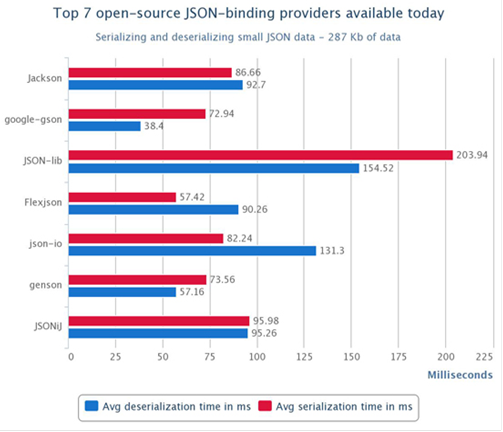
在小資料量情境下,Flexjson 的序列化速度最快,JSON-lib 則是兩端都墊底;反序列化由 Gson 奪冠。
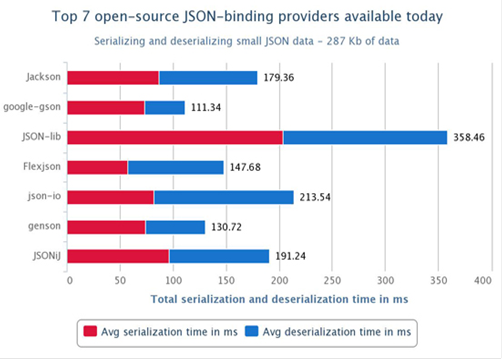
資料量提升到約 287KB 時,最快的是 Gson,緊接著是 Genson 與 Flexjson。
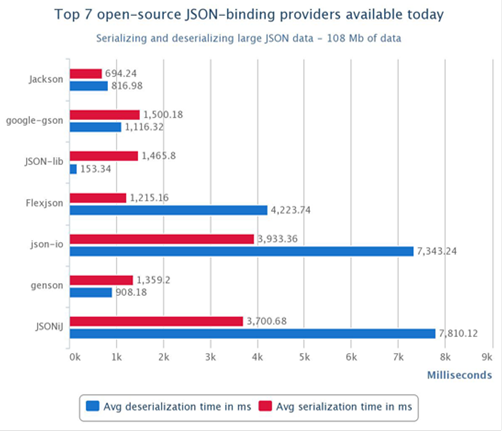
當資料膨脹到 108MB,排名徹底洗牌:序列化由 Jackson 拿下第一,Flexjson 居次;反序列化則由原本墊底的 JSON-lib 逆轉奪冠,Jackson 第二。
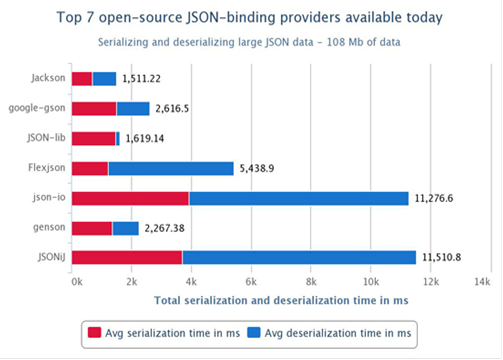
也就是說,處理大檔案時 Jackson 與 JSON-lib 才是正解。
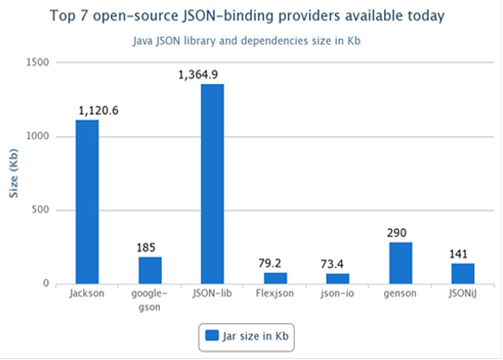
最後一項指標是 jar 檔大小,這對行動端開發至關重要。json-io 體積最小,其後依序為 Flexjson 與 JSONiJ。
七款類庫都能勝任 Java 物件與 JSON 的雙向轉換,差別在於適用場景。若你的應用處理的是小量資料,Flexjson 或 Gson 是輕巧的選擇;一旦面對大檔案,就該轉向 Jackson 或 JSON-lib。除了效能,套件體積、依賴數量與 API 友善度同樣值得納入評估——特別是在 APK 大小敏感的行動專案裡。
 CircleImageView 與 CardView 搭配實作:圓形頭像加卡片列表
做出一張有質感的卡片列表 圓形頭像在現代 App 中幾乎是標配,配上 CardView 的陰影與圓角,一個簡單的列表就能有相當不錯的視覺層次。本文示範如何把這兩者組進 D
 Android Picasso 快速載入遠端圖片
Picasso 的核心優勢 Picasso 是 Square 開源的 Android 圖片載入庫,主打簡單、快取與記憶體優化。只要一行程式,就能把遠端圖片載入 Image
 Android 圖像處理核心:Drawable 家族與 Bitmap 的實際運用
再怎麼功能強大的 App,介面醜就輸一半。使用者對品質的第一印象,往往來自視覺細節:圖示是否清晰、圖片載入是否順暢、壁紙切換是否即時。而在 Android 裡負責扛起這份
 Kotlin Android 開發指南:建立專案與環境設定
 Kotlin 是 JetBrains 推出的程式語言,可與 Java 互操作,也越來越常用於 Android