

編輯:關於 Android 開發
本文聚焦在「內部存儲空間的讀寫」,做一個小案例:使用者輸入帳號密碼,勾選「記住帳號密碼」後點擊登錄,登錄的同時把帳號密碼持久化保存下來。
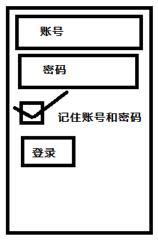
第一版直接把控件豎著堆下去:
<LinearLayout xmlns:android="https://schemas.android.com/apk/res/android"
    xmlns:tools="https://schemas.android.com/tools"
    android:layout_width="match_parent"
    android:layout_height="match_parent"
    android:paddingBottom="@dimen/activity_vertical_margin"
    android:paddingLeft="@dimen/activity_horizontal_margin"
    android:paddingRight="@dimen/activity_horizontal_margin"
    android:paddingTop="@dimen/activity_vertical_margin"
    tools:context=".MainActivity"
    android:orientation="vertical" >

    <EditText
        android:id="@+id/et_name"
        android:layout_width="match_parent"
        android:layout_height="wrap_content"
        android:hint="請輸入賬號" />

    <EditText
        android:id="@+id/pass"
        android:inputType="textPassword"
        android:layout_width="match_parent"
        android:layout_height="wrap_content"
        android:hint="請輸入密碼" />

    <CheckBox
        android:id="@+id/cb"
        android:layout_width="wrap_content"
        android:layout_height="wrap_content"
        android:text="記住賬號和密碼" />

    <Button
        android:layout_width="wrap_content"
        android:layout_height="wrap_content"
        android:onClick="click"
        android:text="登錄" />

</LinearLayout>
看著不太舒服,於是調整一下:把 CheckBox 和 Button 放進 RelativeLayout,讓勾選框靠左、登錄鈕靠右,同一行對齊。
<LinearLayout xmlns:android="https://schemas.android.com/apk/res/android"
    xmlns:tools="https://schemas.android.com/tools"
    android:layout_width="match_parent"
    android:layout_height="match_parent"
    android:orientation="vertical"
    android:paddingBottom="@dimen/activity_vertical_margin"
    android:paddingLeft="@dimen/activity_horizontal_margin"
    android:paddingRight="@dimen/activity_horizontal_margin"
    android:paddingTop="@dimen/activity_vertical_margin"
    tools:context=".MainActivity" >

    <EditText
        android:id="@+id/et_name"
        android:layout_width="match_parent"
        android:layout_height="wrap_content"
        android:hint="請輸入賬號" />

    <EditText
        android:id="@+id/et_pass"
        android:layout_width="match_parent"
        android:layout_height="wrap_content"
        android:hint="請輸入密碼"
        android:inputType="textPassword" />

    <RelativeLayout
        android:layout_width="wrap_content"
        android:layout_height="wrap_content" >

        <CheckBox
            android:id="@+id/cb"
            android:layout_width="wrap_content"
            android:layout_height="wrap_content"
            android:layout_centerVertical="true"
            android:text="記住賬號和密碼" />

        <Button
            android:layout_width="wrap_content"
            android:layout_height="wrap_content"
            android:layout_alignParentRight="true"
            android:onClick="click"
            android:text="登錄" />

    </RelativeLayout>

</LinearLayout>
運行程序之前,內部存儲的應用目錄是空的:

點擊登錄之後,目錄裡就多出了一個 info.txt:
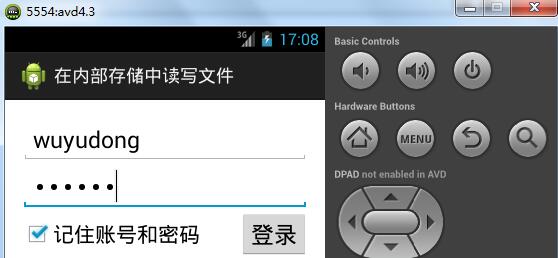

把這個文件導出到電腦打開,內容是 wuyudong##123456——用 ## 作為分隔符,後面讀取時好拆分。
直接開文件輸出流寫數據:
// 持久化保存數據
File file = new File("data/data/com.wuyudong.rwinrom/info.txt");
FileOutputStream fos = new FileOutputStream(file);
fos.write((name + "##" + pass).getBytes());
fos.close();
讀取前先判斷文件是否存在:
if (file.exists()) { ... }
用文件輸入流讀取,字節流轉字符流:
File file = new File("data/data/com.wuyudong.rwinrom/info.txt");
FileInputStream fis = new FileInputStream(file);
BufferedReader br = new BufferedReader(new InputStreamReader(fis));
String text = br.readLine();
String[] s = text.split("##");
讀到之後回顯到輸入框:
et_name.setText(s[0]);
et_pass.setText(s[1]);
切記:應用只能在自己的包名目錄下創建文件,沒辦法往別人的私有目錄裡寫東西,這也是 Android 沙箱機制的體現。
package com.wuyudong.rwinrom;

import java.io.BufferedReader;
import java.io.File;
import java.io.FileInputStream;
import java.io.FileOutputStream;
import java.io.InputStreamReader;

import android.os.Bundle;
import android.app.Activity;
import android.view.View;
import android.widget.CheckBox;
import android.widget.EditText;
import android.widget.Toast;

public class MainActivity extends Activity {

    @Override
    protected void onCreate(Bundle savedInstanceState) {
        super.onCreate(savedInstanceState);
        setContentView(R.layout.activity_main);
        loadAccount();
    }

    public void click(View v) {
        // 獲取用戶輸入的賬號和密碼
        EditText et_name = (EditText) findViewById(R.id.et_name);
        EditText et_pass = (EditText) findViewById(R.id.et_pass);
        String name = et_name.getText().toString();
        String pass = et_pass.getText().toString();

        // 獲取選框組件
        CheckBox cb = (CheckBox) findViewById(R.id.cb);

        // 檢測選框是否被勾選
        if (cb.isChecked()) {
            saveAccount(name, pass);
        }

        Toast.makeText(this, "登錄成功", Toast.LENGTH_SHORT).show();
    }

    public void saveAccount(String name, String pass) {
        File file = new File("data/data/com.wuyudong.rwinrom/info.txt");
        try {
            FileOutputStream fos = new FileOutputStream(file);
            fos.write((name + "##" + pass).getBytes());
            fos.close();
        } catch (Exception e) {
            e.printStackTrace();
        }
    }

    public void loadAccount() {
        File file = new File("data/data/com.wuyudong.rwinrom/info.txt");
        if (file.exists()) {
            try {
                FileInputStream fis = new FileInputStream(file);
                // 把字節流轉換為字符流
                BufferedReader br = new BufferedReader(new InputStreamReader(fis));
                String text = br.readLine();
                String[] s = text.split("##");

                EditText et_name = (EditText) findViewById(R.id.et_name);
                EditText et_pass = (EditText) findViewById(R.id.et_pass);
                et_name.setText(s[0]);
                et_pass.setText(s[1]);
            } catch (Exception e) {
                e.printStackTrace();
            }
        }
    }
}
這個案例把密碼明文寫進文件,僅適合教學演示。真實項目裡密碼絕不能明文落盤,應該做加鹽哈希後保存,或者使用 SharedPreferences 配合 Android Keystore 加密。另外建議改用 getFilesDir() 這種 API 而不是硬編路徑,換設備、換系統版本時更穩妥(下一篇會講)。
 Android Accessibility 輔助功能深入實戰:一念天堂,一念地獄
 0x00 什麼是 Accessibility(輔助功能) 考量到部分使用者因視力、身體或
 Android 圖形圖像處理入門:Bitmap、Matrix 與塗鴉
Android 圖形處理基礎Android 圖形處理常圍繞 Bitmap、Canvas、Paint 與 Matrix。理解解析度、記憶體與縮放,是避免 OutOfMemo
 DragLayout 實戰:仿 QQ 5.0 側拉菜單的縮放與漸變特效
DragLayout 實戰:仿 QQ 5.0 側拉菜單特效 側滑菜單幾乎是每個應用都會用到的交互。實現方式有很多,但要做出那種主界面隨拖動縮小、菜單同步放大淡入的高級感,
 Android Toolbar 與 DrawerLayout 搭配筆記:讓 NavigationView 正確落在 Toolbar 下方
Android Toolbar 與 DrawerLayout 搭配筆記在 Android Studio 產生的 Navigation Drawer Activity 範本