

編輯:關於 Android 開發
Android 應用的本質,是手機與遠端 Web 服務器之間的不斷通信。既然要通信,就離不開向服務端取數據,而反反覆覆地透過網絡拉取資料是一件相當耗時的事。一旦訪問頻繁,性能就會被明顯拖累。聰明的做法是在本地引入二級緩存,把重複的網絡請求次數壓下來,既能省流量,又能提升流暢度。
當我們需要一份數據(比如一張網絡圖片)時,查找順序是分層的:先看內存裡有沒有,內存找不到再去讀磁盤文件或 SQLite,如果磁盤裡也沒有,這才發起網絡請求。從網絡拿回數據後,一方面以 key-value 的形式存進內存(一級緩存),另一方面同步寫入文件或 SQLite(二級緩存)。
這裡有個要點:內存緩存一旦失控就會造成堆內存洩漏,所以一級緩存必須嚴格限制容量,實務上通常控制在可用內存的四分之一左右。
讀到這裡可能會有人疑惑:網絡上的數據是會變的,一旦存進緩存,之後讀到的都是舊值,豈不是永遠看不到變化?解決辦法是給緩存設置有效期,比如 30 分鐘。超過時限數據自動失效並釋放空間,下次訪問便重新向網絡請求。至於 30 分鐘之內想拿到最新值,那就下拉刷新一下,其實算不上什麼難題。
ACache 是一個專為 Android 打造的輕量級開源緩存框架,輕到整個庫只有一個 Java 文件(由十幾個類精煉合併而來)。
普通字符串、JSON、可序列化的 Java 對象,以及字節數據,都在支持之列。
1:夠輕,全部邏輯壓縮在一個 Java 文件裡。
2:夠靈活,緩存路徑、緩存大小、緩存數量都能自定義。
3:支持設置超時時間,數據過期後會自動失效並被刪除。
4:具備多進程支持能力。
1. 初始化
ACache aCache = ACache.get(context);或者 ACache aCache = ACache.get(context, max_size, max_count)。
參數說明:
max_size:限制緩存總容量,默認 50M。
max_count:限制緩存數據條數,默認不限制。
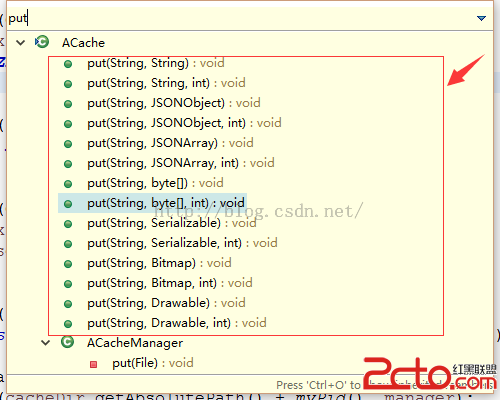
2. 寫入數據
aCache.put(key, data, time) 或 aCache.put(key, data),會把數據同時寫入一級緩存(內存 Map)與二級緩存(文件)。
參數說明:
Key:數據的唯一標識,讀取時依此定位。
Data:要緩存的內容,支持 String、可序列化對象、字節數組、Drawable 等。
Time:有效期,單位為秒。
3. 讀取數據
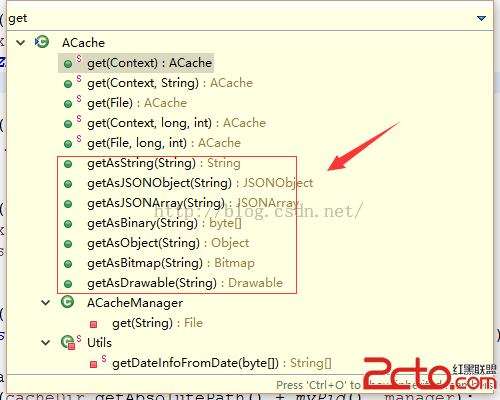
框架提供了一系列 getAsXXX() 方法,根據寫入時的數據類型調用對應方法即可。
下面附上核心源碼,方便理解其內部實現:
package com.example.acachetest.util;
import java.io.BufferedReader;
import java.io.BufferedWriter;
import java.io.ByteArrayInputStream;
import java.io.ByteArrayOutputStream;
import java.io.File;
import java.io.FileOutputStream;
import java.io.FileReader;
import java.io.FileWriter;
import java.io.IOException;
import java.io.ObjectInputStream;
import java.io.ObjectOutputStream;
import java.io.RandomAccessFile;
import java.io.Serializable;
import java.util.Collections;
import java.util.HashMap;
import java.util.Map;
import java.util.Map.Entry;
import java.util.Set;
import java.util.concurrent.atomic.AtomicInteger;
import java.util.concurrent.atomic.AtomicLong;
import org.json.JSONArray;
import org.json.JSONObject;
import android.content.Context;
import android.graphics.Bitmap;
import android.graphics.BitmapFactory;
import android.graphics.Canvas;
import android.graphics.PixelFormat;
import android.graphics.drawable.BitmapDrawable;
import android.graphics.drawable.Drawable;
public class ACache {
 public static final int TIME_HOUR = 60 * 60;
 public static final int TIME_DAY = TIME_HOUR * 24;
 private static final int MAX_SIZE = 1000 * 1000 * 50; // 50 mb
 private static final int MAX_COUNT = Integer.MAX_VALUE; // 不限制存放數據的數量
 private static Map mInstanceMap = new HashMap();
 private ACacheManager mCache;
 public static ACache get(Context ctx) { return get(ctx, "ACache"); }
 public static ACache get(Context ctx, String cacheName) { File f = new File(ctx.getCacheDir(), cacheName); return get(f, MAX_SIZE, MAX_COUNT); }
 public static ACache get(File cacheDir) { return get(cacheDir, MAX_SIZE, MAX_COUNT); }
 public static ACache get(Context ctx, long max_zise, int max_count) { File f = new File(ctx.getCacheDir(), "ACache"); return get(f, max_zise, max_count); }
 public static ACache get(File cacheDir, long max_zise, int max_count) {
  ACache manager = mInstanceMap.get(cacheDir.getAbsoluteFile() + myPid());
  if (manager == null) { manager = new ACache(cacheDir, max_zise, max_count); mInstanceMap.put(cacheDir.getAbsolutePath() + myPid(), manager); }
  return manager;
 }
 private static String myPid() { return "_" + android.os.Process.myPid(); }
 private ACache(File cacheDir, long max_size, int max_count) {
  if (!cacheDir.exists() && !cacheDir.mkdirs()) { throw new RuntimeException("can't make dirs in " + cacheDir.getAbsolutePath()); }
  mCache = new ACacheManager(cacheDir, max_size, max_count);
 }
 public void put(String key, String value) {
  File file = mCache.newFile(key); BufferedWriter out = null;
  try { out = new BufferedWriter(new FileWriter(file), 1024); out.write(value); }
  catch (IOException e) { e.printStackTrace(); }
  finally { if (out != null) { try { out.flush(); out.close(); } catch (IOException e) { e.printStackTrace(); } } mCache.put(file); }
 }
 public void put(String key, String value, int saveTime) { put(key, Utils.newStringWithDateInfo(saveTime, value)); }
 public String getAsString(String key) {
  File file = mCache.get(key); if (!file.exists()) return null;
  boolean removeFile = false; BufferedReader in = null;
  try {
   in = new BufferedReader(new FileReader(file)); String readString = ""; String currentLine;
   while ((currentLine = in.readLine()) != null) { readString += currentLine; }
   if (!Utils.isDue(readString)) { return Utils.clearDateInfo(readString); }
   else { removeFile = true; return null; }
  } catch (IOException e) { e.printStackTrace(); return null; }
  finally { if (in != null) { try { in.close(); } catch (IOException e) { e.printStackTrace(); } } if (removeFile) remove(key); }
 }
 public void put(String key, JSONObject value) { put(key, value.toString()); }
 public void put(String key, JSONObject value, int saveTime) { put(key, value.toString(), saveTime); }
 public JSONObject getAsJSONObject(String key) { String JSONString = getAsString(key); try { return new JSONObject(JSONString); } catch (Exception e) { e.printStackTrace(); return null; } }
 public void put(String key, JSONArray value) { put(key, value.toString()); }
 public void put(String key, JSONArray value, int saveTime) { put(key, value.toString(), saveTime); }
 public JSONArray getAsJSONArray(String key) { String JSONString = getAsString(key); try { return new JSONArray(JSONString); } catch (Exception e) { e.printStackTrace(); return null; } }
 public void put(String key, byte[] value) {
  File file = mCache.newFile(key); FileOutputStream out = null;
  try { out = new FileOutputStream(file); out.write(value); }
  catch (Exception e) { e.printStackTrace(); }
  finally { if (out != null) { try { out.flush(); out.close(); } catch (IOException e) { e.printStackTrace(); } } mCache.put(file); }
 }
 public void put(String key, byte[] value, int saveTime) { put(key, Utils.newByteArrayWithDateInfo(saveTime, value)); }
 public byte[] getAsBinary(String key) {
  RandomAccessFile RAFile = null; boolean removeFile = false;
  try {
   File file = mCache.get(key); if (!file.exists()) return null;
   RAFile = new RandomAccessFile(file, "r"); byte[] byteArray = new byte[(int) RAFile.length()]; RAFile.read(byteArray);
   if (!Utils.isDue(byteArray)) { return Utils.clearDateInfo(byteArray); }
   else { removeFile = true; return null; }
  } catch (Exception e) { e.printStackTrace(); return null; }
  finally { if (RAFile != null) { try { RAFile.close(); } catch (IOException e) { e.printStackTrace(); } } if (removeFile) remove(key); }
 }
 public void put(String key, Serializable value) { put(key, value, -1); }
 public void put(String key, Serializable value, int saveTime) {
  ByteArrayOutputStream baos = null; ObjectOutputStream oos = null;
  try { baos = new ByteArrayOutputStream(); oos = new ObjectOutputStream(baos); oos.writeObject(value); byte[] data = baos.toByteArray(); if (saveTime != -1) { put(key, data, saveTime); } else { put(key, data); } }
  catch (Exception e) { e.printStackTrace(); }
  finally { try { oos.close(); } catch (IOException e) { } }
 }
 public Object getAsObject(String key) {
  byte[] data = getAsBinary(key);
  if (data != null) {
   ByteArrayInputStream bais = null; ObjectInputStream ois = null;
   try { bais = new ByteArrayInputStream(data); ois = new ObjectInputStream(bais); return ois.readObject(); }
   catch (Exception e) { e.printStackTrace(); return null; }
   finally { try { if (bais != null) bais.close(); } catch (IOException e) { e.printStackTrace(); } try { if (ois != null) ois.close(); } catch (IOException e) { e.printStackTrace(); } }
  }
  return null;
 }
 public void put(String key, Bitmap value) { put(key, Utils.Bitmap2Bytes(value)); }
 public void put(String key, Bitmap value, int saveTime) { put(key, Utils.Bitmap2Bytes(value), saveTime); }
 public Bitmap getAsBitmap(String key) { if (getAsBinary(key) == null) { return null; } return Utils.Bytes2Bimap(getAsBinary(key)); }
 public void put(String key, Drawable value) { put(key, Utils.drawable2Bitmap(value)); }
 public void put(String key, Drawable value, int saveTime) { put(key, Utils.drawable2Bitmap(value), saveTime); }
 public Drawable getAsDrawable(String key) { if (getAsBinary(key) == null) { return null; } return Utils.bitmap2Drawable(Utils.Bytes2Bimap(getAsBinary(key))); }
 public File file(String key) { File f = mCache.newFile(key); if (f.exists()) return f; return null; }
 public boolean remove(String key) { return mCache.remove(key); }
 public void clear() { mCache.clear(); }
 // ACacheManager 與 Utils 內部類省略部分細節,核心為按 lastModified 實現 LRU 淘汰與超時判斷
}
最後是一個簡單的測試 Activity,示範如何寫入、讀取並驗證超時失效:
package com.example.acachetest;
import com.example.acachetest.util.ACache;
import android.app.Activity;
import android.os.Bundle;
import android.os.Handler;
import android.os.SystemClock;
import android.widget.TextView;
public class MainActivity extends Activity {
 private ACache aCache;
 private TextView mTextView;
 private Handler mHandler = new Handler(){
  public void handleMessage(android.os.Message msg) {
   if(msg.what==1){ mTextView.setText("開始保存"); }
   else if(msg.what==2){ initDate(); }
   else{ if(aCache.getAsString("newText")==null){ mTextView.setText("沒有保存的數據了,重新加載"); } }
  }
 };
 @Override protected void onCreate(Bundle savedInstanceState) {
  super.onCreate(savedInstanceState); setContentView(R.layout.activity_main);
  mTextView = (TextView) findViewById(R.id.list); initAcache(); initDate();
 }
 private void initDate() {
  String cacheData = aCache.getAsString("newText");
  if (cacheData != null) { mTextView.setText(cacheData); }
  else {
   new Thread(new Runnable() {
    @Override public void run() {
     SystemClock.sleep(1000); aCache.put("newText", "保存3秒", 3);
     mHandler.sendEmptyMessage(1); mHandler.sendEmptyMessageDelayed(2, 1000); mHandler.sendEmptyMessageDelayed(3, 4000);
    }
   }).start();
  }
 }
 private void initAcache() { aCache = ACache.get(this); }
}
 Nginx 與 PHP 正確配置指南
 許多人配置 Nginx 與 PHP 時,習慣直接複製網路教程。然而,若配置方式過時或概念不清,可能會埋下安全與維護上的隱憂。本文以常
 Nginx 反向代理下如何拿到客戶端真實 IP?編譯、配置與多層代理實測
在 client → nginx → apache 這條鏈路裡,後端程序看到的 REMOTE_ADDR 往往是 nginx 自己的地址。想拿到真實客戶端 IP,需要在編
 硅谷社交 10:聊天會話頁面的搭建與 EaseChatFragment 整合
 在即時通訊類應用裡,會話頁面是使用者停留時間最長、互動最密集的一環。它既要承載單聊的氣泡流
 做一個會分頁的菜單:Tab-Menu 複合控件封裝全記錄
用過 UCWEB Android 版的人,大概都對它那個分頁式菜單有印象。Android 原生的 OptionsMenu 有個硬限制:項數超過 6 個就被折進「更多」裡,