

編輯:關於 Android 開發
在慕課網上學習了五子棋的課程,感覺頗有收穫,於是便自己動手寫了一個關於五子棋的 Android 程序,從中受益匪淺。下面記錄整個編寫歷程。
在菜單中加入了「再來一局」的功能:
public class MainActivity extends AppCompatActivity {
    private ChessBoardView chessBoardView;
    @Override
    protected void onCreate(Bundle savedInstanceState) {
        super.onCreate(savedInstanceState);
        setContentView(R.layout.activity_main);
        chessBoardView = (ChessBoardView) findViewById(R.id.boardView);
    }
    @Override
    public boolean onOptionsItemSelected(MenuItem item) {
        int id = item.getItemId();
        // 再來一局
        if (id == R.id.action_setting) {
            chessBoardView.start();
            return true;
        }
        return super.onOptionsItemSelected(item);
    }
    @Override
    public boolean onCreateOptionsMenu(Menu menu) {
        getMenuInflater().inflate(R.menu.menu_main, menu);
        return true;
    }
}
便於維護管理:
public class Constants {
    // 五子連珠
    public final static int MAX_COUNT_IN_LINE = 5;
    // 棋盤的行數
    final static int MAX_LINE = 15;
    // 檢查的方向
    final static int HORIZONTAL = 0;
    final static int VERTICAL = 1;
    final static int LEFT_DIAGONAL = 2;
    final static int RIGHT_DIAGONAL = 4;
}
<?xml version="1.0" encoding="utf-8"?>
<RelativeLayout xmlns:android="https://schemas.android.com/apk/res/android" xmlns:tools="https://schemas.android.com/tools" android:layout_width="match_parent" android:layout_height="match_parent" android:background="@mipmap/bg" tools:context="com.example.linux.mygobang.MainActivity">
    <com.example.linux.mygobang.ChessBoardView android:id="@+id/boardView" android:layout_centerInParent="true" android:layout_width="match_parent" android:layout_height="match_parent" />
</RelativeLayout>
<?xml version="1.0" encoding="utf-8"?>
<menu xmlns:tools="https://schemas.android.com/tools" xmlns:android="https://schemas.android.com/apk/res/android">
    <item android:id="@+id/action_setting" android:title="再來一局" android:orderInCategory="100" android:showAsAction="never" tools:ignore="AppCompatResource" />
</menu>
ChessBoardView 類是整個程式的核心部分。
// 棋盤的寬度,也是長度
private int mViewWidth;
// 棋盤每格的長度
private float maxLineHeight;
private Paint paint = new Paint();
// 定義黑白棋子的 Bitmap
private Bitmap mwhitePiece, mblackPiece;
private float ratioPieceOfLineHeight = 3 * 1.0f / 4;
// 判斷當前落下的棋子是否是白色的
private boolean mIsWhite = true;
// 記錄黑白棋子位置的列表
private ArrayList<Point> mwhiteArray = new ArrayList<>();
private ArrayList<Point> mblackArray = new ArrayList<>();
// 游戲是否結束
private boolean mIsGameOver;
// 游戲結束,是否是白色方勝利
private boolean mIsWhiteWinner;
public ChessBoardView(Context context, AttributeSet attrs) {
    super(context, attrs);
    init();
}
private void init() {
    paint.setColor(0x88000000);
    paint.setAntiAlias(true);
    paint.setDither(true);
    paint.setStyle(Paint.Style.STROKE);
    mwhitePiece = BitmapFactory.decodeResource(getResources(), R.mipmap.stone_w2);
    mblackPiece = BitmapFactory.decodeResource(getResources(), R.mipmap.stone_b1);
}
@Override
protected void onMeasure(int widthMeasureSpec, int heightMeasureSpec) {
    int widthSize = MeasureSpec.getSize(widthMeasureSpec);
    int widthModel = MeasureSpec.getMode(widthMeasureSpec);
    int heightSize = MeasureSpec.getSize(heightMeasureSpec);
    int heightModel = MeasureSpec.getMode(heightMeasureSpec);
    int width = Math.min(widthSize, heightSize);
    if (widthModel == MeasureSpec.UNSPECIFIED) {
        width = heightSize;
    } else if (heightModel == MeasureSpec.UNSPECIFIED) {
        width = widthSize;
    }
    setMeasuredDimension(width, width);
}
@Override
protected void onSizeChanged(int w, int h, int oldw, int oldh) {
    super.onSizeChanged(w, h, oldw, oldh);
    mViewWidth = w;
    maxLineHeight = mViewWidth * 1.0f / Constants.MAX_LINE;
    int pieceWidth = (int) (maxLineHeight * ratioPieceOfLineHeight);
    mwhitePiece = Bitmap.createScaledBitmap(mwhitePiece, pieceWidth, pieceWidth, false);
    mblackPiece = Bitmap.createScaledBitmap(mblackPiece, pieceWidth, pieceWidth, false);
}
@Override
public boolean onTouchEvent(MotionEvent event) {
    if (mIsGameOver) {
        return false;
    }
    int action = event.getAction();
    if (action == MotionEvent.ACTION_UP) {
        int x = (int) event.getX();
        int y = (int) event.getY();
        Point point = getValidPoint(x, y);
        if (mwhiteArray.contains(point) || mblackArray.contains(point)) {
            return false;
        }
        if (mIsWhite) {
            mwhiteArray.add(point);
        } else {
            mblackArray.add(point);
        }
        invalidate();
        mIsWhite = !mIsWhite;
    }
    return true;
}
@Override
protected void onDraw(Canvas canvas) {
    super.onDraw(canvas);
    drawBoard(canvas);      // 繪制棋盤的網格
    drawPieces(canvas);     // 繪制棋盤的黑白棋子
    checkGameOver();        // 檢查游戲是否結束
}
繪制棋盤的網線:
private void drawBoard(Canvas canvas) {
    int w = mViewWidth;
    float lineHeight = maxLineHeight;
    for (int i = 0; i < Constants.MAX_LINE; i++) {
        int startX = (int) (lineHeight / 2);
        int endX = (int) (w - lineHeight / 2);
        int y = (int) ((0.5 + i) * lineHeight);
        canvas.drawLine(startX, y, endX, y, paint);
        canvas.drawLine(y, startX, y, endX, paint);
    }
}
繪制黑白棋子:
private void drawPieces(Canvas canvas) {
    for (int i = 0, n = mwhiteArray.size(); i < n; i++) {
        Point whitePoint = mwhiteArray.get(i);
        float left = (whitePoint.x + (1 - ratioPieceOfLineHeight) / 2) * maxLineHeight;
        float top = (whitePoint.y + (1 - ratioPieceOfLineHeight) / 2) * maxLineHeight;
        canvas.drawBitmap(mwhitePiece, left, top, null);
    }
    for (int i = 0, n = mblackArray.size(); i < n; i++) {
        Point blackPoint = mblackArray.get(i);
        float left = (blackPoint.x + (1 - ratioPieceOfLineHeight) / 2) * maxLineHeight;
        float top = (blackPoint.y + (1 - ratioPieceOfLineHeight) / 2) * maxLineHeight;
        canvas.drawBitmap(mblackPiece, left, top, null);
    }
}
檢查游戲是否結束:
private void checkGameOver() {
    CheckWinner checkWinner = new CheckWinner();
    boolean whiteWin = checkWinner.checkFiveInLineWinner(mwhiteArray);
    boolean blackWin = checkWinner.checkFiveInLineWinner(mblackArray);
    if (whiteWin || blackWin) {
        mIsGameOver = true;
        mIsWhiteWinner = whiteWin;
        String text = mIsWhiteWinner ? "白棋勝利" : "黑棋勝利";
        Toast.makeText(getContext(), text, Toast.LENGTH_SHORT).show();
    }
}
private static final String INSTANCE = "instance";
private static final String INSTANCE_GAME_OVER = "instance_game_over";
private static final String INSTANCE_WHITE_ARRAY = "instance_white_array";
private static final String INSTANCE_BLACK_ARRAY = "instance_black_array";
@Override
protected Parcelable onSaveInstanceState() {
    Bundle bundle = new Bundle();
    bundle.putParcelable(INSTANCE, super.onSaveInstanceState());
    bundle.putBoolean(INSTANCE_GAME_OVER, mIsGameOver);
    bundle.putParcelableArrayList(INSTANCE_BLACK_ARRAY, mblackArray);
    bundle.putParcelableArrayList(INSTANCE_WHITE_ARRAY, mwhiteArray);
    return bundle;
}
@Override
protected void onRestoreInstanceState(Parcelable state) {
    if (state instanceof Bundle) {
        Bundle bundle = (Bundle) state;
        mIsGameOver = bundle.getBoolean(INSTANCE_GAME_OVER);
        mwhiteArray = bundle.getParcelableArrayList(INSTANCE_WHITE_ARRAY);
        mblackArray = bundle.getParcelableArrayList(INSTANCE_BLACK_ARRAY);
        super.onRestoreInstanceState(bundle.getParcelable(INSTANCE));
        return;
    }
    super.onRestoreInstanceState(state);
}
// 再來一局
public void start() {
    mwhiteArray.clear();
    mblackArray.clear();
    mIsGameOver = false;
    mIsWhiteWinner = false;
    invalidate();
}
在 CheckWinner 中,對棋盤上的棋子做「米」字型檢查,判斷是否五子連珠。
private boolean check(int x, int y, List<Point> points, int checkOri) {
    int count = 1;
    for (int i = 1; i < Constants.MAX_COUNT_IN_LINE; i++) {
        switch (checkOri) {
            case Constants.HORIZONTAL:
                point1 = new Point(x - i, y);
                break;
            case Constants.VERTICAL:
                point1 = new Point(x, y - i);
                break;
            case Constants.LEFT_DIAGONAL:
                point1 = new Point(x - i, y + i);
                break;
            case Constants.RIGHT_DIAGONAL:
                point1 = new Point(x + i, y + i);
                break;
        }
        if (points.contains(point1)) {
            count++;
        } else {
            break;
        }
    }
    for (int i = 1; i < Constants.MAX_COUNT_IN_LINE; i++) {
        switch (checkOri) {
            case Constants.HORIZONTAL:
                point2 = new Point(x + i, y);
                break;
            case Constants.VERTICAL:
                point2 = new Point(x, y + i);
                break;
            case Constants.LEFT_DIAGONAL:
                point2 = new Point(x + i, y - i);
                break;
            case Constants.RIGHT_DIAGONAL:
                point2 = new Point(x - i, y - i);
                break;
        }
        if (points.contains(point2)) {
            count++;
        } else {
            break;
        }
    }
    if (count == Constants.MAX_COUNT_IN_LINE) {
        return true;
    }
    return false;
}
// 橫向判斷
private boolean checkHorizontal(int x, int y, List<Point> points) {
    checkModel = Constants.HORIZONTAL;
    return check(x, y, points, checkModel);
}
// 豎向判斷
private boolean checkVertical(int x, int y, List<Point> points) {
    checkModel = Constants.VERTICAL;
    return check(x, y, points, checkModel);
}
// 左斜判斷
private boolean checkLeftDiagonal(int x, int y, List<Point> points) {
    checkModel = Constants.LEFT_DIAGONAL;
    return check(x, y, points, checkModel);
}
// 右斜判斷
private boolean checkRighttDiagonal(int x, int y, List<Point> points) {
    checkModel = Constants.RIGHT_DIAGONAL;
    return check(x, y, points, checkModel);
}
private Point point1, point2;
private int checkModel = -1;
public boolean checkFiveInLineWinner(List<Point> points) {
    for (Point point : points) {
        int x = point.x;
        int y = point.y;
        if (checkHorizontal(x, y, points)) {
            return true;
        } else if (checkVertical(x, y, points)) {
            return true;
        } else if (checkLeftDiagonal(x, y, points)) {
            return true;
        } else if (checkRighttDiagonal(x, y, points)) {
            return true;
        }
    }
    return false;
}
 使用 RecyclerView 與 CardView 實作 Android 瀑布流
 Material Design 導入後,RecyclerView 與 CardView
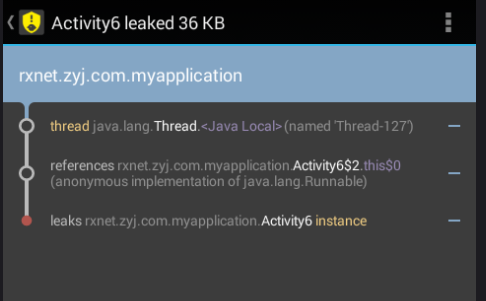 Android 內存洩漏排查實戰:五類高頻陷阱與 LeakCanary 定位思路
前言:近期在複習 Handler 相關知識時,碰上一個反覆被提及的難題——如何避免 Handler 帶來的內存溢出。網路上的資料雖然多,但彼此抄來抄去,真正能落地的內容並
 Android 介面設計基本功:布局屬性、LayoutInflater 與列表控制項
Android 介面設計基本知識 一個好的 App 不能只有好看的介面,還要有良好的效能與穩定性。身為開發人員,得理解介面設計的原則,並寫出可靠的布局程式碼。以下整理常用
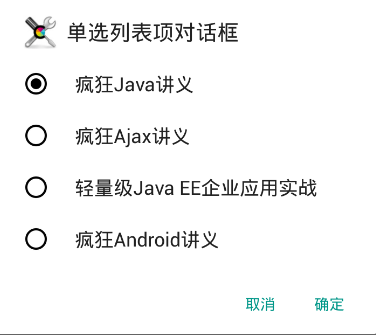 安卓第五天筆記:對話框(AlertDialog / 日期 / 進度)
安卓第五天筆記 —— 對話框 1. 常見的對話框家族 AlertDialog:功能最豐富,可承載文字、列表、自訂版面。ProgressDialog:進度對話框。DateP