

編輯:關於 Android 開發
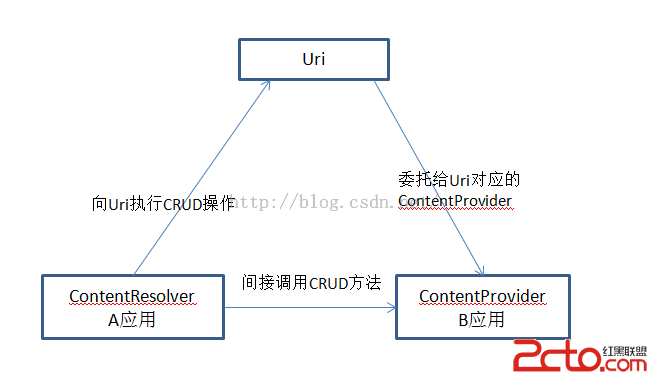
ContentProvider 的核心功能與意義在於對外共享數據:它能把某個應用中的數據暴露給其他應用訪問,讓其他應用可以對指定應用的數據進行操作。透過 ContentProvider,一個應用 A 可以把自己的數據暴露給應用 B,B 則透過 ContentResolver 來操作這些數據,包括增、刪、查、改。
1、ContentProvider 以「表」的形式來組織數據。無論數據的來源是什麼,它都會被視為一張表,並組織成表格形式。
2、ContentProvider 提供的主要方法有:
public boolean onCreate() 在創建 ContentProvider 時調用
public Cursor query(Uri, String[], String, String[], String) 查詢指定 Uri 的數據,返回一個 Cursor
public Uri insert(Uri, ContentValues) 向指定 Uri 添加數據
public int update(Uri, ContentValues, String, String[]) 更新指定 Uri 的數據
public int delete(Uri, String, String[]) 從指定 Uri 刪除數據
public String getType(Uri) 返回指定 Uri 中數據的 MIME 類型
*若數據屬於集合類型,MIME 字符串應以 vnd.android.cursor.dir/ 開頭。例如取得所有 person 記錄的 Uri 為 content://contacts/person,返回的 MIME 為 "vnd.android.cursor.dir/person"。
*若數據屬於非集合類型,MIME 字符串應以 vnd.android.cursor.item/ 開頭。例如 id 為 10 的記錄 Uri 為 content://contacts/person/10,返回的 MIME 為 "vnd.android.cursor.item/person"。
3、每個 ContentProvider 都有一個公共的 URI,用於表示它所提供的數據。Android 內建的 ContentProvider 都放在 android.provider 包中。
1、系統為每一個資源都賦予一個名字,比如通話記錄。每個 ContentProvider 都有一個公共 URI 來表示它所提供的數據。
例如 Uri:content://com.hust.uri/words
Uri 指定了要操作的 ContentProvider,可以把它理解成一個網址,並分成三部分:
第一部分是 "content://",相當於網址中的 "https://"。
第二部分是主機名或 authority,用於唯一標識 ContentProvider,外部應用靠它找到對應的提供者,相當於網址中的主機名,例如 "blog.csdn.net"。
第三部分是路徑名,也就是資源部分,用來表示要操作的數據。
例:content://com.hust.uri/words,訪問 words 數據表中的全部數據。
例:content://com.hust.uri/words/2,訪問 word 數據中 ID 為 2 的記錄。
例:content://com.hust.uri/words/2/word,訪問 word 數據中 ID 為 2 記錄的 word 字段。
把字符串轉換成 Uri,使用 Uri 類的靜態方法:
Uri uri = Uri.parse("content://com.hust.uri/contact")
2、UriMatcher 類使用介紹
由於 Uri 代表了要操作的數據,我們經常需要解析 Uri 並從中取數據。Android 提供了兩個操作 Uri 的工具類:UriMatcher 和 ContentUris。
UriMatcher 用於匹配 Uri:
A、void addURI(String authority, String path, int code) 向 UriMatcher 註冊 Uri,authority 與 path 組成一個 Uri,code 代表該 Uri 對應的標識碼。
B、int match(Uri uri) 根據已註冊的 Uri 判斷指定 Uri 對應的標識碼。
UriMatcher matcher=new UriMatcher(UriMatcher.NO_MATCH); matcher.addURI("com.hust.uri","words",1); matcher.addURI("com.hust.uri","words/#",2);
com.hust.uri/words/# 表示 words 下的所有數據,其 Uri 表示為 2。
匹配結果如下:
matcher.match(Uri.parse("content://com.hust.uri/words")); //返回標識碼1 matcher.match(Uri.parse("content://com.hust.uri/words/2")); //返回標識碼2 matcher.match(Uri.parse("content://com.hust.uri/words/10")); //返回標識碼2
註冊完要匹配的 Uri 後,就能用 sMatcher.match(uri) 對輸入的 Uri 進行匹配,匹配成功會返回 addURI() 傳入的第三個參數(匹配碼)。
3、ContentUris 類使用介紹
ContentUris 用於操作 Uri 路徑後面的 ID 部分,有兩個實用方法:
withAppendedId(uri, id) 為路徑加上 ID 部分:
Uri resultUri = ContentUris.withAppendedId(uri, 10); //生成後的Uri為:content://com.hust.personprovider/person/10
parseId(uri) 從路徑中獲取 ID 部分:
Uri uri = Uri.parse("content://com.hust.uri.personprovider/person/10") long personid = ContentUris.parseId(uri);//獲取的結果為:10
1、開發一個 ContentProvider 子類,繼承 ContentProvider,實現 query、insert、update、delete 等方法。
2、在 Manifest.xml 中註冊該 ContentProvider,指定其 android:authorities 屬性。
public class FirstProvider extends ContentProvider { // 第一次創建該ContentProvider時調用該方法 @Override public boolean onCreate() { System.out.println("===onCreate方法被調用==="); return true; } // 該方法的返回值代表了該ContentProvider所提供數據的MIME類型 @Override public String getType(Uri uri) { System.out.println("~~getType方法被調用~~"); return null; } // 實現查詢方法,該方法應該返回查詢得到的Cursor @Override public Cursor query(Uri uri, String[] projection, String where, String[] whereArgs, String sortOrder) { System.out.println(uri + "===query方法被調用==="); System.out.println("where參數為:" + where); return null; } // 實現插入的方法,該方法應該新插入的記錄的Uri @Override public Uri insert(Uri uri, ContentValues values) { System.out.println(uri + "===insert方法被調用==="); System.out.println("values參數為:" + values); return null; } // 實現刪除方法,該方法應該返回被刪除的記錄條數 @Override public int delete(Uri uri, String where, String[] whereArgs) { System.out.println(uri + "===delete方法被調用==="); System.out.println("where參數為:" + where); return 0; } // 實現更新方法,該方法應該返回被更新的記錄條數 @Override public int update(Uri uri, ContentValues values, String where, String[] whereArgs) { System.out.println(uri + "===update方法被調用==="); System.out.println("where參數為:" + where + ",values參數為:" + values); return 0; } }
這些方法供其他應用透過 ContentProvider 調用。註冊 ContentProvider:
android:authorities 屬性一定要配置,用來指定該 ContentProvider 對應的 Uri。
上面的配置把該 ContentProvider 綁定到 "content://org.providers.firstprovider",意味著當其他應用的 ContentResolver 對該 Uri 執行 query、insert、update、delete 時,實際上就是調用該 ContentProvider 的對應方法,並把參數傳遞過去。
透過 getContentResolver() 獲取 ContentResolver 對象,之後就能調用 query、insert、update、delete 方法,實際上調用的就是指定 Uri 對應的 ContentProvider 的方法。
例:界面放四個按鈕,分別對應增刪查改:
public class FirstResolver extends Activity { ContentResolver contentResolver;//聲明變量 Uri uri = Uri.parse("content://org.providers.firstprovider/");//FirstProvider的Uri @Override public void onCreate(Bundle savedInstanceState) { super.onCreate(savedInstanceState); setContentView(R.layout.main); // 獲取系統的ContentResolver對象 contentResolver = getContentResolver(); } public void query(View source) { // 調用ContentResolver的query()方法。 // 實際返回的是該Uri對應的ContentProvider的query()的返回值 Cursor c = contentResolver.query(uri, null , "query_where", null, null); Toast.makeText(this, "遠程ContentProvide返回的Cursor為:" + c, Toast.LENGTH_LONG).show(); } public void insert(View source) { ContentValues values = new ContentValues(); values.put("name", "fkjava"); // 調用ContentResolver的insert()方法。 // 實際返回的是該Uri對應的ContentProvider的insert()的返回值 Uri newUri = contentResolver.insert(uri, values); Toast.makeText(this, "遠程ContentProvide新插入記錄的Uri為:" + newUri, Toast.LENGTH_LONG).show(); } public void update(View source) { ContentValues values = new ContentValues(); values.put("name", "fkjava"); // 調用ContentResolver的update()方法。 // 實際返回的是該Uri對應的ContentProvider的update()的返回值 int count = contentResolver.update(uri, values , "update_where", null); Toast.makeText(this, "遠程ContentProvide更新記錄數為:" + count, Toast.LENGTH_LONG).show(); } public void delete(View source) { // 調用ContentResolver的delete()方法。 // 實際返回的是該Uri對應的ContentProvider的delete()的返回值 int count = contentResolver.delete(uri , "delete_where", null); Toast.makeText(this, "遠程ContentProvide刪除記錄數為:" + count, Toast.LENGTH_LONG).show(); }
ContentResolver 針對指定的 Uri 進行 CRUD 等數據操作,但 Uri 並非真正的數據中心,因此這些操作會委託給 Uri 對應的 ContentProvider 來實現。一般來說,A 應用透過 ContentResolver 執行 CRUD 時都要指定 Uri,Android 系統便依此找到對應的 ContentProvider(通常屬於 B 應用),由它負責實現 CRUD 方法、完成對底層數據的增刪改查,這樣 A 應用就能訪問並修改 B 應用的數據了。
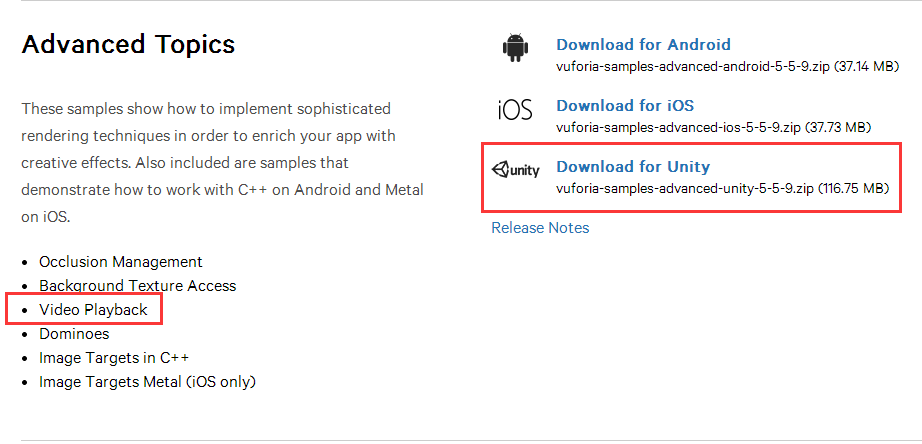 Unity 整合 Vuforia:讓 AR 識別圖播放影片
Unity + Vuforia:在識別圖上播放影片 前面幾篇我們已經把 Vuforia 的圖片識別跑通,並能在識別結果上掛載 3D 模型。不過實務上更常見的需求是——掃描
 Android 無線開發常用技術綜述
 完整開發一款 Android 移動 App,需要經過需求拆解、架構設計、開發調試、測試、上線發布等多個階段,上線後還會有功能上的迭代
 模擬微信聊天菜單:OptionsMenu 與 ContextMenu 的配合使用
在微信裡長按一條聊天記錄,會從底部彈出「標記為未讀 / 置頂聊天 / 刪除該聊天」的浮層。這個交互在原生 Android 中,可以用 OptionsMenu 與 Cont
 自訂 View 密碼輸入框的完整實作思路
設計準則 寫自訂 View 時有一條值得奉行的原則:把凡是會影響外觀與行為的屬性全部暴露出來,讓使用者可以透過 XML 添加和設置樣式,透過元素屬性控制外觀與行為,並提供