

編輯:關於 Android 開發
本文示範如何讀取放在 res/raw 資料夾中的資源檔,並把內容顯示出來。
布局檔:
<?xml version="1.0" encoding="utf-8"?> <LinearLayout xmlns:android="https://schemas.android.com/apk/res/android" android:layout_width="match_parent" android:layout_height="match_parent" android:orientation="vertical" > <Button android:id="@+id/read" android:layout_width="wrap_content" android:layout_height="wrap_content" android:text="讀取資源文件(Raw)" /> <TextView android:id="@+id/cont" android:layout_width="wrap_content" android:layout_height="wrap_content" /> </LinearLayout>
MainActivity.java:
package com.example.yanlei.wifi; import android.content.res.Resources; import android.os.Bundle; import android.support.v7.app.AppCompatActivity; import android.view.View; import android.view.View.OnClickListener; import android.widget.Button; import android.widget.Toast; import java.io.IOException; import java.io.InputStream; import java.util.Scanner; public class MainActivity extends AppCompatActivity { private Button btnRead=null; @Override protected void onCreate(Bundle savedInstanceState) { super.onCreate(savedInstanceState); setContentView(R.layout.activity_main); btnRead=(Button)super.findViewById(R.id.read); // 讀取資源文件 btnRead.setOnClickListener(new OnClickListener(){ public void onClick(View v) { // 獲取資源對象 Resources res=MainActivity.this.getResources(); // 通過 openRawResource() 讀取 R.raw.friend 資源,結果返回 InputStream InputStream input=res.openRawResource(R.raw.friend); // 讀取資源文件內容 Scanner scan=new Scanner(input); StringBuffer info=new StringBuffer(); while(scan.hasNext()) info.append(scan.next()).append("\n"); scan.close(); try { input.close(); } catch (IOException e) { e.printStackTrace(); } Toast.makeText(getApplicationContext(), info.toString(),Toast.LENGTH_LONG).show(); } }); } }
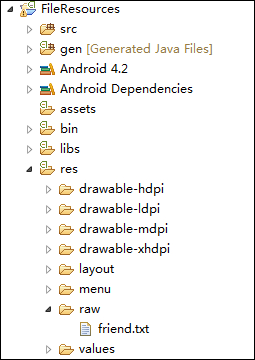
我們把 friend.txt 檔保存到 res/raw 資料夾中。
注意:raw 資料夾預設並不存在,需要你手動建立。
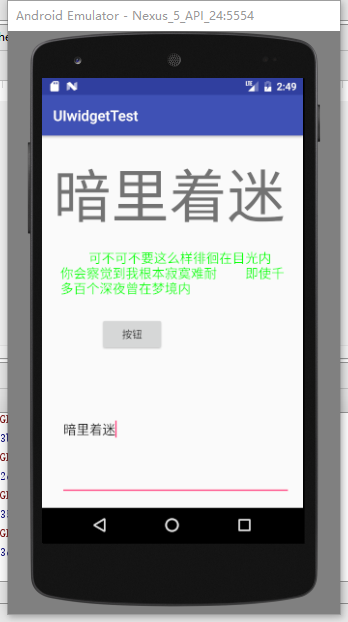 UI 入門第一課:TextView、Button、EditText 的常用屬性實解
為什麼要重視 UI App 想吸引使用者,介面就得打理得體面一點。好的外貌是拉近距離的第一步。我們工程師看一個 App 時,第一眼往往先看功能,不太在意界面漂不漂亮,看到
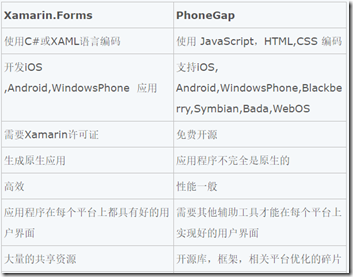 跨平台開發的兩種方法與比較:PhoneGap 與 Xamarin
兩條路線跨平台開發有兩種常見方向。第一種是以 Web 技術為核心,再包裝成原生 App;第二種是使用跨平台語言與工具,直接編譯成各平台應用。PhoneGapPhoneGa
 Android Material Design 新 UI 控件使用大全(一)
Material Design 新 UI 控件使用大全(上) 序言 自從 Google 在 2014 年 IO 大會推出 Material Design 設計規範後,An
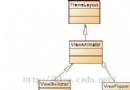 Android 動畫切換元件:ViewAnimator 與子類解析
Android 動畫切換元件:ViewAnimator 與子類ViewAnimator 主要用於在同一位置切換多個子檢視,並可套用進出動畫。其 XML 屬性包含 anim