

編輯:關於 Android 開發
Android 裝置型號繁多,加上各家廠商的客製化系統差異極大,我們不可能把每一種設備情境都測過一遍。因此「完全沒有 bug 的應用」幾乎是個不可能任務。
既然躲不掉,那就換個思路:當應用在使用者手機上 Force Close 時,我們能不能把這個錯誤攔下來、記錄當時的設備資訊與堆棧,再讓使用者選擇是否回報給我們?這種 bug 回饋機制,能讓我們針對真實環境的問題做精準修復,而不是憑空猜測。
Android 的每條線程都可以綁定一個 UncaughtExceptionHandler。只要設定主線程的處理器,就能攔下所有未捕獲的執行期異常,取得完整的堆棧資訊。
以下為完整的異常捕獲處理類別:
import java.io.BufferedReader;
import java.io.File;
import java.io.FileInputStream;
import java.io.FileNotFoundException;
import java.io.FileOutputStream;
import java.io.IOException;
import java.io.InputStreamReader;
import java.io.PrintWriter;
import java.io.StringWriter;
import java.io.Writer;
import java.lang.Thread.UncaughtExceptionHandler;
import java.lang.reflect.Field;
import java.text.DateFormat;
import java.text.SimpleDateFormat;
import java.util.Date;
import java.util.HashMap;
import java.util.Map;

import android.content.Context;
import android.content.pm.PackageInfo;
import android.content.pm.PackageManager;
import android.content.pm.PackageManager.NameNotFoundException;
import android.os.Build;
import android.os.Environment;
import android.os.Looper;
import android.util.Log;
import android.widget.Toast;

/**
 * UncaughtException 處理類別。
 * 當程式發生未捕獲異常時,由本類別接管程式,並記錄、送出錯誤報告。
 * 需要在 Application 中註冊,才能從程式啟動階段就監控整個流程。
 */
public class CrashHandler implements UncaughtExceptionHandler {

    public static final String TAG = "CrashHandler";

    // 系統預設的 UncaughtException 處理類別
    private Thread.UncaughtExceptionHandler mDefaultHandler;

    // CrashHandler 單例
    private static CrashHandler instance;

    // 程式的 Context 物件
    private Context mContext;

    // 用來存放設備資訊與異常資訊
    private Map<String, String> infos = new HashMap<String, String>();

    // 格式化日期,作為日誌檔名的一部分
    private DateFormat formatter = new SimpleDateFormat("yyyy-MM-dd-HH-mm-ss");

    /** 保證只有一個 CrashHandler 實例 */
    private CrashHandler() {}

    /** 取得 CrashHandler 實例(單例模式) */
    public static CrashHandler getInstance() {
        if (instance == null) instance = new CrashHandler();
        return instance;
    }

    /** 初始化 */
    public void init(Context context) {
        mContext = context;
        // 先保存系統預設的處理器,作為最後的兜底
        mDefaultHandler = Thread.getDefaultUncaughtExceptionHandler();
        // 再把本類別設為程式的預設處理器
        Thread.setDefaultUncaughtExceptionHandler(this);
    }

    /** 當 UncaughtException 發生時會進入此方法 */
    @Override
    public void uncaughtException(Thread thread, Throwable ex) {
        if (!handleException(ex) && mDefaultHandler != null) {
            // 若未被自訂邏輯處理,交給系統預設處理器
            mDefaultHandler.uncaughtException(thread, ex);
        } else {
            try {
                Thread.sleep(3000);
            } catch (InterruptedException e) {
                Log.e(TAG, "error : ", e);
            }
            // 退出程式
            android.os.Process.killProcess(android.os.Process.myPid());
            System.exit(1);
        }
    }

    /**
     * 自訂錯誤處理:收集錯誤資訊、發送錯誤報告等操作都在此完成。
     * @return true 代表已處理該異常,否則回傳 false
     */
    private boolean handleException(Throwable ex) {
        if (ex == null) return false;

        // 收集設備參數資訊
        collectDeviceInfo(mContext);

        // 用 Toast 提示使用者
        new Thread() {
            @Override
            public void run() {
                Looper.prepare();
                Toast.makeText(mContext, "很抱歉,程式出現異常,即將退出.", Toast.LENGTH_SHORT).show();
                Looper.loop();
            }
        }.start();

        // 保存日誌檔
        saveCatchInfo2File(ex);
        return true;
    }

    /** 收集設備參數資訊 */
    public void collectDeviceInfo(Context ctx) {
        try {
            PackageManager pm = ctx.getPackageManager();
            PackageInfo pi = pm.getPackageInfo(ctx.getPackageName(), PackageManager.GET_ACTIVITIES);
            if (pi != null) {
                String versionName = pi.versionName == null ? "null" : pi.versionName;
                String versionCode = pi.versionCode + "";
                infos.put("versionName", versionName);
                infos.put("versionCode", versionCode);
            }
        } catch (NameNotFoundException e) {
            Log.e(TAG, "an error occured when collect package info", e);
        }
        Field[] fields = Build.class.getDeclaredFields();
        for (Field field : fields) {
            try {
                field.setAccessible(true);
                infos.put(field.getName(), field.get(null).toString());
                Log.d(TAG, field.getName() + " : " + field.get(null));
            } catch (Exception e) {
                Log.e(TAG, "an error occured when collect crash info", e);
            }
        }
    }

    /**
     * 保存錯誤資訊到檔案。
     * @return 回傳檔名,便於後續傳送到伺服器
     */
    private String saveCatchInfo2File(Throwable ex) {
        StringBuffer sb = new StringBuffer();
        for (Map.Entry<String, String> entry : infos.entrySet()) {
            sb.append(entry.getKey() + "=" + entry.getValue() + "\n");
        }
        Writer writer = new StringWriter();
        PrintWriter printWriter = new PrintWriter(writer);
        ex.printStackTrace(printWriter);
        Throwable cause = ex.getCause();
        while (cause != null) {
            cause.printStackTrace(printWriter);
            cause = cause.getCause();
        }
        printWriter.close();
        sb.append(writer.toString());
        try {
            long timestamp = System.currentTimeMillis();
            String time = formatter.format(new Date());
            String fileName = "crash-" + time + "-" + timestamp + ".log";
            if (Environment.getExternalStorageState().equals(Environment.MEDIA_MOUNTED)) {
                String path = "/mnt/sdcard/crash/";
                File dir = new File(path);
                if (!dir.exists()) dir.mkdirs();
                FileOutputStream fos = new FileOutputStream(path + fileName);
                fos.write(sb.toString().getBytes());
                sendCrashLog2PM(path + fileName);
                fos.close();
            }
            return fileName;
        } catch (Exception e) {
            Log.e(TAG, "an error occured while writing file...", e);
        }
        return null;
    }

    /**
     * 把捕獲到的崩潰資訊交給開發人員。
     * 目前僅將 log 存到 sdcard 並輸出至 LogCat,尚未送到後台。
     */
    private void sendCrashLog2PM(String fileName) {
        if (!new File(fileName).exists()) {
            Toast.makeText(mContext, "日誌檔案不存在!", Toast.LENGTH_SHORT).show();
            return;
        }
        FileInputStream fis = null;
        BufferedReader reader = null;
        String s = null;
        try {
            fis = new FileInputStream(fileName);
            reader = new BufferedReader(new InputStreamReader(fis, "GBK"));
            while (true) {
                s = reader.readLine();
                if (s == null) break;
                Log.i("info", s.toString());
            }
        } catch (FileNotFoundException e) {
            e.printStackTrace();
        } catch (IOException e) {
            e.printStackTrace();
        } finally {
            try {
                reader.close();
                fis.close();
            } catch (IOException e) {
                e.printStackTrace();
            }
        }
    }
}
由於異常捕獲要監控整個應用,所以必須在 Application.onCreate 裡完成初始化,這樣才能涵蓋程式的整個生命週期:
import android.app.Application;

public class CrashApplication extends Application {
    @Override
    public void onCreate() {
        super.onCreate();
        CrashHandler catchHandler = CrashHandler.getInstance();
        catchHandler.init(getApplicationContext());
    }
}
接著別忘了在清單檔中註冊這個 Application,同時加上寫入外置儲存的權限:
<?xml version="1.0" encoding="utf-8"?>
<manifest xmlns:android="https://schemas.android.com/apk/res/android"
    package="com.forms.catchlog"
    android:versionCode="1"
    android:versionName="1.0" >

    <uses-sdk android:minSdkVersion="8" />
    <uses-permission android:name="android.permission.WRITE_EXTERNAL_STORAGE"/>

    <application
        android:icon="@drawable/ic_launcher"
        android:label="@string/app_name"
        android:name=".CrashApplication" >

        <activity
            android:label="@string/app_name"
            android:name=".CatchExceptionLogActivity" >
            <intent-filter >
                <action android:name="android.intent.action.MAIN" />
                <category android:name="android.intent.category.LAUNCHER" />
            </intent-filter>
        </activity>
    </application>
</manifest>
除了寫檔,也可以更積極一點——攔到異常後直接叫起郵件客戶端,把設備資訊與堆棧一併寄回給開發者。
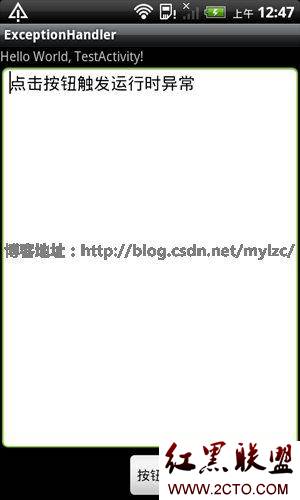
界面 1(觸發執行期異常):
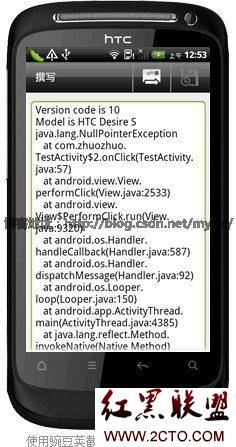
界面 2(發送堆疊資訊):
TestActivity.java
package com.zhuozhuo;

import java.io.PrintWriter;
import java.io.StringWriter;
import java.lang.Thread.UncaughtExceptionHandler;

import android.app.Activity;
import android.content.Intent;
import android.net.Uri;
import android.os.Build;
import android.os.Bundle;
import android.view.View;
import android.view.View.OnClickListener;
import android.widget.Button;

public class TestActivity extends Activity {

    @Override
    public void onCreate(Bundle savedInstanceState) {
        super.onCreate(savedInstanceState);
        setContentView(R.layout.main);

        // 為主線程設定一個處理執行期異常的 handler
        Thread.setDefaultUncaughtExceptionHandler(new UncaughtExceptionHandler() {
            @Override
            public void uncaughtException(Thread thread, final Throwable ex) {
                StringWriter sw = new StringWriter();
                PrintWriter pw = new PrintWriter(sw);
                ex.printStackTrace(pw);

                StringBuilder sb = new StringBuilder();
                sb.append("Version code is ");
                sb.append(Build.VERSION.SDK_INT + "\n");   // 設備的 Android 版本號
                sb.append("Model is ");
                sb.append(Build.MODEL + "\n");             // 設備型號
                sb.append(sw.toString());

                Intent sendIntent = new Intent(Intent.ACTION_SENDTO);
                sendIntent.setData(Uri.parse("mailto:csdn@csdn.com"));
                sendIntent.putExtra(Intent.EXTRA_SUBJECT, "bug report"); // 郵件主題
                sendIntent.putExtra(Intent.EXTRA_TEXT, sb.toString());   // 堆疊資訊
                startActivity(sendIntent);
                finish();
            }
        });

        findViewById(R.id.button).setOnClickListener(new OnClickListener() {
            @Override
            public void onClick(View v) {
                Integer a = null;
                a.toString();  // 故意觸發 NullPointerException
            }
        });
    }
}
main.xml
<?xml version="1.0" encoding="utf-8"?>
<LinearLayout xmlns:android="https://schemas.android.com/apk/res/android"
    android:orientation="vertical"
    android:layout_width="fill_parent"
    android:layout_height="fill_parent">

    <TextView
        android:layout_width="fill_parent"
        android:layout_height="wrap_content"
        android:text="點擊按鈕觸發執行期異常" />

    <Button
        android:text="按鈕"
        android:id="@+id/button"
        android:layout_width="wrap_content"
        android:layout_height="wrap_content"
        android:layout_gravity="center_horizontal"></Button>
</LinearLayout>
兩種做法可以並存:先在 CrashHandler 中把完整資訊落地存檔,再引導使用者透過郵件回報。實務上還要注意兩點:一是 Build.VERSION.SDK_INT 與 Build.MODEL 這類欄位幾乎是定位問題的必備資訊;二是別在 uncaughtException 裡做太重的操作,否則可能來不及寫檔就被系統砍掉。
 Android 事件分派機制源碼追蹤:三個方法背後的真相
 做 Android 也有一段時間了,一直習慣把筆記丟在雲端記事本裡,沒什麼寫部落格的習慣。趁這次機會把舊筆記重
 Tomcat + Java 的 Web 程序持續佔用 CPU 問題排查
 現象: 在 Tomcat 中部署 Java 的 Web 應用程序,運行一段時間後,Tomcat 的
 Android 開發環境配置:Eclipse 關聯源碼與源碼/JAR 查看工具
想更深入理解 Android 底層運作,關聯系統源碼、選對查看工具是必備技能。本文介紹三項實用配置。 1、Eclipse 關聯源碼 步驟一:自行下載對應版本的源碼,本文以
 Android GridView 自定義適配器實現圖文網格排列(未優化版)
GridView 組件用於以網格方式排列視圖,類似矩陣。當屏幕上需要展示大量元素(文字、圖片或其