

編輯:關於 Android 開發
分類:C#、Android、VS2015
建立日期:2016-03-03
本示例透過 AlarmManager 以固定的時間間隔呼叫服務(每 2 秒更新一次隨機產生的股票資料)。只要把其中的資料來源改為定期呼叫一次 Web 服務,就能輕鬆改造成股票線上即時更新的功能。
本示例在 Android 4.4.2(API 19)中運行正常,右側螢幕的資料會每 2 秒自動更新一次。
但在 Android 6.0(API 23)模擬器中 AlarmManager 不起作用,原因未明,因此這裡截取的是 Android 4.4.2 模擬器中的執行效果。
1、添加 Json 引用
有些股票資料是以 JSON 格式提供的,若要讀取這類資料需加入 Json 引用。做法是:在專案的「引用」上按右鍵,然後選擇 System.Json。由於本示例實際並未使用,不加入亦可。
2、添加 Internet 訪問權限
股票資料一般都是透過 Internet 發布的,若要訪問股票的 Web 服務,需要在清單檔中加上:
<uses-permission android:name="android.permission.INTERNET" />
當然,由於這個例子並未真正連網,不加也可以。
3、添加 ch1703_main.xml
<?xml version="1.0" encoding="utf-8"?>
<TextView xmlns:android="https://schemas.android.com/apk/res/android"
    android:layout_width="fill_parent"
    android:layout_height="fill_parent"
    android:padding="15dp"
    android:text="test" />
4、添加 ch1703StockService.cs
using System;
using System.Collections.Generic;
using Android.App;
using Android.Content;
using Android.OS;

namespace MyDemos.SrcDemos
{
    [Service]
    [IntentFilter(new string[] { StocksUpdatedAction })]
    public class ch1703StockService : IntentService
    {
        IBinder binder;
        public List<Stock> Stocks { get; private set; }
        public const string StocksUpdatedAction = "StocksUpdated";

        List<string> stockSymbols = new List<string>() {
            "聯動A股", "深深B股", "宇平A股", "塔塔B股", "乖乖A股", "果果C股"
        };
        Random r = new Random();

        protected override void OnHandleIntent(Intent intent)
        {
            UpdateStocks();
            var stocksIntent = new Intent(StocksUpdatedAction);
            SendOrderedBroadcast(stocksIntent, null);
        }

        public override IBinder OnBind(Intent intent)
        {
            binder = new StockServiceBinder(this);
            return binder;
        }

        // 此處原本應呼叫股票的 Web 服務;為簡化起見,這裡用隨機數直接回傳模擬結果
        private void UpdateStocks()
        {
            Stocks = new List<Stock>();
            for (int i = 0; i < stockSymbols.Count; i++)
            {
                Stocks.Add(new Stock()
                {
                    Symbol = stockSymbols[i],
                    LastPrice = r.Next(10, 151)
                });
            }
        }
    }

    public class StockServiceBinder : Binder
    {
        public ch1703StockService service { get; private set; }

        public StockServiceBinder(ch1703StockService service)
        {
            this.service = service;
        }
    }

    public class Stock
    {
        public string Symbol { get; set; }
        public float LastPrice { get; set; }

        public override string ToString()
        {
            return string.Format("[Stock: Symbol={0}, LastPrice={1}]", Symbol, LastPrice);
        }
    }
}
5、添加 ch1703MainActivity.cs
注意該類繼承自 ListActivity:
using Android.App;
using Android.Content;
using Android.OS;
using Android.Widget;

namespace MyDemos.SrcDemos
{
    [Activity(Label = "【例17-3】綁定到IntentService")]
    public class ch1703MainActivity : ListActivity
    {
        bool isBound = false;
        StockServiceBinder binder;
        StockServiceConnection stockServiceConnection;
        StockReceiver stockReceiver;
        Intent stockServiceIntent;

        protected override void OnCreate(Bundle savedInstanceState)
        {
            base.OnCreate(savedInstanceState);

            stockReceiver = new StockReceiver(this);
            stockServiceIntent = new Intent(ch1703StockService.StocksUpdatedAction);
            stockServiceConnection = new StockServiceConnection(this);

            BindService(stockServiceIntent, stockServiceConnection, Bind.AutoCreate);

            var intentFilter = new IntentFilter();
            intentFilter.AddAction(ch1703StockService.StocksUpdatedAction);
            intentFilter.Priority = (int)IntentFilterPriority.HighPriority;
            RegisterReceiver(stockReceiver, intentFilter);

            var alarm = (AlarmManager)GetSystemService(AlarmService);
            var a = PendingIntent.GetService(
                this, 0, stockServiceIntent, PendingIntentFlags.UpdateCurrent);

            // 每 2 秒更新一次
            alarm.SetRepeating(AlarmType.Rtc, 0, 2000, a);
        }

        protected override void OnDestroy()
        {
            if (isBound == true)
            {
                UnbindService(stockServiceConnection);
                isBound = false;
            }
            UnregisterReceiver(stockReceiver);
            base.OnDestroy();
        }

        private void UpdateStocks()
        {
            if (isBound)
            {
                var stocks = binder.service.Stocks;
                if (stocks != null)
                {
                    ListAdapter = new ArrayAdapter<Stock>(
                        this, Resource.Layout.ch1703_main, stocks);
                }
            }
        }

        private class StockReceiver : BroadcastReceiver
        {
            ch1703MainActivity activity;

            public StockReceiver(ch1703MainActivity activity)
            {
                this.activity = activity;
            }

            public override void OnReceive(Context context, Intent intent)
            {
                activity.UpdateStocks();
            }
        }

        private class StockServiceConnection : Java.Lang.Object, IServiceConnection
        {
            ch1703MainActivity activity;

            public StockServiceConnection(ch1703MainActivity activity)
            {
                this.activity = activity;
            }

            public void OnServiceConnected(ComponentName name, IBinder service)
            {
                var stockServiceBinder = service as StockServiceBinder;
                if (stockServiceBinder != null)
                {
                    activity.binder = (StockServiceBinder)service;
                    activity.isBound = true;
                }
            }

            public void OnServiceDisconnected(ComponentName name)
            {
                activity.isBound = false;
            }
        }
    }
}
整個設計其實示範了 IntentService 的兩種溝通方式並用:綁定(BindService + Binder)用於取得服務內部的資料,廣播(SendOrderedBroadcast + BroadcastReceiver)則用於在資料更新時主動通知界面刷新。
另外別忘了在 OnDestroy 中同時解除綁定與取消註冊接收器,否則會造成記憶體洩漏。至於 AlarmManager 在 6.0 以上失效的問題,通常是 Doze 模式與 App Standby 對定時任務的限制所致,實務上需改用 JobScheduler 或 WorkManager。
 Android ImageScale 圖片變換:縮放、旋轉、平移與倒影效果
使用 Matrix 處理圖片變換在 Android 中,若需要對 Bitmap 進行縮放、旋轉、平移或鏡像處理,Matrix 是非常關鍵的 API。開發者可以先建立與原圖
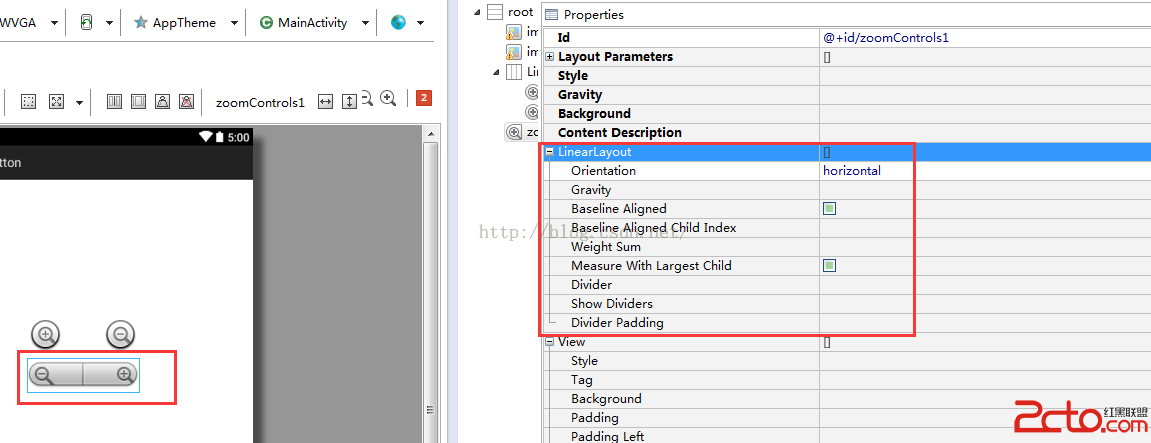 Android UI 組件深入:ImageButton 與 ZoomButton 圖文解析
透視 ImageButton 與 ZoomButton:讓圖片按鈕真正「活」起來 單看 ImageButton 這個名字,很容易以為它就是一個普通的圖片按鈕,把圖片往上一
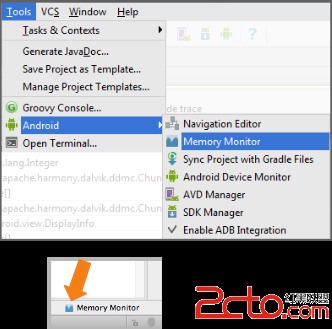 Android Developer:Memory Monitor 內存監控工具實操演示
本演示展示 Android Studio 中 Memory Monitor 工具的基本用法與流程。Memory Monitor 會即時報告你的 App 已分配的內存情況。
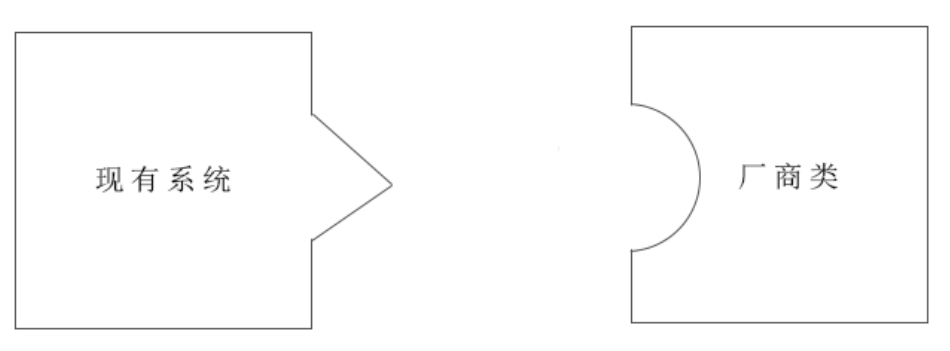 設計模式入門:用鴨子與火雞輕鬆理解適配器模式(Adapter)
適配器模式的定義是:將一個類別的接口,轉換成客戶期望的另一個接口,讓原本接口不相容的類別能夠協同工作。它也可以被稱為「轉換器模式」——本質上就是把某些物件包裝起來,讓它們