

編輯:開發入門

從上圖可以看到,Button 與 Gallery 採用的對齊方式是「置中對齊」,也就是 Button 與它的 Parent 容器中心對齊,而不是貼齊某個邊緣。
Android 在對齊這件事上提供了好幾個層次不同的設定,官方文件對這幾個值的定義如下:
換句話說,這幾個值的差別只在「對齊哪個軸」以及「靠哪個邊」,它們都不會改變元件本身的寬高。真正會撐開或壓縮元件尺寸的是 weight 這類機制,別把兩者搞混了。
實務上常見的誤解是:以為設了 gravity 元件就會自動填滿或縮放。事實上元件尺寸仍由 layout_width 與 layout_height 決定,gravity 只負責在既有空間裡安排它的位置。
 搞懂 Android 的置中:Button 與 Gallery 為什麼會對齊
從上圖可以看到,Button 與 Gallery 採用的對齊方式是「置中對齊」,也就是 Button 與它的 Parent 容器中心對齊,而不是貼齊某個邊緣。 An
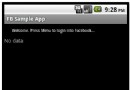 Facebook SDK for Android 入門(一):從 Graph API 動手做第一個社交應用
前言:把 Facebook 的社交能力搬進你的 App 想在自己的應用裡加入社交元素?Facebook 早就把這條路鋪好了。從行動端來看,Facebook Platfor
 用 Eclipse 與 Android 元件做開發(一):觀念、環境與 AVD 建置
先搞懂 Android 的幾個關鍵術語 一個典型的 Android 應用由幾類元件組成。以下先列出主要四種,並附上 Android 開發者網站的定義: 活動(Activ
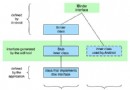 Android組件的使用詳解
Android是一個開放的平台,而位於四層框架頂端的應用開發,必然繞不開Android組件。本文就為大家詳細介紹這四大組件。 「組件」(Component)在談及架構與重