編輯:關於android開發
來自:http://blog.csdn.net/jianghuiquan/article/details/8569233
<?xml version="1.0" encoding="utf-8"?>
<LinearLayout
    xmlns:android="http://schemas.android.com/apk/res/android"
    android:layout_width="match_parent"
    android:layout_height="match_parent"
    android:orientation="vertical" >

    <Button
        android:id="@+id/save"
        android:layout_width="wrap_content"
        android:layout_height="wrap_content"
        android:text="保存數據(File)" />

    <Button
        android:id="@+id/read"
        android:layout_width="wrap_content"
        android:layout_height="wrap_content"
        android:text="讀取數據(File)" />

</LinearLayout>
package com.example.yanlei.wifi;

import android.os.Bundle;
import android.os.Environment;
import android.support.v7.app.AppCompatActivity;
import android.view.View;
import android.view.View.OnClickListener;
import android.widget.Button;
import android.widget.Toast;

import java.io.File;
import java.io.FileInputStream;
import java.io.FileNotFoundException;
import java.io.FileOutputStream;
import java.io.PrintStream;
import java.util.Scanner;

public class MainActivity extends AppCompatActivity {

    private Button btnSave=null;
    private Button btnRead=null;
    private File file=null;

    private static final String FILENAME="data.txt";

    @Override
    protected void onCreate(Bundle savedInstanceState) {
        super.onCreate(savedInstanceState);
        setContentView(R.layout.activity_main);
        btnSave=(Button)super.findViewById(R.id.save);
        btnRead=(Button)super.findViewById(R.id.read);

        btnSave.setOnClickListener(new OnClickListener(){
            public void onClick(View v)
            {

                PrintStream ps=null;

                //判斷外部存儲卡是否存在
                if(!Environment.getExternalStorageState().equals(Environment.MEDIA_MOUNTED)){
                    Toast.makeText(getApplicationContext(), "讀取失敗,SD存儲卡不存在!", Toast.LENGTH_LONG).show();
                    return;
                }

                //初始化File
                String path=Environment.getExternalStorageDirectory().toString()
                        +File.separator
                        +"genwoxue"
                        +File.separator
                        +FILENAME;
                file=new File(path);

                //如果當前文件的父文件夾不存在,則創建genwoxue文件夾
                if(!file.getParentFile().exists())
                    file.getParentFile().mkdirs();

                //寫文件
                try {
                    ps = new PrintStream(new FileOutputStream(file));
                    ps.println("跟我學網址:www.genwoxue.com");
                    ps.println("");
                    ps.println("電子郵件:hello@genwoxue.com");
                } catch (FileNotFoundException e) {
                    e.printStackTrace();
                }finally{
                    ps.close();

                }
                Toast.makeText(getApplicationContext(), "保存成功!", Toast.LENGTH_LONG).show();
            }
        });

        btnRead.setOnClickListener(new OnClickListener(){
            public void onClick(View v)
            {
                StringBuffer info=new StringBuffer();

                //判斷外部存儲卡是否存在
                if(!Environment.getExternalStorageState().equals(Environment.MEDIA_MOUNTED)){
                    Toast.makeText(getApplicationContext(), "讀取失敗,SD存儲卡不存在!", Toast.LENGTH_LONG).show();
                    return;
                }

                //初始化File
                String path=Environment.getExternalStorageDirectory().toString()
                        +File.separator
                        +"genwoxue"
                        +File.separator
                        +FILENAME;
                file=new File(path);

                if(!file.exists()){
                    Toast.makeText(getApplicationContext(), "文件不存在!", Toast.LENGTH_LONG).show();
                    return;
                }

                //讀取文件內容
                Scanner scan=null;
                try {
                    scan=new Scanner(new FileInputStream(file));
                    while(scan.hasNext()){
                        info.append(scan.next()).append("☆☆☆\n");
                    }
                    Toast.makeText(getApplicationContext(), info.toString(), Toast.LENGTH_LONG).show();
                } catch (FileNotFoundException e) {
                    e.printStackTrace();
                }finally{
                    scan.close();
                }
            }
        });
    }
}
權限
<?xml version="1.0" encoding="utf-8"?>
<manifest xmlns:android="http://schemas.android.com/apk/res/android"
    package="com.example.yanlei.wifi" >
    <!-- 在SDCard中創建與刪除文件權限 -->

    <uses-permission android:name="android.permission.MOUNT_UNMOUNT_FILESYSTEMS"/>

    <!-- 往SDCard寫入數據權限 -->


    <uses-permission android:name="android.permission.READ_EXTERNAL_STORAGE"/>
    <uses-permission android:name="android.permission.WRITE_EXTERNAL_STORAGE" />
    <application
        android:allowBackup="true"
        android:icon="@mipmap/ic_launcher"
        android:label="@string/app_name"
        android:theme="@style/AppTheme" >
        <activity
            android:name=".MainActivity"
            android:label="@string/app_name" >
            <intent-filter>
                <action android:name="android.intent.action.MAIN" />

                <category android:name="android.intent.category.LAUNCHER" />
            </intent-filter>
        </activity>
    </application>

</manifest>
 <uses-permission android:name="android.permission.READ_EXTERNAL_STORAGE"/>
    <uses-permission android:name="android.permission.WRITE_EXTERNAL_STORAGE" />
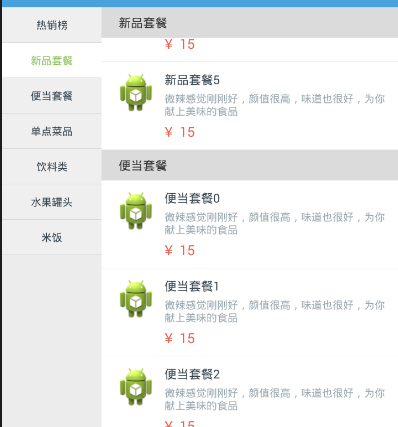 仿餓了點餐界面2個ListView聯動,界面listview聯動
仿餓了點餐界面2個ListView聯動,界面listview聯動如圖是效果圖 是仿餓了的點餐界面 1.點擊左側的ListView,通過在在適配器中設置Item來改變顏色,
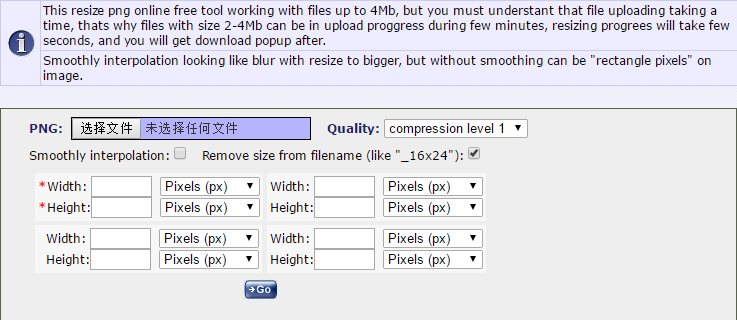 png圖片尺寸大小調整,png圖片尺寸大小
png圖片尺寸大小調整,png圖片尺寸大小 Android 開發中經常遇到各種hdpi,xhdpi,xxhdpi....很多尺寸大小的png圖片要求. 網上也
 Android特效專輯(八)——實現心型起泡飛舞的特效,讓你的APP瞬間暖心
Android特效專輯(八)——實現心型起泡飛舞的特效,讓你的APP瞬間暖心 Android特效專輯(八)——實現心型起泡飛舞的特效,讓你的A
 基於鴻洋博客自定於View實現的android音量調節控件,android音量調節
基於鴻洋博客自定於View實現的android音量調節控件,android音量調節 1.在values建立attrs.xml,寫出你需要的屬性: