編輯:關於android開發
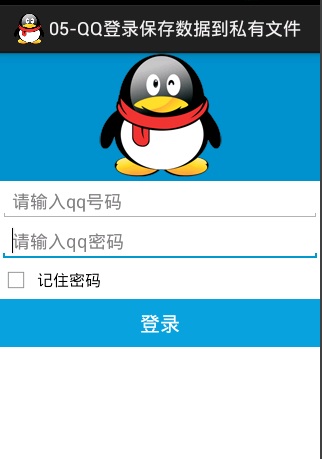
<LinearLayout xmlns:android="http://schemas.android.com/apk/res/android"
    xmlns:tools="http://schemas.android.com/tools"
    android:layout_width="match_parent"
    android:layout_height="match_parent"
    android:orientation="vertical"
    tools:context=".MainActivity" >

    <ImageView
        android:background="#0090CA"
        android:layout_width="match_parent"
        android:layout_height="wrap_content"
        android:src="@drawable/qq"/>

    <!--號碼  -->
    <EditText
        android:id="@+id/et_qqNumber"
        android:layout_width="match_parent"
        android:layout_height="wrap_content"
        android:inputType="number"
        android:hint="請輸入qq號碼"/>
    <!--密碼  -->
    <EditText
        android:id="@+id/et_qqPwd"
        android:layout_width="match_parent"
        android:layout_height="wrap_content"
        android:inputType="textPassword"
        android:hint="請輸入qq密碼"/>
    <!--記住密碼復選框  -->
    <CheckBox
        android:id="@+id/cb_remember"
        android:layout_width="match_parent"
        android:layout_height="wrap_content"
        android:text="記住密碼"/>
<!--登錄按鍵  -->
    <Button
        android:id="@+id/btn_login"
        android:layout_width="match_parent"
        android:layout_height="wrap_content"
        android:background="#09A3DC"
        android:textSize="20sp"
        android:textColor="#fff"
        android:text="登錄"/>
</LinearLayout>
Activity
/**
 * QQ 登錄 保存密碼到私有文件
 * 步驟
 * 1.獲取輸入的用戶名與密碼
 *  2.判斷是否 為空,為空就給用戶提示Toast
 *  3.保存用戶名與密碼到文件
 *  4.數據回顯
 *
 * @author 劉楠
 *
 *         2016-2-18下午12:39:54
 */
public class MainActivity extends Activity implements OnClickListener {

    private static final String TAG = "MainActivity";
    /*
     * QQ號碼
     */
    private EditText et_qqNumber;
    /*
     * QQ密碼
     */
    private EditText et_qqPwd;
    /*
     * 記住密碼,復選框
     */
    private CheckBox cb_remember;
    /*
     * 登錄按鍵
     */
    private Button btn_login;

    @Override
    protected void onCreate(Bundle savedInstanceState) {
        super.onCreate(savedInstanceState);
        setContentView(R.layout.activity_main);
        /*
         * 初始化
         */
        et_qqNumber = (EditText) findViewById(R.id.et_qqNumber);
        et_qqPwd = (EditText) findViewById(R.id.et_qqPwd);
        cb_remember = (CheckBox) findViewById(R.id.cb_remember);

        btn_login = (Button) findViewById(R.id.btn_login);
        /*
         * 為登錄按鍵設置單擊事件
         */
        btn_login.setOnClickListener(this);

        /*
         * 回顯示數據
         */
        Map<String, String> map=QQLoginUtils.getUser(this);

        if(map!=null){
            et_qqNumber.setText(map.get("username"));
            et_qqPwd.setText(map.get("password"));
            String isChecked = map.get("isChecked");
            if("true".equals(isChecked)){
                cb_remember.setChecked(true);

            }else{
            cb_remember.setChecked(false);
            }
        }

    }

    /**
     * 單擊事件,監聽器
     */
    @Override
    public void onClick(View v) {

        // 判斷ID
        switch (v.getId()) {
        case R.id.btn_login:
            // 執行相應的方法
            qqLogin();
            break;

        default:
            break;
        }

    }

    /**
     * 登錄方法
     */

    public void qqLogin() {
        /*
         * 獲取用戶名與密碼
         */
        String qq = et_qqNumber.getText().toString().trim();
        String pwd = et_qqPwd.getText().toString().trim();
        // 判斷是否為空
        if (TextUtils.isEmpty(qq) || TextUtils.isEmpty(pwd)) {
            Toast.makeText(this, "親,qq號碼 與密碼不能為空!", Toast.LENGTH_SHORT).show();
            return;
        }
        /*
         * 判斷 是否要保存
         */
        if (cb_remember.isChecked()) {
            Log.i(TAG, "保存用戶名與密碼");
            // 要保存
            boolean flag = QQLoginUtils.saveUser(this, qq, pwd,cb_remember.isChecked());
            // 判斷 是否保存成功
            if (flag) {
                Toast.makeText(this, "保存成功", Toast.LENGTH_SHORT).show();
            } else {
                Toast.makeText(this, "保存失敗", Toast.LENGTH_SHORT).show();

            }
        } else {
             //不要保存
            Log.i(TAG, "不保存用戶名與密碼");
            boolean flag = QQLoginUtils.saveUser(this, "", "",cb_remember.isChecked());
            // 判斷 是否保存成功
            if (flag) {
                Toast.makeText(this, "保存成功", Toast.LENGTH_SHORT).show();
            } else {
                Toast.makeText(this, "保存失敗", Toast.LENGTH_SHORT).show();

            }
        }

    }

}
Utils
/**
 * 保存用戶名密碼工具類

 * @author 劉楠
 *
 * 2016-2-18下午12:50:55
 */
public class QQLoginUtils {

    /**
     *
     * @param context 上下文
     * @param name 用戶名
     * @param password 密碼
     * @param isChecked  記錄密碼狀態
     * @return  是否保存成功
     */
    public static boolean saveUser(Context context, String name, String password, boolean isChecked) {

        OutputStream out=null;
        try {
            File file = new File(context.getFilesDir(), "user.txt");

            out = new FileOutputStream(file);

            String data = name +"#"+password+"#"+isChecked;
            out.write(data.getBytes());

            return true;
        } catch (FileNotFoundException e) {
            e.printStackTrace();
        } catch (IOException e) {
            e.printStackTrace();
        }
        return false;
    }


    public static Map<String, String> getUser(Context context) {
        File file = new File(context.getFilesDir(), "user.txt");
        /*
         * 判斷文件是否存在
         */
        if(!file.exists()){
            return null;
        }
        /*
         * 獲取文件
         */
        Map<String,String> map= new HashMap<String, String>();
        BufferedReader br=null;
        try {
            br = new BufferedReader(new InputStreamReader(new FileInputStream(file)));
            String data = br.readLine();
            String[] split = data.split("#");

            map.put("username", split[0]);
            map.put("password", split[1]);
            map.put("isChecked", split[2]);
            //返回結果
            br.close();
            return map;
        } catch (FileNotFoundException e) {
            e.printStackTrace();
        } catch (IOException e) {
            e.printStackTrace();
        }
        //
        return null;
    }

}

更改工具類
/**
 * 保存用戶名密碼工具類

 * @author 劉楠
 *
 * 2016-2-18下午12:50:55
 */
public class QQLoginUtils {

    /**
     *
     * @param context 上下文
     * @param name 用戶名
     * @param password 密碼
     * @param isChecked
     * @return  是否保存成功
     */
    public static boolean saveUser(Context context, String name, String password, boolean isChecked) {
        /*
         * 判斷SD卡是否正常
         */
        String state = Environment.getExternalStorageState();
        if(!Environment.MEDIA_MOUNTED.equals(state)){
            Toast.makeText(context, "SD卡沒有插入", Toast.LENGTH_SHORT).show();
            return false;
        }
        OutputStream out=null;
        try {
            File file = new File(Environment.getExternalStorageDirectory(), "user.txt");


            out = new FileOutputStream(file);

            String data = name +"#"+password+"#"+isChecked;
            out.write(data.getBytes());

            return true;
        } catch (FileNotFoundException e) {
            e.printStackTrace();
        } catch (IOException e) {
            e.printStackTrace();
        }
        return false;
    }


    public static Map<String, String> getUser(Context context) {
        /*
         * 判斷SD卡是否正常
         */
        String state = Environment.getExternalStorageState();
        if(!Environment.MEDIA_MOUNTED.equals(state)){
            Toast.makeText(context, "SD卡沒有插入", Toast.LENGTH_SHORT).show();
            return null;
        }

        File file = new File(Environment.getExternalStorageDirectory(), "user.txt");
        /*
         * 判斷文件是否存在
         */
        if(!file.exists()){
            return null;
        }
        /*
         * 獲取文件
         */
        Map<String,String> map= new HashMap<String, String>();
        BufferedReader br=null;
        try {
            br = new BufferedReader(new InputStreamReader(new FileInputStream(file)));
            String data = br.readLine();
            String[] split = data.split("#");

            map.put("username", split[0]);
            map.put("password", split[1]);
            map.put("isChecked", split[2]);
            //返回結果
            br.close();
            return map;
        } catch (FileNotFoundException e) {
            e.printStackTrace();
        } catch (IOException e) {
            e.printStackTrace();
        }
        //
        return null;
    }

}
添加寫入SD卡的權限
在Manifest.xml中
<uses-permission android:name="android.permission.WRITE_EXTERNAL_STORAGE"/>
    <uses-permission android:name="android.permission.READ_EXTERNAL_STORAGE"/>
布局文件不變
/**
 * QQ 登錄 保存密碼到SharedPreferences
 * 步驟 1.獲取輸入的用戶名與密碼
 *  2.判斷是否 為空,為空就給用戶提示Toast
 *  3.保存用戶名與密碼到文件
 *
 * @author 劉楠
 *
 *         2016-2-18下午12:39:54
 */
public class MainActivity extends Activity implements OnClickListener {

    private static final String TAG = "MainActivity";
    /*
     * QQ號碼
     */
    private EditText et_qqNumber;
    /*
     * QQ密碼
     */
    private EditText et_qqPwd;
    /*
     * 記住密碼,復選框
     */
    private CheckBox cb_remember;
    /*
     * 登錄按鍵
     */
    private Button btn_login;

    @Override
    protected void onCreate(Bundle savedInstanceState) {
        super.onCreate(savedInstanceState);
        setContentView(R.layout.activity_main);
        /*
         * 初始化
         */
        et_qqNumber = (EditText) findViewById(R.id.et_qqNumber);
        et_qqPwd = (EditText) findViewById(R.id.et_qqPwd);
        cb_remember = (CheckBox) findViewById(R.id.cb_remember);

        btn_login = (Button) findViewById(R.id.btn_login);
        /*
         * 為登錄按鍵設置單擊事件
         */
        btn_login.setOnClickListener(this);

        /*
         * 回顯示數據
         */
        Map<String, Object> map=QQLoginUtils.getUser(this);

        if(map!=null){
            et_qqNumber.setText(map.get("username").toString());
            et_qqPwd.setText(map.get("password").toString());
            boolean isChecked = (Boolean) map.get("isChecked");
            cb_remember.setChecked(isChecked);

        }

    }

    /**
     * 單擊事件,監聽器
     */
    @Override
    public void onClick(View v) {

        // 判斷ID
        switch (v.getId()) {
        case R.id.btn_login:
            // 執行相應的方法
            qqLogin();
            break;
        }

    }

    /**
     * 登錄方法
     */

    public void qqLogin() {
        /*
         * 獲取用戶名與密碼
         */
        String qq = et_qqNumber.getText().toString().trim();
        String pwd = et_qqPwd.getText().toString().trim();
        // 判斷是否為空
        if (TextUtils.isEmpty(qq) || TextUtils.isEmpty(pwd)) {
            Toast.makeText(this, "親,qq號碼 與密碼不能為空!", Toast.LENGTH_SHORT).show();
            return;
        }
        /*
         * 判斷 是否要保存
         */
        if (cb_remember.isChecked()) {
            Log.i(TAG, "保存用戶名與密碼");
            // 要保存
            boolean flag = QQLoginUtils.saveUser(this, qq, pwd,cb_remember.isChecked());
            // 判斷 是否保存成功
            if (flag) {
                Toast.makeText(this, "保存成功", Toast.LENGTH_SHORT).show();
            } else {
                Toast.makeText(this, "保存失敗", Toast.LENGTH_SHORT).show();

            }
        } else {
             //不要保存
            Log.i(TAG, "不保存用戶名與密碼");
            boolean flag = QQLoginUtils.saveUser(this, null, null,cb_remember.isChecked());
            // 判斷 是否保存成功
            if (flag) {
                Toast.makeText(this, "保存成功", Toast.LENGTH_SHORT).show();
            } else {
                Toast.makeText(this, "保存失敗", Toast.LENGTH_SHORT).show();
        }

        }
    }

}
工具類
/**
 * 保存用戶名密碼工具類

 * @author 劉楠
 *
 * 2016-2-18下午12:50:55
 */
public class QQLoginUtils {

    /**
     *
     * @param context 上下文
     * @param name 用戶名
     * @param password 密碼
     * @param isChecked
     * @return  是否保存成功
     */
    public static boolean saveUser(Context context, String name, String password, boolean isChecked) {

        SharedPreferences preferences = context.getSharedPreferences("config", Context.MODE_PRIVATE);

        Editor editor = preferences.edit();
        editor.putString("username", name);
        editor.putString("password", password);
        editor.putBoolean("isChecked", isChecked);

        editor.commit();
        return true;

    }

    /**
     * 取出數據
     * @param context
     * @return
     */
    public static Map<String, Object> getUser(Context context) {
        Map<String, Object> map= new HashMap<String, Object>();
        SharedPreferences preferences = context.getSharedPreferences("config", Context.MODE_PRIVATE);
        String username = preferences.getString("username", "");
        String password = preferences.getString("password", "");
        boolean isChecked = preferences.getBoolean("isChecked", false);

        map.put("username", username);
        map.put("password", password);
        map.put("isChecked", isChecked);


        return map;

    }

}
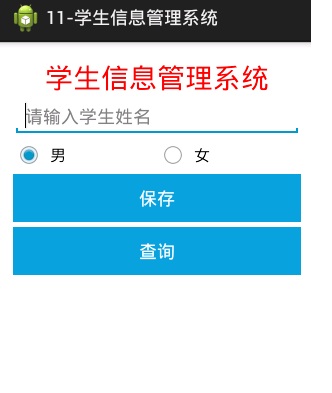
<LinearLayout xmlns:android="http://schemas.android.com/apk/res/android"
    xmlns:tools="http://schemas.android.com/tools"
    android:layout_width="match_parent"
    android:layout_height="match_parent"
    android:orientation="vertical"
    android:paddingBottom="@dimen/activity_vertical_margin"
    android:paddingLeft="@dimen/activity_horizontal_margin"
    android:paddingRight="@dimen/activity_horizontal_margin"
    android:paddingTop="@dimen/activity_vertical_margin"
    tools:context=".MainActivity" >

    <TextView
        android:layout_width="match_parent"
        android:layout_height="wrap_content"
        android:gravity="center_horizontal"
        android:text="學生信息管理系統"
        android:textColor="#ff0000"
        android:textSize="28sp" />
    <!-- 學生姓名 -->

    <EditText
        android:id="@+id/et_name"
        android:layout_width="match_parent"
        android:layout_height="wrap_content"
        android:hint="請輸入學生姓名" />

    <!-- 性別 -->

    <RadioGroup
        android:id="@+id/rg_gender"
        android:layout_width="match_parent"
        android:layout_height="wrap_content"
        android:orientation="horizontal" >

        <RadioButton
            android:id="@+id/rb_man"
            android:layout_width="0dp"
            android:layout_height="wrap_content"
            android:layout_weight="1"
            android:checked="true"
            android:text="男" />

        <RadioButton
            android:id="@+id/rb_felman"
            android:layout_width="0dp"
            android:layout_height="wrap_content"
            android:layout_weight="1"
            android:text="女" />
    </RadioGroup>

    <Button
        android:id="@+id/btn_save"
        android:layout_width="match_parent"
        android:layout_height="wrap_content"
        android:background="#09A3DC"
        android:text="保存"
        android:textColor="#fff" />

    <Button
        android:id="@+id/btn_query"
        android:layout_width="match_parent"
        android:layout_height="wrap_content"
        android:layout_marginTop="5dp"
        android:background="#09A3DC"
        android:text="查詢"
        android:textColor="#fff" />

    <TextView
        android:id="@+id/tv_result"
        android:layout_width="match_parent"
        android:layout_height="wrap_content"/>

</LinearLayout>
/**
 * 學生信息管理系統
    保存學生信息到XML文件 serializer

    步驟:
    1.獲取用戶輸入的用戶名
    2.判斷輸入是否為空, 為空給用戶提示,Toast
    3.使用 serializer,生成XML保存
    查詢
    1.獲取用戶輸入的姓名
    2.查找文件是否存在
    3.存在就解析pull解析,並顯示,不存在就提示

 * @author 劉楠
 *
 * 2016-2-18下午7:50:09
 */
public class MainActivity extends Activity  implements OnClickListener{

    /*
     * 學生姓名
     */
    private EditText et_name;
    /*
     * 學生性別
     */
    private RadioGroup rg_gender;

    /*
     * 保存
     */
    private Button btn_save;
    /*
     * 查詢
     */
    private Button btn_query;

    /*
     * 顯示查詢結果
     */
    private TextView tv_result;

    @Override
    protected void onCreate(Bundle savedInstanceState) {
        super.onCreate(savedInstanceState);
        setContentView(R.layout.activity_main);
        et_name = (EditText) findViewById(R.id.et_name);
        rg_gender = (RadioGroup) findViewById(R.id.rg_gender);

        btn_save = (Button) findViewById(R.id.btn_save);

        btn_query = (Button) findViewById(R.id.btn_query);

        tv_result = (TextView) findViewById(R.id.tv_result);

        /*
         * 設置單擊事件
         */
        btn_save.setOnClickListener(this);
        btn_query.setOnClickListener(this);

    }

    /**
     * 單擊事件監聽器
     */
    @Override
    public void onClick(View v) {
    switch (v.getId()) {
    case R.id.btn_save:
        //保存
        save();
        break;
    case R.id.btn_query:
        //查詢
        query();
        break;
    }

    }
    /**
     * 查詢
     */
    private void query() {
        //獲取用戶輸入的用戶名

                String name = et_name.getText().toString().trim();
                //判斷
                if(TextUtils.isEmpty(name)){
                    Toast.makeText(this, "學生姓名不能為空", Toast.LENGTH_SHORT).show();
                    return ;
                }

            Map<String, String> map =    StudentUtils.getStudent(this,name);
            //tv_result;
            if(map!=null){

                String data="姓名:"+map.get("name")+",性別:"+map.get("gender");
                tv_result.setText(data);
            }
    }

    /**
     * 保存
     */
    private void save() {
        //獲取用戶輸入的用戶名

        String name = et_name.getText().toString().trim();
        //判斷
        if(TextUtils.isEmpty(name)){
            Toast.makeText(this, "學生姓名不能為空", Toast.LENGTH_SHORT).show();
            return ;
        }

        //判斷性別
        String gender="男";
        switch (rg_gender.getCheckedRadioButtonId()) {
        case R.id.rb_man:
            RadioButton rb_man = (RadioButton) findViewById(R.id.rb_man);
            gender=rb_man.getText().toString().trim();
            break;
        case R.id.rb_felman:
            RadioButton rb_felman = (RadioButton) findViewById(R.id.rb_felman);
            gender=rb_felman.getText().toString().trim();
            break;
        }
        /*
         * 開始保存文件 serializer
         */

        boolean flag =StudentUtils.save(this,name,gender);

        if(flag){
            Toast.makeText(this, "保存成功", Toast.LENGTH_SHORT).show();
        }else{
            Toast.makeText(this, "保存失敗", Toast.LENGTH_SHORT).show();
        }

    }


}
工具類
/**
 * 學生保存,查詢的工具類
 *
 * @author 劉楠
 *
 *         2016-2-18下午8:09:29
 */
public class StudentUtils {

    public static boolean save(Context context, String name, String gender) {

        File file = new File(context.getFilesDir(), name + ".xml");
        try {
            OutputStream out = new FileOutputStream(file);
            // 獲取XML生成工具serializer
            XmlSerializer serializer = Xml.newSerializer();
            // 調置輸出編碼
            serializer.setOutput(out, "UTF-8");
            // 設置XML頭
            serializer.startDocument("UTF-8", true);

            serializer.startTag(null, "student");

            serializer.startTag(null, "name");
            serializer.text(name);
            serializer.endTag(null, "name");

            serializer.startTag(null, "gender");
            serializer.text(gender);
            serializer.endTag(null, "gender");

            serializer.endTag(null, "student");

            serializer.endDocument();

            // 關閉流
            out.close();
            return true;
        } catch (Exception e) {
            e.printStackTrace();
        }

        return false;
    }

    /*
     * 查詢
     */
    public static Map<String, String> getStudent(Context context, String name) {

        File file = new File(context.getFilesDir(), name + ".xml");
        if (!file.exists()) {
            Toast.makeText(context, "學生信息不存在", Toast.LENGTH_SHORT).show();
            return null;
        }
        Map<String, String> map = new HashMap<String, String>();
        try {
            InputStream in = new FileInputStream(file);
            // 使用pull解析
            XmlPullParser pullParser = Xml.newPullParser();
            // 讀取編碼
            pullParser.setInput(in, "UTF-8");
            // 事件
            int eventType = pullParser.getEventType();

            while (eventType != XmlPullParser.END_DOCUMENT) {
                // 判斷是不是開始標簽
                if (eventType == XmlPullParser.START_TAG) {

                    if ("name".equals(pullParser.getName())) {

                        String stuName = pullParser.nextText();
                        map.put("name", stuName);

                    } else if ("gender".equals(pullParser.getName())) {
                        String gender = pullParser.nextText();
                        map.put("gender", gender);
                    }
                }
                // 向下移動指針
                eventType = pullParser.next();
            }
            in.close();
            return map;
        } catch (Exception e) {
            e.printStackTrace();
        }

        return null;
    }

}
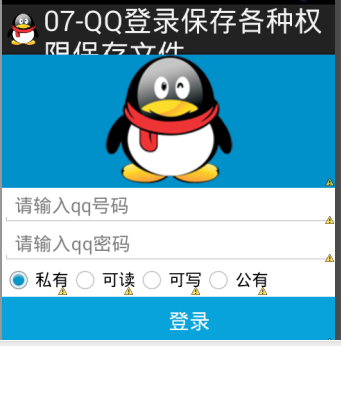
<LinearLayout xmlns:android="http://schemas.android.com/apk/res/android"
    xmlns:tools="http://schemas.android.com/tools"
    android:layout_width="match_parent"
    android:layout_height="match_parent"
    android:orientation="vertical"
    tools:context=".MainActivity" >

    <ImageView
        android:background="#0090CA"
        android:layout_width="match_parent"
        android:layout_height="wrap_content"
        android:src="@drawable/qq"/>

    <!--號碼  -->
    <EditText
        android:id="@+id/et_qqNumber"
        android:layout_width="match_parent"
        android:layout_height="wrap_content"
        android:inputType="number"
        android:hint="請輸入qq號碼"/>
    <!--密碼  -->
    <EditText
        android:id="@+id/et_qqPwd"
        android:layout_width="match_parent"
        android:layout_height="wrap_content"
        android:inputType="textPassword"
        android:hint="請輸入qq密碼"/>
     <!--記住密碼復選框  -->
  <!--  <CheckBox
        android:id="@+id/cb_remember"
        android:layout_width="match_parent"
        android:layout_height="wrap_content"
        android:text="記住密碼"/> -->

        <RadioGroup
            android:id="@+id/rg_premission"
            android:layout_width="match_parent"
            android:layout_height="wrap_content"
            android:orientation="horizontal">

            <RadioButton
                android:id="@+id/rb_private"
                android:checked="true"
                android:layout_width="wrap_content"
                android:layout_height="wrap_content"
                android:text="私有"/>

            <RadioButton
                android:id="@+id/rb_readable"
                android:layout_width="wrap_content"
                android:layout_height="wrap_content"
                android:text="可讀"/>
            <RadioButton
                android:id="@+id/rb_writable"
                android:layout_width="wrap_content"
                android:layout_height="wrap_content"
                android:text="可寫"/>
             <RadioButton
                android:id="@+id/rb_public"
                android:layout_width="wrap_content"
                android:layout_height="wrap_content"
                android:text="公有"/>

        </RadioGroup>
<!--登錄按鍵  -->
    <Button
        android:id="@+id/btn_login"
        android:layout_width="match_parent"
        android:layout_height="wrap_content"
        android:background="#09A3DC"
        android:textSize="20sp"
        android:textColor="#fff"
        android:text="登錄"/>
</LinearLayout>
/**
 * QQ 登錄 保存密碼到私有文件
 * 步驟 1.獲取輸入的用戶名與密碼
 * 2.判斷是否 為空,為空就給用戶提示Toast
 *  3.保存用戶名與密碼到文件
 *
 * @author 劉楠
 *
 *         2016-2-18下午12:39:54
 */
public class MainActivity extends Activity implements OnClickListener {

    private static final String TAG = "MainActivity";
    /*
     * QQ號碼
     */
    private EditText et_qqNumber;
    /*
     * QQ密碼
     */
    private EditText et_qqPwd;
    /*
     * 記住密碼,復選框
     */
    //private CheckBox cb_remember;
    /*
     * 登錄按鍵
     */
    private Button btn_login;


    private RadioGroup rg_premission;
    @Override
    protected void onCreate(Bundle savedInstanceState) {
        super.onCreate(savedInstanceState);
        setContentView(R.layout.activity_main);
        /*
         * 初始化
         */
        et_qqNumber = (EditText) findViewById(R.id.et_qqNumber);
        et_qqPwd = (EditText) findViewById(R.id.et_qqPwd);
    //    cb_remember = (CheckBox) findViewById(R.id.cb_remember);

        btn_login = (Button) findViewById(R.id.btn_login);

        rg_premission = (RadioGroup) findViewById(R.id.rg_premission);

        /*
         * 為登錄按鍵設置單擊事件
         */
        btn_login.setOnClickListener(this);

        /*
         * 回顯示數據
         */
        Map<String, String> map=QQLoginUtils.getUser(this);

        if(map!=null){
            et_qqNumber.setText(map.get("username"));
            et_qqPwd.setText(map.get("password"));
        }

    }

    /**
     * 單擊事件,監聽器
     */
    @Override
    public void onClick(View v) {

        // 判斷ID
        switch (v.getId()) {
        case R.id.btn_login:
            // 執行相應的方法
            qqLogin();
            break;

        default:
            break;
        }

    }

    /**
     * 登錄方法
     */

    public void qqLogin() {
        /*
         * 獲取用戶名與密碼
         */
        String qq = et_qqNumber.getText().toString().trim();
        String pwd = et_qqPwd.getText().toString().trim();
        // 判斷是否為空
        if (TextUtils.isEmpty(qq) || TextUtils.isEmpty(pwd)) {
            Toast.makeText(this, "親,qq號碼 與密碼不能為空!", Toast.LENGTH_SHORT).show();
            return;
        }
        /*
         * 判斷 要保存的類型
         */
        int radioButtonId = rg_premission.getCheckedRadioButtonId();
        boolean flag = false ;
        switch (radioButtonId) {

        case R.id.rb_private:
            //私有
            flag= QQLoginUtils.saveUser(this, qq, pwd,1);
            break;

        case R.id.rb_readable:
            //只讀
            flag= QQLoginUtils.saveUser(this, qq, pwd,2);
            break;

        case R.id.rb_writable:
            //可寫
            flag= QQLoginUtils.saveUser(this, qq, pwd,3);
            break;

        case R.id.rb_public:
            //可讀可寫
            flag= QQLoginUtils.saveUser(this, qq, pwd,4);
            break;


        }

            // 要保存

            // 判斷 是否保存成功
            if (flag) {
                Toast.makeText(this, "保存成功", Toast.LENGTH_SHORT).show();
            } else {
                Toast.makeText(this, "保存失敗", Toast.LENGTH_SHORT).show();

            }


    }

}
工具類
/**
 * 保存用戶名密碼工具類

 * @author 劉楠
 *
 * 2016-2-18下午12:50:55
 */
public class QQLoginUtils {

    /**
     *
     * @param context 上下文
     * @param name 用戶名
     * @param password 密碼
     * @param mode 模式 1,私有,2,只讀,3,只可寫,4,可讀可寫
     * @return  是否保存成功
     */
    public static boolean saveUser(Context context, String name, String password,int mode) {

        OutputStream out=null;
        try {


            switch (mode) {
            case 1:
                out =context.openFileOutput("private.txt",context.MODE_PRIVATE);
                break;
            case 2:
                out =context.openFileOutput("readable.txt", context.MODE_WORLD_READABLE);
                break;
            case 3:
                out =context.openFileOutput("writable.txt", context.MODE_WORLD_WRITEABLE);
                break;
            case 4:
                out =context.openFileOutput("public.txt", context.MODE_WORLD_READABLE+context.MODE_WORLD_WRITEABLE);
                break;

            }

            String data = name +"#"+password;
            out.write(data.getBytes());

            return true;
        } catch (FileNotFoundException e) {
            e.printStackTrace();
        } catch (IOException e) {
            e.printStackTrace();
        }
        return false;
    }


    public static Map<String, String> getUser(Context context) {
        File file = new File(context.getFilesDir(), "user.txt");
        /*
         * 判斷文件是否存在
         */
        if(!file.exists()){
            return null;
        }
        /*
         * 獲取文件
         */
        Map<String,String> map= new HashMap<String, String>();
        BufferedReader br=null;
        try {
            br = new BufferedReader(new InputStreamReader(new FileInputStream(file)));
            String data = br.readLine();
            String[] split = data.split("#");

            map.put("username", split[0]);
            map.put("password", split[1]);
            //返回結果
            br.close();
            return map;
        } catch (FileNotFoundException e) {
            e.printStackTrace();
        } catch (IOException e) {
            e.printStackTrace();
        }
        //
        return null;
    }

}
<LinearLayout xmlns:android="http://schemas.android.com/apk/res/android"
    xmlns:tools="http://schemas.android.com/tools"
    android:layout_width="match_parent"
    android:layout_height="match_parent"
    android:paddingBottom="@dimen/activity_vertical_margin"
    android:paddingLeft="@dimen/activity_horizontal_margin"
    android:paddingRight="@dimen/activity_horizontal_margin"
    android:paddingTop="@dimen/activity_vertical_margin"
    android:orientation="vertical"
    tools:context=".MainActivity" >

    <Button
        android:id="@+id/btn_readPrivate"
        android:layout_width="wrap_content"
        android:layout_height="wrap_content"
        android:text="讀取私有文件private" />
    <Button
        android:id="@+id/btn_writePrivate"
        android:layout_width="wrap_content"
        android:layout_height="wrap_content"
        android:text="寫入私有文件private" />
    <Button
        android:id="@+id/btn_readReadable"
        android:layout_width="wrap_content"
        android:layout_height="wrap_content"
        android:text="讀取可讀文件readable" />
    <Button
        android:id="@+id/btn_writeReadable"
        android:layout_width="wrap_content"
        android:layout_height="wrap_content"
        android:text="寫入可讀文件readable" />
    <Button
        android:id="@+id/btn_readWritable"
        android:layout_width="wrap_content"
        android:layout_height="wrap_content"
        android:text="讀取可寫文件Writable" />
    <Button
        android:id="@+id/btn_writeWritable"
        android:layout_width="wrap_content"
        android:layout_height="wrap_content"
        android:text="寫入可寫文件Writable" />
    <Button
        android:id="@+id/btn_readPublic"
        android:layout_width="wrap_content"
        android:layout_height="wrap_content"
        android:text="讀取公有文件Public" />
    <Button
        android:id="@+id/btn_writePublic"
        android:layout_width="wrap_content"
        android:layout_height="wrap_content"
        android:text="寫入公有文件Public" />

</LinearLayout>
package com.itheiam.readfile;

import java.io.BufferedReader;
import java.io.File;

import java.io.FileOutputStream;
import java.io.FileReader;

import java.io.OutputStream;

import android.app.Activity;
import android.os.Bundle;
import android.view.View;
import android.view.View.OnClickListener;
import android.widget.Button;
import android.widget.Toast;

/**
 * 讀取和寫入各種權限下的文件 07號項目 的文件
 *
 * @author 劉楠
 *
 *         2016-2-18下午6:33:00
 */
public class MainActivity extends Activity implements OnClickListener {
    /*
     * 讀取私有文件按鍵
     */
    private Button btn_readPrivate;
    /*
     * 寫入私有文件按鍵
     */
    private Button btn_writePrivate;
    /*
     * 讀取可讀文件
     */
    private Button btn_readReadable;
    /*
     * 寫入可讀文件
     */
    private Button btn_writeReadable;
    /*
     * 讀取可寫文件
     */
    private Button btn_readWritable;
    /*
     * 寫入可寫文件
     */
    private Button btn_writeWritable;
    /*
     * 讀取公有文件
     */
    private Button btn_readPublic;
    /*
     * 寫入公有文件
     */
    private Button btn_writePublic;

    @Override
    protected void onCreate(Bundle savedInstanceState) {
        super.onCreate(savedInstanceState);
        setContentView(R.layout.activity_main);
        //私有文件
        btn_readPrivate = (Button) findViewById(R.id.btn_readPrivate);
        btn_writePrivate = (Button) findViewById(R.id.btn_writePrivate);

        //可讀文件
        btn_readReadable = (Button) findViewById(R.id.btn_readReadable);
        btn_writeReadable = (Button) findViewById(R.id.btn_writeReadable);

        //可寫文件
        btn_readWritable = (Button) findViewById(R.id.btn_readWritable);
        btn_writeWritable = (Button) findViewById(R.id.btn_writeWritable);
        //公有文件
        btn_readPublic = (Button) findViewById(R.id.btn_readPublic);
        btn_writePublic = (Button) findViewById(R.id.btn_writePublic);
        /*
         * 設置單擊事件
         */
        //私有
        btn_readPrivate.setOnClickListener(this);
        btn_writePrivate.setOnClickListener(this);
        //可讀
        btn_readReadable.setOnClickListener(this);
        btn_writeReadable.setOnClickListener(this);
        //可寫
        btn_readWritable.setOnClickListener(this);
        btn_writeWritable.setOnClickListener(this);
        //公有
        btn_readPublic.setOnClickListener(this);
        btn_writePublic.setOnClickListener(this);
    }

    /**
     * 單擊事件監聽器
     */
    @Override
    public void onClick(View v) {
        switch (v.getId()) {
        case R.id.btn_readPrivate:
            readPrivate();
            break;
        case R.id.btn_writePrivate:
            writePrivate();
            break;
        case R.id.btn_readReadable:
            readReadable();
            break;
        case R.id.btn_writeReadable:
            writeReadable();
            break;
        case R.id.btn_readWritable:
            readWritable();
            break;
        case R.id.btn_writeWritable:
            writeWritable();
            break;
        case R.id.btn_readPublic:
            readPublic();
            break;
        case R.id.btn_writePublic:
            writePublic();
            break;

        }

    }

    /**
     * 寫入公有文件
     */
    private void writePublic() {
        // 獲取公有文件
                File file = new File(
                        "/data/data/com.itheima.qqlogin/files/public.txt");
                if (!file.exists()) {
                    Toast.makeText(this, "private文件不存在", Toast.LENGTH_SHORT).show();
                    return;
                }
                // 開始寫入
                        try {
                            OutputStream out = new FileOutputStream(file);

                            out.write("我寫入了".getBytes());

                            out.close();
                            Toast.makeText(this, "寫入public成功", Toast.LENGTH_SHORT).show();
                        } catch (Exception e) {
                            e.printStackTrace();
                            Toast.makeText(this, "寫入public失敗", Toast.LENGTH_SHORT).show();
                        }
    }
    /**
     * 讀取公有文件
     */
    private void readPublic() {
        // 獲取公有文件
        File file = new File(
                "/data/data/com.itheima.qqlogin/files/public.txt");
                if (!file.exists()) {
                    Toast.makeText(this, "public文件不存在", Toast.LENGTH_SHORT).show();
                    return;
                }
                // 開始讀取
                        try {
                            BufferedReader br = new BufferedReader(new FileReader(file));

                            String data = br.readLine();

                            Toast.makeText(this, data, Toast.LENGTH_SHORT).show();
                            br.close();
                        } catch (Exception e) {
                            e.printStackTrace();
                            Toast.makeText(this, "讀取public文件失敗", Toast.LENGTH_SHORT).show();
                        }
    }

    /**
     * 寫入可寫文件
     */
    private void writeWritable() {
        // 獲取可寫文件
                File file = new File(
                        "/data/data/com.itheima.qqlogin/files/writable.txt");
                if (!file.exists()) {
                    Toast.makeText(this, "writable文件不存在", Toast.LENGTH_SHORT).show();
                    return;
                }
                // 開始寫入
                        try {
                            OutputStream out = new FileOutputStream(file);

                            out.write("我寫入了".getBytes());

                            out.close();
                            Toast.makeText(this, "寫入writable成功", Toast.LENGTH_SHORT).show();
                        } catch (Exception e) {
                            e.printStackTrace();
                            Toast.makeText(this, "寫入writable失敗", Toast.LENGTH_SHORT).show();
                        }
    }
    /**
     * 讀取可寫文件
     */
    private void readWritable() {
        // 獲取可寫文件
        File file = new File(
                "/data/data/com.itheima.qqlogin/files/writable.txt");
                if (!file.exists()) {
                    Toast.makeText(this, "writable文件不存在", Toast.LENGTH_SHORT).show();
                    return;
                }
                // 開始讀取
                        try {
                            BufferedReader br = new BufferedReader(new FileReader(file));

                            String data = br.readLine();

                            Toast.makeText(this, data, Toast.LENGTH_SHORT).show();
                            br.close();
                        } catch (Exception e) {
                            e.printStackTrace();
                            Toast.makeText(this, "讀取writable文件失敗", Toast.LENGTH_SHORT).show();
                        }
    }

    /**
     * 寫入可讀文件
     */
    private void writeReadable() {
        // 獲取可讀文件
        File file = new File(
                "/data/data/com.itheima.qqlogin/files/readable.txt");
        if (!file.exists()) {
            Toast.makeText(this, "private文件不存在", Toast.LENGTH_SHORT).show();
            return;
        }
        // 開始寫入
                try {
                    OutputStream out = new FileOutputStream(file);

                    out.write("我寫入了".getBytes());

                    out.close();
                    Toast.makeText(this, "寫入readable成功", Toast.LENGTH_SHORT).show();
                } catch (Exception e) {
                    e.printStackTrace();
                    Toast.makeText(this, "寫入readable失敗", Toast.LENGTH_SHORT).show();
                }
    }

    /**
     * 讀取可讀文件
     */
    private void readReadable() {
        // 獲取可讀文件
        File file = new File(
                "/data/data/com.itheima.qqlogin/files/readable.txt");
        if (!file.exists()) {
            Toast.makeText(this, "private文件不存在", Toast.LENGTH_SHORT).show();
            return;
        }
        // 開始讀取
                try {
                    BufferedReader br = new BufferedReader(new FileReader(file));

                    String data = br.readLine();

                    Toast.makeText(this, data, Toast.LENGTH_SHORT).show();
                    br.close();
                } catch (Exception e) {
                    e.printStackTrace();
                    Toast.makeText(this, "讀取readable文件失敗", Toast.LENGTH_SHORT).show();
                }
    }

    /*
     * 讀取私有文件
     */
    private void readPrivate() {
        // 獲取私有文件
        File file = new File("/data/data/com.itheima.qqlogin/files/private.txt");
        if (!file.exists()) {
            Toast.makeText(this, "private文件不存在", Toast.LENGTH_SHORT).show();
            return;
        }
        // 開始讀取
        try {
            BufferedReader br = new BufferedReader(new FileReader(file));

            String data = br.readLine();

            Toast.makeText(this, data, Toast.LENGTH_SHORT).show();
            br.close();
        } catch (Exception e) {
            e.printStackTrace();
            Toast.makeText(this, "讀取private文件失敗", Toast.LENGTH_SHORT).show();
        }

    }

    /*
     * 寫入私有文件
     */
    private void writePrivate() {
        // 獲取私有文件
        File file = new File("/data/data/com.itheima.qqlogin/files/private.txt");
        if (!file.exists()) {
            Toast.makeText(this, "private文件不存在", Toast.LENGTH_SHORT).show();
            return;
        }
        // 開始寫入
        try {
            OutputStream out = new FileOutputStream(file);

            out.write("我寫入了".getBytes());

            out.close();
            Toast.makeText(this, "寫入private成功", Toast.LENGTH_SHORT).show();
        } catch (Exception e) {
            e.printStackTrace();
            Toast.makeText(this, "寫入private失敗", Toast.LENGTH_SHORT).show();
        }
    }

}
<LinearLayout xmlns:android="http://schemas.android.com/apk/res/android"
    xmlns:tools="http://schemas.android.com/tools"
    android:layout_width="match_parent"
    android:layout_height="match_parent"
    android:paddingBottom="@dimen/activity_vertical_margin"
    android:paddingLeft="@dimen/activity_horizontal_margin"
    android:paddingRight="@dimen/activity_horizontal_margin"
    android:paddingTop="@dimen/activity_vertical_margin"
    android:orientation="vertical"
    tools:context=".MainActivity" >

    <Button
        android:onClick="getRamSpace"
        android:layout_width="wrap_content"
        android:layout_height="wrap_content"
        android:text="獲取內部存儲空間"/>

    <Button
        android:onClick="getSdSpace"
        android:layout_width="wrap_content"
        android:layout_height="wrap_content"
        android:text="獲取SD卡存儲空間"/>

    <TextView
        android:id="@+id/tv_ram"
        android:layout_width="match_parent"
        android:layout_height="wrap_content"/>
    <TextView
        android:id="@+id/tv_sd"
        android:layout_width="match_parent"
        android:layout_height="wrap_content"/>

</LinearLayout>
public class MainActivity extends Activity {

    /*
     * 顯示內部空間
     */
    private TextView tv_sd;
    /*
     * 顯示SD卡空間
     */
    private TextView tv_ram;
    @Override
    protected void onCreate(Bundle savedInstanceState) {
        super.onCreate(savedInstanceState);
        setContentView(R.layout.activity_main);
        tv_ram = (TextView) findViewById(R.id.tv_ram);

        tv_sd = (TextView) findViewById(R.id.tv_sd);
    }


    /**
     *  獲取內部存儲空間
     * @param v
     */
    public void getRamSpace(View v){
        //總空間
                long totalSpace = Environment.getRootDirectory().getTotalSpace();
                //可用空間
                long freeSpace = Environment.getRootDirectory().getFreeSpace();

                //已經使用的空間
                long  useSpace = totalSpace-freeSpace;
                //總空間大小
                String totalSize = Formatter.formatFileSize(this, totalSpace);
                //可用
                String freeSize = Formatter.formatFileSize(this, freeSpace);
                //已經使用
                String useSize = Formatter.formatFileSize(this, useSpace);

                String data="內部存儲總空間:"+totalSize+", 已經使用:"+useSize+",可用空間:"+freeSize;

                tv_ram.setText(data);


    }
    /**
     *  獲取SD存儲空間
     * @param v
     */
    public void getSdSpace(View v){
        //總空間
        long totalSpace = Environment.getExternalStorageDirectory().getTotalSpace();
        //可用空間
        long freeSpace = Environment.getExternalStorageDirectory().getFreeSpace();

        //已經使用的空間
        long  useSpace = totalSpace-freeSpace;
        //總空間大小
        String totalSize = Formatter.formatFileSize(this, totalSpace);
        //可用
        String freeSize = Formatter.formatFileSize(this, freeSpace);
        //已經使用
        String useSize = Formatter.formatFileSize(this, useSpace);

        String data="SD卡總空間:"+totalSize+", 已經使用:"+useSize+",可用空間:"+freeSize;

        tv_sd.setText(data);


    }

}
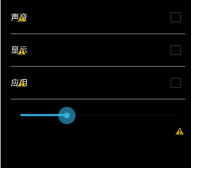
<LinearLayout xmlns:android="http://schemas.android.com/apk/res/android"
    xmlns:tools="http://schemas.android.com/tools"
    android:layout_width="match_parent"
    android:layout_height="match_parent"
    android:background="#000"
    android:orientation="vertical"
    android:paddingBottom="@dimen/activity_vertical_margin"
    android:paddingLeft="@dimen/activity_horizontal_margin"
    android:paddingRight="@dimen/activity_horizontal_margin"
    android:paddingTop="@dimen/activity_vertical_margin"
    tools:context=".MainActivity" >

    <RelativeLayout
        android:layout_width="match_parent"
        android:layout_height="wrap_content" >

        <TextView
            android:layout_width="wrap_content"
            android:layout_height="wrap_content"
            android:layout_centerVertical="true"
            android:text="聲音"
            android:textColor="#fff" />

        <CheckBox
            android:id="@+id/cb_sound"
            android:layout_width="wrap_content"
            android:layout_height="wrap_content"
            android:layout_alignParentRight="true"
            android:layout_centerVertical="true" />
    </RelativeLayout>

    <View
        android:layout_width="match_parent"
        android:layout_height="2dp"
        android:background="#55ffffff"
        android:layout_marginTop="10dp"
        android:layout_marginBottom="10dp"/>

    <RelativeLayout
        android:layout_width="match_parent"
        android:layout_height="wrap_content" >

        <TextView
            android:layout_width="wrap_content"
            android:layout_height="wrap_content"
            android:layout_centerVertical="true"
            android:text="顯示"
            android:textColor="#fff" />

        <CheckBox
            android:id="@+id/cb_display"
            android:layout_width="wrap_content"
            android:layout_height="wrap_content"
            android:layout_alignParentRight="true"
            android:layout_centerVertical="true" />
    </RelativeLayout>
    <View
        android:layout_width="match_parent"
        android:layout_height="2dp"
        android:background="#55ffffff"
        android:layout_marginTop="10dp"
        android:layout_marginBottom="10dp"/>

    <RelativeLayout
        android:layout_width="match_parent"
        android:layout_height="wrap_content" >

        <TextView
            android:layout_width="wrap_content"
            android:layout_height="wrap_content"
            android:layout_centerVertical="true"
            android:text="應用"
            android:textColor="#fff" />

        <CheckBox
            android:id="@+id/cb_app"
            android:layout_width="wrap_content"
            android:layout_height="wrap_content"
            android:layout_alignParentRight="true"
            android:layout_centerVertical="true" />
    </RelativeLayout>
  <View
        android:layout_width="match_parent"
        android:layout_height="2dp"
        android:background="#55ffffff"
        android:layout_marginTop="10dp"
        android:layout_marginBottom="10dp"/>

  <SeekBar
      android:id="@+id/sb"
      android:layout_width="match_parent"
      android:layout_height="wrap_content"
      android:max="100"
      android:progress="30"
      />

     <TextView
         android:gravity="center_horizontal"
         android:id="@+id/tv_sbProgress"
            android:layout_width="match_parent"
            android:layout_height="wrap_content"
            android:layout_centerVertical="true"
            android:textColor="#fff" />
</LinearLayout>
package com.itheima.settingcenter;


import android.app.Activity;
import android.content.SharedPreferences;
import android.content.SharedPreferences.Editor;
import android.os.Bundle;
import android.widget.CheckBox;
import android.widget.CompoundButton;
import android.widget.TextView;
import android.widget.CompoundButton.OnCheckedChangeListener;
import android.widget.SeekBar;
import android.widget.SeekBar.OnSeekBarChangeListener;

/**
 * 使用SharedPreferences存儲選項
 * 1.初始化
 * 2.設置監聽器
 * 3.保存
 * 4.取出

 * @author 劉楠
 *
 * 2016-2-18下午8:44:14
 */
public class MainActivity extends Activity {
    /*
     * 聲音復選框保存
     */
    private CheckBox cb_sound;
    /*
     * 顯示復選框
     */
    private CheckBox cb_display;
    /*
     * app復選框保存
     */
    private CheckBox cb_app;
    /*
     * 進度
     */
    private SeekBar sb;
    /*
     * 聲音復選框保存
     */
    private SharedPreferences soundPreferences;
    /*
     * 顯示復選框
     */
    private SharedPreferences displayPreferences;
    /*
     * app復選框保存
     */
    private SharedPreferences appPreferences;
    /*
     * seekbar的進度保存
     */
    private SharedPreferences spPreferences;
    /*
     *  顯示seekbar進度
     */
    private TextView tv_sbProgress;

    @Override
    protected void onCreate(Bundle savedInstanceState) {
        super.onCreate(savedInstanceState);
        setContentView(R.layout.activity_main);

        cb_sound = (CheckBox) findViewById(R.id.cb_sound);
        cb_display = (CheckBox) findViewById(R.id.cb_display);
        cb_app = (CheckBox) findViewById(R.id.cb_app);

         sb = (SeekBar) findViewById(R.id.sb);

         tv_sbProgress = (TextView) findViewById(R.id.tv_sbProgress);

         soundPreferences = getSharedPreferences("sound", MODE_PRIVATE);

         boolean soundChecked = soundPreferences.getBoolean("isChecked", false);

         cb_sound.setChecked(soundChecked);
         displayPreferences = getSharedPreferences("display", MODE_PRIVATE);

         boolean displayChecked = displayPreferences.getBoolean("isChecked", false);
         cb_display.setChecked(displayChecked);

         appPreferences = getSharedPreferences("app", MODE_PRIVATE);

         boolean appChecked = appPreferences.getBoolean("isChecked", false);
         cb_app.setChecked(appChecked);


         spPreferences= getSharedPreferences("seekBar", MODE_PRIVATE);

         int progress = spPreferences.getInt("progress", 0);

         sb.setProgress(progress);


         /*
          * 設置監聽器
          */
         cb_sound.setOnCheckedChangeListener(new OnCheckedChangeListener() {

            @Override
            public void onCheckedChanged(CompoundButton buttonView, boolean isChecked) {
                Editor editor = soundPreferences.edit();
                editor.putBoolean("isChecked", isChecked);
                editor.commit();

            }
        } );
         /*
          * 設置監聽器
          */
         cb_display.setOnCheckedChangeListener(new OnCheckedChangeListener() {

            @Override
            public void onCheckedChanged(CompoundButton buttonView, boolean isChecked) {

                Editor editor = displayPreferences.edit();
                editor.putBoolean("isChecked", isChecked);
                editor.commit();
            }
        } );
         /*
          * 設置監聽器
          */
         cb_app.setOnCheckedChangeListener(new OnCheckedChangeListener() {

            @Override
            public void onCheckedChanged(CompoundButton buttonView, boolean isChecked) {

                Editor editor = appPreferences.edit();
                editor.putBoolean("isChecked", isChecked);
                editor.commit();
            }

        } );

         /*
          * seekbar監聽器
          */
         sb.setOnSeekBarChangeListener(new OnSeekBarChangeListener() {

            @Override
            public void onStopTrackingTouch(SeekBar seekBar) {
                int progress2 = seekBar.getProgress();

                Editor editor = spPreferences.edit();
                editor.putInt("progress", progress2);
                editor.commit();
            }

            @Override
            public void onStartTrackingTouch(SeekBar seekBar) {

                tv_sbProgress.setText(seekBar.getProgress()+"");
            }

            @Override
            public void onProgressChanged(SeekBar seekBar, int progress,
                    boolean fromUser) {
                tv_sbProgress.setText(progress+"");
            }
        });
    }


}
 ViewPager的刷新、限制預加載、緩存所有,viewpager緩存
ViewPager的刷新、限制預加載、緩存所有,viewpager緩存【框架】: 公共部分:左側菜單、TitleBar、RadioGroup(3個RadioButton
 Android應用開發教程之十七:新浪微博XAuth方式授權與發送
開發新浪微博 首先須要使用官方提供的API接口weibo4android.jar 下載地址:http://download.csdn.net/so
 android下面res目錄,androidres目錄
android下面res目錄,androidres目錄1. 相關文件夾介紹 在Android項目文件夾裡面
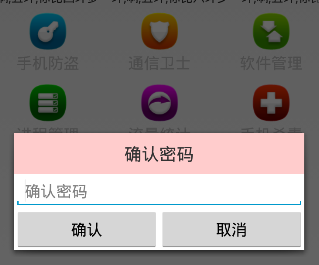 Android 手機衛士--確認密碼對話框編寫,android確認密碼
Android 手機衛士--確認密碼對話框編寫,android確認密碼本文接著實現“確認密碼”功能,也即是用戶以前設置過密碼,現在只需要輸入確認密