編輯:關於Android編程
微信小程序 列表刷新:
微信小程序,最近自己學習微信小程序的知識,就想實現現在APP 那種列表刷新,下拉刷新,上拉加載等功能。
先開看一下界面
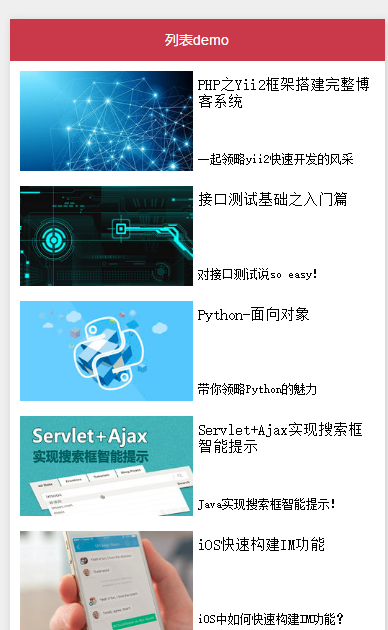
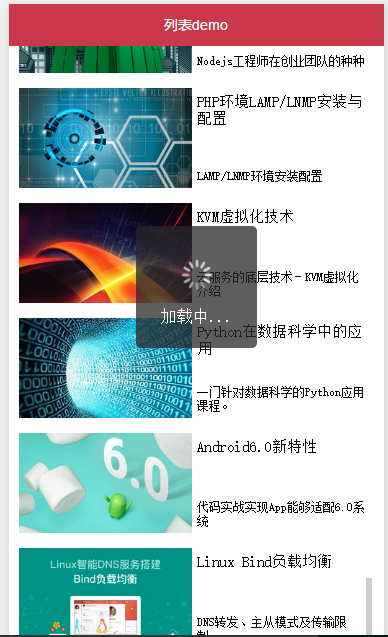
1.wx.request (獲取遠程服務器的數據,可以理解成$.ajax)
2. scroll-view的兩個事件
2.1 bindscrolltolower(滑到頁面底部時)
2.2 bindscroll (頁面滑動時)
2.3 bindscrolltoupper (滑倒頁面頂部時)
然後我們看代碼,詳細描述。
index.js
var url = "http://www.imooc.com/course/ajaxlist";
var page =0;
var page_size = 20;
var sort = "last";
var is_easy = 0;
var lange_id = 0;
var pos_id = 0;
var unlearn = 0;


// 獲取數據的方法,具體怎麼獲取列表數據大家自行發揮
var GetList = function(that){
  that.setData({
    hidden:false
  });
  wx.request({
    url:url,
    data:{
      page : page,
      page_size : page_size,
      sort : sort,
      is_easy : is_easy,
      lange_id : lange_id,
      pos_id : pos_id,
      unlearn : unlearn
    },
    success:function(res){
      //console.info(that.data.list);
      var list = that.data.list;
      for(var i = 0; i < res.data.list.length; i++){
        list.push(res.data.list[i]);
      }
      that.setData({
        list : list
      });
      page ++;
      that.setData({
        hidden:true
      });
    }
  });
}
Page({
 data:{
  hidden:true,
  list:[],
  scrollTop : 0,
  scrollHeight:0
 },
 onLoad:function(){
  //  這裡要非常注意,微信的scroll-view必須要設置高度才能監聽滾動事件,所以,需要在頁面的onLoad事件中給scroll-view的高度賦值
   var that = this;
   wx.getSystemInfo({
     success:function(res){
       console.info(res.windowHeight);
       that.setData({
         scrollHeight:res.windowHeight
       });
     }
   });
 },
 onShow:function(){
  //  在頁面展示之後先獲取一次數據
  var that = this;
  GetList(that);
 },
 bindDownLoad:function(){
  //  該方法綁定了頁面滑動到底部的事件
   var that = this;
   GetList(that);
 },
 scroll:function(event){
  //  該方法綁定了頁面滾動時的事件,我這裡記錄了當前的position.y的值,為了請求數據之後把頁面定位到這裡來。
   this.setData({
     scrollTop : event.detail.scrollTop
   });
 },
 refresh:function(event){
  //  該方法綁定了頁面滑動到頂部的事件,然後做上拉刷新
   page = 0;
   this.setData({
     list : [],
     scrollTop : 0
   });
   GetList(this)
 }
})
index.wxml
<view class="container">
  <scroll-view scroll-top="{{scrollTop}}" scroll-y="true"
    class="list" bindscrolltolower="bindDownLoad" bindscroll="scroll" bindscrolltoupper="refresh">
    <view class="item" wx:for="{{list}}">
      <image class="img" src="{{item.pic_url}}"></image>
      <view class="text">
        <text class="title">{{item.name}}</text>
        <text class="description">{{item.short_description}}</text>
      </view>
    </view>
  </scroll-view>
  <view class="body-view">
    <loading hidden="{{hidden}}" bindchange="loadingChange">
      加載中...
    </loading>
  </view>
</view>
感謝閱讀,希望能幫助到大家,謝謝大家對本站的支持!
 Android開發從相機或相冊獲取圖片裁剪
廢話不多說了,直接給大家貼代碼了。package com.only.android.app;import java.io.File;import android.app.
 Android Material Design(一)材料設計控件大全
主要內容:本文將要介紹Material design和Support library控件,主要包括TextInputLayout、SwitchCompat、SnackBa
 android 關於屏幕截屏的幾種辦法
年末較閒,就上個星期查找各方面的資料關於android截圖事情,自已也測試一些代碼,已改改進或者優化。接下來進行總結一下。其實,如果真正android系統截屏是需要roo
 android SoundRecorder (錄音機)添加錄音列表菜單項
在錄音機中添加一個錄音列表項,點擊後用戶可以看到已經存在的錄音文件。效果圖如下: 修改代碼參照如下: 最初的錄音機是沒有錄音列表選項的,所