編輯:關於Android編程
最近在做下拉框,本來想用spinner,可是spinner達不到項目要求,跟同學同事問了一圈,都在用popwindow,網上看了一下,popwindow挺簡單的,可定制性挺強的,符合我的要求,所以,借鑒網上看的代碼,自己撸了一遍。寫篇博客以防忘記。
首先,先寫個自定義布局,代碼如下
<?xml version="1.0" encoding="utf-8"?>
<LinearLayout xmlns:android="http://schemas.android.com/apk/res/android"
 xmlns:tools="http://schemas.android.com/tools"
 android:layout_width="110dp"
 android:layout_height="wrap_content">
 <LinearLayout
  android:layout_width="100dp"
  android:layout_height="wrap_content"
  android:background="@drawable/bg_circle_drop_down_qr_code"
  android:orientation="vertical"
  android:layout_marginRight="@dimen/padding_10"
  android:paddingBottom="0dp"
  android:paddingLeft="@dimen/padding_5"
  android:paddingRight="@dimen/padding_5"
  android:paddingTop="@dimen/padding_5">

  <LinearLayout
   android:id="@+id/lin_scan_qr_code"
   android:layout_width="match_parent"
   android:layout_height="0dp"
   android:layout_weight="1"
   android:gravity="center"
   android:orientation="horizontal"
   android:paddingBottom="@dimen/padding_5"
   android:paddingTop="@dimen/padding_5">

   <ImageView
    android:layout_width="wrap_content"
    android:layout_height="wrap_content"
    android:src="@drawable/ic_circle_scan_qr_code" />

   <TextView
    android:layout_width="wrap_content"
    android:layout_height="wrap_content"
    android:layout_marginLeft="@dimen/padding_10"
    android:gravity="center"
    android:text="掃一掃"
    android:textColor="@color/color_white"
    android:textSize="@dimen/text_16" />
  </LinearLayout>

  <View
   android:layout_width="wrap_content"
   android:layout_height="1px"
   android:layout_marginLeft="@dimen/padding_3"
   android:layout_marginRight="@dimen/padding_3"
   android:background="@color/color_white" />

  <LinearLayout
   android:id="@+id/lin_my_qr_code"
   android:layout_width="match_parent"
   android:layout_height="0dp"
   android:layout_weight="1"
   android:gravity="center"
   android:orientation="horizontal"
   android:paddingBottom="@dimen/padding_5"
   android:paddingTop="@dimen/padding_5">

   <ImageView
    android:layout_width="wrap_content"
    android:layout_height="wrap_content"
    android:src="@drawable/ic_circle_my_qr_code" />

   <TextView
    android:layout_width="wrap_content"
    android:layout_height="wrap_content"
    android:layout_marginLeft="@dimen/padding_10"
    android:gravity="center"
    android:text="二維碼"
    android:textColor="@color/color_white"
    android:textSize="@dimen/text_16" />
  </LinearLayout>
 </LinearLayout>
</LinearLayout>
第二步,在代碼中定義popwindow樣式,綁定點擊事件,代碼如下:
// // 獲取自定義布局文件pop.xml的視圖
  View customView = getActivity().getLayoutInflater().inflate(R.layout.lay_circle_pop_drop_down_qr_code,
    null, false);
  // 創建PopupWindow實例,200,150分別是寬度和高度

  mQrCodePopWindow = new PopupWindow(customView, CommonUtil.dipToPx(getContext(),110), ViewGroup.LayoutParams.WRAP_CONTENT,true);
  // 設置動畫效果 [R.style.AnimationFade 是自己事先定義好的]
//  popupwindow.setAnimationStyle(R.style.AnimationFade);
//  popupwindow.setTouchable(true);
//  popupwindow.setOutsideTouchable(true);
  mQrCodePopWindow.setBackgroundDrawable(new BitmapDrawable());
  customView.findViewById(R.id.lin_scan_qr_code).setOnClickListener(v -> {
   ToastUtil.show(getContext(),"掃一掃");
   dismissQrCodePopWindow();
  });
  customView.findViewById(R.id.lin_my_qr_code).setOnClickListener(v -> ToastUtil.show(getContext(),"二維碼"));
注意,代碼中的true為setFoucusable,如要點擊空白處隱藏popwindow的話,setFocusable(true)和setBackground()兩者必不可少(親測)。
最後,為空間添加點擊事件,控制下拉框的顯示隱藏,代碼如下:
@OnClick(R.id.lin_top_right)
 public void onClick(View v) {
  if (mQrCodePopWindow != null&& mQrCodePopWindow.isShowing()) {
   mQrCodePopWindow.dismiss();
  } else {
   initQrCodePopWindow();
   mQrCodePopWindow.showAsDropDown(v);
  }
 }
(由於暫時沒有發現好的動畫效果,所以沒有添加動畫,如果大家有發現好的動畫,還請告知一二,在此謝過)
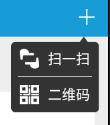
效果圖:
以上就是本文的全部內容,希望對大家的學習有所幫助,也希望大家多多支持本站。
 Android開發筆記(一百一十一)聊天室中的Socket通信
Socket通信基本概念對於程序開發來說,網絡通信的基礎就是Socket,但因為是基礎,所以用起來不容易,今天我們就來談談Socket通信。計算機網絡有個大名鼎鼎的TCP
 Android動畫之二:View Animation
如上一篇博客《Android動畫之一:Drawable Animation》所說,android動畫主要分為三大部分,上一篇博客已經講解Drawable Animatio
 Android使用RecyclerView和CardView,實現知乎日報精致布局
在寫博客園客戶端的時候,突然想到,弄個知乎日報風格的簡單清爽多好!不需要那麼多繁雜的信息干擾視野。先貼上效果圖,左邊是知乎日報的,右邊是本方案的 本文所使用的ide是an
 EventBus的源碼分析
通過這片文章可以回答以下兩個問題1、為啥EventBus的事件處理方法必須申明為Public?但是我用protected也是OK的2、粘性事件的原理,為啥發送多次Even