編輯:關於Android編程
首先先上一張開發效果圖:

效果是模仿微信的發送位置,項目的框架上采用mvp模式,並用了我自己寫的一套lib,地址ndileber
首先界面上的開發,我簡單粘貼代碼(笑)
activity_location_baidu.xml
cell的界面
當然很多資源文件我懶得剔除了,大家自己把資源那塊全換為具體數值吧
LocationAdapter的代碼,由於我寫了兩套,一套是百度地圖的,一套是高德地圖的,裡面有切換方式,大家可以吧高德地圖的那塊去掉。
public class LocationAdapter extends RecyclerView.Adapter{

    List poiItems = null;
    List poiInfos = null;

    LocationAmapActivity.LocationOnCreateItem locationOnCreateItem = null;
    LocationBaiduActivity.LocationOnCreateItem locationOnCreateItem2 = null;

    public LocationAdapter(List poiItems,LocationAmapActivity.LocationOnCreateItem locationOnCreateItem){
        this.poiItems = poiItems;
        this.locationOnCreateItem = locationOnCreateItem;
    }

    public LocationAdapter(List poiInfos, LocationBaiduActivity.LocationOnCreateItem locationOnCreateItem){
        this.poiInfos = poiInfos;
        this.locationOnCreateItem2 = locationOnCreateItem;
    }

    public void refData(List poiItems){
        this.poiItems = poiItems;
        notifyDataSetChanged();
    }

    public void refData2(List poiInfos){
        this.poiInfos = poiInfos;
        notifyDataSetChanged();
    }

    @Override
    public LocationViewHolder onCreateViewHolder(ViewGroup parent, int viewType) {
        View view = LayoutInflater.from(parent.getContext())
                .inflate(R.layout.recy_location_item, parent, false);
        return new LocationViewHolder(view);
    }

    @Override
    public void onBindViewHolder(final LocationViewHolder holder, int position) {
        if(App.MAP_TYPE == App.MAP_BAIDU){
            holder.poiInfo = poiInfos.get(position);
            holder.location_name.setText(holder.poiInfo.name);
            holder.location_local.setText(holder.poiInfo.address);
            if(locationOnCreateItem2!=null){
                holder.mView.setOnClickListener(new View.OnClickListener() {
                    @Override
                    public void onClick(View v) {
                        locationOnCreateItem2.onItemClick(holder.poiInfo);
                    }
                });
            }
        }else{
            holder.poiItem = poiItems.get(position);
            holder.location_name.setText(holder.poiItem.getTitle());
            holder.location_local.setText(holder.poiItem.getSnippet());
            Logger.d(holder.poiItem.getCityName()+holder.poiItem.getProvinceName()+holder.poiItem.getSnippet()+holder.poiItem.getWebsite());
            if(locationOnCreateItem!=null){
                holder.mView.setOnClickListener(new View.OnClickListener() {
                    @Override
                    public void onClick(View v) {
                        locationOnCreateItem.onItemClick(holder.poiItem);
                    }
                });
            }
        }

    }

    @Override
    public int getItemCount() {
        if(App.MAP_TYPE == App.MAP_BAIDU){
            if(poiInfos==null){
                return 0;
            }else{
                return poiInfos.size();
            }
        }else{
            if(poiItems==null){
                return 0;
            }else{
                return poiItems.size();
            }
        }
    }

    public class LocationViewHolder extends RecyclerView.ViewHolder{
        private final View mView;
        private PoiItem poiItem;
        private PoiInfo poiInfo;
        private final TextView location_name;
        private final TextView location_local;

        public LocationViewHolder(View itemView) {
            super(itemView);
            mView = itemView;
            location_name = (TextView) itemView.findViewById(R.id.location_name);
            location_local = (TextView) itemView.findViewById(R.id.location_local);

        }
    }

}
建立接口的連接器:Contract
LocationBaiduContract.java
public interface LocationBaiduContract extends BaseContract{

    public interface View extends BaseView{
        void setAddress(String address);
        void refData(List poiInfoList);
        void sendButtonStatus(int status);
        void pinInfoPanelStatus(int status);
        MapView getMapView();
        void keybordState(boolean show);
        void searchText(String text);
        void setPinInfoText(String text);
        String getSearchText();
        void deleteVisibility(int visiblility);
    }

    public interface Presenter extends BasePresenter,NimLocationManager.NimLocationListener,
            android.view.View.OnClickListener,BaiduMap.OnMapStatusChangeListener,OnGetGeoCoderResultListener,OnGetPoiSearchResultListener,BDLocationListener,LocationBaiduActivity.LocationOnCreateItem,TextWatcher,TextView.OnEditorActionListener {
        void initMap();
    }

}
建立presenter,來操作業務,裡面大部分代碼都是百度地圖開發的代碼,基本不解釋了
LocationBaiduPresenter.java
public class LocationBaiduPresenter implements LocationBaiduContract.Presenter{

    LocationBaiduContract.View view;

    public LocationBaiduPresenter(LocationBaiduContract.View view){
        this.view = Check.checkNotNull(view, "view cannot be null!");
        this.view.setPresenter(this);
    }

    @Override
    public void start() {

    }

    @Override
    public void onDestroy() {
        // 退出時銷毀定位
        mLocClient.stop();
        // 關閉定位圖層
        mBaiduMap.setMyLocationEnabled(false);
        mSearch.destroy();
    }


    private double latitude; // 經度
    private double longitude; // 維度
    private boolean isChick = false;
    private String addressInfo; // 對應的地址信息

    @Override
    public void onGetReverseGeoCodeResult(ReverseGeoCodeResult result) {
        if (result == null  result.error != SearchResult.ERRORNO.NO_ERROR) {
            view.toast( "未找到結果", Toast.LENGTH_LONG);
            return;
        }

        if (result.error == SearchResult.ERRORNO.NO_ERROR) {
            if(!isChick){
                view.setAddress(result.getAddress());
                latitude = result.getLocation().latitude;
                longitude = result.getLocation().longitude;
                addressInfo =  result.getAddress();
            }
            isChick = false;
            List poiInfoList = result.getPoiList();
            view.refData(poiInfoList);
            return;
        }
    }

    @Override
    public void onGetPoiResult(PoiResult result) {
        if (result == null  result.error == SearchResult.ERRORNO.RESULT_NOT_FOUND) {
            view.toast( "未找到結果", Toast.LENGTH_LONG);
            return;
        }
        if (result.error == SearchResult.ERRORNO.NO_ERROR) {
            view.refData(result.getAllPoi());
            return;
        }
    }

    @Override
    public void onGetGeoCodeResult(GeoCodeResult geoCodeResult) {
    }

    @Override
    public void onGetPoiDetailResult(PoiDetailResult poiDetailResult) {

    }

    @Override
    public void onGetPoiIndoorResult(PoiIndoorResult poiIndoorResult) {

    }

    @Override
    public void onLocationChanged(NimLocation location) {

    }

    private boolean isButtonLoc = false;

    LocationClient mLocClient;

    @Override
    public void onClick(View v) {
        switch (v.getId()) {
            case R.id.my_location:
                isButtonLoc = true;
                mLocClient.start();
                break;
            case R.id.action_bar_right_clickable_textview:
                sendLocation();
                ((Activity)(view.getContext())).finish();
                break;
            case R.id.dileber_search_editext_delete:
                view.searchText("");
                break;
            case R.id.dileber_search_editext_button:
                search(view.getSearchText());
                break;
        }
    }
    PoiSearch mPoiSearch;

    private void search(String message){
        mPoiSearch.searchNearby(new PoiNearbySearchOption().keyword(message).location(new LatLng(latitude,longitude)).radius(500).pageNum(1));
        view.keybordState(false);
        view.searchText("");
    }

    @Override
    public void initMap() {
        mBaiduMap = view.getMapView().getMap();
        // 開啟定位圖層
        mBaiduMap.setMyLocationEnabled(true);
        // 定位初始化
        mLocClient = new LocationClient(view.getContext());
        mLocClient.registerLocationListener(this);
        LocationClientOption option = new LocationClientOption();
        option.setOpenGps(true); // 打開gps
        option.setCoorType("bd09ll"); // 設置坐標類型
        option.setScanSpan(1000);
        mLocClient.setLocOption(option);
        mLocClient.start();
        mBaiduMap.setOnMapStatusChangeListener(this);
        mSearch = GeoCoder.newInstance();
        mSearch.setOnGetGeoCodeResultListener(this);
        mPoiSearch = PoiSearch.newInstance();
        mPoiSearch.setOnGetPoiSearchResultListener(this);
    }

    private static LocationProvider.Callback mCallback;
    public static void start(Context context, LocationProvider.Callback callback) {
        mCallback = callback;
        context.startActivity(new Intent(context, LocationBaiduActivity.class));
    }
    private void sendLocation() {
        addressInfo = TextUtils.isEmpty(addressInfo) ? MainApplication.getAppContext().getString(R.string.location_address_unkown) : addressInfo;
        if (mCallback != null) {
            mCallback.onSuccess(longitude, latitude, addressInfo);
        }
    }

    /**
     * 手勢操作地圖,設置地圖狀態等操作導致地圖狀態開始改變。
     * @param mapStatus 地圖狀態改變開始時的地圖狀態
     */
    @Override
    public void onMapStatusChangeStart(MapStatus mapStatus) {

    }
    /**
     * 地圖狀態變化中
     * @param mapStatus 當前地圖狀態
     */
    @Override
    public void onMapStatusChange(MapStatus mapStatus) {

    }
    /**
     * 地圖狀態改變結束
     * @param mapStatus 地圖狀態改變結束後的地圖狀態
     */
    @Override
    public void onMapStatusChangeFinish(MapStatus mapStatus) {

        LatLng ll=mapStatus.target;
        Logger.d("map change sts ch fs:"+ll.latitude+","+ll.longitude+"");
        searchNearBy(ll);
    }

    GeoCoder mSearch;

    public void searchNearBy(LatLng latLng){
        mSearch.reverseGeoCode(new ReverseGeoCodeOption()
                .location(latLng));
    }
    boolean isFirstLoc = true; // 是否首次定位
    BaiduMap mBaiduMap;

    @Override
    public void onReceiveLocation(BDLocation location) {
        // map view 銷毀後不在處理新接收的位置
        if (location == null  view.getMapView() == null) {
            return;
        }
        view.sendButtonStatus(View.VISIBLE);
        view.pinInfoPanelStatus(View.VISIBLE);
        MyLocationData locData = new MyLocationData.Builder()
                .accuracy(location.getRadius())
                // 此處設置開發者獲取到的方向信息,順時針0-360
                .direction(100).latitude(location.getLatitude())
                .longitude(location.getLongitude()).build();
        mBaiduMap.setMyLocationData(locData);
        if (isFirstLocisButtonLoc) {
            isFirstLoc = false;
            isButtonLoc = false;
            LatLng ll = new LatLng(location.getLatitude(),
                    location.getLongitude());
            MapStatus.Builder builder = new MapStatus.Builder();
            builder.target(ll).zoom(18.0f);
            mBaiduMap.animateMapStatus(MapStatusUpdateFactory.newMapStatus(builder.build()));
            searchNearBy(ll);
        }
        mLocClient.stop();
    }

    @Override
    public void onItemClick(PoiInfo poiInfo) {
        view.setPinInfoText(poiInfo.name);
        MapStatus.Builder builder = new MapStatus.Builder();
        builder.target(poiInfo.location).zoom(18.0f);
        mBaiduMap.animateMapStatus(MapStatusUpdateFactory.newMapStatus(builder.build()));
        latitude = poiInfo.location.latitude;
        longitude = poiInfo.location.longitude;
        addressInfo = poiInfo.name;
        isChick = true;
    }

    @Override
    public void beforeTextChanged(CharSequence s, int start, int count, int after) {

    }

    @Override
    public void onTextChanged(CharSequence s, int start, int before, int count) {

    }

    @Override
    public void afterTextChanged(Editable s) {
        int size = view.getSearchText().length();
        if(size>0){
            view.deleteVisibility(View.VISIBLE);
        }else{
            view.deleteVisibility(View.GONE);
        }
    }

    @Override
    public boolean onEditorAction(TextView v, int actionId, KeyEvent event) {
        if (actionId == EditorInfo.IME_ACTION_SEARCH) {
            search(view.getSearchText());
        }
        return false;
    }
}
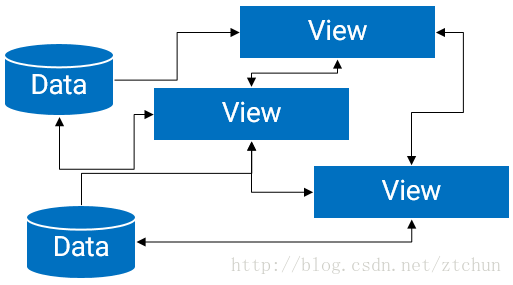 詳解Android中的MVP架構分解和實現
1、概述傳統的Android開發架構一般是MVC模式, Model:業務邏輯和實體模型 View:對應於布局文件 Controllor:對應於Activity 單
 Android學習筆記-EditText&TextView&Button&菜單欄
界面文件activity_main.xml 1 2 3 4 5 6 7 8 9 10 11 12 13 14 15 1
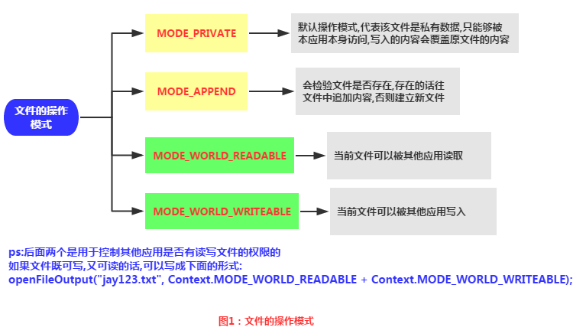 android數據存儲之文件存儲方法
文件存儲是 Android 中最基本的一種數據存儲方式,它不對存儲的內容進行任何的格式化處理,所有數據都是原封不動的保存到文件當中的。概述文件存取的核心就是輸入流和輸出流
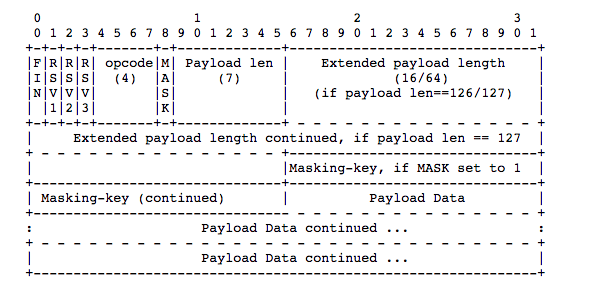 Android WebSocket協議
首先明確一下概念,WebSocket協議是一種建立在TCP連接基礎上的全雙工通信的協議。概念強調了兩點內容:TCP基礎上 全雙工通信那麼什麼是全雙工通信呢? 全雙工就是指