編輯:關於Android編程
管理Activity(Fragment、dialogFragment)的生命周期需要在build.gradle中加入compile 'com.trello:rxlifecycle-components:0.6.1'
在Activity或者Fragment中管理Observable的生命周期是很有必要的,未完成的訂閱會引起內存洩漏
你必須提供一個Observable或者是Observable
你可以通過下面的方式顯式停止序列:
myObservable
    .compose(RxLifecycle.bindUntilEvent(lifecycle, ActivityEvent.DESTROY))
    .subscribe();
你也可以讓RxLifecycle決定在何時的時間停止序列的發送
myObservable
    .compose(RxLifecycle.bindActivity(lifecycle))
    .subscribe();
//發射的內容,每1s發射一條數據
        Observable.interval(1, TimeUnit.SECONDS)
                //序列停止發射後執行的方法
                .doOnUnsubscribe(new Action0() {
                    @Override
                    public void call() {
                        Log.e(TAG, "Unsubscribing subscription from onCreate()");
                    }
                })
                //指定在哪個生命周期序列停止發射
                .compose(this.bindUntilEvent(ActivityEvent.PAUSE))
                //訂閱subscriber
                .subscribe(new Action1() {
                    @Override
                    public void call(Long num) {
                        Log.e(TAG, "Started in onCreate(), running until onPause(): " + num);
                    }
                });
1.指定在某個聲明周期結束
compose(this.
2.使用RxActivity或者RxFragment默認的聲明周期管理來管理
compose(this.
注:RxActivity、RxFragment中默認的取消訂閱的時間
 //RxActivity中的默認LifeCycle
    // Figures out which corresponding next lifecycle event in which to unsubscribe, for Activities
    private static final Func1 ACTIVITY_LIFECYCLE =
            new Func1() {
                @Override
                public ActivityEvent call(ActivityEvent lastEvent) {
                    switch (lastEvent) {
                        case CREATE:                                    //如果在onCreate中訂閱,則在onDestroy中序列被停止發射
                            return ActivityEvent.DESTROY;
                        case START:                                     //如果在onStart中訂閱,則在onStop中序列被停止發射

                            return ActivityEvent.STOP;
                        case RESUME:                                    //如果在onResume中訂閱,則在onPause中序列被停止發射

                            return ActivityEvent.PAUSE;
                        case PAUSE:                                     //如果在onPause中訂閱,則在onStop中序列被停止發射
                            return ActivityEvent.STOP;
                        case STOP:                                      //如果在onStop中訂閱,則在onDestroy中序列被停止發射
                            return ActivityEvent.DESTROY;
                        case DESTROY:                                   //如果在onDestroy中訂閱,則拋出異常
                            throw new OutsideLifecycleException("Cannot bind to Activity lifecycle when outside of it.");
                        default:
                            throw new UnsupportedOperationException("Binding to " + lastEvent + " not yet implemented");
                    }
                }
            };

    //RxFragment中的默認LifeCycle
    // Figures out which corresponding next lifecycle event in which to unsubscribe, for Fragments
    private static final Func1 FRAGMENT_LIFECYCLE =
            new Func1() {
                @Override
                public FragmentEvent call(FragmentEvent lastEvent) {
                    switch (lastEvent) {
                        case ATTACH:                                    //如果在onAttach中訂閱,則在onDetach中序列被停止發射

                            return FragmentEvent.DETACH;
                        case CREATE:                                    //如果在onCreate中訂閱,則在onDestroy中序列被停止發射
                            return FragmentEvent.DESTROY;
                        case CREATE_VIEW:                               //如果在onCreateView中訂閱,則在onDestroyView中序列被停止發射
                            return FragmentEvent.DESTROY_VIEW;
                        case START:                                     //如果在onStart中訂閱,則在onStop中序列被停止發射
                            return FragmentEvent.STOP;
                        case RESUME:                                    //如果在onResume中訂閱,則在onPause中序列被停止發射
                            return FragmentEvent.PAUSE;
                        case PAUSE:                                     //如果在onPause中訂閱,則在onStop中序列被停止發射
                            return FragmentEvent.STOP;
                        case STOP:                                      //如果在onStop中訂閱,則在onDestroy中序列被停止發射
                            return FragmentEvent.DESTROY_VIEW;
                        case DESTROY_VIEW:                              //如果在onDestroyView中訂閱,則在onDestroyView中序列被停止發射
                            return FragmentEvent.DESTROY;
                        case DESTROY:                                   //如果在onDestroyView中訂閱,則在onDestroyView中序列被停止發射
                            return FragmentEvent.DETACH;
                        case DETACH:                                    //如果在onDetach中訂閱,則拋出異常
                            throw new OutsideLifecycleException("Cannot bind to Fragment lifecycle when outside of it.");
                        default:
                            throw new UnsupportedOperationException("Binding to " + lastEvent + " not yet implemented");
                    }
                }
            };
測試代碼:
public class RxLifecycleActivity extends RxAppCompatActivity{

    private static final String TAG = "RxLifecycle";

    @Override
    protected void onCreate(Bundle savedInstanceState) {
        super.onCreate(savedInstanceState);
        setContentView(R.layout.activity_main);

        Log.e(TAG, "onCreate()");

        // Specifically bind this until onPause()
        //發射的內容,每1s發射一條數據
        Observable.interval(1, TimeUnit.SECONDS)
                //序列被停止發射後執行的方法
                .doOnUnsubscribe(new Action0() {
                    @Override
                    public void call() {
                        Log.e(TAG, "Unsubscribing subscription from onCreate()");
                    }
                })
                //指定在哪個生命周期,在onPause()中序列被停止發射
                .compose(this.bindUntilEvent(ActivityEvent.PAUSE))
                //訂閱subscriber
                .subscribe(new Action1() {
                    @Override
                    public void call(Long num) {
                        Log.e(TAG, "Started in onCreate(), running until onPause(): " + num);
                    }
                });
    }

    @Override
    protected void onStart() {
        super.onStart();

        Log.e(TAG, "onStart()");

        // Using automatic unsubscription, this should determine that the correct time to
        // unsubscribe is onStop (the opposite of onStart).
        Observable.interval(1, TimeUnit.SECONDS)
                .doOnUnsubscribe(new Action0() {
                    @Override
                    public void call() {
                        Log.e(TAG, "Unsubscribing subscription from onStart()");
                    }
                })
                //使用默認的聲明周期取消訂閱,在RxActivity中,如果在onStart中訂閱,則在onStop中序列被停止發射
                .compose(this.bindToLifecycle())
                .subscribe(new Action1() {
                    @Override
                    public void call(Long num) {
                        Log.e(TAG, "Started in onStart(), running until in onStop(): " + num);
                    }
                });
    }

    @Override
    protected void onResume() {
        super.onResume();

        Log.e(TAG, "onResume()");

        // `this.` is necessary if you're compiling on JDK7 or below.
        //
        // If you're using JDK8+, then you can safely remove it.
        Observable.interval(1, TimeUnit.SECONDS)
                .doOnUnsubscribe(new Action0() {
                    @Override
                    public void call() {
                        Log.e(TAG, "Unsubscribing subscription from onResume()");
                    }
                })
                //指定在onDestroy()中序列被停止發射
                .compose(this.bindUntilEvent(ActivityEvent.DESTROY))
                .subscribe(new Action1() {
                    @Override
                    public void call(Long num) {
                        Log.e(TAG, "Started in onResume(), running until in onDestroy(): " + num);
                    }
                });
    }

    @Override
    protected void onPause() {
        super.onPause();

        Log.e(TAG, "onPause()");
    }

    @Override
    protected void onStop() {
        super.onStop();

        Log.e(TAG, "onStop()");
    }

    @Override
    protected void onDestroy() {
        super.onDestroy();

        Log.e(TAG, "onDestroy()");

    }
運行結果:
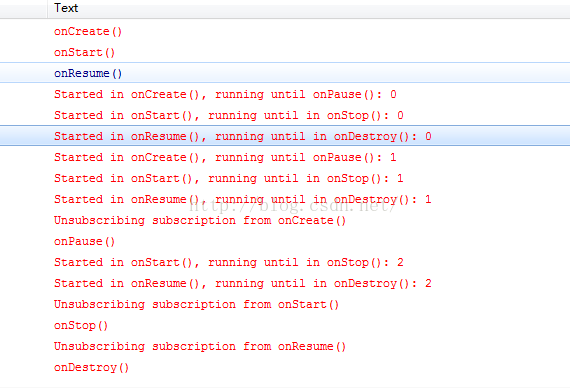
注:1.參考資料https://github.com/trello/RxLifecycle
2.RxLifecycle不會自動取消訂閱,他只是停止了序列繼續發射,取消訂閱需要手動執行
 Android 增量升級學習使用記錄
好久沒有發博客了,現在工作忙了,底層代碼跟蹤學習的東西很久沒有做成文檔了,雖然博客寫的爛,但是再寫的過程中,能更清晰的認識到自己那個地方還不清晰,不明白。這樣能更好的嘴一
 Android開發:app工程集成銀聯支付功能(服務器端)
一.功能描述因為是自己開發了一個app應用,沒資格去申請微信支付和支付寶支付,於是就采用了銀聯支付功能,銀聯支付分為了兩種環境:測試環境和生產環境,一般前期開發的時候都是
 android 圖像處理(黑白,模糊,浮雕,圓角,鏡像,底片,油畫,灰白,加舊,哈哈鏡,放大鏡)
前些天在github上得到一個關於圖像處理的源碼(地址找不到了),挺全面,閒了分享一下。感謝開源。 對於圖片的反轉,傾斜,縮放之類的操作就不提了,網上太多了
 android-wheel控件實現三級聯動效果
本文實例為大家分享了android wheel省市縣三級聯動效果,供大家參考,具體內容如下在github上面有一個叫做 Android-wheel 的開源控件, 代碼地址