編輯:關於Android編程
穿插一篇自定義view 的動畫效果,偶然看到的一個gif刷新齒輪效果圖片,原圖如下:

感覺挺有意思的,就想自己也做一個,發費了一番功夫,算是做出了基本效果,但原諒我使其美觀盡毀,做出的效果如下:
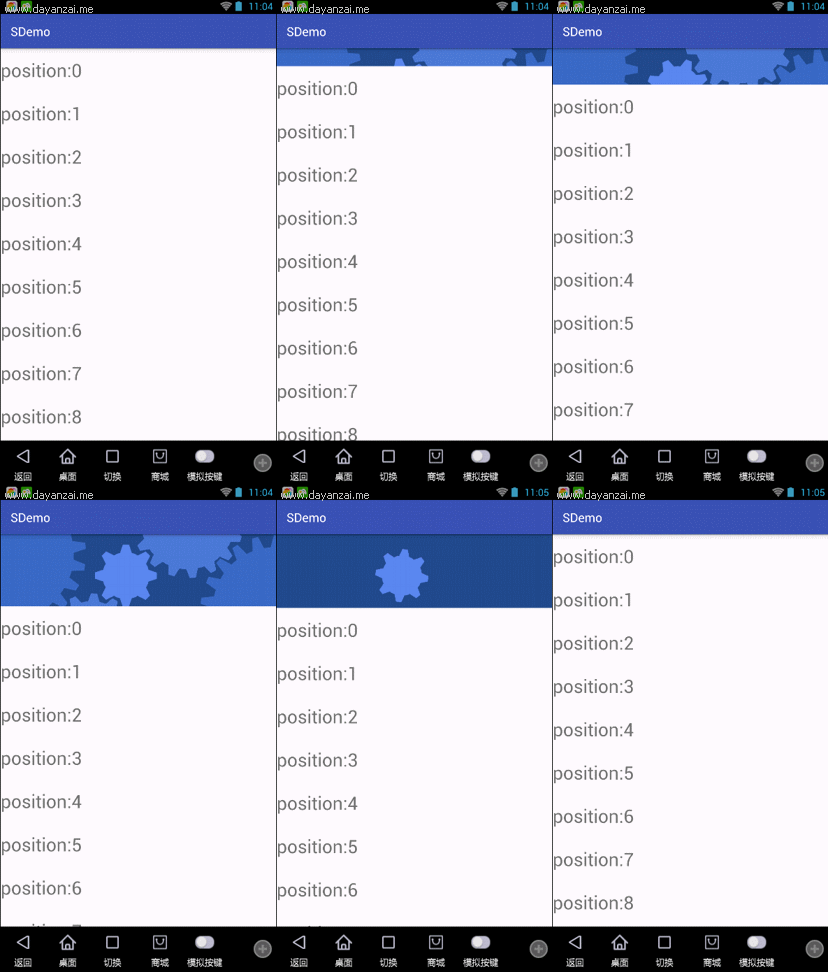
gif錄制有些掉幀
好了,放源碼了:
public class GearView extends View {
    private Context context;
    private Paint paint;
    private float PI = 3.1415926f;
    private int circleGrade = 1;//圓的齒輪個數 9+circleGrade 個
    private float gearWidth = 40;
    private float gearHeight = 50;
    private float length = 60;//弧長
    private List circles;//存儲圓的參數
    private Map bitmaps;//把已經繪制好的bitmap存儲起來,循環利用
    private int speedArgu = 20;//旋轉速度參數
    private int viewWidth;//所在view 的寬度
    private int viewHeight;//所在view 的高度
    private boolean startRotato = true;//是否開始動畫
    private int r1;
    private int r2;
    private int r3;
    private int r4;
    private int r5;

    private float fTran = 0;//平移基本數
    private float translationArgu = 4.0f;//平移乘數
    private float fRotate = 0;//平移後中心旋轉基本數
    private float transientRotate = 70.0f;//平移後中心旋轉乘數
    private float scale = 0.001f;//平移後中心縮放 程度
    private float scaleBase = 1.0f;//平移後中心縮放基本數

    public boolean isStartRotato() {
        return startRotato;
    }

    public void setStartRotato(boolean startRotato) {
        this.startRotato = startRotato;
    }

    public int getSpeedArgu() {
        return speedArgu;
    }

    public void setSpeedArgu(int speedArgu) {
        if(speedArgu > 70){
            speedArgu = 70;
        }
        if(speedArgu < 5 && speedArgu > 0){
            speedArgu = 5;
        }
        if(speedArgu < -70){
            speedArgu = -70;
        }
        if(speedArgu <0 && speedArgu > -5){
            speedArgu = -5;
        }
        this.speedArgu = speedArgu;
    }

    public GearView(Context context) {
        super(context);
        this.context = context;

        init();
    }

    public GearView(Context context, AttributeSet attrs) {
        super(context, attrs);
        context = context;
        init();
    }

    public GearView(Context context, AttributeSet attrs, int defStyleAttr) {
        super(context, attrs, defStyleAttr);
        context = context;
        init();
    }

    private void init() {
        paint = new Paint();
        paint.setAntiAlias(false);
        bitmaps = new HashMap();
        circles = new ArrayList();

    }

    @Override
    protected void onSizeChanged(int w, int h, int oldw, int oldh) {
        super.onSizeChanged(w, h, oldw, oldh);
        this.viewHeight = h;
        this.viewWidth = w;
        initCircle();
    }

    private void initCircle() {
        float centerX = viewWidth/2;
        float centerY = viewHeight/2;

        //添加圓和設置位置,在此處添加和修改即可

        r1 = 3;
//        float c1Top = centerY-getRaidus(r1) * 2;
        float c1Top = centerY-getRaidus(r1) -20;
        float c1Left = centerX-getRaidus(r1) * 2;
        int color1 = getResources().getColor(R.color.colorGear1);
        Circle circle = new Circle(c1Top,c1Left,getRaidus(r1), false,0,0,color1);
        circles.add(circle);

        r2 = 8;
        updataHeight(r2);
        float c2Top = c1Top + getRaidus(r2) + gearHeight;
        float c2Left = c1Left - getRaidus(r2) - gearHeight;
        int color2 = getResources().getColor(R.color.colorGear2);
        circle = new Circle(c2Top ,c2Left, getRaidus(r2), true,0,3, color2);
        circles.add(circle);

        r3 = 18;
        updataHeight(r3);
        float c3Top = c2Top - getRaidus(r3) -getRaidus(r2) - gearHeight + 5;
        float c3Left = c2Left - getRaidus(r3) - getRaidus(r2)- gearHeight + 5;
        int color3 = getResources().getColor(R.color.colorGear3);
        circle = new Circle(c3Top ,c3Left, getRaidus(r3), false,0,6, color3);
        circles.add(circle);

        r4 = 11;
        updataHeight(r4);
        float c4Top = c1Top - getRaidus(r4) - gearHeight - getRaidus(r1);
        float c4Left = c1Left + getRaidus(r4) + gearHeight - getRaidus(r1);
        int color4 = getResources().getColor(R.color.colorGear4);
        circle = new Circle(c4Top ,c4Left, getRaidus(r4), true,0,-5, color4);
        circles.add(circle);

        r5 = 16;
        updataHeight(r5);
        float c5Top = c4Top  +getRaidus(r5) + gearHeight + 10 ;
        float c5Left = c4Left  + getRaidus(r5)+ gearHeight +10 ;
        int color5 = getResources().getColor(R.color.colorGear5);
        circle = new Circle(c5Top ,c5Left, getRaidus(r5), false,0,2, color5);
        circles.add(circle);

    }

    /**
     * 供外部調用旋轉
     * */
    public void startRotato(float dy){
        int speed = (int) (dy * 4);
        setSpeedArgu(speed);
        startRotato = true;
        isTranslation = false;

        if((speed < 20 && speed >0) || (speed < 0 && speed > -20)){
            speed = 20;
        }
        if(speed <= -20){
            speed = Math.abs(speed);
        }
        if(speed > 100 || speed < -100){
            speed = 100;
        }
        for(int i = 0;i0.01f && scale <0.03f){
            scaleBase = scaleBase -scale +0.01f;
        }
        matrix.postScale(scaleBase,scaleBase);

        matrix.postTranslate(circle.getLeft() + offsetX, circle.getTop() + offsetY);
        canvas.drawBitmap(bitmap,matrix,null);

        fTran+=1.0f * translationArgu;
        Bitmap bitmap1 = bitmaps.get(getRaidus(r2));
        Matrix matrix1 = new Matrix();
        Circle circle1 = circles.get(1);
        matrix1.postTranslate(circle1.getLeft()-fTran,circle1.getTop()+fTran);
        canvas.drawBitmap(bitmap1,matrix1,null);

        Bitmap bitmap2 = bitmaps.get(getRaidus(r3));
        Matrix matrix2 = new Matrix();
        Circle circle2 = circles.get(2);
        matrix2.postTranslate(circle2.getLeft()-fTran,circle2.getTop()-fTran);
        canvas.drawBitmap(bitmap2,matrix2,null);

        Bitmap bitmap3 = bitmaps.get(getRaidus(r4));
        Matrix matrix3 = new Matrix();
        Circle circle3 = circles.get(3);
        matrix3.postTranslate(circle3.getLeft()+fTran,circle3.getTop()-fTran);
        canvas.drawBitmap(bitmap3,matrix3,null);

        Bitmap bitmap4 = bitmaps.get(getRaidus(r5));
        Matrix matrix4 = new Matrix();
        Circle circle4 = circles.get(4);
        matrix4.postTranslate(circle4.getLeft()+fTran,circle4.getTop()+fTran);
        canvas.drawBitmap(bitmap4,matrix4,null);
    }

    /*繪制圓的動畫效果*/
    private void drawCircle(Canvas canvas, Circle circle) {
        float top = circle.getTop();
        float left = circle.getLeft();
        float radius = circle.getRaidus();
        boolean isClockwise = circle.isClockwise();
        float speed = circle.getSpeed();

        canvas.drawColor(Color.TRANSPARENT);
        Paint paint = new Paint(this.paint);
        paint.setColor(Color.YELLOW);
        Bitmap trapezoidBitmap = getTrapezoidBitmap(circle, paint);

        Matrix matrix = new Matrix();
        int offsetX = trapezoidBitmap.getWidth() / 2;
        int offsetY = trapezoidBitmap.getHeight() / 2;
        matrix.postTranslate(-offsetX, -offsetY);

        if (isClockwise) {
            matrix.postRotate(speed+circle.getStartDegree());
        } else {
            matrix.postRotate(-speed+circle.getStartDegree());
        }
        float degree = getDegree(0.1f * speedArgu, radius);
        speed += degree;
        circle.setSpeed(speed);

        matrix.postTranslate(left + offsetX, top + offsetY);
        canvas.drawBitmap(trapezoidBitmap, matrix, null);


    }

    /*繪制圓*/
    private Bitmap getTrapezoidBitmap(Circle circle, Paint paint) {
        float radius = circle.getRaidus();
        if(bitmaps == null){
            bitmaps = new HashMap();
        }
        Bitmap bitmap = bitmaps.get(radius);
        if (bitmap != null) {
            return bitmap;
        }
        Bitmap bitmapTmp = Bitmap.createBitmap((int) (radius * 2 + gearHeight * 2), (int) (radius * 2 + gearHeight * 2), Bitmap.Config.ARGB_8888);
        Canvas canvas = new Canvas(bitmapTmp);
        canvas.drawColor(Color.TRANSPARENT);
        canvas.translate(bitmapTmp.getWidth() / 2, bitmapTmp.getHeight() / 2);
        /* 設置漸變色  */
        /*Shader mShader = new LinearGradient(0, 0, 100, 100,
                new int[]{Color.RED, Color.GREEN, Color.BLUE, Color.YELLOW,
                        Color.LTGRAY}, null, Shader.TileMode.REPEAT); // 一個材質,打造出一個線性梯度沿著一條線。
        paint.setShader(mShader);*/
        paint.setColor(circle.getColor());
        canvas.drawCircle(0, 0, radius, paint);
        drawGear(canvas,circle, paint);
        bitmaps.put(radius,bitmapTmp);
        return bitmapTmp;
    }

    /*在圓上畫齒輪*/
    private void drawGear(Canvas canvas, Circle circle, Paint paint) {
        updataHeight(circle.getRaidus());
        float radius = circle.getRaidus();
        Path path = new Path();
        path.moveTo(-(gearWidth / 2), -radius + 5);
        path.lineTo(gearWidth / 2, -radius + 5);
        path.lineTo(gearWidth / 2 - 10, -radius - gearHeight + 10);
        path.lineTo(-(gearWidth / 2 - 10), -radius - gearHeight + 10);
        path.lineTo(-(gearWidth / 2), -radius + 5);
        int num = (int) (360 / getDegree(length, radius));
        Paint p = new Paint(paint);
        p.setColor(circle.getColor());
        for (int i = 0; i <= num; i++) {
            canvas.drawPath(path, p);
            canvas.rotate(getDegree(length, radius));
        }
        canvas.save();
    }

    private void updataHeight(float radius) {
        gearHeight = radius/4f;
        if(gearHeight<35){
            gearHeight = 35;
        } else if(gearHeight > 50){
            gearHeight = 50;
        }
    }

    /**
     * 由弧長獲取度數
     */
    public float getDegree(float length, float r) {
        float degree = 360 * length / (2 * PI * r);
        return degree;
    }

    public float getPerimeter(float r) {
        float perimeter = 2 * PI * r;
        return perimeter;
    }

    /**
     * 對圓的半徑有要求
     *
     * @param multiple
     * @return
     */
    public float getRaidus(int multiple) {
        int gearNum = 5;
        gearNum += multiple;//gearNum代表圓上齒輪的個數
        float f1 = length * gearNum;
        float f = f1 / (2 * PI);
        return f;
    }

    public void setGear(int gear) {
        gearHeight = gearHeight + gear*3;
    }

    class Circle {
        float top;//頂部坐標
        float left;//左側坐標
        float raidus;//半徑
        float speed;//旋轉速度
        boolean clockwise;//旋轉方向
        float gearWidth;
        float gearHeight;
        float startDegree;//起始角度
        private int color;

        public int getColor() {
            return color;
        }

        public void setColor(int color) {
            this.color = color;
        }

        public float getStartDegree() {
            return startDegree;
        }

        public void setStartDegree(float startDegree) {
            this.startDegree = startDegree;
        }

        public float getGearWidth() {
            return gearWidth;
        }

        public void setGearWidth(float gearWidth) {
            this.gearWidth = gearWidth;
        }

        public float getGearHeight() {
            return gearHeight;
        }

        public void setGearHeight(float gearHeight) {
            this.gearHeight = gearHeight;
        }

        public Circle(float top, float left, float raidus, boolean clockwise, float speed, float startDegree, int color) {
            this.left = left;
            this.top = top;
            this.raidus = raidus;
            this.clockwise = clockwise;
            this.speed = speed;
            this.startDegree = startDegree;
            this.color = color;
        }

        public boolean isClockwise() {
            return clockwise;
        }

        public void setClockwise(boolean clockwise) {
            this.clockwise = clockwise;
        }

        public float getTop() {
            return top;
        }

        public void setTop(float top) {
            this.top = top;
        }

        public float getLeft() {
            return left;
        }

        public void setLeft(float left) {
            this.left = left;
        }

        public float getRaidus() {
            return raidus;
        }

        public void setRaidus(float raidus) {
            this.raidus = raidus;
        }

        public float getSpeed() {
            return speed;
        }

        public void setSpeed(float speed) {
            this.speed = speed;
        }
    }

}
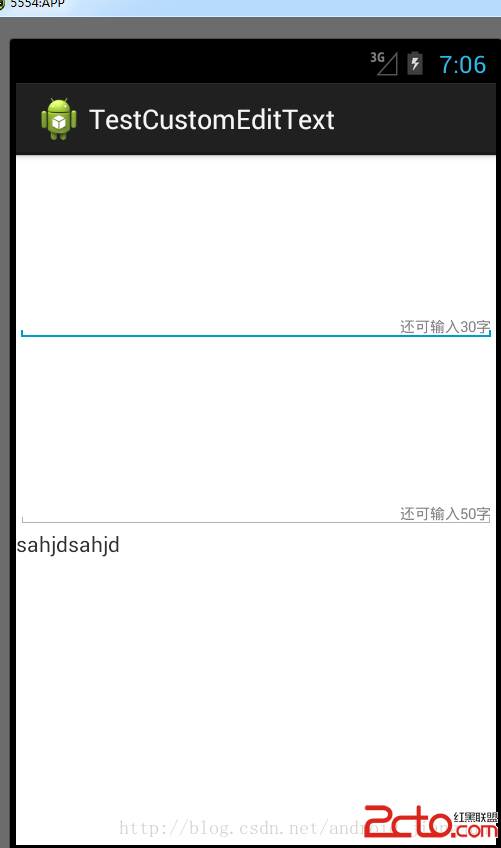 Android 中自定義控件之判斷還剩多少可輸入字符的EditText
最近做的項目有個需求就是判斷一下還 剩多少字符可輸入,也就是對EditText 的文本變化做監聽 ,功能實現了,但是感覺使用組合方式,每次都要編寫,還不如寫
 android 5.X Toolbar+DrawerLayout實現抽屜菜單
前言?android5.X新增的一個控件Toolbar,這個控件比ActionBar更加自由,可控,由於以前的ActionBar的靈活性比較差,所以google逐漸使用T
 android GridView多選效果的實例代碼
具體代碼如下:main.xml復制代碼 代碼如下:<LinearLayout xmlns:android=http://schemas.android.com/ap
 Android的Launcher啟動器中添加快捷方式及小部件實例
前言: 最近一直在看Launcher模塊,經過差不多兩個月學習,終於摸透了Launcher的一些主要功能實現,目前繼續還處於摸索狀態。未看Launcher時,於我而言,只