編輯:關於Android編程
1、獲取文件的最後修改時間
	@SuppressLint("SimpleDateFormat")
	public String getFileDataTime(File file) {
		Date date = new Date(file.lastModified());
		SimpleDateFormat sdformat = new SimpleDateFormat("yyyy-MM-dd HH:mm:ss");// 24小時制
		String LgTime = sdformat.format(date);
		return LgTime;
	}
	@SuppressLint("SimpleDateFormat")
	public int compareDataTime(String date1, String date2) {
		java.text.DateFormat df = new java.text.SimpleDateFormat(
				"yyyy-MM-dd HH:mm:ss");
		java.util.Calendar c1 = java.util.Calendar.getInstance();
		java.util.Calendar c2 = java.util.Calendar.getInstance();
		try {
			c1.setTime(df.parse(date1));
			c2.setTime(df.parse(date2));
		} catch (java.text.ParseException e) {
			System.err.println("error");
		}
		int result = c1.compareTo(c2);
		if (result == 0)
			System.out.println("c1==c2");
		else if (result < 0)
			System.out.println("c1c2");

		return result;
	}
	public String[] compareStringPre(String[] Source, String[] Object) {
		String[] result;
		if (Source.length >= Object.length) {
			result = new String[Source.length];
		} else {
			result = new String[Object.length];
		}
		int n = 0;
		for (int i = 0; i < Object.length; i++) {
			boolean flag = false;
			for (int j = 0; j < Source.length; j++) {
				if (Object[i].equals(Source[j])) {
					flag = true;
				}
			}
			if (!flag) {
				result[n] = Object[i];
				n++;
			}
		}
		return result;
	}
	private boolean saveCrash(String crash) {
		String fileName = "cache.txt";
		try {
			File file = new File(mstrFilePath, fileName);
			FileOutputStream fos = new FileOutputStream(file);
			fos.write(crash.toString().getBytes());
			fos.close();
		} catch (Exception e) {
			return false;
		}
		return true;
	}
	public String readCrashData() {
		String strDataLine = "";
		String filePath = mstrFilePath + "/cache.txt";
		File file = new File(filePath);
		if (file.exists() == false)
			return strDataLine;
		long fileSize = file.length();
		// 文件大於1M, 認為是無效數據, 直接刪除
		if (fileSize >= 1 * 1024 * 1024) {
			file.delete();
			return strDataLine;
		}
		if (file.canRead() == false)
			return strDataLine;
		try {
			FileInputStream in = new FileInputStream(file);
			BufferedReader reader = new BufferedReader(
					new InputStreamReader(in));
			strDataLine = reader.readLine();
			reader.close();
		} catch (FileNotFoundException e) {
			e.printStackTrace();
			return strDataLine;
		} catch (IOException e) {
			e.printStackTrace();
			return strDataLine;
		}
		return strDataLine;
	}
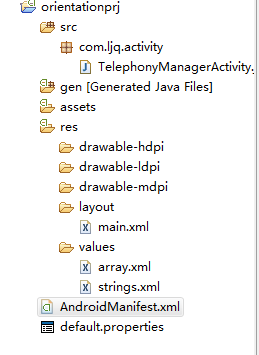 Android中TelephonyManager類的用法案例詳解
本文以案例形式分析了Android中TelephonyManager類的用法。分享給大家供大家參考。具體如下:目錄結構:main.xml布局文件:<?xml
 Android仿支付寶支付密碼輸入框
本文實例為大家分享了Android實現一個仿支付寶支付密碼的輸入框,主要實現如下:PasswordView.javapackage com.jackie.alipay.p
 Android自定義控件系列三:如何畫畫
前面章節我們說了如何定義屬性、如何定義寬高,這樣之後組件的簡單外形或輪廓就已經出來,或者說已經定義出了畫布的大小,解下來就是如何在畫布上揮毫潑墨了。組件(除了容器組件)實
 如何為RecyclerView添加分隔線
我在簡書上發布了我個人的第一篇技術文檔:RecyclerView系列之: RecyclerView系列之(1)為RecyclerView添加Header和Footer,也