編輯:關於Android編程
main.xml代碼如下:
package org.lxh.demo;

import android.app.Activity;
import android.app.AlertDialog;
import android.app.Dialog;
import android.app.Notification;
import android.app.NotificationManager;
import android.app.PendingIntent;
import android.content.DialogInterface;
import android.content.Intent;
import android.os.Bundle;
import android.view.View;
import android.view.View.OnClickListener;
import android.view.View.OnFocusChangeListener;
import android.widget.AdapterView;
import android.widget.AdapterView.OnItemClickListener;
import android.widget.AdapterView.OnItemSelectedListener;
import android.widget.ArrayAdapter;
import android.widget.Button;
import android.widget.EditText;
import android.widget.Spinner;
import android.widget.TextView;

public class Hello extends Activity {
	private NotificationManager myNotification;
	private Spinner spinner;
	private ArrayAdapter  myAdapter;
	private static final String[] status={在線,離開,忙碌,馬上回來,離線};
	public void onCreate(Bundle savedInstanceState) {
		super.onCreate(savedInstanceState); // 生命周期方法
		super.setContentView(R.layout.main); // 設置要使用的布局管理器
		this.myNotification=(NotificationManager)getSystemService(NOTIFICATION_SERVICE);
		this.myAdapter=new ArrayAdapter(this,android.R.layout.simple_spinner_item,this.status);
		this.spinner=(Spinner)super.findViewById(R.id.spinner);
		this.spinner.setAdapter(myAdapter);
		this.spinner.setOnItemSelectedListener(new Item());

	}
	private class Item implements OnItemSelectedListener{


		private void setNotiType(int iconId, String text) {
			Intent notifyIntent=new Intent(Hello.this,Test.class);
			notifyIntent.setFlags(Intent.FLAG_ACTIVITY_NEW_TASK);
			PendingIntent appIntent=PendingIntent.getActivity(Hello.this, 0, notifyIntent, 0);
			Notification noti=new Notification();
			noti.icon=iconId;
			noti.tickerText=text;
			noti.defaults=Notification.DEFAULT_SOUND;
			noti.setLatestEventInfo(Hello.this, MSN登錄狀態, text, appIntent);
			myNotification.notify(0,noti);
		}

		public void onItemSelected(AdapterView parent, View v, int position,
				long id) {
			if(Hello.this.status[position].equals(在線)){
				setNotiType(R.drawable.msn,在線);
			}else if(Hello.this.status[position].equals(離開)){
				setNotiType(R.drawable.away,離開);
			}
			else if(Hello.this.status[position].equals(忙碌)){
				setNotiType(R.drawable.busy,忙碌);
			}
			else if(Hello.this.status[position].equals(馬上回來)){
				setNotiType(R.drawable.min,馬上回來);
			}
			else {
				setNotiType(R.drawable.offine,離線);
			}


		}

		public void onNothingSelected(AdapterView arg0) {


		}

	}
}
package org.lxh.demo;

import android.app.Activity;
import android.os.Bundle;
import android.widget.Toast;

public class Test extends Activity {

	@Override
	protected void onCreate(Bundle savedInstanceState) {

		super.onCreate(savedInstanceState);
		Toast.makeText(this, 這是模擬MSN切換登錄狀態的程序, Toast.LENGTH_SHORT);
		finish();
	}


}
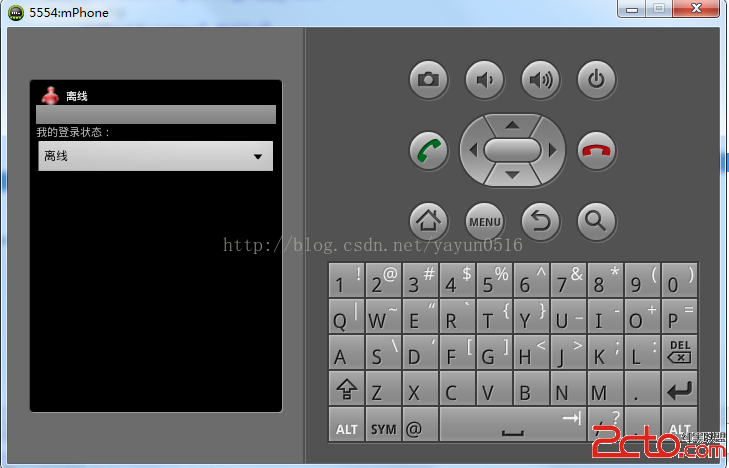
運行如下:

 Android觸摸事件傳遞圖解
本博文講解流程TouchEvent相關事件簡介流程圖分解講解總結與歸納一.TouchEvent相關事件簡介 android TouchEvent相關事件有&nb
 Android 畫一個太極圖實例代碼
今天練手一下,一起來畫個太極圖吧~最終效果如下:最終效果一般都是先講原理,我就反其道而行,先講實現吧。1.繼承實現初始化方法繼承View,實現基本的構造函數:public
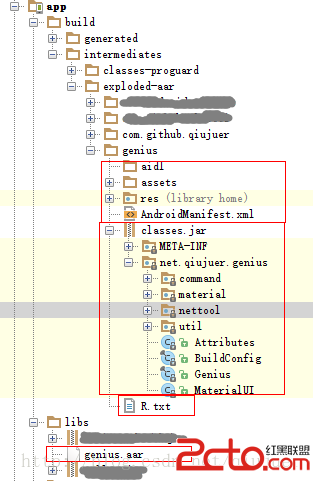 [Android][Android Studio] *.jar 與 *.aar 的生成與*.aar導入項目方法
主要講解Android Studio中生成aar文件以及本地方式使用aar文件的方法。 在Android Studio中對一個自己庫進行生成操作時將會同時生成*.jar與
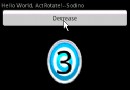 Android實現文字翻轉動畫的效果
本文實現了Android程序文字翻轉動畫的小程序,具體代碼如下:先上效果圖如下:要求:沿Y軸正方向看,數值減1時動畫逆時針旋轉,數值加1時動畫順時針旋轉。實現動畫的具體細