編輯:關於Android編程
服務的生命周期跟啟動服務的方法有關:
當采用Context.startService()方法啟動服務,與之有關的生命周期方法
onCreate() onStart() onDestroy()
onCreate()該方法在服務被創建時調用,該方法只會被調用一次,無論調用多少次startService()或bindService()方法,服務也只被創建一次。
onStart() 只有采用Context.startService()方法啟動服務時才會回調該方法。該方法在服務開始運行時被調用。多次調用startService()方法盡管不會多次創建服務,但onStart() 方法會被多次調用。
onDestroy()該方法在服務被終止時調用。
當采用Context.bindService()方法啟動服務,與之有關的生命周期方法
onCreate() onBind() onUnbind() onDestroy()
onBind()只有采用Context.bindService()方法啟動服務時才會回調該方法。該方法在調用者與服務綁定時被調用,當調用者與服務已經綁定,多次調用Context.bindService()方法並不會導致該方法被多次調用。
onUnbind()只有采用Context.bindService()方法啟動服務時才會回調該方法。該方法在調用者與服務解除綁定時被調用。
如果先采用startService()方法啟動服務,然後調用bindService()方法綁定到服務,再調用unbindService()方法解除綁定,最後調用bindService()方法再次綁定到服務,觸發的生命周期方法如下:
onCreate()onStart()onBind()onUnbind()[重載後的方法需返回true]onRebind()
開啟服務 (startservice)
服務一旦開啟與調用者沒有任何的關系 , 調用著的activity 即便是退出了 不會影響。後台的service的運行.在activity裡面 不能去調用服務裡面的方法 .
通過綁定方式開啟服務(bindservice)
服務跟調用者不求同生 ,但求同死.如果調用者(activity)退出了 那他綁定的服務呢 也會跟著退出.我們可以在activity裡面調用服務裡面的方法.利用 serviceSonnection 接口 返回一個ibinder對象 , 拿著ibinder對象獲取到服務裡面方法的引用(自定義了一個接口信息) ,調用服務裡面的方法 。
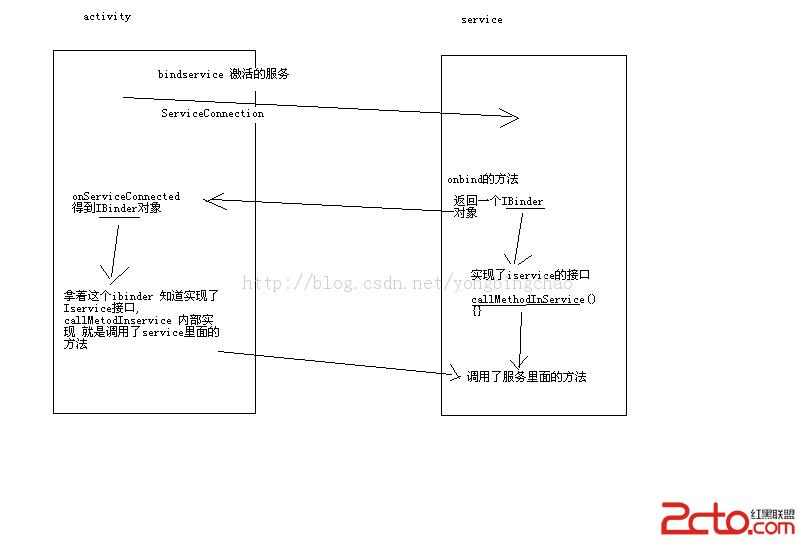
自定義接口IService.java:
package cn.itcast.servicelife;

public interface IService {
	public void callMethodInService();
}
MyService.java:
package cn.itcast.servicelife;

import android.app.Service;
import android.content.Intent;
import android.os.Binder;
import android.os.IBinder;

public class MyService extends Service {
	// 初始化服務時運行
	@Override
	public IBinder onBind(Intent intent) {

		System.out.println("on bind");
		return new MyBinder();
	}

	public class MyBinder extends Binder implements IService {

		@Override
		public void callMethodInService() {
			sayHelloInService();
		}
	}

	/**
	 * 服務裡面的一個方法
	 */
	public void sayHelloInService() {
		System.out.println("hello in service");
	}

	@Override
	public boolean onUnbind(Intent intent) {
		System.out.println("on  unbind");
		return super.onUnbind(intent);
	}

	@Override
	public void onCreate() {
		System.out.println("oncreate");
		super.onCreate();
	}

	@Override
	public void onStart(Intent intent, int startId) {
		System.out.println("onstart");

		super.onStart(intent, startId);
	}

	@Override
	public void onDestroy() {
		System.out.println("ondestroy");
		super.onDestroy();
	}
}
DemoActivity.java:
package cn.itcast.servicelife;

import android.app.Activity;
import android.content.ComponentName;
import android.content.Context;
import android.content.Intent;
import android.content.ServiceConnection;
import android.os.Bundle;
import android.os.IBinder;
import android.view.View;
import android.view.View.OnClickListener;
import android.widget.Button;
import android.widget.Toast;

public class DemoActivity extends Activity implements OnClickListener {

	Button bt_start;
	Button bt_stop;
	Button bt_bind_service; // 綁定服務
	Button bt_unbind_service; // 解除綁定服務
	Button bt_call_service;
	Intent intent;
	MyConn conn;
	IService iService;
	int flag = 0;

	@Override
	public void onCreate(Bundle savedInstanceState) {
		super.onCreate(savedInstanceState);
		setContentView(R.layout.main);
		bt_start = (Button) this.findViewById(R.id.button1);
		bt_stop = (Button) this.findViewById(R.id.button2);
		bt_bind_service = (Button) this.findViewById(R.id.button3);
		bt_unbind_service = (Button) this.findViewById(R.id.button4);
		bt_call_service = (Button) this.findViewById(R.id.button5);
		bt_start.setOnClickListener(this);
		bt_stop.setOnClickListener(this);
		bt_bind_service.setOnClickListener(this);
		bt_unbind_service.setOnClickListener(this);
		bt_call_service.setOnClickListener(this);
		intent = new Intent(this, MyService.class);
		conn = new MyConn();

	}

	@Override
	public void onClick(View v) {
		switch (v.getId()) {
		case R.id.button1: // 開啟服務
			startService(intent);
			break;
		case R.id.button2: // 停止服務
			stopService(intent);
			break;
		case R.id.button3: // 綁定服務
			bindService(intent, conn, Context.BIND_AUTO_CREATE);
			break;
		case R.id.button4: // 解除綁定服務
			if (flag == 0) {
				Toast.makeText(getBaseContext(), "還沒有綁定服務,無需解綁", 0).show();
			} else {
				unbindService(conn);
				flag = 0;
			}
			break;
		// 綁定開啟
		case R.id.button5: // 調用服務裡面的方法
			iService.callMethodInService();
			break;
		}
	}

	private class MyConn implements ServiceConnection {

		// 綁定一個服務成功的時候 調用 onServiceConnected
		@Override
		public void onServiceConnected(ComponentName name, IBinder service) {
			flag = 1;
			iService = (IService) service;
		}

		@Override
		public void onServiceDisconnected(ComponentName name) {

		}
	}

	// DemoActivity的銷毀方法
	@Override
	protected void onDestroy() {
		if (flag == 1) {
			unbindService(conn);
		}
		super.onDestroy();
	}
}
清單文件:
1.通過實驗證明在bindService之後在模擬器的設置中的“正在運行的服務”中找不到相應的服務,是因為和activity綁定的所以不顯示嗎?
2.在unbindService之後還可以調用服務裡面的方法,為什麼?服務不是已經被銷毀了嗎?
 Android開發本地及網絡Mp3音樂播放器(九)音樂收藏與列表切換
實現功能:使用快速開發框架xUtils中的DbUtils模塊,為音樂收藏功能做准備實現PlayActivity(獨立音樂播放界面)收藏、取消收藏按鈕實現MainActiv
 android仿新聞閱讀器菜單彈出效果實例(附源碼DEMO下載)
開發中碰到問題之後實現的,覺得可能有的開發者用的到或則希望獨立成一個小功能DEMO,所以就放出來這麼一個DEMO。原本覺得是最後完成後發網站客戶端的,可是這樣體現不出一個
 總結Android中MD風格相關控件
要使用MD風格控件,首先需要在Gradle中加入Support Design Library,例如:compile com.android.support:design:
 Android網格視圖GridView的使用
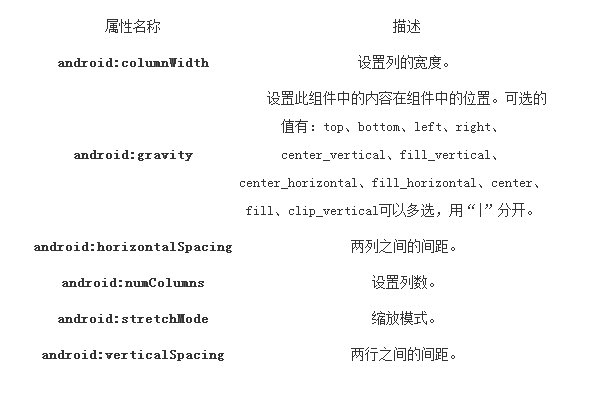
GridView(網格視圖)是按照行列的方式來顯示內容的,一般用於顯示圖片,圖片等內容,比如實現九宮格圖,用GridView是首選,也是最簡單的。主要用於設置Adapte