編輯:關於Android編程
一、寫在前面的
在需求上遇到背景設置透明度還是比較常見的,設置透明度有幾種方式,但是不同的場景應用下,不同的方式可能會出現一些問題。針對開發過程中的需求做以下總結。
二、先看效果圖
圖1、
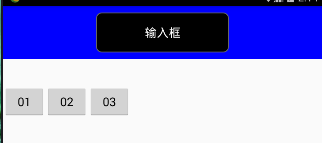
圖2、
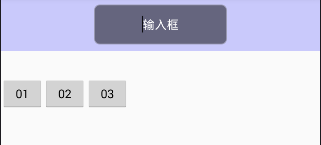
圖3、
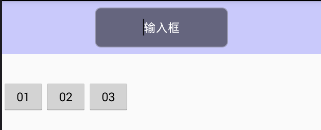
圖4
介紹:圖1、藍色頭部和輸入框背景初始狀態
圖2、點擊按鈕01,輸入框的透明度不起作用,和title的透明度一樣
圖3、點擊按鈕02,背景透明度設置正常,但是可能會對全局的背景有影響
圖4、點擊按鈕03,背景透明度設置正常,具體原因代碼注釋有提到
三、再加上代碼
按鈕點擊
public void button01(View view){
  // search透明度不起作用
  title.setAlpha(0.2f);
  search.setAlpha(0.8f);
 }
 public void button02(View view){
  // 在布局中多個控件同時使用一個資源的時候,這些控件會共用一個狀態
  // 如果你改變了一個控件的狀態,其他的控件都會接收到相同的通知
  title.getBackground().setAlpha(51);
  search.getBackground().setAlpha(153);
 }
 public void button03(View view){
  // 使用mutate()方法使該控件狀態不定,這樣不定狀態的控件就不會共享自己的狀態了
  title.getBackground().mutate().setAlpha(51);
  search.getBackground().mutate().setAlpha(153);
 }
布局:
<?xml version="1.0" encoding="utf-8"?>
<LinearLayout xmlns:android="http://schemas.android.com/apk/res/android"
    android:orientation="vertical"
    android:layout_width="match_parent"
    android:layout_height="match_parent">
 <LinearLayout
  android:id="@+id/ll_title"
  android:layout_width="match_parent"
  android:layout_height="80dp"
  android:gravity="center"
  android:background="#0000ff"
  android:orientation="horizontal">
  <EditText
   android:id="@+id/et_search"
   android:layout_width="200dp"
   android:layout_height="60dp"
   android:gravity="center"
   android:hint="輸入框"
   android:textColorHint="#ffffff"
   android:background="@drawable/search_title_bg"/>
 </LinearLayout>
 <LinearLayout
  android:layout_width="match_parent"
  android:layout_height="wrap_content"
  android:layout_marginTop="40dp"
  android:orientation="horizontal">
  <Button
   android:layout_width="wrap_content"
   android:layout_height="wrap_content"
   android:text="01"
   android:onClick="button01"/>
  <Button
   android:layout_width="wrap_content"
   android:layout_height="wrap_content"
   android:text="02"
   android:onClick="button02"/>
  <Button
   android:layout_width="wrap_content"
   android:layout_height="wrap_content"
   android:text="03"
   android:onClick="button03"/>
 </LinearLayout>
</LinearLayout>
輸入框背景 search_title_bg
<?xml version="1.0" encoding="utf-8"?>
<shape xmlns:android="http://schemas.android.com/apk/res/android"
 android:shape="rectangle">
 <solid
  android:color="#000000"/>
 <corners
  android:radius="8dp"/>
 <stroke
  android:width="1dp"
  android:color="#666666"/>
</shape>
四、寫在後面的
背景透明度設置比較常見,mutate()方法,可以解決背景透明狀態設置異常的現象。
 Service要點全解析
1、Service概述Service的主要作用是,讓系統可以在後台干一些不與用戶交互的操作,這些操作可能會比較耗時,比如去下載一些網絡資源等;也可能是一項長期運行的工作,
 Android so 庫加載符號找不到的問題解決
錯誤信息Trying to load lib /data/data/com.sohu.inputmethod.sogou/files/.dict/sogou
 Android中的Touch事件
Activity或View類的onTouchEvent()回調函數會接收到touch事件。一個完整的手勢是從ACTION_DOWN開始,到ACTION_UP結束。簡單的情
 Android自定義View仿微博運動積分動畫效果
自定義View一直是自己的短板,趁著公司項目不緊張的時候,多加強這方面的練習。這一系列文章主要記錄自己在自定義View的學習過程中的心得與體會。刷微博的時候,發現微博運動