編輯:關於Android編程
前言
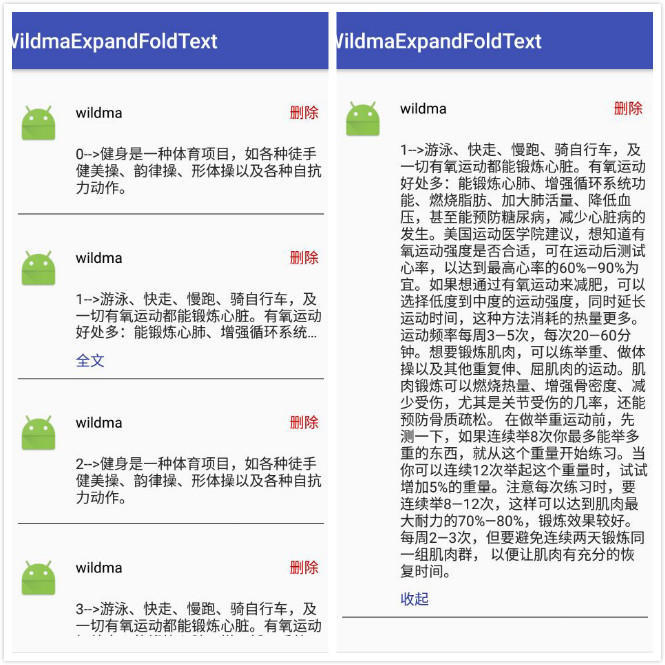
一般在社交APP中都有類似朋友圈的功能,其中發表的動態內容很長的時候不可能讓它全部顯示。這裡就需要做一個仿微信朋友圈全文、收起功能來解決該問題。在網上看到一個例子-->http://www.jb51.net/article/105251.htm ,寫的很不錯,但是有個bug,他這個Demo只有在條目固定的時候才正常,當增加、刪除條目的時候會出現全文、收起顯示混亂的問題。原因是他使用了固定的position作為key來保存當前顯示的狀態。這篇文章在他的基礎上進行優化。
效果圖
具體代碼
(詳細解釋在代碼注釋中都有,這裡就省略了)
MainActivity.java
package com.wildma.wildmaexpandfoldtext;

import android.os.Bundle;
import android.support.v7.app.AppCompatActivity;
import android.support.v7.widget.LinearLayoutManager;
import android.support.v7.widget.RecyclerView;

import java.util.ArrayList;
import java.util.List;

/**
 * Author   wildma
 * DATE    2017/8/3
 * Des    ${TODO}
 */
public class MainActivity extends AppCompatActivity {
  private RecyclerView mRecyclerView;
  List<ExpandFoldTextBean> mList = new ArrayList<>();

  @Override
  protected void onCreate(Bundle savedInstanceState) {
    super.onCreate(savedInstanceState);
    setContentView(R.layout.activity_main);

    initData();
    ExpandFoldTextAdapter adapter = new ExpandFoldTextAdapter(mList, this);
    mRecyclerView = (RecyclerView) findViewById(R.id.recyclerview);
    mRecyclerView.setLayoutManager(new LinearLayoutManager(this, LinearLayoutManager.VERTICAL, false));
    mRecyclerView.setAdapter(adapter);
  }

  /**
   * 初始化數據
   */
  private void initData() {
    String longContent = "-->游泳、快走、慢跑、騎自行車,及一切有氧運動都能鍛煉心髒。有氧運動好處多:能鍛煉心肺、增強循環系統功能、燃燒脂肪、加大肺活量、降低血壓,甚至能預防糖尿病,減少心髒病的發生。美國運動醫學院建議,想知道有氧運動強度是否合適,可在運動後測試心率,以達到最高心率的60%—90%為宜。如果想通過有氧運動來減肥,可以選擇低度到中度的運動強度,同時延長運動時間,這種方法消耗的熱量更多。運動頻率每周3—5次,每次20—60分鐘。想要鍛煉肌肉,可以練舉重、做體操以及其他重復伸、屈肌肉的運動。肌肉鍛煉可以燃燒熱量、增強骨密度、減少受傷,尤其是關節受傷的幾率,還能預防骨質疏松。 在做舉重運動前,先測一下,如果連續舉8次你最多能舉多重的東西,就從這個重量開始練習。當你可以連續12次舉起這個重量時,試試增加5%的重量。注意每次練習時,要連續舉8—12次,這樣可以達到肌肉最大耐力的70%—80%,鍛煉效果較好。每周2—3次,但要避免連續兩天鍛煉同一組肌肉群, 以便讓肌肉有充分的恢復時間。";
    String shortContent = "-->健身是一種體育項目,如各種徒手健美操、韻律操、形體操以及各種自抗力動作。";
    for (int i = 0; i < 20; i++) {
      ExpandFoldTextBean bean = new ExpandFoldTextBean();
      if (i % 2 == 0) {
        bean.setContent(i + shortContent);
        bean.setId(i);
      } else {
        bean.setContent(i + longContent);
        bean.setId(i);
      }
      mList.add(bean);
    }
  }
}
ExpandFoldTextAdapter.java
package com.wildma.wildmaexpandfoldtext;

import android.app.Activity;
import android.support.v7.widget.RecyclerView;
import android.util.SparseArray;
import android.view.View;
import android.view.ViewGroup;
import android.view.ViewTreeObserver;
import android.widget.TextView;

import java.util.List;

/**
 * Author   wildma
 * DATE    2017/8/3
 * Des    ${展開折疊文本適配器}
 */
public class ExpandFoldTextAdapter extends RecyclerView.Adapter<ExpandFoldTextAdapter.MyViewHolder> {
  private Activity mContent;

  private final int MAX_LINE_COUNT = 3;//最大顯示行數

  private final int STATE_UNKNOW = -1;//未知狀態

  private final int STATE_NOT_OVERFLOW = 1;//文本行數小於最大可顯示行數

  private final int STATE_COLLAPSED = 2;//折疊狀態

  private final int STATE_EXPANDED = 3;//展開狀態

  /**
   * 注意:保存文本狀態集合的key一定要是唯一的,如果用position。
   * 如果使用position作為key,則刪除、增加條目的時候會出現顯示錯亂
   */
  private SparseArray<Integer> mTextStateList;//保存文本狀態集合

  List<ExpandFoldTextBean> mList;

  public ExpandFoldTextAdapter(List<ExpandFoldTextBean> list, Activity context) {
    mContent = context;
    this.mList = list;
    mTextStateList = new SparseArray<>();
  }

  @Override
  public MyViewHolder onCreateViewHolder(ViewGroup parent, int viewType) {
    return new MyViewHolder(mContent.getLayoutInflater().inflate(R.layout.item_expand_fold_text, parent, false));
  }

  @Override
  public void onBindViewHolder(final MyViewHolder holder, final int position) {
    int state = mTextStateList.get(mList.get(position).getId(), STATE_UNKNOW);
    //第一次初始化,未知狀態
    if (state == STATE_UNKNOW) {
      holder.content.getViewTreeObserver().addOnPreDrawListener(new ViewTreeObserver.OnPreDrawListener() {
        @Override
        public boolean onPreDraw() {
          //這個回掉會調用多次,獲取完行數後記得注銷監聽
          holder.content.getViewTreeObserver().removeOnPreDrawListener(this);
          //holder.content.getViewTreeObserver().addOnPreDrawListener(null);
          //如果內容顯示的行數大於最大顯示行數
          if (holder.content.getLineCount() > MAX_LINE_COUNT) {
            holder.content.setMaxLines(MAX_LINE_COUNT);//設置最大顯示行數
            holder.expandOrFold.setVisibility(View.VISIBLE);//顯示“全文”
            holder.expandOrFold.setText("全文");
            mTextStateList.put(mList.get(position).getId(), STATE_COLLAPSED);//保存狀態
          } else {
            holder.expandOrFold.setVisibility(View.GONE);
            mTextStateList.put(mList.get(position).getId(), STATE_NOT_OVERFLOW);
          }
          return true;
        }
      });

      holder.content.setMaxLines(Integer.MAX_VALUE);//設置文本的最大行數,為整數的最大數值
      holder.content.setText(mList.get(position).getContent());
    } else {
      //如果之前已經初始化過了,則使用保存的狀態。
      switch (state) {
        case STATE_NOT_OVERFLOW:
          holder.expandOrFold.setVisibility(View.GONE);
          break;
        case STATE_COLLAPSED:
          holder.content.setMaxLines(MAX_LINE_COUNT);
          holder.expandOrFold.setVisibility(View.VISIBLE);
          holder.expandOrFold.setText("全文");
          break;
        case STATE_EXPANDED:
          holder.content.setMaxLines(Integer.MAX_VALUE);
          holder.expandOrFold.setVisibility(View.VISIBLE);
          holder.expandOrFold.setText("收起");
          break;
      }
      holder.content.setText(mList.get(position).getContent());
    }

    //全文和收起的點擊事件
    holder.expandOrFold.setOnClickListener(new View.OnClickListener() {
      @Override
      public void onClick(View v) {
        int state = mTextStateList.get(mList.get(position).getId(), STATE_UNKNOW);
        if (state == STATE_COLLAPSED) {
          holder.content.setMaxLines(Integer.MAX_VALUE);
          holder.expandOrFold.setText("收起");
          mTextStateList.put(mList.get(position).getId(), STATE_EXPANDED);
        } else if (state == STATE_EXPANDED) {
          holder.content.setMaxLines(MAX_LINE_COUNT);
          holder.expandOrFold.setText("全文");
          mTextStateList.put(mList.get(position).getId(), STATE_COLLAPSED);
        }
      }
    });

    //刪除點擊事件
    holder.delete.setOnClickListener(new View.OnClickListener() {
      @Override
      public void onClick(View view) {
        mList.remove(position);
        notifyDataSetChanged();
      }
    });
  }

  @Override
  public int getItemCount() {
    return mList.size();
  }


  public class MyViewHolder extends RecyclerView.ViewHolder {
    public TextView nickname;
    public TextView content;
    public TextView delete;
    public TextView expandOrFold;

    public MyViewHolder(View itemView) {
      super(itemView);
      nickname = (TextView) itemView.findViewById(R.id.tv_nickname);
      content = (TextView) itemView.findViewById(R.id.tv_content);
      delete = (TextView) itemView.findViewById(R.id.tv_delete);
      expandOrFold = (TextView) itemView.findViewById(R.id.tv_expand_or_fold);
    }
  }
}
ExpandFoldTextBean.java
package com.wildma.wildmaexpandfoldtext;

/**
 * Author   wildma
 * DATE    2017/8/3
 * Des    ${TODO}
 */
public class ExpandFoldTextBean {

  private String content;//內容

  private int id;//該條數據的id

  public String getContent() {
    return content;
  }

  public void setContent(String content) {
    this.content = content;
  }

  public int getId() {
    return id;
  }

  public void setId(int id) {
    this.id = id;
  }
}
activity_main.xml
<?xml version="1.0" encoding="utf-8"?>
<RelativeLayout
  android:id="@+id/activity_main"
  xmlns:android="http://schemas.android.com/apk/res/android"
  android:layout_width="match_parent"
  android:layout_height="match_parent"
  android:paddingBottom="@dimen/activity_vertical_margin"
  android:paddingLeft="@dimen/activity_horizontal_margin"
  android:paddingRight="@dimen/activity_horizontal_margin"
  android:paddingTop="@dimen/activity_vertical_margin">

  <android.support.v7.widget.RecyclerView
    android:id="@+id/recyclerview"
    android:layout_width="match_parent"
    android:layout_height="match_parent">
  </android.support.v7.widget.RecyclerView>

</RelativeLayout>
item_expand_fold_text.xml
<?xml version="1.0" encoding="utf-8"?>
<LinearLayout xmlns:android="http://schemas.android.com/apk/res/android"
       android:layout_width="match_parent"
       android:layout_height="wrap_content"
       android:orientation="vertical"
       android:paddingBottom="@dimen/activity_vertical_margin"
       android:paddingLeft="@dimen/activity_horizontal_margin"
       android:paddingRight="@dimen/activity_horizontal_margin"
       android:paddingTop="@dimen/activity_vertical_margin">

  <LinearLayout
    android:layout_width="match_parent"
    android:layout_height="wrap_content"
    android:layout_gravity="center_vertical"
    android:orientation="horizontal">

    <ImageView
      android:layout_width="40dp"
      android:layout_height="40dp"
      android:layout_marginRight="16dp"
      android:gravity="center"
      android:scaleType="centerCrop"
      android:src="@mipmap/ic_launcher"/>

    <RelativeLayout
      android:layout_width="match_parent"
      android:layout_height="wrap_content">

      <TextView
        android:id="@+id/tv_nickname"
        android:layout_width="wrap_content"
        android:layout_height="wrap_content"
        android:text="wildma"
        android:textColor="@android:color/black"
        android:textSize="14sp"/>

      <TextView
        android:id="@+id/tv_delete"
        android:layout_width="wrap_content"
        android:layout_height="wrap_content"
        android:layout_alignParentRight="true"
        android:layout_marginLeft="12dp"
        android:paddingLeft="5dp"
        android:paddingRight="5dp"
        android:text="刪除"
        android:textColor="@android:color/holo_red_dark"
        android:textSize="14sp"/>
    </RelativeLayout>

  </LinearLayout>

  <LinearLayout
    android:layout_width="match_parent"
    android:layout_height="wrap_content"
    android:layout_marginLeft="56dp"
    android:orientation="vertical"
    android:paddingBottom="8dp">

    <TextView
      android:id="@+id/tv_content"
      android:layout_width="wrap_content"
      android:layout_height="wrap_content"
      android:layout_marginBottom="8dp"
      android:alpha="0.85"
      android:ellipsize="end"
      android:text="內容"
      android:textColor="@android:color/black"
      android:textSize="14sp"/>

    <TextView
      android:id="@+id/tv_expand_or_fold"
      android:layout_width="wrap_content"
      android:layout_height="wrap_content"
      android:text="全文"
      android:textColor="@color/colorPrimaryDark"
      android:textSize="14sp"/>
  </LinearLayout>

  <View
    android:layout_width="match_parent"
    android:layout_height="0.5dp"
    android:background="@android:color/black"/>
</LinearLayout>
源碼地址:https://github.com/wildma/WildmaExpandFoldText
以上就是本文的全部內容,希望對大家的學習有所幫助,也希望大家多多支持本站。
 Android中編寫屬性動畫PropertyAnimation的進階實例
0、基礎回顧PropertyAnimation,屬性動畫,顧名思義就是利用對象的屬性變化形成動畫的效果。屬性動畫的類可以用Animator這個抽象類來表示,通常使用它的子
 android使用ViewPager實現引導頁效果
對於大多數android開發者來說,ViewPager和ListView是再熟悉不過了,ViewPager的實現思路和ListView大同小異,具體參照前面的ListVi
 Android中自定義進度條詳解
Android原生控件只有橫向進度條一種,而且沒法變換樣式,比如原生rom的樣子很丑是吧,當偉大的產品設計要求更換前背景,甚至縱向,甚至圓弧狀的,咋辦,比如:ok,我們開
 Android中的二維碼生成與掃描功能
0. 前言今天這篇文章主要描述二維碼的生成與掃描,使用目前流行的Zxing,為什麼要講二維碼,因為二維碼太普遍了,隨便一個Android APP都會有二維碼掃描。本篇旨在