

編輯:Android 技術基礎
Android 的 MediaPlayer 同時支援音訊與影片播放。本篇以 MP3 為例,示範播放、暫停、停止與播放完成處理。
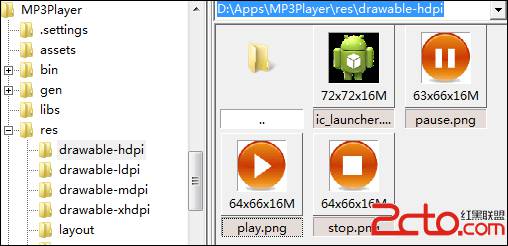
將 play.png、pause.png、stop.png 放入 res/drawable-hdpi。
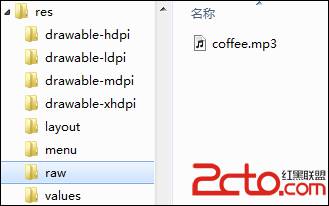
再將 coffee.mp3 放入 res/raw。
activity_main.xml 中放入三個 ImageButton 與一個 TextView。
<LinearLayout xmlns:android="https://schemas.android.com/apk/res/android"
    android:layout_width="match_parent"
    android:layout_height="match_parent"
    android:orientation="vertical">

    <ImageButton
        android:id="@+id/play"
        android:layout_width="wrap_content"
        android:layout_height="wrap_content"
        android:src="@drawable/play" />

    <ImageButton
        android:id="@+id/pause"
        android:layout_width="wrap_content"
        android:layout_height="wrap_content"
        android:src="@drawable/pause" />

    <ImageButton
        android:id="@+id/stop"
        android:layout_width="wrap_content"
        android:layout_height="wrap_content"
        android:src="@drawable/stop" />

    <TextView
        android:id="@+id/prompt"
        android:layout_width="wrap_content"
        android:layout_height="wrap_content"
        android:text="提示信息" />
</LinearLayout>使用 MediaPlayer.create(this, R.raw.coffee) 建立播放器。播放時先 stop 再 prepare/start,避免重複播放造成狀態錯誤。暫停與停止可透過 isPaused 變數切換。
mpPlayer = MediaPlayer.create(this, R.raw.coffee);if (mpPlayer != null) {
mpPlayer.stop();
}
mpPlayer.prepare();
mpPlayer.start();
tvPrompt.setText("音樂播放中...");暫停與繼續:
if (isPaused == false) {
    mpPlayer.pause();
    isPaused = true;
} else {
    mpPlayer.start();
    isPaused = false;
}
播放完成與錯誤時,記得釋放資源。
mpPlayer.setOnCompletionListener(new MediaPlayer.OnCompletionListener() {
    public void onCompletion(MediaPlayer mp) {
        mp.release();
        tvPrompt.setText("音樂播放結束!");
    }
});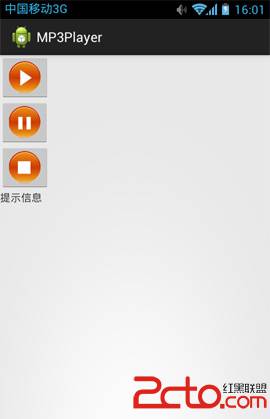
點擊播放,即可聽見 res/raw 中的音樂。
 2.5.5 ExpandableListView 可折疊清單實作
前言 本節要講的 Adapter 類元件是 ExpandableListView,也就是可折疊清單。它是 ListView 的子類,在 ListView 的基礎上把項目
 Android 佈局教學:FrameLayout 框架佈局的特性與限制
FrameLayout 好比在螢幕上預留的一塊空白區域,你把元素填進去就好。它的個性非常鮮明:所有子元素都被放在區域的左上角,而且無法為它們指定確切座標;一旦有多個元素,
 Storage Access Framework 入門:用 Document Provider 讀取與管理檔案
從 ContentProvider 到檔案瀏覽器ContentProvider 可用來共用資料,而 Android 4.4 後加入的 Storage Access Fra
 從零開始學 Android:用 MediaPlayer 播放影片
Android 播放影片的三種常見做法 呼叫系統播放器:使用 ACTION_VIEW、Uri 與 MIME 類型。 使用 VideoView 搭配 MediaContr