

編輯:Android 開發實例
Android 可透過 Intent 快速撥打電話。若只是要讓使用者輸入號碼後按下按鈕撥出,可使用 ACTION_CALL;若希望先進入撥號畫面由使用者確認,則可使用 ACTION_DIAL。
畫面可包含一個輸入框與一個按鈕:
EditText phone = findViewById(R.id.phone);
Button button = findViewById(R.id.button);String tel = phone.getText().toString();
Intent intent = new Intent("android.intent.action.CALL", Uri.parse("tel:" + tel));
startActivity(intent);若要使用更明確的常數,也可寫成:
Intent intent = new Intent(Intent.ACTION_CALL);
intent.setData(Uri.parse("tel:" + tel));
startActivity(intent);直接撥號需要通話權限:
<uses-permission android:name="android.permission.CALL_PHONE" />在 Android 6.0 以後,此權限屬於危險權限,需要在執行期向使用者請求。
若使用 ACTION_DIAL,通常不需要 CALL_PHONE 權限,但使用者仍需自行按下撥號鍵。直接撥號較方便,但也更容易造成誤觸或濫用,建議加入二次確認或僅在受控情境使用。
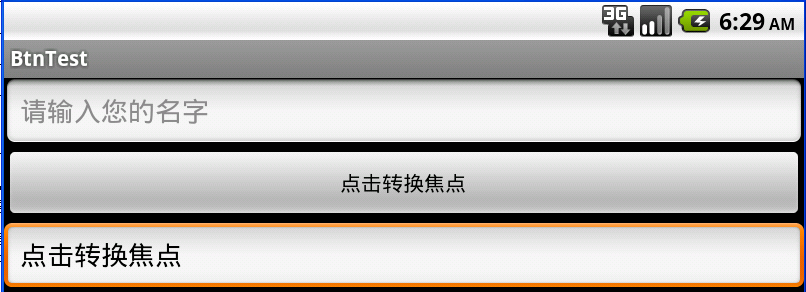 Android EditText 實戰:提示文字、焦點切換與輸入長度限制
EditText 是使用者輸入資料最主要的入口。本文示範如何做出「未輸入時顯示灰色提示、開始輸入後提示消失」的常見效果,並在超過上限時給出明確提醒。 學習目標 1. 學
 Android 載入轉圈動畫(Spinner)怎麼做
使用者按下按鈕後,如果背後要跑一段時間的作業,畫面若完全沒有反應,往往會被誤以為當機。這時候進度提示就派上用場了。 Android 的 ProgressBar 有兩種常
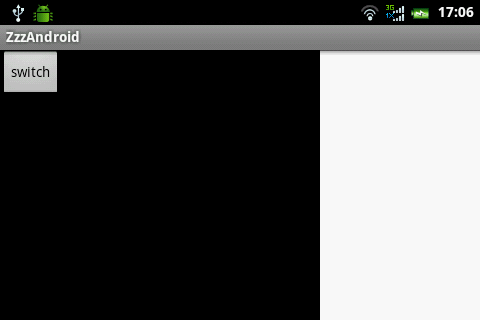 Android 實現局部界面動態切換:固定骨架 + 可替換區域
本文示範一個常見的介面結構:外層版面固定不動,其中某塊區域可以動態替換內容。實作效果如下: 整個畫面由三個 layout 檔組成。 main.xml:外層骨架 &
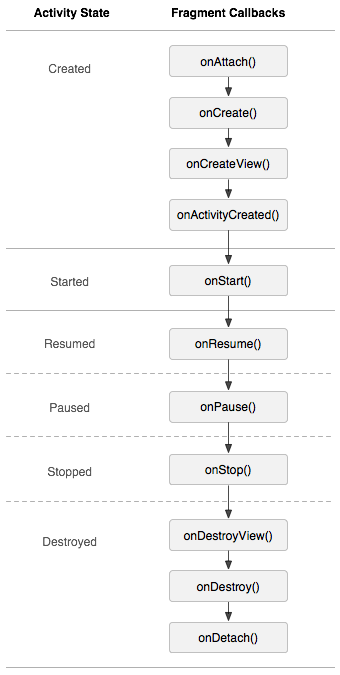 Android 基礎:Fragment 與 Activity 互動詳解
本文繼續探討 Fragment 元件的特性,重點在於它與 Activity 的互動以及生命週期的關係。由於 Fragment 依賴於 Activity,兩者的生命週期緊密